Agent Mind Map
Agent Mind Map turns AI agent conversations from Cursor and Claude Code into interactive mind maps inside VS Code and Cursor.
Use it when a chat has grown too long to scan, when you want to jump back to the exact turn that introduced a decision, or when you want a project-level concept map built from many agent sessions.
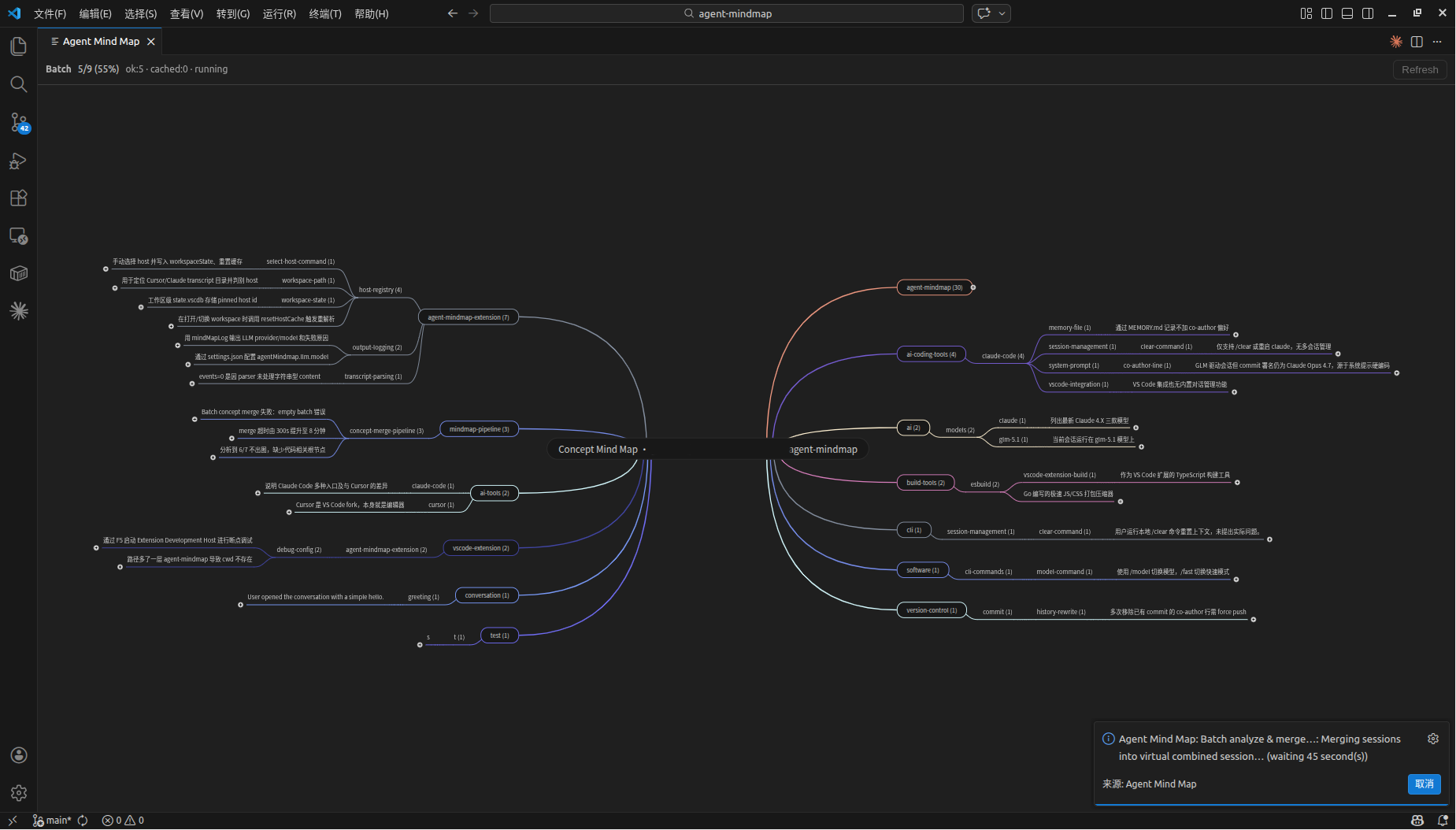
Features
- Single-session mind maps: open the latest Cursor or Claude Code transcript and view the conversation as topics, knowledge points, and code references.
- Session picker: choose an older agent session by title and timestamp.
- Project concept map: analyze all sessions for the current workspace and merge them into a cross-session concept map.
- Click-to-source navigation: click a mind-map node to open the readable transcript at the matching conversation turn.
- Offline export: export the mind map plus linked transcript HTML/Markdown files for sharing or archiving.
- Local library and cache: keep summarized session records under
~/.agent-mindmap so unchanged conversations do not need to be re-analyzed.
- Cursor and Claude Code support: read local transcripts from either host and call the matching headless CLI.
- No separate API key: LLM analysis runs through your existing
cursor-agent or claude CLI subscription.
Requirements
Agent Mind Map needs one supported agent product with its headless CLI available:
- Cursor with
agent or cursor-agent
- Claude Code with
claude
The extension reads local transcript files and opens a read-only mind map. It does not write back to chat storage or modify the Agent panel.
Getting Started
- Open a workspace that has Cursor or Claude Code agent sessions.
- Run Agent Mind Map: Open Latest Session from the Command Palette.
- Pick a model when prompted. Leaving the model empty uses the CLI default.
- Explore the generated mind map. Click nodes to open their source transcript.
For a workspace-level map, run Agent Mind Map: Analyze All Sessions (Current Project). The first run may take longer because each uncached session is analyzed; later runs reuse the local library when transcripts are unchanged.
Commands
Agent Mind Map: Open Latest Session opens the most recent agent transcript.Agent Mind Map: Choose Session... lets you select a transcript manually.Agent Mind Map: Analyze All Sessions (Current Project) builds a project-level concept mind map.Agent Mind Map: Select Host (Cursor/Claude Code) switches between Cursor, Claude Code, or auto detection.Agent Mind Map: Select Model changes the model passed to the selected CLI.
Important Settings
agentMindmap.host: choose auto, cursor, or claude-code.agentMindmap.llm.provider: choose the CLI provider, or keep auto.agentMindmap.llm.model: optional model name passed to the CLI.agentMindmap.storeDir: local directory for cached summaries and merge records.agentMindmap.ui.preset: choose automatic, dark, or light mind-map colors.agentMindmap.ui.direction: choose side-by-side, left-only, or right-only layout.agentMindmap.ui.locale: choose UI language.
Privacy
Agent Mind Map is local-first and has no telemetry. Transcript content is only sent to the configured headless CLI (cursor-agent or claude) for LLM analysis under your existing product subscription. The local library stores summarized concept data and metadata, not raw transcripts.
See the full privacy policy in the project repository: https://github.com/abeelu688/agent-mindmap/blob/main/PRIVACY.md
Feedback and Source Code

