Skip to content
| Marketplace
Sign in
Visual Studio Code>Programming Languages>OpenRouter for CopilotNew to Visual Studio Code? Get it now.
OpenRouter for Copilot

OpenRouter for Copilot

AbbalochDev

|
1 install
| (1) | Free
Use 300+ OpenRouter models (GPT, Claude, DeepSeek, Llama, Gemini, Qwen, and free models) in the Copilot Chat model picker. Vision, thinking mode, agent tools — zero config, BYOK.
Installation
Launch VS Code Quick Open (Ctrl+P), paste the following command, and press enter.
Copied to clipboard
More Info

OpenRouter for Copilot Chat — 300+ AI Models (GPT, Claude, DeepSeek, Gemini) for VS Code

The fastest way to run 300+ OpenRouter models — OpenAI GPT, Anthropic Claude, DeepSeek, Google Gemini, Meta Llama, Mistral — inside GitHub Copilot Chat in VS Code, including hundreds of free AI models. One API key, zero runtime dependencies, and full agent mode, vision, and thinking support.

Latest release of the OpenRouter VS Code extension GitHub stars VS Code Marketplace downloads 300+ AI models supported Zero runtime dependencies MIT License

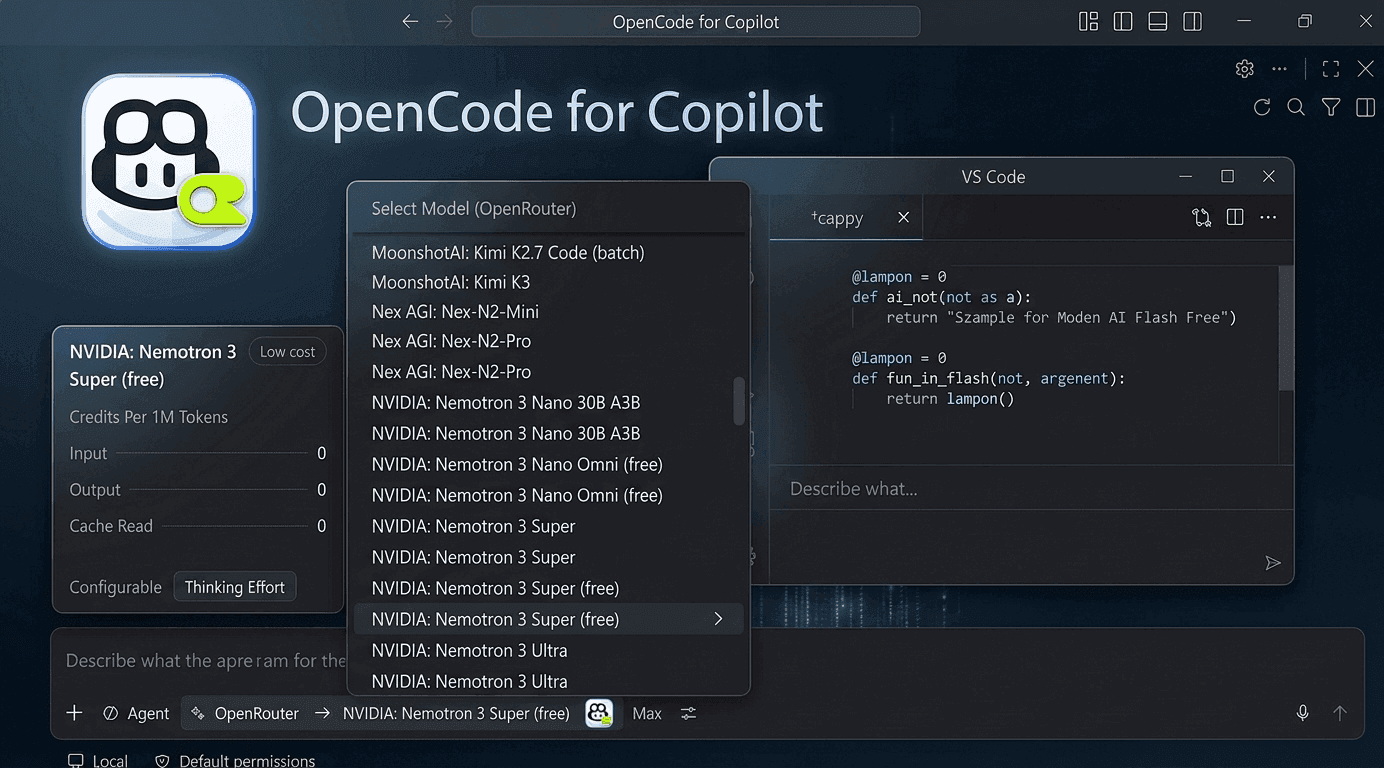
300+ models — OpenAI, Anthropic, Google, DeepSeek, Meta, and more — inside Copilot Chat's model picker, with vision, thinking mode, and a multi-agent swarm.

OpenRouter GPT-4o, Claude, DeepSeek and Gemini models in the Copilot Chat model picker

Table of Contents

  • Quick Start — 60 seconds to 300+ models
  • Why OpenRouter for Copilot Chat?
  • Architecture at a Glance
  • Features
    • Agent Swarm
    • Vision Proxy
    • Thinking Mode
    • Ponytail
    • Code Simplifier
  • Models
  • Getting Started
  • Settings
  • Commands
  • FAQ
  • License

Quick Start — 60 seconds to 300+ models

  1. Get a key — create a free account at openrouter.ai/keys and copy your API key.
  2. Set it — run OpenRouter: Set API Key; it lands in your OS keychain, never on disk.
  3. Chat — pick any of the 300+ models in Copilot Chat, or type @swarm and let a team of agents do the work.

Why OpenRouter for Copilot Chat?

You already have Copilot's agent mode, tool calling, MCP, and skills. What you might not have is the models you want to run them on. This extension keeps the entire Copilot stack and swaps the brain:

  • Don't replace Copilot — power it up. No sidebar, no new UI. Just a new model in the picker you already use.
  • One API key, 300+ models. Every model on OpenRouter — OpenAI, Anthropic, Google, DeepSeek, Meta, Mistral, and more — in the picker you already use.
  • One protocol. OpenRouter is a single OpenAI-compatible Chat Completions endpoint. No per-model protocol routing.
  • Everything Copilot gives you still works. Agent mode, tools, instructions, MCP, skills — untouched, now on your OpenRouter account.
  • Zero runtime dependencies. Pure VS Code API + Node.js built-ins. No Python, no Docker, no proxy process to babysit.

How it compares

GitHub Copilot (built-in) OpenRouter for Copilot Chat Standalone AI IDEs (Cursor, etc.)
Model choice ~4 curated models 300+ (GPT-4o, Claude, DeepSeek, Gemini, Llama, Mistral, Qwen + free models) Varies by plan / lock-in
Free models ❌ ✅ Hundreds, audited for you ❌ Mostly paid
Bring your own key ❌ ✅ BYOK, OpenRouter account ❌ Vendor account required
Your editor & workflow — Unchanged — stays in VS Code + Copilot ❌ New editor, new context
Agent mode / MCP / skills ✅ ✅ Same stack, your models Partial
Cost control Fixed subscription Pay-per-use + per-turn price estimates Subscription + credits
Runtime footprint — Zero dependencies (no Python/Docker/proxy) Heavy local daemons

A model running Copilot's agent mode with tool calls

Architecture at a Glance

┌─────────────────────────────────────┐
│   VS Code · Copilot Chat            │
│                                     │
│   Model Picker ──────────────────┐  │
│   Agent Swarm (@swarm) ──────────┤  │
│   Vision Proxy (describes first) ┘  │
└─────────────────┬───────────────────┘
                  │
                  ▼
   OpenRouter API · /api/v1/chat/completions

Every model is served through a single OpenAI-compatible endpoint, images are described before they reach the model, and the Agent Swarm orchestrates parallel agents — all inside the model picker you already know.

Features

🐝 Agent Swarm — parallel agents on one task (@swarm)

Type @swarm and a team of autonomous agents takes over: research agents explore the codebase in parallel, review agents verify the plan before a single line is written, and an implementation agent — on the exact model you have selected — does the work and runs the tests.

Your task
   |
   v
Decompose into <= 3 focus areas
   |
   +--> Research Agent · Area 1 ----+
   +--> Research Agent · Area 2 ----+---> Findings
   +--> Research Agent · Area 3 ----+
                                        |
                                        v
                         Reviewer A ----+
                         Reviewer B ----+---> Implementation Agent
                                                  (chat-selected model)
                                                  |
                                                  v
                                               runTests
                                                /   \
                                           fail/     \pass
                                              v       v
                          Implementation Agent      Report
                          (fix, then retest)        (findings + review
                                   ^                     + diff + tests)
                                   |
                                   +--- loop back
  • Every agent is autonomous — its own tool loop and turn budget. Research and review are read-only; only the implementer edits.
  • Resilient by design — a rate-limited or failed sub-agent degrades to a marked note; the swarm never sinks.
  • Your model, your cost — research/review default to free models; implementation always runs on the model you picked.

Role models are configurable via openrouter-for-copilot.agentRoles — see Settings.

👁 Transparent Vision Proxy

Drop a screenshot into chat and the proxy describes it before the model sees it — the coding model focuses on code while a vision model handles the pixels. Falls back to any installed VS Code vision model automatically.

Dropping an image into Copilot Chat and the model responding via the vision proxy

🧠 Thinking Mode with Reasoning Effort Control

OpenRouter exposes reasoning through a reasoning_effort setting (none / low / minimal / medium / high / xhigh / max). The extension also requests include_reasoning: true and surfaces reasoning tokens through Copilot Chat's thinking channel. Pick the effort level per model from Copilot Chat's native picker menu.

🦥 Ponytail — Lazy Senior Dev Verification

Every coding request carries a Ponytail-style system instruction that makes the model think like a lazy senior developer — efficient, not careless. Before writing any code it climbs a 7-rung ladder:

  1. Does this need to be built at all? (YAGNI)
  2. Does it already exist in the codebase? Reuse it.
  3. Does the standard library do this? Use it.
  4. Does a native platform feature cover it? Use it.
  5. Does an already-installed dependency solve it? Use it.
  6. Can this be one line? Make it one line.
  7. Only then: write the minimum code that works.

Three intensity modes — lite (reminder), full (complete ladder, default), ultra (strict, edge-case-first) — plus off. Injected only into real coding requests; utility calls stay lean and cheap. Switch live with OpenRouter: Set Ponytail Mode.

🧹 Code Simplifier — Autonomous Code Refinement

An always-on refinement agent that reviews recently modified code and flattens nesting, kills redundancy, renames vague identifiers, and replaces chained ternaries — while never changing behaviour, API signatures, or safety checks. When active, Ponytail auto-downgrades to Lite for compatibility.

♻️ Inherits Every Copilot Capability

Because the extension plugs into Copilot's native provider API, you keep the full stack for free: agent mode, tool calling, instructions & skills, MCP, and prompt-caching stats.

💰 Cost Visibility · 🔒 Security by Default

  • Per-turn list-price estimates in the status bar and logs — USD pricing pulled live from the OpenRouter /api/v1/models response.
  • API key in VS Code SecretStorage (OS keychain) — never in settings.json, never in Git history.

Getting Started

Prerequisites

  • VS Code 1.116 or later. This extension relies on non-public Copilot Chat APIs that may break on newer VS Code versions — report an issue if you hit one.
  • GitHub Copilot subscription (Free / Pro / Enterprise — the free tier works)
  • An OpenRouter account — sign up at openrouter.ai and create a key at openrouter.ai/keys.

Installation

Install from the registry used by your editor:

  1. Microsoft VS Code — install from the VS Code Marketplace.
  2. Editors that use Open VSX — install from Open VSX.

Usage

  1. Create an API key at openrouter.ai/keys
  2. Run OpenRouter: Set API Key from the Command Palette (Cmd+Shift+P / Ctrl+Shift+P)
  3. Paste your OpenRouter API key — it's stored in VS Code's secure SecretStorage (OS keychain)
  4. Open Copilot Chat, click the model picker, pick any OpenRouter model (e.g. gpt-4o, anthropic/claude-3.5-sonnet, deepseek/deepseek-chat-v3)
  5. That's it — chat away!

Models — the full OpenRouter catalogue, live

The full OpenRouter catalogue (300+ GPT, Claude, DeepSeek, Gemini, Llama, Mistral & Qwen models) is fetched live from GET /api/v1/models and merged with your custom models. A small offline baseline (OpenAI gpt-4o-mini, Anthropic claude-3.5-sonnet, DeepSeek deepseek-chat-v3-0324:free, Google gemini-flash-1.5) keeps the picker working with no network.

Every model is served through the same OpenAI-compatible endpoint, so there is no per-model protocol routing. Picker names are prefixed with their provider (e.g. OpenAI · gpt-4o, Anthropic · claude-3.5-sonnet) so you can tell models apart at a glance. Free models end in :free.

All models support tool calling. Models that advertise reasoning support thinking mode with reasoning-effort control. Image attachments go through the Vision Proxy.

Settings

Setting Default Description
openrouter-for-copilot.baseUrl empty Optional OpenAI-compatible API base URL override. When set, overrides the default OpenRouter endpoint (https://openrouter.ai/api/v1). Leave empty to use OpenRouter's default API.
openrouter-for-copilot.maxTokens 0 Max output tokens (0 = no limit). Useful for cost control
openrouter-for-copilot.modelIdOverrides prefilled OpenRouter IDs API model IDs to send for built-in or custom models. Change only for endpoints with different model names
openrouter-for-copilot.customModels [] Extra OpenRouter-compatible models for the picker. Accepts string IDs or objects with id, optional name, token limits, toolCalling, and thinking. Custom IDs override built-ins. Images still go through the current Vision Proxy; custom models do not bypass it for native vision
openrouter-for-copilot.debugMode minimal Diagnostic mode: minimal for token usage only, metadata for privacy-preserving logs, or verbose for full request dumps and pipeline snapshots under extension global storage. Full dumps may include sensitive prompt text, tool schemas, file snippets, and image descriptions. Use OpenRouter: Open Request Dumps Folder to open the dump location
openrouter-for-copilot.visionModel (auto) VS Code vision model used as fallback when automatic vision is unavailable. Configure from OpenRouter: Configure Vision Proxy; new saves use vendor/id, while legacy bare model IDs are still read
openrouter-for-copilot.visionPrompt (built-in) Prompt used to describe image attachments
openrouter-for-copilot.ponytailMode full Ponytail coding-discipline system instruction level. off = no instruction; lite = brief reminder; full = complete 7-rung ladder with all rules; ultra = strict mode prioritizing edge-case correctness. Use OpenRouter: Set Ponytail Mode to switch at runtime
openrouter-for-copilot.codeSimplifier true Autonomous code refinement agent (on by default). Proactively reviews modified code and simplifies for clarity, consistency, and maintainability. When enabled, Ponytail auto-downgrades to Lite. Toggle with OpenRouter: Toggle Code Simplifier
openrouter-for-copilot.agentRoles {} Models per agent-swarm role: research (list, round-robin — defaults to audited free models), implement (always the chat-selected model), and optional review (list). Each entry is { "vendor", "family", "id"? }
openrouter-for-copilot.experimental.stabilizeToolList false Experimental. Tries to pre-activate VS Code/Copilot virtual tools so the API tools parameter is more complete and stable across turns. May improve context-cache hit rate when enabled tools change between turns. Can increase input tokens because more function definitions may be included; cache-hit input tokens are cheaper but still count toward usage. Usually leave it off with 64 or fewer enabled tools unless the tool list still changes across turns; do not enable it with more than 128 enabled tools

Example settings.json for a custom OpenAI-compatible proxy:

{
  "openrouter-for-copilot.baseUrl": "https://proxy.example.com/v1",
  "openrouter-for-copilot.customModels": [
    "my-model",
    {
      "id": "team-coder",
      "name": "Team Coder",
      "maxInputTokens": 200000,
      "maxOutputTokens": 131072,
      "toolCalling": true,
      "thinking": true
    }
  ],
  "openrouter-for-copilot.modelIdOverrides": {
    "team-coder": "provider/team-coder"
  }
}

Commands

Command Description
OpenRouter: Set API Key Store your OpenRouter API key in SecretStorage
OpenRouter: Open API Key Page Open openrouter.ai/keys
OpenRouter: Query Usage Open your OpenRouter usage page
OpenRouter: Clear All API Keys Remove your stored API key
OpenRouter: Refresh Model List Re-fetch the live OpenRouter model catalogue
OpenRouter: Configure Vision Proxy Pick the vision model used to describe images
OpenRouter: Open Settings Open the extension settings
OpenRouter: Show Logs Show diagnostic logs
OpenRouter: Show Runtime Diagnostics Show provider/runtime diagnostics
OpenRouter: Set Ponytail Mode Switch the Ponytail instruction intensity
OpenRouter: Toggle Code Simplifier Enable/disable the code refinement agent

FAQ

Can I use OpenRouter models in Copilot Chat for free?

Yes. OpenRouter hosts hundreds of free models (their IDs end in :free, e.g. deepseek/deepseek-chat-v3-0324:free). For @swarm runs, the extension even audits free models automatically — probing which ones respond fastest and routing research/review through them with zero configuration.

Does this replace GitHub Copilot?

No — it extends it. You keep agent mode, tool calling, MCP, skills, and instructions; the extension just adds 300+ OpenRouter models to the model picker. You still need a GitHub Copilot subscription (the free tier works).

Is my API key safe?

Yes. The key is stored in VS Code's SecretStorage (OS keychain) — never in settings.json, never in Git history. Logs are privacy-preserving by default (minimal/metadata modes strip prompts); only explicit verbose mode writes full dumps.

Which models support vision and thinking?

Any model that advertises vision on OpenRouter works through the Vision Proxy (images are described by a vision model before reaching the coding model). Models advertising reasoning support thinking mode with reasoning_effort control (none → max) from Copilot Chat's native picker menu.

Can I use my own OpenAI-compatible endpoint?

Yes — set openrouter-for-copilot.baseUrl and add your models under openrouter-for-copilot.customModels. Anything that speaks the OpenAI Chat Completions protocol works, including local servers (Ollama, LM Studio, vLLM) and private gateways.

Does it work in Cursor, VSCodium, or other VS Code forks?

Any editor that uses the Open VSX registry can install from Open VSX. The extension relies on current Copilot Chat APIs, so test it in your fork after updating.

How do I control cost?

Free models for research/review, maxTokens per response, per-turn USD price estimates in the status bar, and implementFallback ordering if a paid model is unavailable. You can also cap spending at the OpenRouter dashboard level.

Support

Found a bug or a missing model? Open an issue — Copilot Chat APIs move fast and reports keep the extension working on newer VS Code versions. Star the repo if the extension saves you money or unlocks the model you wanted.

License

MIT

  • Contact us
  • Jobs
  • Privacy
  • Manage cookies
  • Terms of use
  • Trademarks
© 2026 Microsoft