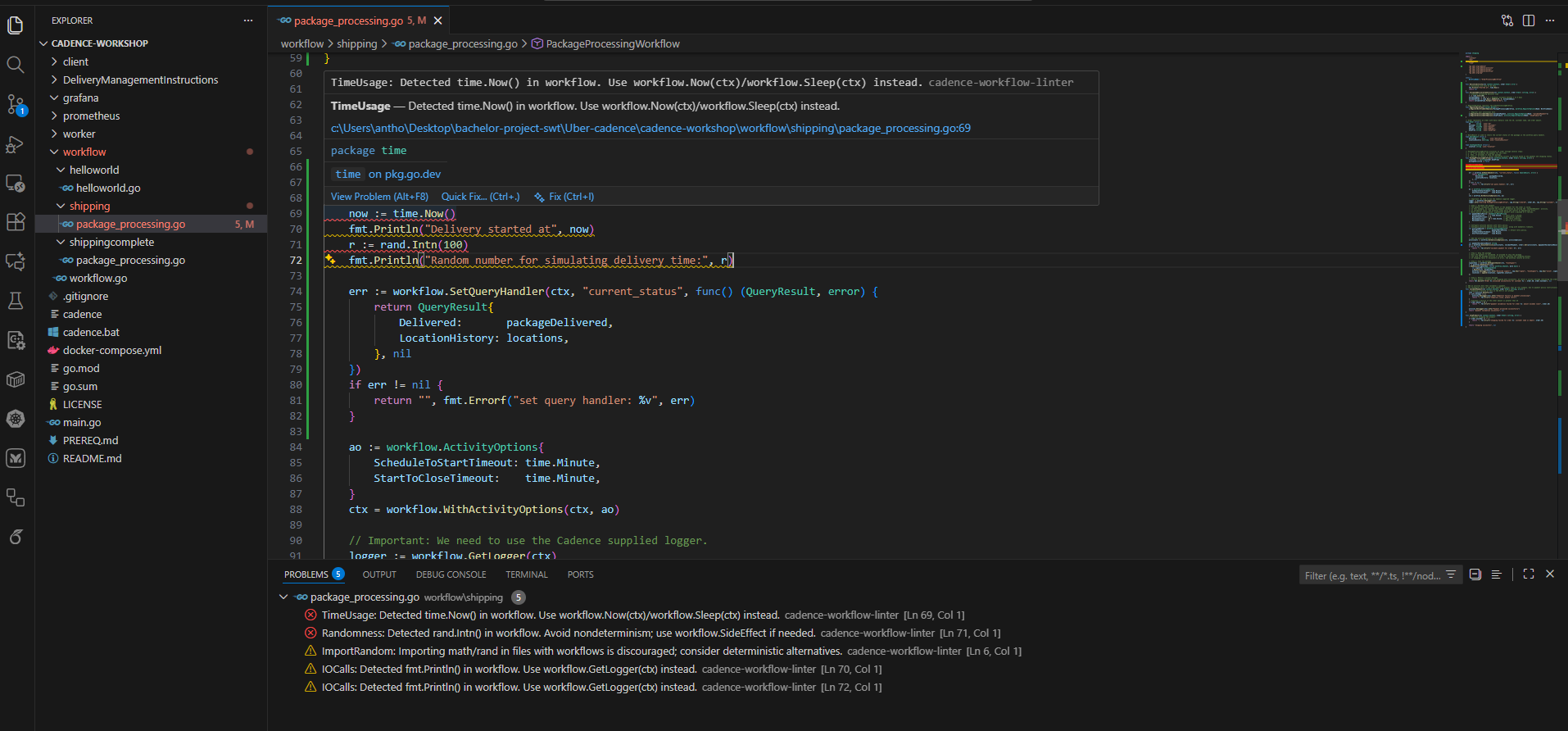
Cadence Workflow Linter is a productivity extension for developers building Cadence workflows. It highlights risky or nondeterministic code (for example, calls to time.Now(), uses of math/rand, unsafely iterating maps, and I/O) right in the editor so you can fix problems early — before they reach tests or production.
This extension integrates the existing cadence-workflow-linter analyzer and surfaces its findings as editor diagnostics, inline hovers and entries in the Problems panel so you can navigate and remediate issues quickly.
Key Benefits
Prevent nondeterministic workflow code early by surfacing issues in-editor.
Jump from a diagnostic to the exact file and line to fix problems quickly.
Export SARIF for CI and code-scanning integration.
Features
Problems panel diagnostics for linter findings
Output channel with discovery, download and run logs
Hover support with rule guidance and remediation tips
Commands: run linter, check/download CLI updates, export SARIF
Quick Start
Install the extension from the Visual Studio Marketplace (search by the publisher name).
Open a workspace containing Go/Cadence code.
The extension will try to use a configured CLI binary, then a workspace or PATH binary. If none are found it can optionally download the platform-specific CLI from this repository's GitHub Release.
Open the Problems panel (View → Problems) or save a file to trigger cadenceLinter.runOnSave (toggleable in Settings).
Commands (Command Palette)
"Cadence Workflow Linter: Run" — run the linter now
"Cadence Workflow Linter: Check for CLI update" — check/download the CLI
"Cadence Workflow Linter: Export SARIF" — save results in SARIF format
Configuration
Open Settings (File → Preferences → Settings) and search for cadenceLinter to configure:
cadenceLinter.runOnSave (boolean) — run the linter automatically on save.
cadenceLinter.cliPath (string) — override the CLI binary path if you have a custom build.
Support
If you find a bug or need help, open an issue on the repository and include the CLI output from the extension output channel.
Documentation and architecture overview: see Documentation/Overview.md in the repository root.
Created by Anthony Nguyen (anthonyking10a@gmail.com)