TF Switcher
Use the right Terraform version in VS Code without installing a command-line
version manager or changing your machine-wide PATH.
TF Switcher is designed for developers on managed enterprise laptops, teams
working across projects with different Terraform requirements, and anyone who
wants a visual alternative to tools such as tfenv or tfswitch.
Why TF Switcher?
- No command-line version manager required. Install and switch Terraform
versions from the VS Code sidebar.
- Works on managed devices. The extension downloads from HashiCorp directly;
it does not require access to GitHub.
- Workspace-aware. It reads
required_version from your Terraform files and
recommends a compatible release.
- Safe and contained. It changes
PATH only for new or relaunched VS Code
terminals. Your operating system and terminals outside VS Code are untouched.
- Verified downloads. Every ZIP is checked against HashiCorp's published
SHA-256 checksum, then the extracted executable is run to confirm its version.
- Reusable local cache. Downloaded versions remain available for later use,
including when you are offline.
Get started
- Open a folder containing Terraform files in VS Code.
- Select the TF Switcher icon in the Activity Bar.
- Choose the recommended version or any available stable version.
- Open a new terminal, or relaunch an existing terminal when prompted.
Run terraform version in the new terminal to confirm the active version.
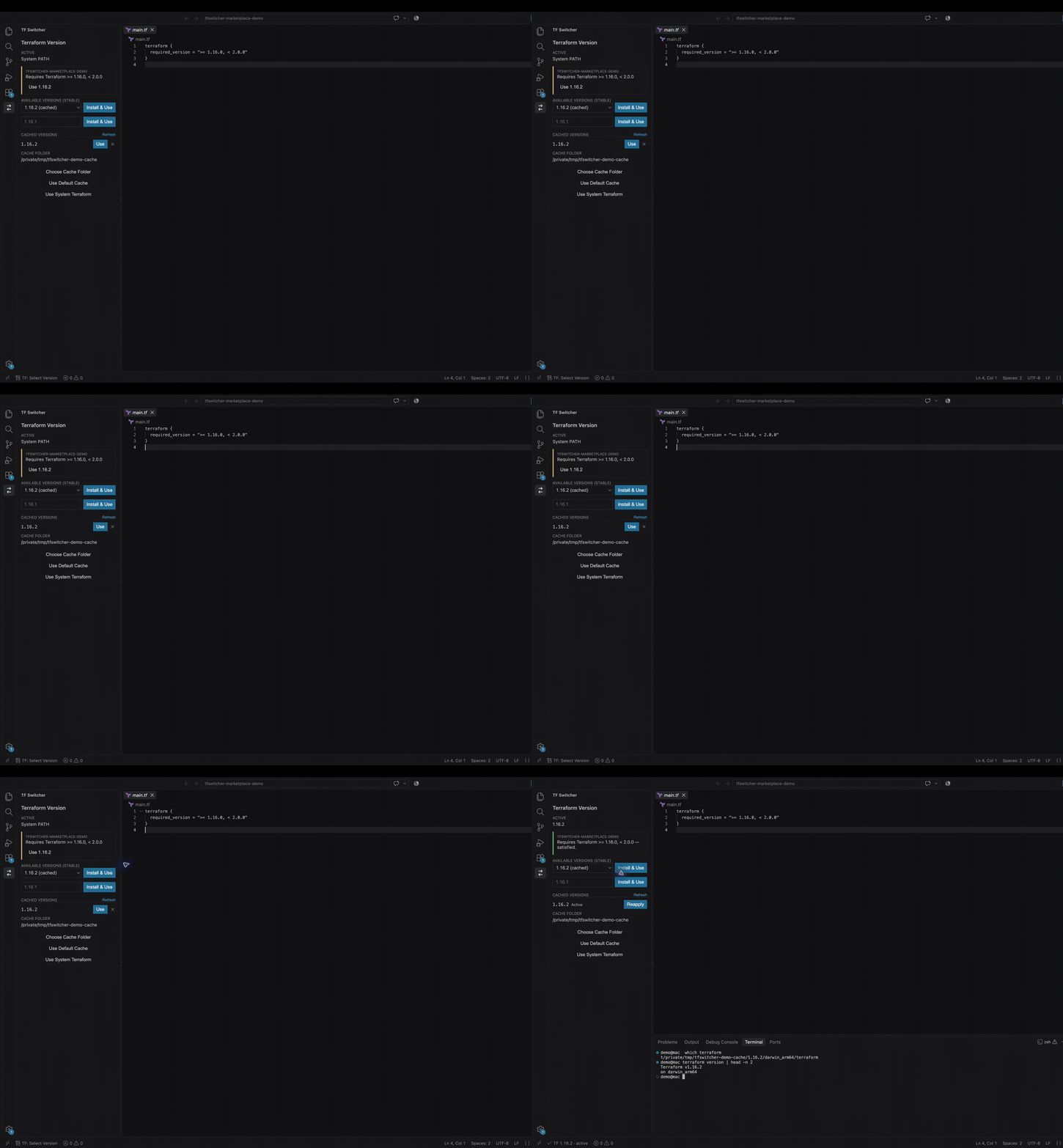
See it in action
TF Switcher reads the workspace requirement and offers a compatible Terraform
version without requiring command-line setup.
What you can do
- Install recent stable Terraform releases from HashiCorp.
- Enter an exact Terraform version when it is not shown in the recent list.
- Reuse or delete locally cached versions.
- Import an approved Terraform ZIP and matching HashiCorp checksum list when
direct downloads are blocked.
- Detect whether the selected version satisfies the workspace's
required_version constraint.
- Read exact project pins from
.terraform-version, or write the active version
there with Pin Active Version to Project.
- Choose a custom cache folder, including an approved local or shared location.
- Return to the system-installed Terraform at any time.
| Platform |
Architectures |
Executable |
| Windows |
x64, ARM64, x86 |
terraform.exe |
| macOS |
Apple Silicon, Intel |
terraform |
| Linux |
x64, ARM64, x86 |
terraform |
TF Switcher selects the HashiCorp build that matches the operating system and
processor running the VS Code extension host.
Security and privacy
TF Switcher does not collect telemetry, request Terraform credentials, or
modify the machine-wide PATH.
For each new version, it:
- Downloads the official checksum list from HashiCorp over HTTPS.
- Downloads the matching Terraform ZIP from HashiCorp over HTTPS.
- Verifies the ZIP's SHA-256 checksum.
- Inspects ZIP entries without allowing the archive to choose filesystem paths.
- Rejects unsafe names, unexpected layouts, excessive entry counts, and
oversized expanded executables.
- Writes only the expected Terraform executable to a temporary file.
- Runs the executable locally to confirm that it reports the requested version.
- Moves the verified executable into the extension cache.
ZIP inspection uses the MIT-licensed yauzl reader, selected for central-directory
parsing, filename validation, entry-size validation, and entry-by-entry processing.
For a customer-facing summary of permissions, automated scans, Marketplace
protections, and verification limits, see
Security and verification.
Enterprise and offline use
- Access to GitHub is not required.
- First-time installation of a Terraform version requires HTTPS access to
releases.hashicorp.com.
- Loading the available-version list requires access to
api.releases.hashicorp.com.
- Previously cached Terraform versions continue to work offline.
- The release list is cached for six hours and retained across VS Code restarts.
When direct downloads are unavailable, select Import Terraform ZIP and
provide both of these files:
- The official archive for the current device, such as
terraform_1.16.3_darwin_arm64.zip.
- The matching checksum list, such as
terraform_1.16.3_SHA256SUMS.
TF Switcher checks the filenames, operating system, processor architecture,
archive size, SHA-256 checksum, safe entry names, entry count, expanded size,
expected executable, and reported Terraform version before placing it in the
cache. Importing does not activate the version; select Use after reviewing it
in the cached-version list.
A matching checksum detects corruption or a mismatched ZIP, but does not by
itself authenticate who supplied both files. Import files only when they came
directly from HashiCorp or a trusted IT software source.
If your organization uses an outbound proxy or TLS inspection, VS Code and the
extension host must be allowed to reach the HashiCorp endpoints above.
Workspace requirements
When a Terraform file contains:
terraform {
  required_version = ">= 1.5.0, < 2.0.0"
}
TF Switcher shows whether the active version satisfies the constraint and
offers the newest compatible cached or downloadable version.
Supported operators are =, !=, >, >=, <, <=, and ~>.
Constraints found in multiple .tf and .tf.json files within a workspace
folder are combined, so every clause must be satisfied. HCL comments are ignored.
If the workspace root contains .terraform-version, its exact version takes
precedence. Select a version and use Pin Active Version to Project to create
or update this file for the project.
In a multi-root workspace, requirements are displayed separately for each
folder. Version activation is currently shared across the workspace.
Cache location
By default, Terraform versions are stored in VS Code's extension-specific
global storage. A custom folder can be selected from the sidebar.
<cache-root>/<version>/<os>_<architecture>/terraform(.exe)
Examples:
- Windows:
<cache-root>\1.16.0\windows_amd64\terraform.exe
- Apple Silicon:
<cache-root>/1.16.0/darwin_arm64/terraform
- Intel Mac:
<cache-root>/1.16.0/darwin_amd64/terraform
Changing the cache folder does not move previously downloaded versions.
Commands
| Command |
Purpose |
TF Switcher: Open Selector |
Open the TF Switcher sidebar. |
TF Switcher: Select Version |
Enter and activate an exact version. |
TF Switcher: Choose Cache Folder |
Select a custom cache location. |
TF Switcher: Reset Cache Folder |
Restore the default cache location. |
TF Switcher: Use System Terraform |
Stop modifying PATH for new terminals. |
TF Switcher: Pin Active Version to Project |
Write the active version to .terraform-version. |
TF Switcher: Delete Cached Version |
Remove a version from the current cache. |
TF Switcher: Import Terraform ZIP |
Verify and cache an approved offline ZIP and checksum list. |
Support TF Switcher
TF Switcher is free to use, with all features available without contributing.
If it saves you time, support its development on Ko-fi.
Optional contributions help fund maintenance, testing, and improvements.
Supporters can choose to be thanked on the
supporters page.
See that page for how to opt in; recognition is entirely optional.
Support and feedback
Report defects or request features through the
GitHub issue tracker. Please do
not include Terraform credentials, access tokens, or other secrets in reports.
Documentation
Public documentation and support resources are available at
github.com/345dave/tfswitcher-docs.

