Simutrans dat_linter (VSCode Extension)
Syntax highlighting, formatting, and parameter validation for Simutrans addon .dat files.
Features
Syntax highlighting
Highlights keys such as obj=building for readability, plus known enum-like values:
waytype/direction suffixes (e.g. [s], [ne]), building/factory type values,
factory location values, climates values, and the skin name values used by
built-in menu/cursor/symbol/misc/ground objects. Because a .dat grammar
can't track which obj type a given line belongs to, these value categories are
flattened across all obj types rather than validated per obj type -- dat_linter lint
remains the source of truth for whether a value is actually valid where it's used.
Snippets
Type an obj form such as buidling=res to generate a template for that addon.
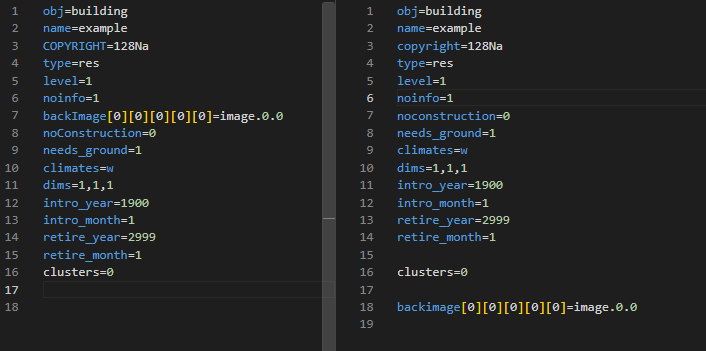
Normalizes parameter order and letter case.
Key/value completion *
Suggests valid keys for the current obj type, and valid values for keys such as waytype=, direction=, type=, or location=.
Parameter check (lint) *
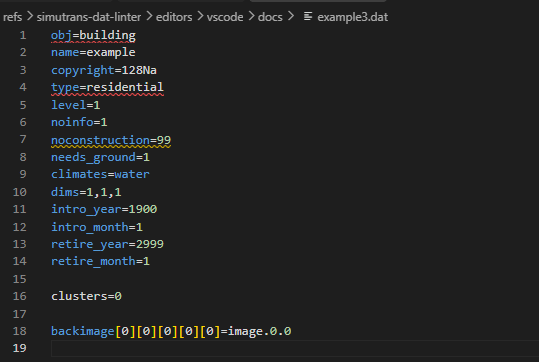
Flags missing parameters and value mistakes.
Language switching *
Switch between English and Japanese messages.


Dependency
Features marked with * require dat_linter to be installed.
This extension does not bundle dat_linter itself. Install it separately beforehand and make sure it's on your PATH.
- Installation: https://github.com/128na/simutrans-dat-linter
(download the executable for your OS from the releases page)
- The
--format json option requires dat_linter 0.1.2 or later. This extension will not work with older versions.
- Key/value completion is powered by
dat_linter keys --format json, which requires a dat_linter build that includes the known_values.per_obj_type field (added after v0.2.0; not yet in a tagged release as of this writing). On an older version, completion is silently disabled (check the "Simutrans dat_linter" output channel for details) while syntax highlighting, formatting, and lint keep working normally.
- If you don't want to install
dat_linter at all and only want syntax highlighting/snippets, set simutransDatLinter.lint.enable and simutransDatLinter.format.enable to false in your settings. This stops the extension from invoking dat_linter (and from popping up an error message every time a .dat file is opened, saved, or formatted) while leaving highlighting and snippets fully functional. Both default to true.
Set up everything at once with Claude Code (Windows)
If you use Claude Code, the simutrans-dat-linter repository bundles a skill (.claude/skills/setup-dev-env/SKILL.md, Windows only) that installs dat_linter, makeobj, this extension (and offers to remove the old one), and a VSCode F5 task to pak addons with makeobj -- checking what's already installed first and only acting on what you choose. Copy SKILL.md into your global skills folder (%USERPROFILE%\.claude\skills\setup-dev-env\) once, then ask Claude Code to "set up the dev environment" in your addon project.
Migrating from the old extension (128na/simutrans-vscode-extention)
The author (128na) previously published a separate VSCode extension,
128na/simutrans-vscode-extention (CC0), which also provides syntax highlighting and snippets for .dat files.
Since both extensions contribute a language definition/grammar for .dat, having both installed at the same time can make highlighting unstable, as which language ID/grammar actually applies depends on VSCode's resolution order.
As the successor from the same publisher (128na), we recommend uninstalling the old extension once you've adopted this one.
The lint (Problems panel) and Document Formatting features are implemented independently of language ID (a filename-based selector, {pattern: "**/*.dat"}), so they work the same whether or not the old extension is still installed.
Simutrans dat_linter (VSCode 拡張)
Simutrans アドオンの .dat を色分けして見やすくしたり、フォーマット、パラメーターの不備をチェックできる拡張です。
機能
シンタックスハイライト
obj=building などのキーを見やすく色分けするほか、既知の列挙値も色分けします:
waytype や [s]/[ne] などの方角サフィックス、building/factory の type 値、
factory の location 値、climates 値、menu/cursor/symbol/misc/ground
といった組み込みobj用のスキン name 値です。.dat の文法定義では今どのobj種別の
行なのかを追跡できないため、これらの値カテゴリはobj種別ごとに区別せず全obj種別分を
まとめて色分けしています。実際にその行のobj種別で有効な値かどうかの最終判定は
引き続き dat_linter lint が担います。
スニペット
buidling=res などobj形式を入力するとそのあアドオンのテンプレートを生成できます。
フォーマット ※
パラメーターの順序を整えたり大文字・小文字を整えます。
キー・値の入力補完 ※
現在の obj 種別に応じたキー名の候補、および waytype=・direction=・type=・location= などのキーに応じた既知の値の候補を提示します。
パラメーターチェック(lint) ※
パラーメーターの不足や値のミスを指摘します。
言語切り替え ※
英語・日本語表示の切り替えができます。
依存ツール
※の機能を使うには dat_linter の導入が必要です。
この拡張は dat_linter 本体を同梱しません。事前に別途インストールし、PATH に通しておく必要があります。
- 本体・インストール方法: https://github.com/128na/simutrans-dat-linter
(リリースページから OS にあった実行ファイルをダウンロードしてください)
--format json オプションは dat_linter 0.1.2 以降が対応しています。それより古いバージョンではこの拡張は動作しません。- キー・値の入力補完は
dat_linter keys --format json の known_values.per_obj_type フィールドを利用しており、これを含むバージョン(v0.2.0以降の未リリースビルド。この文章を書いている時点ではまだタグ付きリリースはありません)が必要です。それより古いバージョンでは補完機能のみ静かに無効化されます(詳細は "Simutrans dat_linter" 出力チャンネルを参照)。シンタックスハイライト・フォーマット・lint は引き続き通常通り動作します。
dat_linter を導入せず、シンタックスハイライト・スニペットだけを使いたい場合は、設定で simutransDatLinter.lint.enable と simutransDatLinter.format.enable を false にしてください。.dat ファイルを開く・保存する・フォーマットするたびに出ていたエラーポップアップが出なくなり、dat_linter は一切呼び出されなくなります(シンタックスハイライト・スニペットは影響を受けず引き続き使えます)。どちらもデフォルトは true です。
Claude Codeでまとめてセットアップ(Windows)
Claude Code を使っている場合、simutrans-dat-linter リポジトリに同梱されているスキル(.claude/skills/setup-dev-env/SKILL.md、Windows専用)で、dat_linter 本体・makeobj・この拡張(旧拡張のアンインストールも含む)・VSCode上でF5からmakeobjでpak化するタスク設定を、現在の導入状況を確認した上でまとめて導入できます。SKILL.md を自分のグローバルスキルフォルダ(%USERPROFILE%\.claude\skills\setup-dev-env\)へ1回コピーしてから、自分のアドオンプロジェクトでClaude Codeに「開発環境をセットアップして」と頼んでください。
旧拡張(128na/simutrans-vscode-extention)からの移行
作者(128na)が以前公開していた別のVSCode拡張
128na/simutrans-vscode-extention(CC0)にも、.dat 向けのシンタックスハイライト・スニペットが含まれています。
両拡張がともに .dat に対して言語定義・グラマーを提供するため、両方を同時にインストールしていると、どちらの言語ID/グラマーが実際に使われるかVSCode側の解決順に依存し、ハイライト表示が不安定になることがあります。
同一 publisher(128na)による後継として、この拡張の採用後は旧拡張のアンインストールを推奨します。
lint(Problems パネル表示)・Document Formatting の機能は言語ID に依存しない実装({pattern: "**/*.dat"} によるファイル名ベースのセレクタ)のため、旧拡張を入れたままにするかどうかに関わらず、これらの機能自体は影響を受けません。

