 TalePal
You create. TalePal assists.
Homepage: www.talepal.org · Documentation
TalePal is a complete writing environment for VS Code — and a dialog partner, not a ghostwriter. It reads your chapters, characters, and world, then develops your story with you: surfacing the right context at the right moment, while you stay in full control of every word.
Local AI is the focus, not a fallback — with Ollama or LM Studio your manuscript never leaves your machine. Cloud (Gemini, OpenAI, Mistral) is optional — bring your own API key.
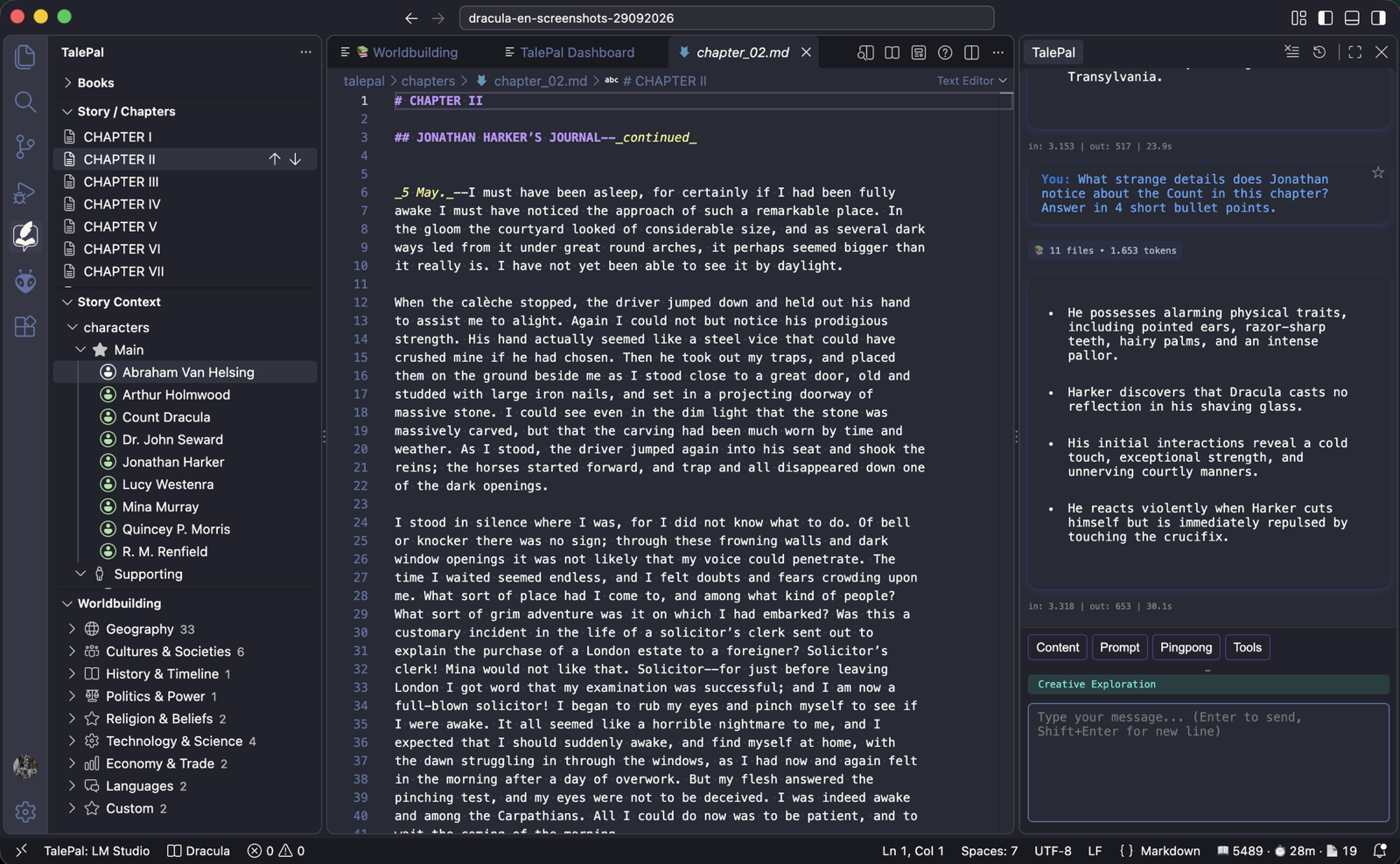
What TalePal does
Intelligent analysis is the foundation. TalePal reads your manuscript and builds a living index — chapter summaries, character profiles, timelines, plot threads, your world. Smart context then feeds the AI the right slice of that knowledge for every reply — so it talks about your story, characters, and world, not just the paragraph you happen to be on.
Talk to your story through five creative dialogue modes — each a specialized partner that already knows the relevant context:
- Story development — write alongside a companion that knows your chapter, your characters, and your voice
- Character development — rich character profiles as files (arcs, relationships, motivations); the AI reads them before every reply, so your cast stays consistent
- Plot development — map your story beat by beat: plot events per chapter, each linked to its characters and locations, with a structure tracker
- Worldbuilding — an indexed wiki of places, factions, and rules; the AI reads it before every reply
- Creative exploration — free brainstorming, the same story context always on tap
Under the hood:
- Intelligent analysis — chapter summaries, character profiles, and timelines, extracted automatically from your prose
- Smart context — see exactly what the AI knows (files, characters, worldbuilding) before it replies; you stay in control
Every mode works on its own — together with the analysis dashboard, they're TalePal's six integrated modes, sharing one story context.
And the basics, done right:
- Plain Markdown — every chapter, character, and note is a text file you own; readable anywhere, no lock-in
- Local EPUB export — generate your ebook directly from VS Code
Dashboard & Analysis
Import or write your chapters, then run the analysis pipeline. TalePal generates an interactive dashboard with character profiles, chapter breakdowns, plot structure, and more.
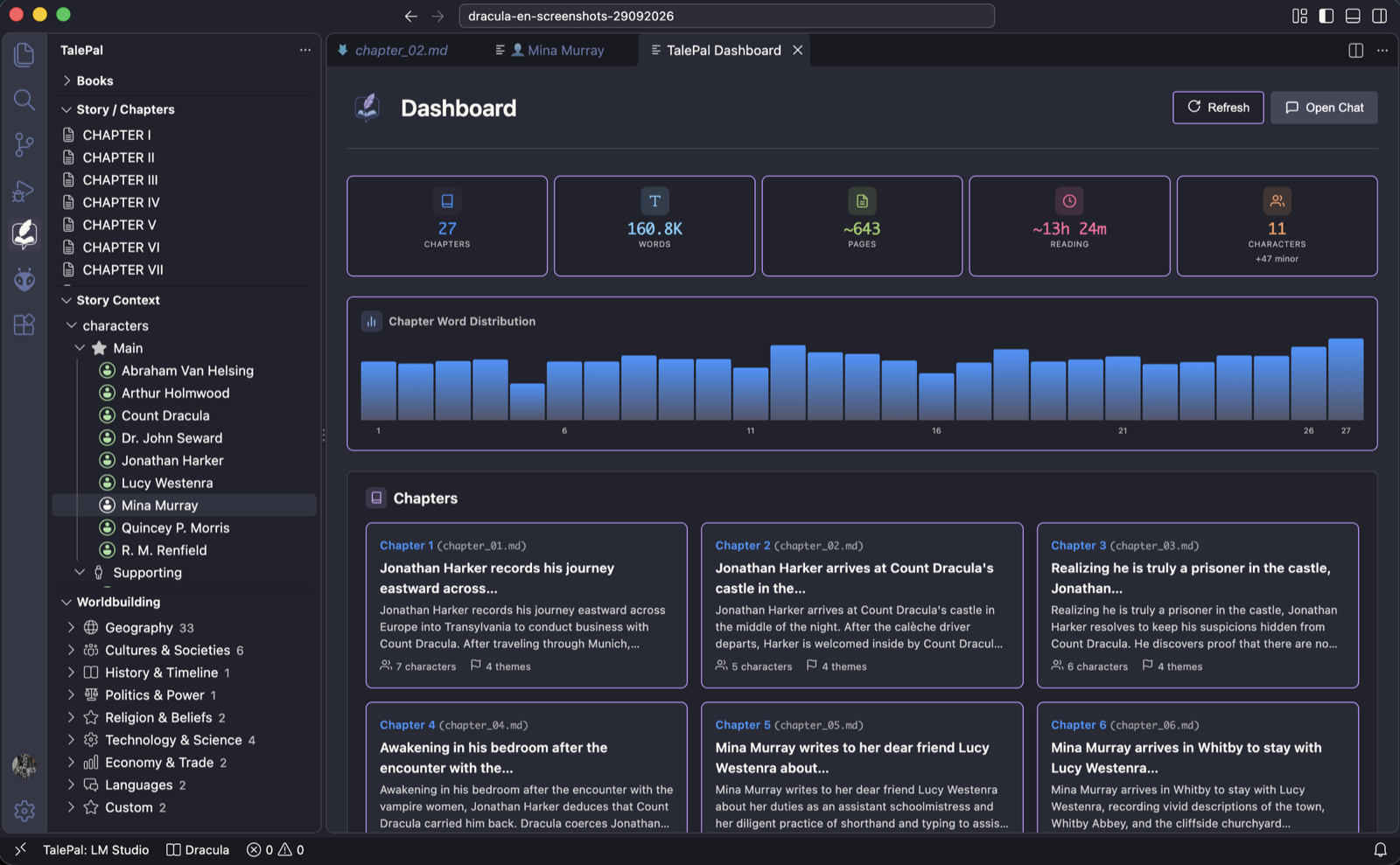
Deep character profiles with role badges, motivations, and chapter-by-chapter tracking — including every name a character goes by, with the reason (married name, title, nickname):
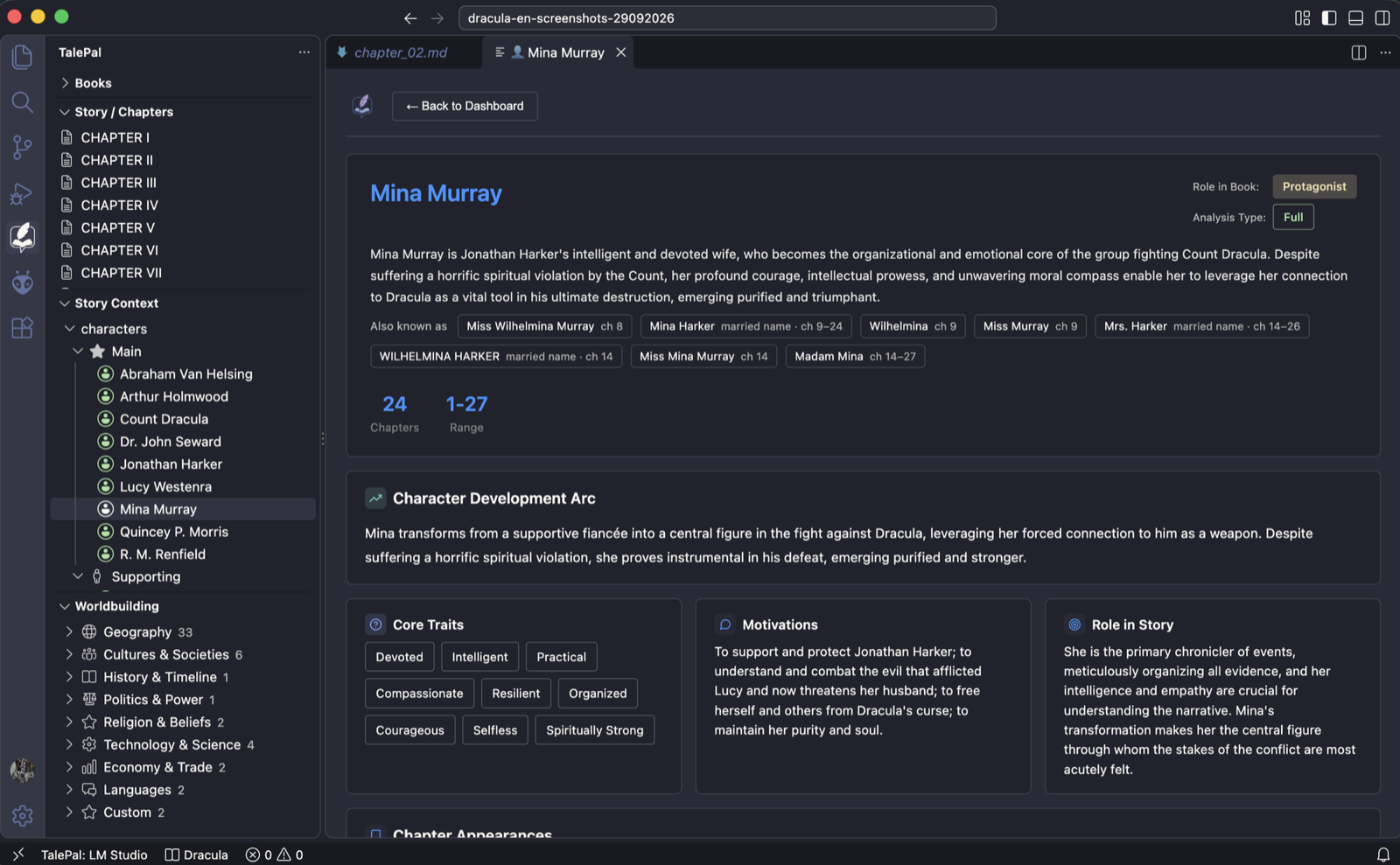
Key relationships, each linked to the other character's page:
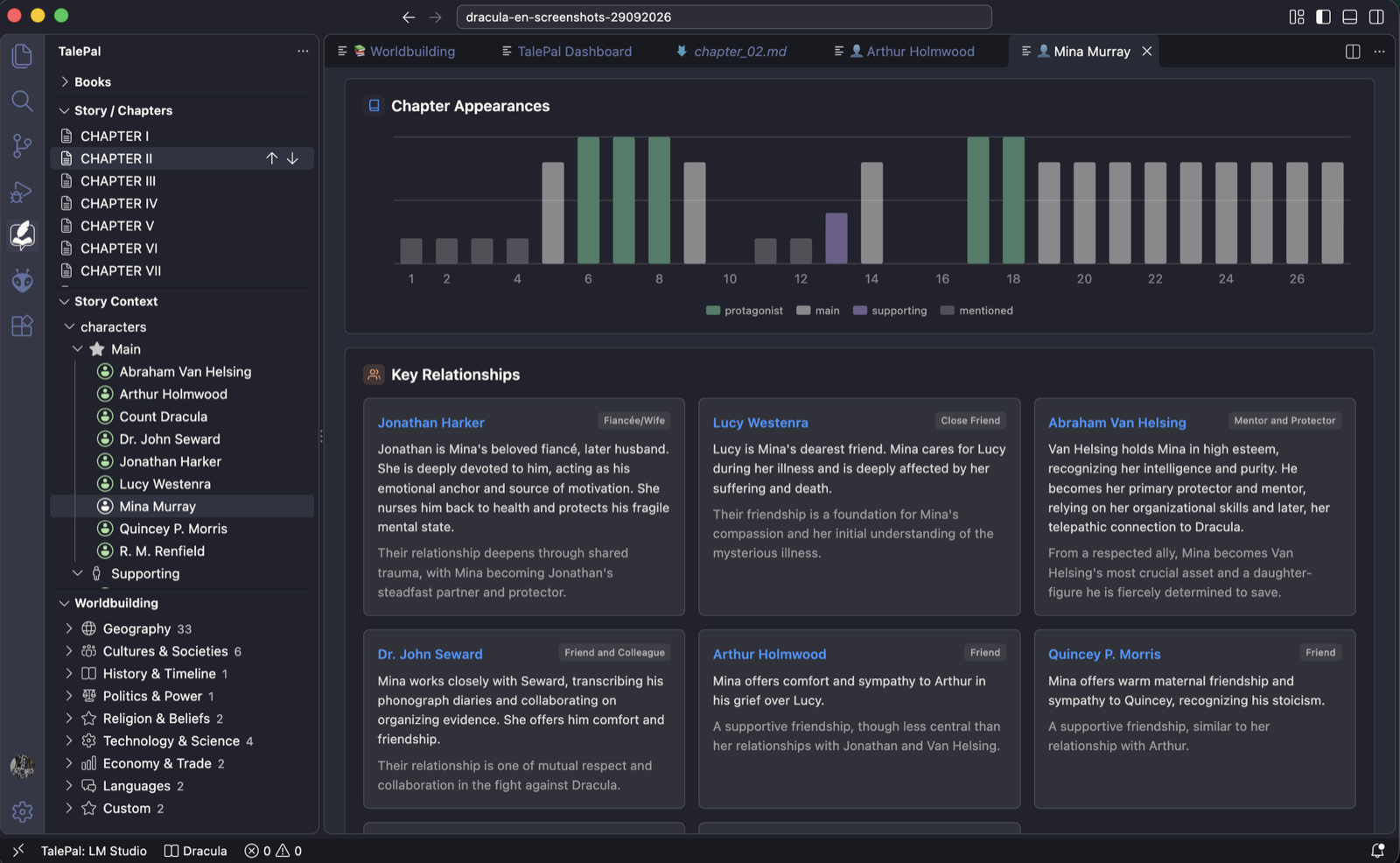
See what TalePal sees — explore live example analyses (the real generated dashboard) at analysis.talepal.org.
Worldbuilding Wiki
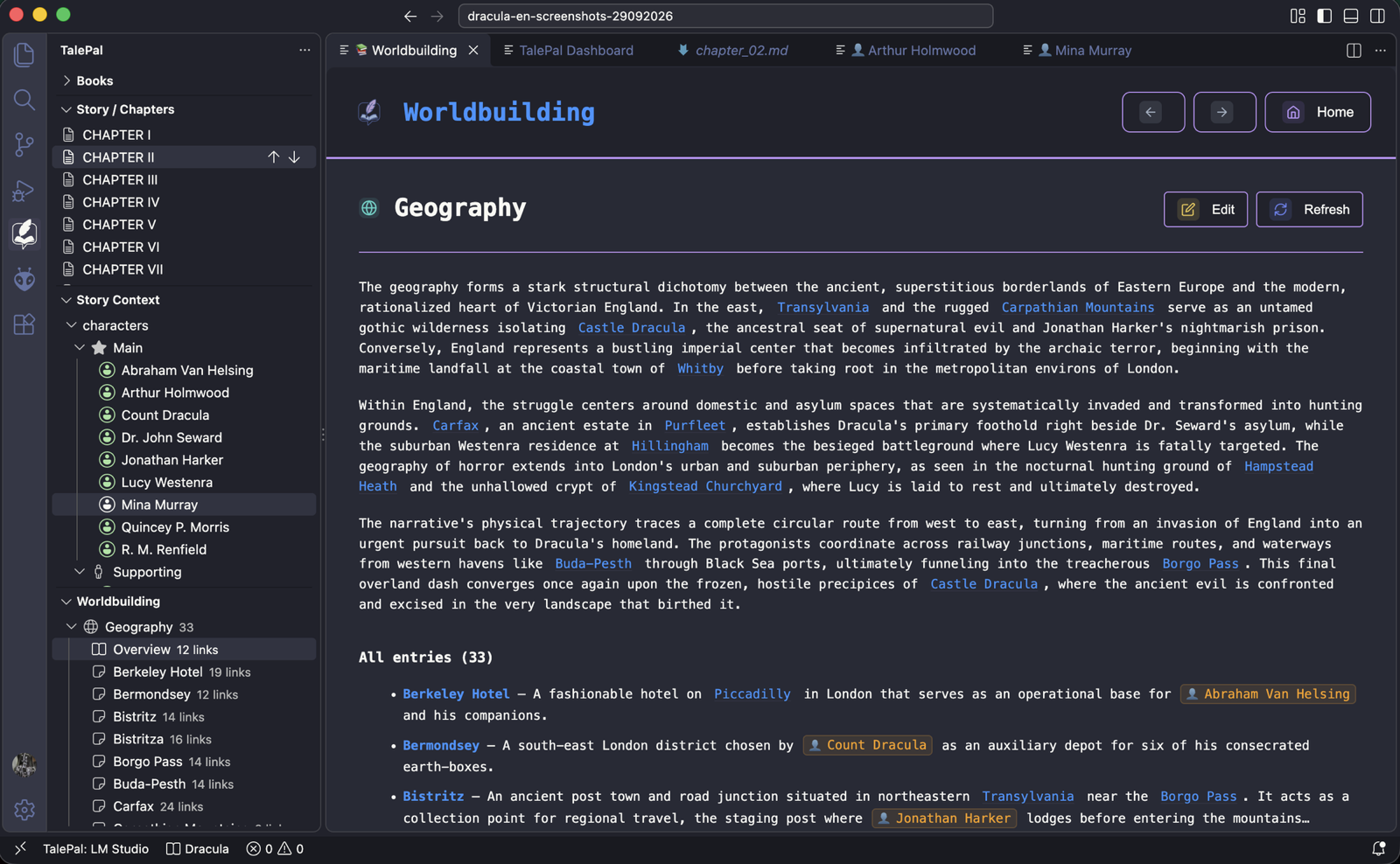
A built-in wiki system with 9 categories (Geography, Cultures, History, Politics, Religion, Technology, Economy, Languages, Custom). Entries are extracted from your chapters or created manually, with [[wiki links]] for cross-referencing. Each category opens as its own page: a short summary of what matters, then every entry at a glance.
Your edits are safe: when you re-run the analysis, entries you changed are never overwritten — TalePal shows what it found as suggestions inside the article, and you adopt only what you want.
AI — tuned for local
TalePal is model-tuned, not model-agnostic. We put real effort into keeping context small and engineering specifically for local AI — trimming a typical request from ~30,000 tokens down to ~5,000 at nearly the same answer quality. Local models like Gemma run your whole manuscript on-device and score within a few points of the cloud — privacy with essentially no quality penalty.
→ See how local AI performs · Model benchmark
Run it fully offline, or bring your own cloud API key:
| Provider |
Type |
Notes |
| Ollama |
Local |
Fully offline & private — runs on your laptop |
| LM Studio |
Local |
Fully offline & private — runs on your laptop |
| Gemini |
Cloud |
Free tier via Google AI Studio |
| OpenAI |
Cloud |
GPT-4.1 models |
| Mistral |
Cloud |
European option |
Requirements
- VS Code 1.99 or newer
- Local AI (recommended): Ollama or LM Studio with a gemma4-class model (e.g. gemma4-e4b or gemma4-12b) — a MacBook (M-series, 16 GB RAM) or a PC with an 8 GB+ GPU is enough
- Cloud AI (optional): an API key for Gemini, OpenAI, or Mistral
- A TalePal license — get one at talepal.org
Getting Started
- Install TalePal from the VS Code Marketplace
- Click the TalePal icon in the activity bar
- Enter your TalePal license key (get one at talepal.org) and click Validate & Save Key
- Create a workspace: pick a folder, choose your language
- Start writing — or import existing Markdown chapters
- Pure Markdown files — all your content is plain text
- No vendor lock-in — your story works with or without TalePal
- Transparent structure — chapters, characters, worldbuilding, analysis data — all readable, all yours
- Telemetry is opt-in — off by default, anonymous metadata only, and it respects your VS Code telemetry setting
your-project/
  talepal/
    chapters/           ← your chapter files (Markdown)
    context/
      characters/       ← character profiles
      worldbuilding/    ← wiki entries by category
      media/            ← images, cover art
      plot-ideas.md     ← plot scratchpad
      story-ideas.md    ← story ideas
    .features/          ← analysis data (managed by TalePal)
Key Features
| Feature |
Description |
| Creative Dialogue |
Five specialized AI modes for different aspects of writing |
| Worldbuilding Wiki |
Categorized entries with [[wiki links]] |
| Character Profiles |
Deep profiles with role badges, motivations, arcs |
| Chapter Management |
Organize, reorder, track word counts |
| EPUB Export |
Generate ebooks with cover images and styled chapters |
| Smart Context |
AI receives only what's relevant to the current mode |
| Readability Check |
Sentence complexity and repetition analysis |
| Book Analysis |
10-step pipeline with an interactive HTML dashboard — check it live |
| Multi-Language |
English and German interface + output |
Pricing
- Free trial — try everything before you buy.
- Buy once — a perpetual license. No subscription, ever.
- No running costs with local AI — Ollama and LM Studio cost nothing per use; cloud is optional with your own API key.
Get a license at talepal.org.
Philosophy
TalePal is built on a simple belief: AI should enhance your creativity, not replace it.
We don't ghostwrite. We ask questions that help you think deeper.
We don't impose structure. We offer tools you can use or ignore.
We don't lock your data. Every file is yours, always readable, always portable.
Your voice. Your story. Your way.
You create. TalePal assists.

