🌟Turn text annotations & comments into AI-ready context ➔ save tokens & make the intent clearer.
- 💡You can also use it as a to‑do list: simply tag items with
#todo, then view your list grouped by tags in the Comment Manager panel.
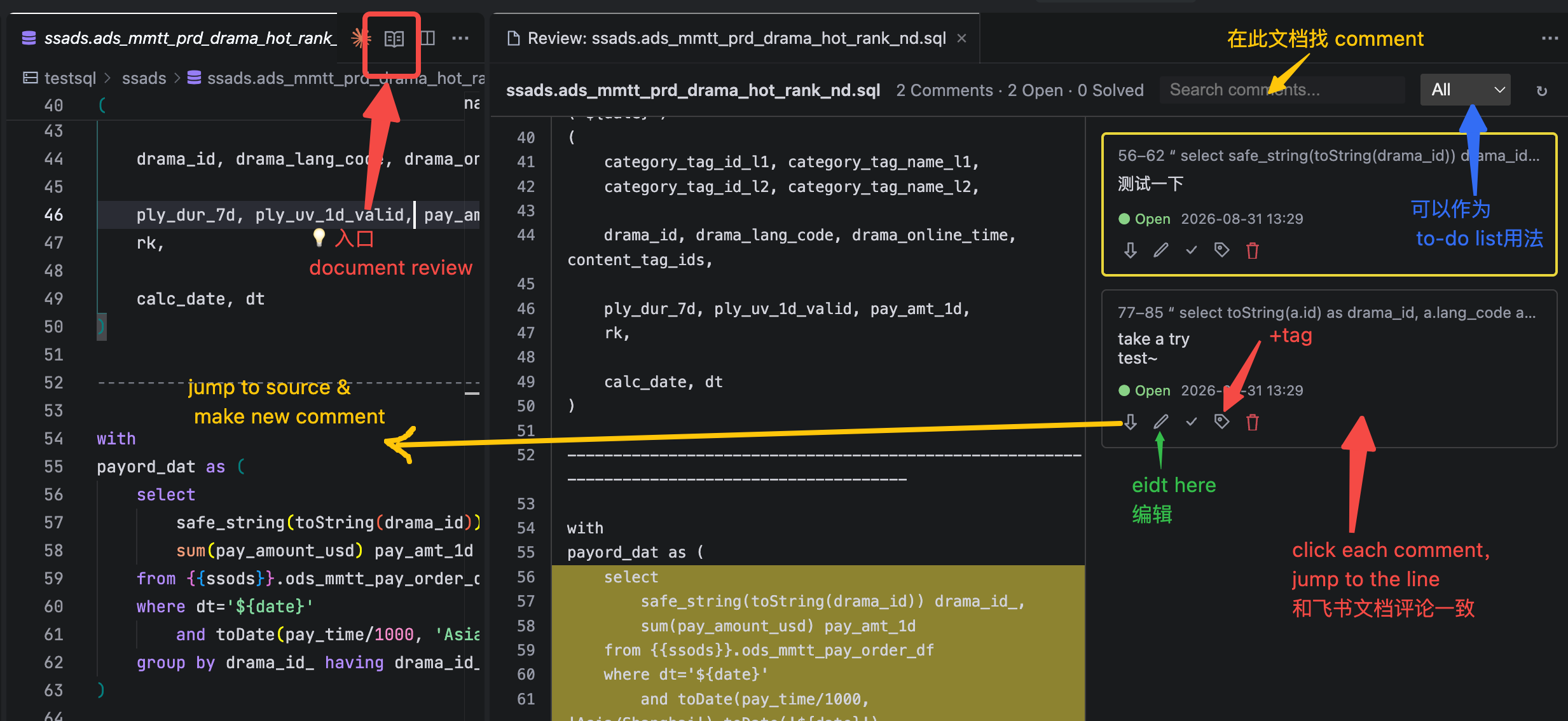
- 💡Revisit your document via "Document Review": see your original thoughts at each position and review all comments sequentially in‑context. (Feishu Docs‑style experience)
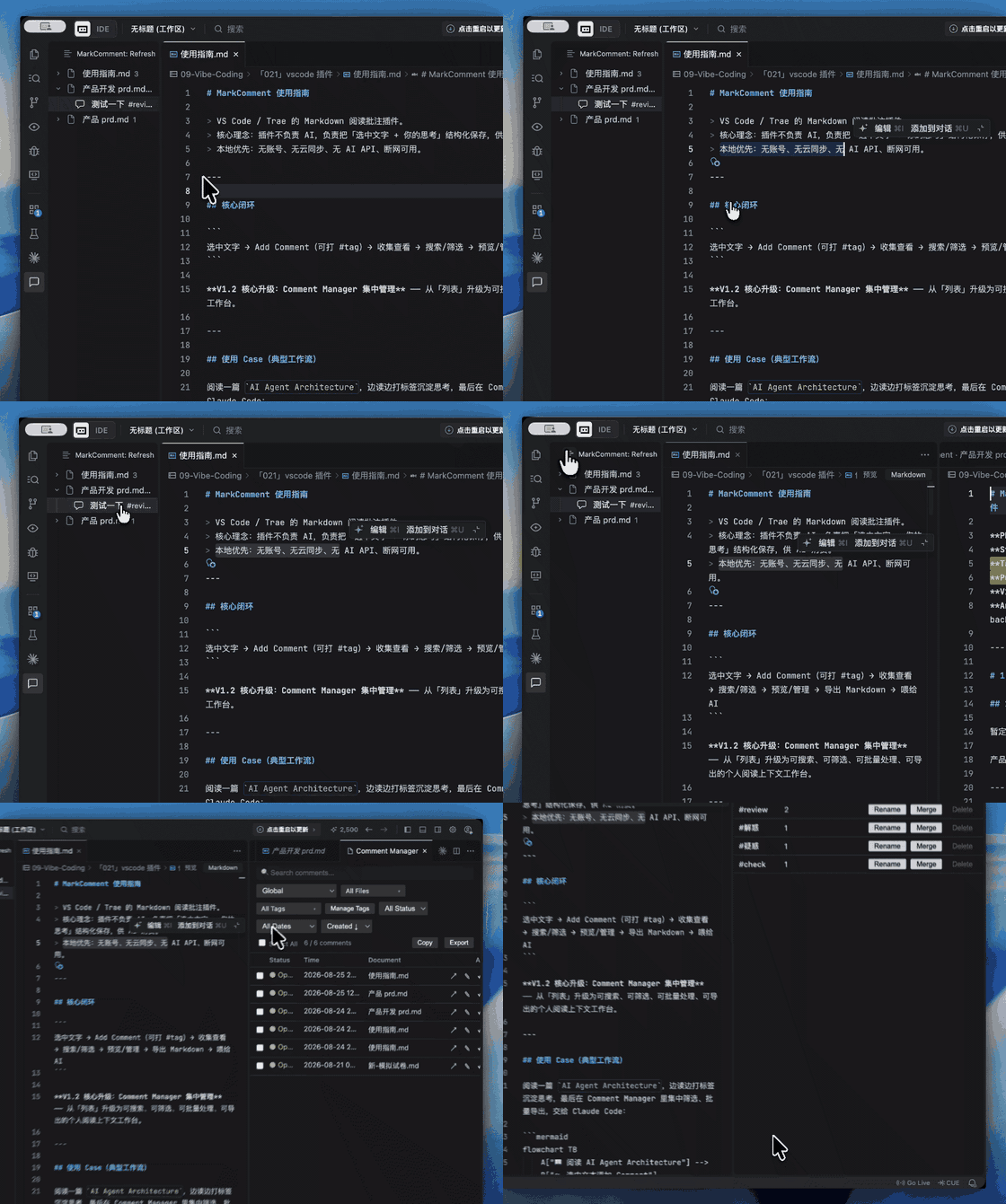
- 🌟Workflow:Read → Select → Comment → Organize(Comment Manager--List/Tags View 、Tag Manager) → Revisit (Jump to) → Copy/Export → Ask AI → Discover → Read again
- 【Feedback】发现 Bug 或者有功能建议?请到插件代码仓库提交 Issue,也可以添加我的微信(Yvonne1ru,好友申请验证信息请写明你的问题)Found a bug or have a feature request? Open an issue in the extension repository, or reach me via WeChat (Yvonne1ru, please state your issue in the verification message).
Workflow(中文介绍见底部)
1、Select what matters, capture a comment, tag it, and keep reading.
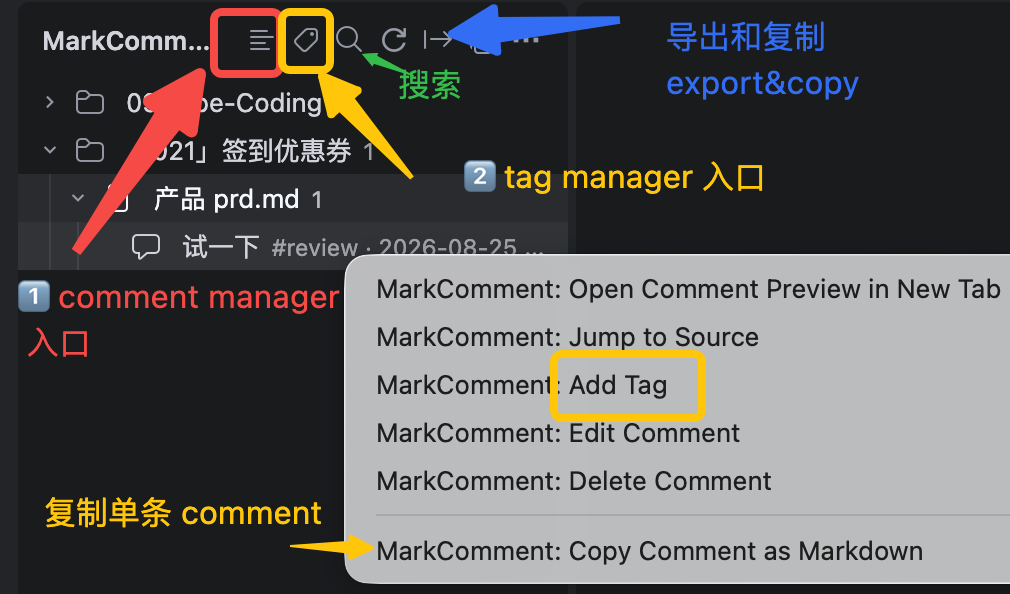
2、Later, organize all comments in Comment Manager, govern tags in Tag Manager, and export only the selected thoughts to AI. 对文件做 comment(annotation)➔ 打上标签 tags 管理➔ copy/save for AI
3、Compared with feeding the whole file, this uses fewer tokens and makes your intent clearer.(更加节省 tokens,使意图更清晰)
AI can summarize a document, but it does not know what you noticed.
When reading a technical article, you constantly have thoughts like:
- “This distinction is important.”
- “I don't understand why this works.”
- “I should investigate this later.”
Normally, these thoughts become scattered notes. MarkComment keeps them attached to the exact text that triggered them.
MarkComment doesn't replace AI. It prepares your context for AI.
| Value |
What it means |
| Capture without breaking reading flow |
Select text, add a comment, tag it, and continue reading. Let AI check, cluster, and solve these questions later. |
| Manage all comments in one place |
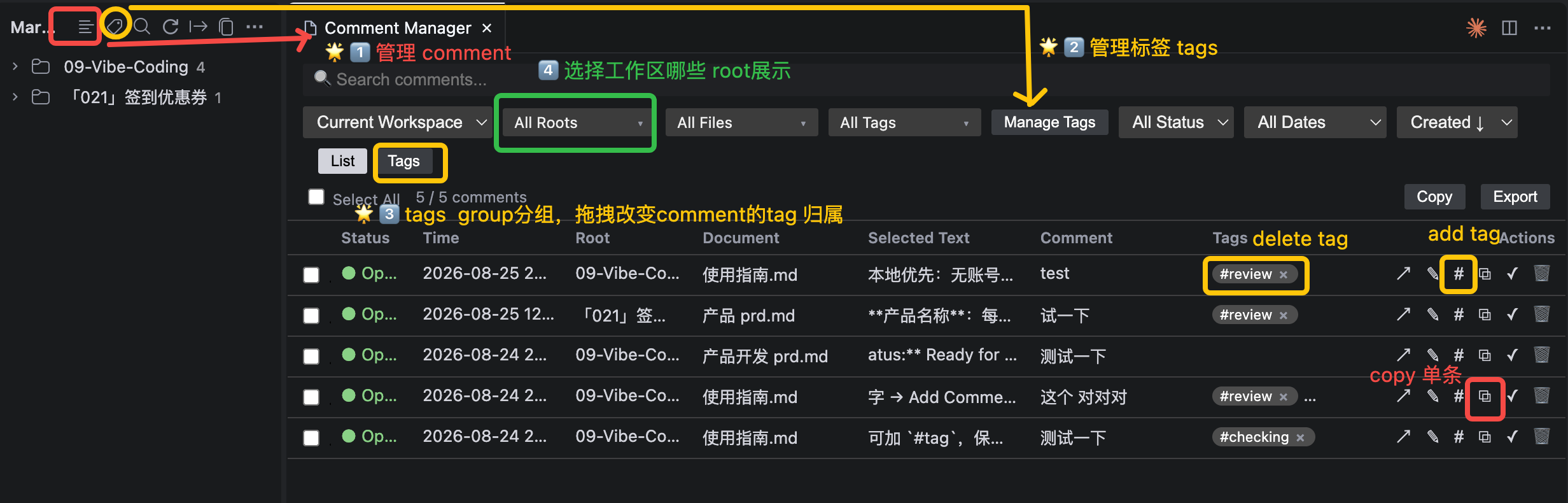
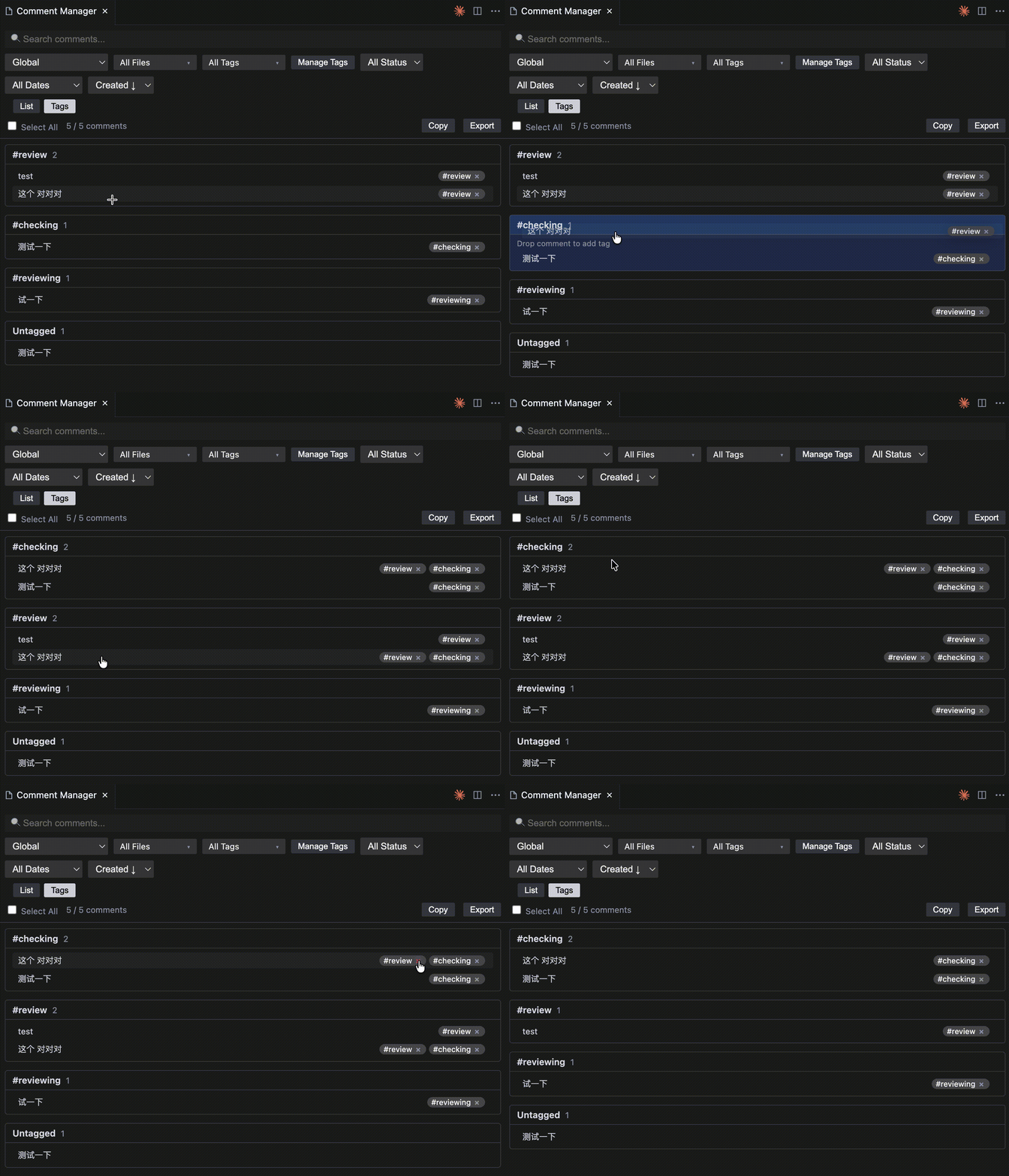
Comment Manager provides List View and Tags View to review, filter, sort, and batch-manage all comments. Drag a comment into a tag group, or remove a tag with badge ×. |
| Govern tags at low cost |
Tag Manager renames, merges, deletes tags. |
| Export AI-readable context |
Copy or save selected comments as structured Markdown. Give AI focused context instead of an entire file. |
| Keep every thought anchored to source |
Each comment stores selected text, file, position, tags, status, and timestamps. |
| Low-cost thinking system |
Record, classify, reclassify, revisit, and export hundreds of reading thoughts without chaos. |
30-second workflow
Read Markdown/sql/txt/tsx/ts/jsx/js/py/json/yaml
  ↓
Select important text
  ↓
Add Comment (shortcut shift+Command+C / right-click / light bulb)
  ↓
Tag it (#review #check #idea)
  ↓
Keep reading
  ↓
Organize in Comment Manager (List / Tag views)
  ↓
Revisit with Jump to Source
  ↓
Copy / Export as AI-ready Markdown
  ↓
Ask AI to check, cluster, summarize, or solve
Detail
                    ┌───────────────┐
                    │   Read files  │
                    └───────┬───────┘
                            ↓
                    Worth recording
                            ↓
                      Add Comment
                            ↓
                    Tag / Status
                            ↓
              ┌─────────────┴─────────────┐
              ↓                           ↓
        Comment Manager             Document Review
              │                           │
        Search / Filter             Source + Comment
        Batch / Export                    │
              │                           │
              │                    ┌──────┴──────┐
              │                    ↓             ↓
              │                 Reading      Annotate
              │                    ↓             ↓
              │                Jump / Hover   Edit / Tag
              │                                  ↓
              │                            Solve / Delete
              │                                  ↓
              └──────────────────────→ Keep reading
Core surfaces
| Surface |
Best for |
Main actions |
| Editor capture |
Immediate annotation |
Select Markdown text → add comment via shortcut, right-click, command palette, or light bulb |
| TreeView |
Quick navigation |
Browse comments by Current File / Workspace / Global |
| Comment Preview |
Single-comment deep dive |
View, edit, solve/reopen, delete, jump to source |
| Comment Manager |
Managing many comments |
List View / Tag View, search, filter, sort, multi-select, batch edit/solve/delete/copy/export; drag comment to tag group; remove tag with badge × |
| Document Review |
Reviewing one document end-to-end |
Source + comment panel, click comment to jump/highlight, inline edit/tag/solve/delete |
| Tag Manager |
Tag taxonomy |
Rename, delete, merge tags |
| Export |
AI context |
Copy as Markdown / Export / Save As |
List View gives a flat table for search, filter, sort, multi-select, and batch operations.
Tag View shows comments under tag groups, making multi-tag membership visible and easy to adjust.
| Task |
How |
| Find comments |
Search selected text, comment, file name, relative path, and tags |
| Narrow down |
Filter by file, tag, status, and date; filters can be combined |
| Review |
Sort by created / updated time; scope by current file, workspace, or global |
| Batch work |
Batch edit, solve/reopen, delete, copy, and export |
| Adjust tags |
Drag a comment to a tag group to add a tag; click badge × to remove a tag relation |
#check (47 comments)
  ↓ Rename
#doublecheck (47 comments)  // all related comments update automatically
| Capability |
Result |
| Rename tag |
One tag name updates across all related comments |
| Merge tags |
Duplicate tags are merged and deduplicated |
| Delete tag |
Removes the tag, not the comments |
Important distinction: deleting a comment removes the comment; removing a tag badge only removes the tag relationship.
3. Document Review: review one document end-to-end
Open Document Review from the command palette, the editor title menu, or the editor right-click menu. It shows the current document as source on the left and all of its comments on the right, ordered by source position.
- Click a comment → the source scrolls to it and highlights it in yellow (no separate Preview tab).
- Inline edit / add tag / remove tag / solve / reopen / delete directly in the comment card, with tag autocomplete.
- Jump to Source → returns to the native editor at the comment's source range.
Export to AI
Markdown study/research + SQL data + TXT/other readings → Comment → Tag → Manager → AI Context
| Feed the whole file |
Export selected comments |
| More tokens |
Fewer tokens |
| Broad context |
Focused intent |
| AI must infer what matters |
AI sees what you selected, commented, tagged, and solved |
Typical workflow
You read “AI Agent Architecture”
  ↓
Create comments with #review #check #解惑 #idea
  ↓
Comment Manager → filter #review + Open → 27 comments
  ↓
Export agent-review.md
  ↓
Ask AI:
“@agent-review.md Cluster these review comments and identify what I should research next.”
Search Case
“I remember I thought about this somewhere, but I can't find it.”
Stop searching through hundreds of Markdown files. Search the thoughts you left behind.
- Search across selected text, comment, file name, relative path, tags
- Filter by file, tag, status, date — all combinable (AND)
- Sort by created / updated time
- Scope — current file, current workspace, or global
Feature overview
| Area | Features |
|---|---|
| Capture | Supported text types (default Markdown / SQL / TXT / TSX / TS / JSX / JS / Python / JSON / YAML, configurable via markcomment.supportedLanguages); add comment via shortcut / right-click / command palette / CodeAction light bulb; multi-line input; Chinese / English / emoji / Markdown characters; #tag or $tag; multiple tags; dedupe; Chinese tags; tag autocomplete; keyboard or voice input |
| Context stored | Selected text, comment, file, relative path, language type, range/position, status, created time, updated time, comment ID |
| Status | Open / Solved; solved comments remain searchable, filterable, and exportable |
| Browse | Current File / Workspace / Global TreeViews; Comment Preview |
| Manage | Comment Manager with List View and Tag View; search / filter / sort; multi-select; batch edit / solve / reopen / delete / copy / export; drag comment to tag group; badge × removes tag relation; tag groups; tooltips and improved actions |
| Document Review | Per-document source + comment panel; source-position ordering; click comment to jump & highlight; inline edit / tag / solve / delete; Jump to Source |
| Tag governance | Tag Manager rename / delete / merge|
| Revisit | Jump to Source; yellow highlight; does not modify source; Range → Text → Context relocation |
| Export | Copy as Markdown / Export / Save As; same structured Markdown generator; includes metadata |
| Local-first | No account, no backend, no cloud sync, no AI API, no external service required |
Product map
MarkComment
├─ Read Markdown/sql/txt/tsx/ts/jsx/js/py/json/yaml (+ configurable)
├─ Capture Comment
│  ├─ Selected text
│  ├─ Comment (keyboard / voice)
│  ├─ Tags: #tag / $tag, autocomplete
│  └─ Metadata: file, language type, range, status, time, ID
├─ Quick Browse
│  ├─ TreeView: Current File / Workspace / Global
│  └─ Comment Preview: Edit / Solve / Delete / Jump
├─ Manage & Browse
│  ├─ Comment Manager
│  │  ├─ List View: search / filter / sort / batch
│  │  └─ Tag View: drag to tag / badge × / multi-tag
│  └─ Tag Manager: rename / delete / merge
├─ Review
│  └─ Document Review: source + comment panel, jump & highlight, inline edit / tag / solve / delete
├─ Revisit
│  └─ Jump to Source: locate + yellow highlight
└─ Export
   └─ Copy / Save As → AI-ready Markdown
Module relationships
MarkComment
├─ TreeView ───────────── quick navigation
├─ Comment Preview ────── single-comment actions
├─ Comment Manager
│  ├─ Search / Filter / Sort
│  ├─ List View / Tag View (Drag & drop tag assignment)
│  └─ Batch operations
├─ Tag Manager
│  ├─ Rename / Delete / Merge
├─ Document Review ────── per-document source + comment panel
└─ CommentStore ───────── local persistence
VS
| Feature |
Primary purpose |
| TreeView |
Quick discovery / navigation |
| Comment Preview |
View a single comment's details |
| Comment Manager |
Search, filter, and bulk-manage across documents |
| Tag Manager |
Global tag governance |
| Document Review |
Review all comments of the current document in order |
                     MarkComment
                          │
        ┌─────────────────┼─────────────────┐
        ↓                 ↓                 ↓
    TreeView        Comment Manager    Document Review
        │                 │                 │
   Quick nav        Global mgmt        Document-level Review
        │                 │                 │
        ↓                 ↓                 ↓
    Comment          Comment set       Source + Comments
        │                 │                 │
        ↓                 ↓                 ↓
    Preview          Batch ops          Inline Review
Installation
- Open VS Code or Trae.
- Go to Extensions.
- Search
MarkComment.
- Click Install.
Keyboard shortcuts (You can customize)
| Shortcut |
Command |
Cmd/Ctrl+Shift+C |
Add Comment (supported text + selection) |
Cmd/Ctrl+Shift+E |
Export Comments |
Cmd/Ctrl+Shift+Y |
Copy as Markdown |
Cmd/Ctrl+Shift+D |
Edit Comment |
Cmd/Ctrl+Shift+Backspace |
Delete Comment |
Supported files and limitations
| Item |
Note |
| Supported files |
Default: Markdown, SQL, TXT, TSX/TS, JSX/JS, Python, JSON, YAML; any other text language can be enabled via markcomment.supportedLanguages (a list of VS Code languageIds); unsupported files show a graceful hint |
| Language detection |
Based on VS Code document.languageId (not file extension), so custom language associations are respected |
| Multi-root workspace |
Workspace storage uses the first workspace folder |
| Moved / renamed files |
Jump to Source relies on Range → Text → Context relocation |
| Workspace vs Global |
Comments are written to both stores; edit/delete sync both |
Local-first by design: your text files and comments stay in your local editor environment.
Feedback
Found a bug or have a feature request? Open an issue in the extension repository.
中文说明(附录)
- 🌟将文本批注与笔记评论(Markdown/sql/txt/tsx/ts/jsx/js/py/json/yaml)转化为可供 AI 直接使用的上下文 ➔ 节省 Token,同时让意图更加清晰。
- 💡你也可以将它用作待办清单:只需为条目打上
#todo 标签,即可在「Comment Manager」面板中查看按标签分组的清单。
- 💡重新阅读这篇文章时,可以通过 "Document Review", 同时看到你当时对每个位置留下了什么思考➔ 沿着文档上下文逐条 Review 所有 Comment。(类似飞书文档)
- 🌟工作流:阅读 → 选中内容 → 添加批注 → 整理(批注管理器Comment Manager —— List列表 / Tags标签视图、标签管理器Tag Manager) → 回溯查阅(Jump to) → 复制 / 导出 → 交给 AI→ 发现新问题 → 再次阅读
1、阅读文件:选中重点 → 写 comment → 打 tag → 继续阅读。
2、之后用 Comment Manager 的 List / Tag 视图统一管理所有 comment,用 Tag Manager 管理 tags,最后一键复制 / 导出给 AI。
3、相比把整个文件作为上下文,更省 tokens,也让 AI 更清楚你的意图。
为什么值得安装?
AI 可以总结一篇文档,但它不知道你在阅读时注意到了什么。
| 价值 |
说明 |
| 不打断阅读思路 |
选中原文,写下 comment,打上 tag,然后继续阅读。之后再让 AI 高效 check、梳理、solve 阅读中的问题。 |
| 一个入口管理所有 comment |
Comment Manager 提供 List 视图 和 Tag 视图,可搜索、筛选、排序、批量处理所有 comment。 |
| 低成本整理大量思考 |
可持续记录、分类、重新分类、整理几百条阅读思考,不用担心标签体系失控。 |
| Tag Manager 管理 tags |
支持重命名、合并、删除 tag;支持拖拽 comment 到 tag group,或用 badge × 移除 tag 关系。 |
| 一键导出 AI 上下文 |
复制 / 导出选中的 comments,生成结构化 Markdown。相比整篇文件作为上下文,更省 tokens,意图更清晰。 |
| 每条 comment 都保留原文上下文 |
每条 comment 都保留 selected text、文件、位置、tags、status、时间等信息。 |
30 秒理解工作流
阅读 Markdown/sql/txt/tsx/ts/jsx/js/py/json/yaml
  ↓
选中重点原文
  ↓
添加 Comment(快捷键 / 右键 / 灯泡)
  ↓
打标签(#review #check #idea)
  ↓
继续阅读
  ↓
在 Comment Manager 中整理(List / Tag 视图)
  ↓
通过 Jump to Source 回到原文
  ↓
复制 / 导出为 AI 可读 Markdown
  ↓
让 AI 检查、聚类、总结、推进解决
详细
                    ┌───────────────┐
                    │ 阅读文件        │
                    └───────┬───────┘
                            ↓
                       发现值得记录
                            ↓
                      Add Comment
                            ↓
                    Tag / Status
                            ↓
              ┌─────────────┴─────────────┐
              ↓                           ↓
        Comment Manager             Document Review
              │                           │
        Search / Filter             原文 + Comment
        Batch / Export                    │
              │                           │
              │                    ┌──────┴──────┐
              │                    ↓             ↓
              │                  阅读          批注
              │                    ↓             ↓
              │                Jump / Hover   Edit / Tag
              │                                  ↓
              │                            Solve / Delete
              │                                  ↓
              └──────────────────────→ 继续阅读
核心界面
| 界面 |
适合场景 |
主要能力 |
| 编辑器内记录 |
即时注释/评论笔记 |
选中 Markdown 原文 → 通过快捷键、右键、命令面板或灯泡添加 comment |
| TreeView |
快速浏览 |
按 Current File / Workspace / Global 浏览 comments |
| Comment Preview |
单条 comment 深入处理 |
查看、编辑、solve/reopen、删除、跳转原文 |
| Comment Manager |
管理大量 comments |
List / Tag 视图,搜索、筛选、排序、多选、批量编辑 / solve / 删除 / 复制 / 导出;拖拽 comment 到 tag group;badge × 移除 tag 关系 |
| Document Review |
逐篇文档整体 review |
源码 + comment 面板,点击 comment 定位高亮,内联编辑 / tag / solve / 删除 |
| Tag Manager |
管理 tags |
重命名、删除、合并 tag |
| Export |
生成 AI 上下文 |
Copy as Markdown / Export / Save As |
List 视图提供扁平表格,适合搜索、筛选、排序、多选和批量操作。
Tag 视图按 tag group 展示 comments,适合查看多 tag 归属,并通过拖拽或 badge × 快速调整分组。
| 任务 |
使用方式 |
| 查找 comment |
搜索 selected text、comment、文件名、相对路径、tags |
| 缩小范围 |
按文件、tag、状态、日期筛选,可组合使用 |
| 浏览回顾 |
按创建 / 更新时间排序;支持当前文件、工作区、全局范围 |
| 批量处理 |
批量编辑、solve/reopen、删除、复制、导出 |
| 调整 tag |
把 comment 拖到 tag group 加 tag;点击 badge × 移除 tag 关系 |
#check(47 条 comments)
  ↓ Rename
#doublecheck(47 条 comments)  // 所有相关 comment 自动更新
| 能力 |
结果 |
| 重命名 tag |
一个 tag 名称更新后,所有相关 comment 自动同步 |
| 合并 tag |
合并重复 tag,并自动去重 |
| 删除 tag |
删除的是 tag,不会删除 comment |
注意: 删除 comment 是删除这条批注;点击 tag badge × 只是移除 tag 关联。
3. Document Review:逐篇文档整体 review
通过命令面板、编辑器标题栏或编辑器右键菜单打开 Document Review。它把当前文档展示为左侧源码 + 右侧全部 comment,并按源码位置排序。
- 点击 comment → 源码滚动到对应位置并黄色高亮(不打开独立 Preview Tab)。
- 内联编辑 / 加 tag / 删 tag / solve / reopen / 删除,tag 带自动补全。
- Jump to Source → 回到原生编辑器对应的源码位置。
导出给 AI
| 把整篇文件交给 AI |
只导出选中的 comments |
| tokens 更多 |
tokens 更少 |
| 上下文更泛 |
意图更聚焦 |
| AI 需要猜你关心什么 |
AI 直接看到你选中、评论、打标、处理过的内容 |
典型工作流
阅读《AI Agent Architecture》
  ↓
用 #review #check #解惑 #idea 记录思考
  ↓
Comment Manager → 筛选 #review + Open → 得到 27 条 comments
  ↓
导出 agent-review.comments.md
  ↓
问 AI:
“帮我梳理这些 review comments,按主题聚类,并指出哪些问题值得进一步研究。”
检索场景
“我记得我在哪留下过这段思考,但就是找不到了。”
不必在成百上千个 Markdown 文件里逐一翻找。直接检索你留下的所有思考批注。
- 搜索:可检索选中文本、批注内容、文件名、相对路径、标签
- 筛选:按文件、标签、状态、日期筛选,支持多条件(逻辑与)组合
- 排序:按创建时间 / 更新时间排序
- 检索范围:当前文件、当前工作区、全局全部批注
数据分析/研究场景
产品文档.md
    ↓
Comment #review

SQL 查询.sql
    ↓
Comment #check

研究资料.txt
    ↓
Comment #idea
        ↓
Comment Manager
        ↓
Tag = #review
Status = Open
        ↓
Export
        ↓
research-review.comments.md
        ↓
Claude Code / AI Agent
        ↓
“分析这些问题,并按照主题分类,
指出哪些问题需要进一步验证。”
功能总览
| 模块 |
功能 |
| 记录 |
支持文本类型(默认 Markdown / SQL / TXT / TSX / TS / JSX / JS / Python / JSON / YAML,可通过 markcomment.supportedLanguages 配置扩展);可通过快捷键 / 右键 / 命令面板 / CodeAction 灯泡添加 comment;支持多行输入;支持中文 / 英文 / emoji / Markdown 字符;支持 #tag 或 $tag;支持多 tag、去重、中文 tag、tag 自动补全、键盘或语音输入 |
| 上下文保存 |
保存 selected text、comment、文件、相对路径、语言类型、range/位置、状态、创建时间、更新时间、comment ID |
| 状态 |
Open / Solved;已 solve 的 comment 仍可搜索、筛选、导出 |
| 浏览 |
Current File / Workspace / Global TreeView;Comment Preview |
| 管理 |
Comment Manager 提供 List 视图和 Tag 视图;支持搜索 / 筛选 / 排序;支持多选和批量编辑 / solve / reopen / 删除 / 复制 / 导出 ;支持拖拽 comment 到 tag group;badge × 移除 tag 关系;支持 tag groups、tooltips |
| Document Review |
逐篇文档的源码 + comment 面板;按源码位置排序;点击 comment 定位高亮;内联编辑 / tag / solve / 删除;Jump to Source |
| Tag 治理 |
Tag Manager 支持重命名 / 删除 / 合并 |
| 回到原文 |
Jump to Source;黄色高亮;不修改源文件;支持 Range → Text → Context 三级定位 |
| 导出 |
Copy as Markdown / Export / Save As;使用同一套结构化 Markdown 生成器;包含 metadata |
| Local-first |
无账号、无后端、无云同步、无 AI API、无外部服务依赖 |
对比
| 功能 |
核心用途 |
| TreeView |
快速发现 / 快速导航 |
| Comment Preview |
查看单条 Comment 详情 |
| Comment Manager |
跨文档集中搜索、筛选、批量管理 |
| Tag Manager |
全局 Tag 治理 |
| Document Review |
围绕当前文档逐条 Review 所有 Comment |
                     MarkComment
                          │
        ┌─────────────────┼─────────────────┐
        ↓                 ↓                 ↓
    TreeView        Comment Manager    Document Review
        │                 │                 │
    快速导航          全局管理             文档级 Review
        │                 │                 │
        ↓                 ↓                 ↓
    Comment          Comment 集合       Source + Comments
        │                 │                 │
        ↓                 ↓                 ↓
    Preview            批量操作          Inline Review
产品功能地图
MarkComment
├─ 阅读 Markdown / SQL / TXT(可配置扩展)
├─ 记录 Comment
│  ├─ Selected text
│  ├─ Comment(键盘 / 语音)
│  ├─ Tags:#tag / $tag,自动补全
│  └─ Metadata:文件、语言类型、range、状态、时间、ID
├─ 浏览
│  ├─ TreeView:Current File / Workspace / Global
│  └─ Comment Preview:Edit / Solve / Delete / Jump
├─ 管理
│  ├─ Comment Manager
│  │  ├─ List 视图:搜索 / 筛选 / 排序 / 批量处理
│  │  └─ Tag 视图:拖拽加 tag / badge × / 多 tag 归属
│  └─ Tag Manager:重命名 / 删除 / 合并
├─ Review
│  └─ Document Review:源码 + comment 面板,定位高亮,内联编辑 / tag / solve / 删除
├─ 回到原文
│  └─ Jump to Source:定位 + 黄色高亮
└─ 导出
   └─ Copy / Save As → AI 可读 Markdown
模块关系
MarkComment
├─ TreeView ───────────── 快速导航
├─ Comment Preview ────── 单条 comment 操作
├─ Comment Manager
│  ├─ Search / Filter / Sort
│  ├─ List 视图 / Tag 视图(拖拽调整 tag 分组)
│  └─ 批量操作
├─ Tag Manager
│  ├─ Rename / Delete / Merge
├─ Document Review ────── 逐篇文档源码 + comment 面板
└─ CommentStore ───────── 本地存储
安装
- 打开 VS Code 或 Trae。
- 进入 扩展。
- 搜索
MarkComment。
- 点击 安装。
快捷键(可自定义)
| 快捷键 |
命令 |
Cmd/Ctrl+Shift+C |
Add Comment(受支持的文本 + 选中文本) |
Cmd/Ctrl+Shift+E |
Export Comments |
Cmd/Ctrl+Shift+Y |
Copy as Markdown |
Cmd/Ctrl+Shift+D |
Edit Comment |
Cmd/Ctrl+Shift+Backspace |
Delete Comment |
支持文件与限制
| 项目 |
说明 |
| 支持文件 |
默认支持 Markdown、SQL、TXT、TSX/TS、JSX/JS、Python、JSON、YAML;其他文本语言可通过 markcomment.supportedLanguages(填写 VS Code languageId 列表)开启;不支持的文件会优雅提示 |
| 语言识别 |
基于 VS Code document.languageId(而非文件扩展名),尊重自定义语言关联 |
| 多根工作区 |
工作区存储使用第一个 workspace folder(目前选 global 看所有) |
| 文件移动 / 重命名 |
Jump to Source 依赖 Range → Text → Context 定位策略 |
| Workspace / Global |
comments 会写入两个 store;编辑 / 删除会同步两边 |
| Local-first |
你的文件与 comments 都保留在本地编辑器环境中。 |
| |