Git Ref Diff
Compare your working tree against any git reference — right in the editor gutter.




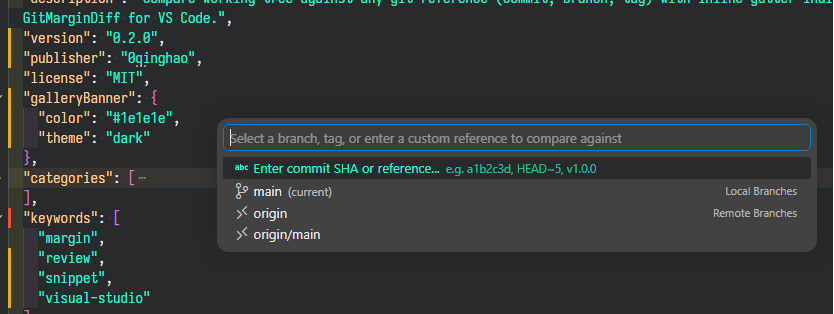
Inspired by the Visual Studio extension Git Diff Margin, Git Ref Diff brings the same intuitive diff-at-a-glance experience to VS Code — with the superpower of comparing against any git reference, not just HEAD.
✨ Features
📌 Compare Against Any Reference
Unlike VS Code's built-in gutter diff (which only compares against HEAD), Git Ref Diff lets you pin any git reference:
| Reference Type |
Examples |
| Branch |
main, develop, feature/login |
| Commit SHA |
a1b2c3d, e5f6g7h |
| Relative |
HEAD~3, main~5 |
| Tag |
v1.0.0, v2.3.1 |
| Remote |
origin/main, upstream/develop |
🎨 Visual Gutter Indicators
Color-coded left-border markers give you instant feedback:
| Color |
Meaning |
| 🟢 Green |
Line was added after the reference |
| 🟡 Yellow |
Line was modified vs the reference |
| 🔴 Red |
Line was deleted from the reference |
🔍 Hover to Preview Diff
Hover over any marked line to see only the changed code — no extra context:
- return oldCompute(a);
+ return newCompute(a, b);
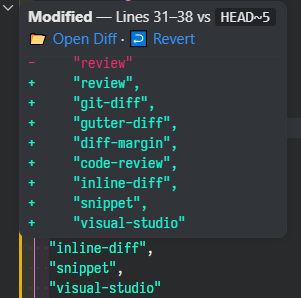
↩️ Revert Block — One Click Undo
Every hover popup includes a Revert Block button that restores the hunk to match the selected reference:
| Scenario |
Behavior |
| Added lines |
Deletes the new lines |
| Modified lines |
Replaces with original content |
| Deleted lines |
Re-inserts the removed lines |
Undo is always available with Ctrl+Z!
📂 One-Click Side-by-Side Diff
Open VS Code's native diff view with a single click from the hover popup.
⚡ Persisted Across Sessions
Your selected reference is saved per-workspace — close and reopen VS Code and your comparison is still there.
Colored markers on the scrollbar show the distribution of changes across the entire file.
🚀 Quick Start
- Install the extension from the VS Code Marketplace
- Click the
$(git-compare) Git Ref Diff button in the bottom-right status bar
- Select a branch, tag, or enter a custom reference (e.g.
HEAD~3 or a commit SHA)
- 🎉 Gutter indicators appear immediately on all open files
⌨️ Commands
| Command |
Description |
Git Ref Diff: Select reference to compare against |
Pick a branch, tag, or enter a custom reference |
Git Ref Diff: Clear comparison |
Remove all indicators and reset |
Git Ref Diff: Open side-by-side diff for current file |
Open VS Code diff panel |
Git Ref Diff: Copy old line content to clipboard |
Copy original from the reference |
Git Ref Diff: Refresh diff decorations |
Re-fetch and redraw all indicators |
Git Ref Diff: Revert hunk block to reference state |
Revert current hunk (also available from hover) |
⚙️ Settings
| Setting |
Default |
Description |
gitRefDiff.addedColor |
#4CAF50 |
Gutte color for added lines |
gitRefDiff.modifiedColor |
#E6A817 |
Gutter color for modified lines |
gitRefDiff.deletedColor |
#F44336 |
Gutter color for deleted lines |
🎯 Why This Extension?
|
Built-in VS Code Gutter |
Git Ref Diff |
| Compare against |
HEAD only |
Any reference |
| Arbitrary commit |
❌ |
✅ a1b2c3d |
| Relative refs |
❌ |
✅ HEAD~5 |
| Tags |
❌ |
✅ v1.0.0 |
| Hover diff preview |
❌ |
✅ Shows old vs new |
| Revert block |
❌ |
✅ One-click |
| Persistence |
❌ |
✅ Survives reload |
Perfect for:
- Code reviews — Pin the base branch, see exactly what your feature branch changed
- Refactoring — Keep track of modifications against the original starting point
- Bug investigation — Compare current state with a known-good commit
- Release preparation — Review all changes since the last release tag
📋 Requirements
- VS Code 1.85+
- Git installed and accessible via
PATH
📄 License
MIT
If you find this extension useful, consider ⭐ starring it on GitHub!

