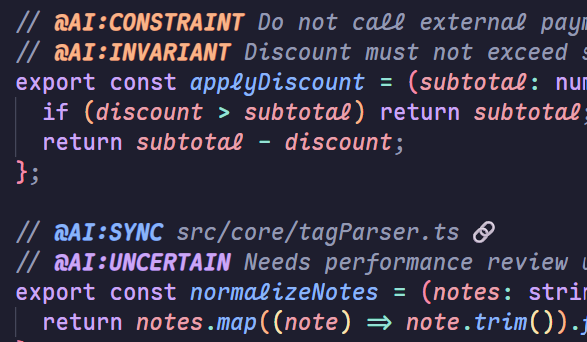
Purpose: Define a consistent comment tag vocabulary for AI-assisted codebases.
Audience: Developers and teams who want machine-readable intent in comments.
Scope: Tag meaning, format rules, and examples for AI Annotation Tags.
Out of scope: Automatic refactors, TODO generation, and external reporting.
Tag format
Write one tag per line.
Use a comment marker appropriate for the language.
Use the format @AI:TAG <payload>.
Use YYYY-MM-DD with optional timezone for expiry tags (defaults to UTC).
If the payload contains ${...}, expiry diagnostics are skipped.
Project documentation guidance
To make the tags effective, document their meaning in your project docs so humans and AI share the same conventions.
We recommend adding a short "AI Annotation Tags" section to files such as AGENTS.md or CLAUDE.md,
and explicitly describe what each tag means in your codebase.
Tag catalog
Core tags
@AI:CONTEXT
Meaning: Business intent and why the code exists.
Payload: Short sentence.
@AI:CONSTRAINT
Meaning: Non-negotiable rules or bans.
Payload: Short sentence.
@AI:BOUNDARY
Meaning: Where input/output validation must occur.
Payload: Short sentence.
@AI:INVARIANT
Meaning: Condition that must always be true.
Payload: Short sentence.
@AI:SYNC
Meaning: Files/modules that must change together.
Payload: Relative path from workspace root. If the path starts with ./ or ../, it is resolved from the current document.
Multiple paths: Separate with commas (,).
Folder paths: When a folder is provided, its files are listed in hover.
Line numbers: Append :L123 to jump to line 123, or :L10-L20 for a range.
Symbols: Append #functionName or #ClassName.methodName to jump to a symbol.
@AI:EXPIRY
Meaning: Temporary code removal deadline.
Payload: Date with optional timezone, format YYYY-MM-DD [TZ].
@AI:ASSUMPTION
Meaning: Explicit assumptions about inputs or environment.
Payload: Short sentence.
@AI:UNCERTAIN
Meaning: Low confidence area that needs review or tests.
Payload: Short sentence.
Optional tags
@AI:PROMPT
Meaning: A precise instruction for AI changes at this location.
Payload: Short sentence.
@AI:CRITICAL
Meaning: High-risk areas (security, billing, PII).
Payload: Short sentence.
@AI:FROZEN
Meaning: Do not change this block.
Payload: Short sentence.
@AI:OWNER
Meaning: Responsible person or team for this code.
Payload: Name or team identifier.
@AI:VERSION
Meaning: Specific library or API version dependency.
// @AI:CONTEXT Checkout price calculation entry point.
// @AI:CONSTRAINT Do not call external payment SDK here.
// @AI:BOUNDARY Validate inputs only in this function.
// @AI:EXPIRY 2026-06-30
// @AI:SYNC src/billing/pricing.ts
// @AI:SYNC src/utils/calc.ts:L50
// @AI:SYNC src/models/order.ts#OrderItem
// @AI:RATIONALE Chose synchronous parsing to keep ordering deterministic.
// @AI:ALTERNATIVE Async batch scan rejected due to stale diagnostics risk.
// @AI:RISK Large files may delay scan; mitigate with size cap and debounce.
// @AI:LIMITATION No diagnostics for tags inside Markdown fenced blocks.
// @AI:RUNBOOK Check Output > AI Tags for scan errors; rescan workspace.
function calcPrice(input: PriceInput) {}
Extension behavior (MVP)
@AI:EXPIRY shows warnings in Problems when expired or invalid.
@AI:SYNC provides hover links to target files.
@AI:SYNC supports multiple paths and folder targets, with quick fixes to create missing files.
Hover for missing @AI:SYNC targets shows a create link.
@AI:TAG keywords are highlighted with theme-aware colors.