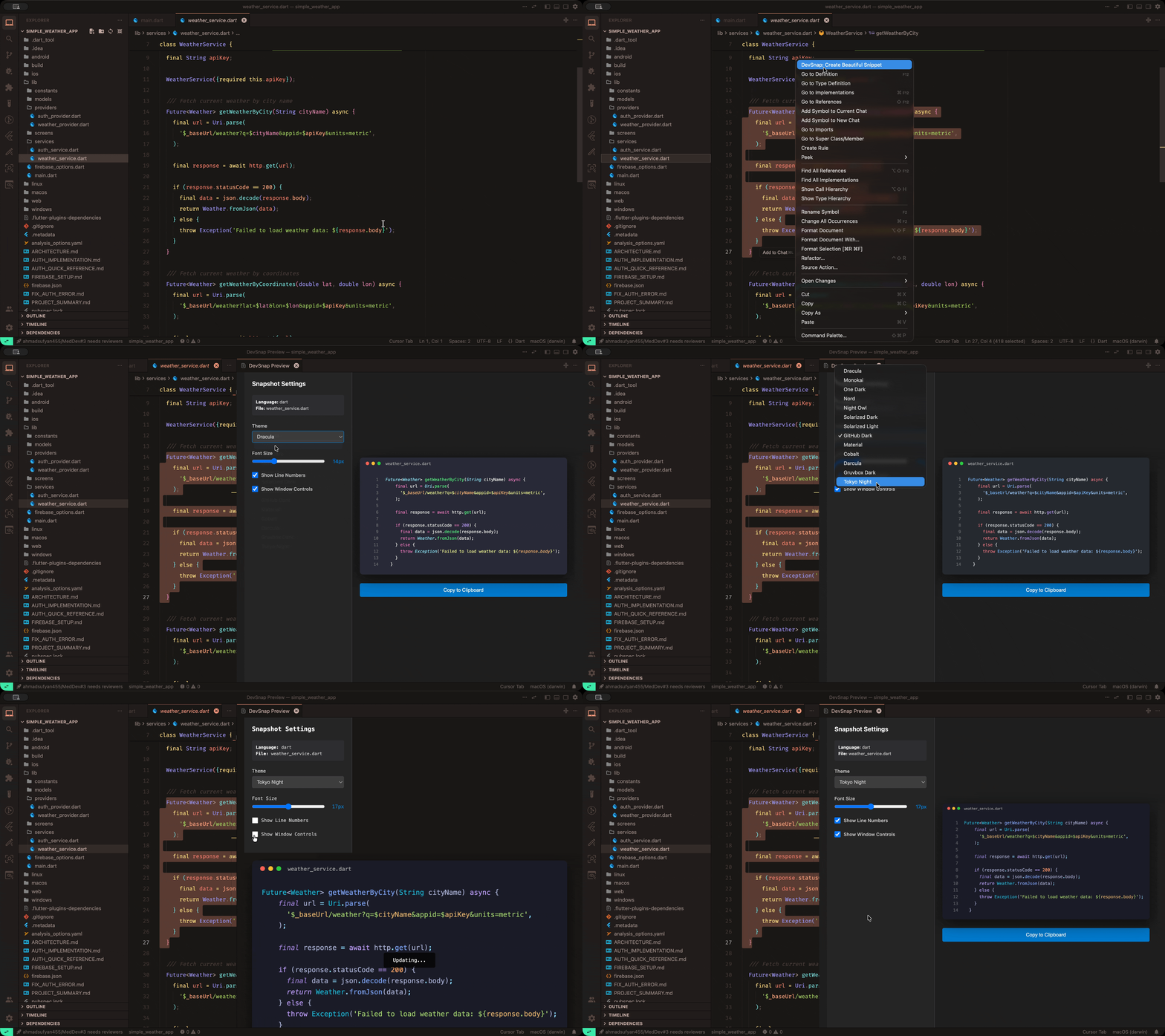
Create stunning, customizable screenshots of your code snippets with just a few clicks! Perfect for documentation, blog posts, presentations, and social media.
✨ Features
🎨 13 Beautiful Themes - Dracula, Monokai, One Dark, Nord, Night Owl, Solarized, GitHub Dark, and more
⚡ Live Preview - See your snapshot update in real-time as you customize
🎯 Customizable - Adjust font size, line numbers, and window controls
📋 One-Click Copy - Copy to clipboard and paste anywhere
🌍 20+ Languages - Python, JavaScript, TypeScript, Java, C++, Go, Rust, and more
🔒 100% Offline - No internet required, your code never leaves your machine
⚡ Lightning Fast - Generate snapshots instantly with local processing
🚀 How to Use
Select code in your editor
Right-click and choose "DevSnap: Create Beautiful Snippet"
Customize your screenshot using the settings panel:
Choose a theme
Adjust font size
Toggle line numbers and window controls
Copy to clipboard with one click
⚙️ Customization
DevSnap works completely offline with no configuration needed! Just install and start creating beautiful code screenshots.
All customization is done through the live preview panel:
Choose from 13 themes
Adjust font size (10-24px)
Toggle line numbers
Toggle window controls
🎨 Available Themes
Choose from 13 professionally designed themes:
Dark Themes
Dracula
Monokai
One Dark
Nord
Night Owl
Solarized Dark
GitHub Dark
Material
Cobalt
Darcula
Gruvbox Dark
Tokyo Night
Light Themes
Solarized Light
💬 Supported Languages
Python • JavaScript • TypeScript • Java • C++ • C • C# • Go • Rust • Ruby • PHP • Swift • Kotlin • HTML • CSS • JSON • YAML • SQL • Bash • Shell • and more!
💡 Tips
Experiment with different themes to find your favorite
Toggle line numbers based on your use case
Adjust font size for better readability
Window controls add a professional touch to your screenshots
📝 What's New
Version 0.0.1 - Initial Release
✨ Live preview with real-time updates
🎨 13 beautiful syntax highlighting themes
⚙️ Customizable font size, line numbers, and window controls