
Skip to content
| Marketplace
Sign in
Visual Studio Code>Formatters>Rewrap RevivedNew to Visual Studio Code? Get it now.
Rewrap Revived

Rewrap Revived

Drew Nutter

|
60,013 installs
| (9) | Free
Hard word wrapping for comments and other text at a given column.
Installation
Launch VS Code Quick Open (Ctrl+P), paste the following command, and press enter.
Copied to clipboard
More Info
Read the Docs
For VS Code, Open VSX and Visual Studio.
Latest stable version 18.3.0 / pre-release 18.4.1 / changelog

Rewrap Revived

Rewrap Revived is a Visual Studio and VS Code extension that is used to hard-wrap code comments to a configured maximium line length. This is a fork of the unmaintained Rewrap extension by Steve Baker (@stkb).


The main Rewrap command is: Rewrap Comment / Text, by default bound to Alt+Q. With the cursor in a comment block, hit this to re-wrap the contents to the specified wrapping column.

Features

  • Re-wrap comment blocks in many languages, with per-language settings.
  • Smart handling of contents, including Java-/JS-/XMLDoc tags and code examples.
  • Can select lines to wrap or multiple comments/paragraphs at once (even the whole document).
  • Also works with Markdown documents, LaTeX or any kind of plain text file.

The contents of comments are usually parsed as markdown, so you can use lists, code samples (which are untouched) etc:
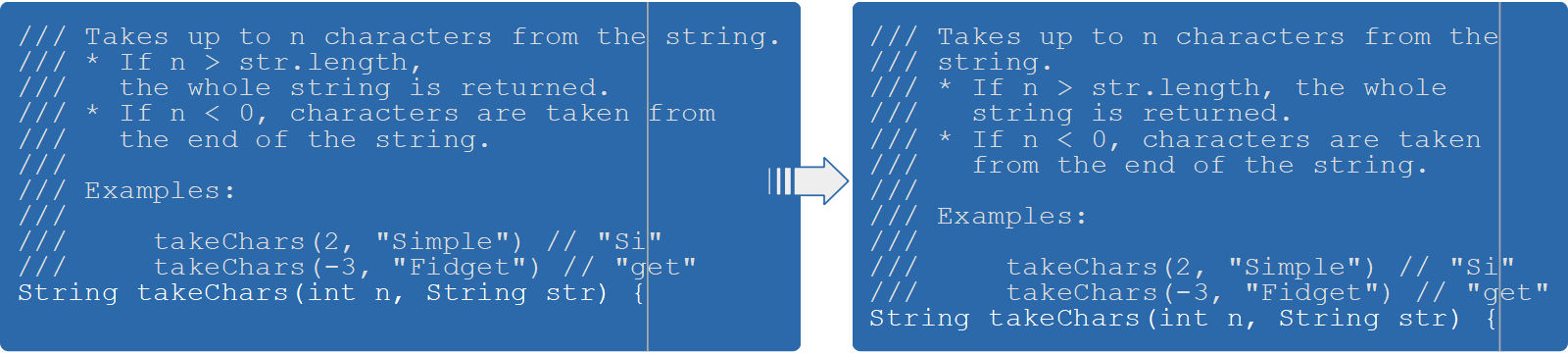

See the docs site for more info.

Installation

Rewrap Revived is available in both the Microsoft marketplace and the OpenVSX marketplace.

Install the pre-release version so you have access to the latest features, and so that if you encounter a new bug, you can fix it immediately on your machine by downgrading to the stable release. Then report it on github so it will be fixed before appearing in a stable release.

Contributing

To build and test locally, run ./do build and ./do test. See the contributing guide for full development workflow documentation including prerequisites, manual testing, and publishing.

  • Contact us
  • Jobs
  • Privacy
  • Manage cookies
  • Terms of use
  • Trademarks
  • Your Privacy Choices
  • Consumer Health Privacy
© 2026 Microsoft
