⚠️ This project is under active development. Some features may not yet be complete, and APIs may change.
DeepSeek v4 for Visual Studio
DeepSeek V4 · Deep Thinking · 1M Context · Multi-Agent Collaboration · Skills System · MCP Protocol · Web Search · OCR Image Recognition
A full-featured AI programming assistant that deeply integrates DeepSeek V4 into Visual Studio 2022+
中文
What Is This?
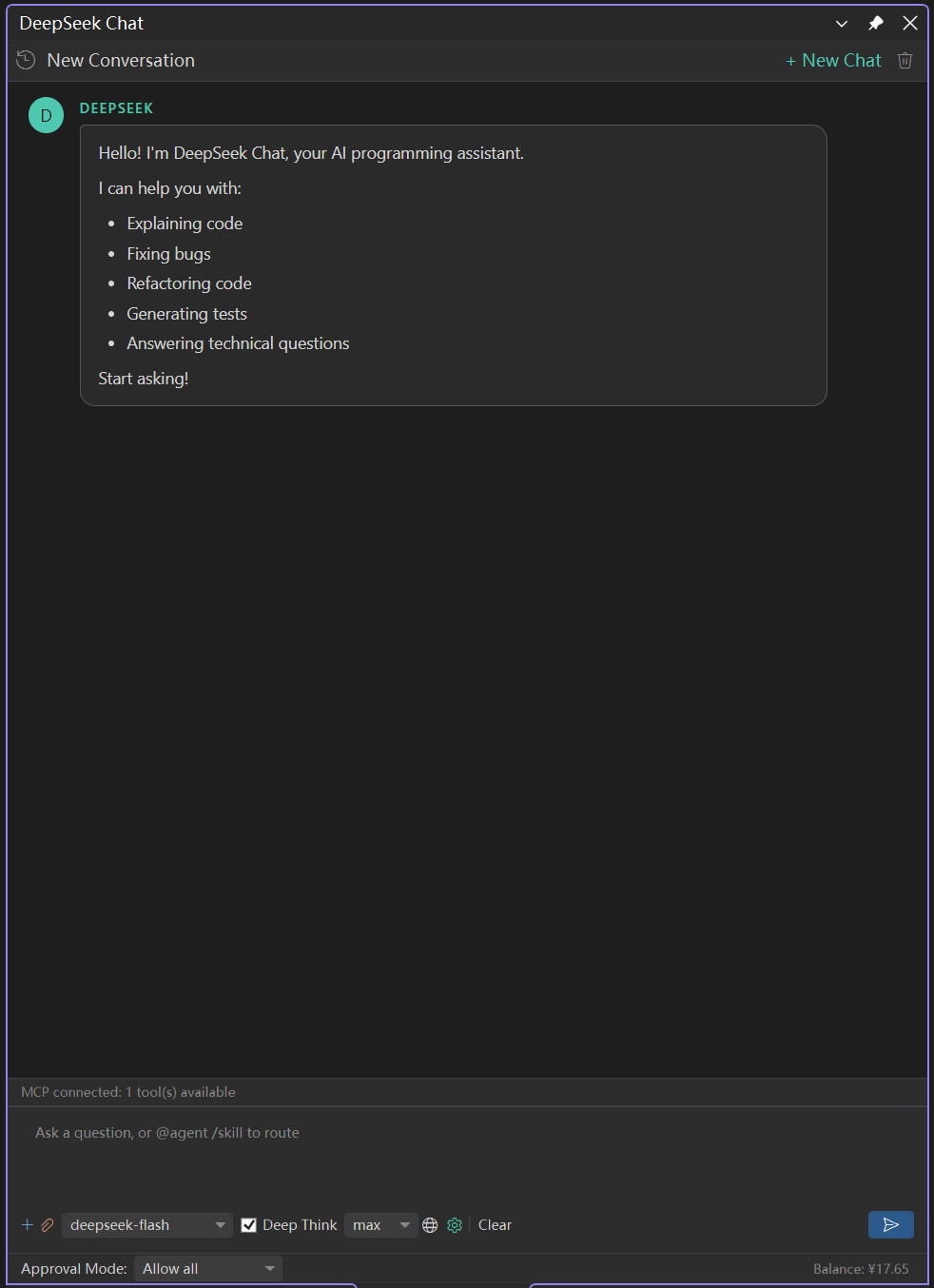
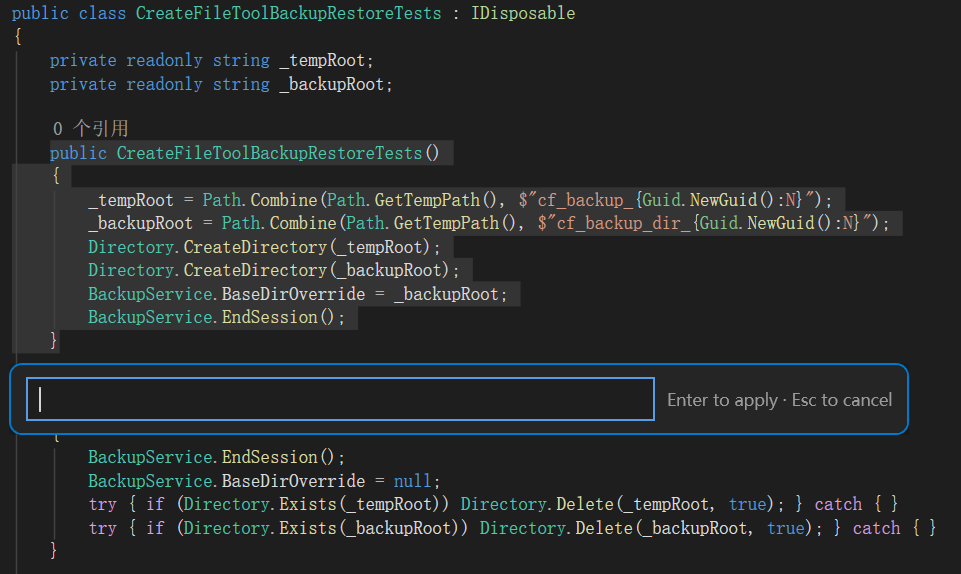
DeepSeek v4 for Visual Studio embeds the DeepSeek V4 model directly into your editor. Select code, paste screenshots, drag in files — AI is right beside you, always ready to respond.
It's more than a chat window; it's a complete AI workflow system:
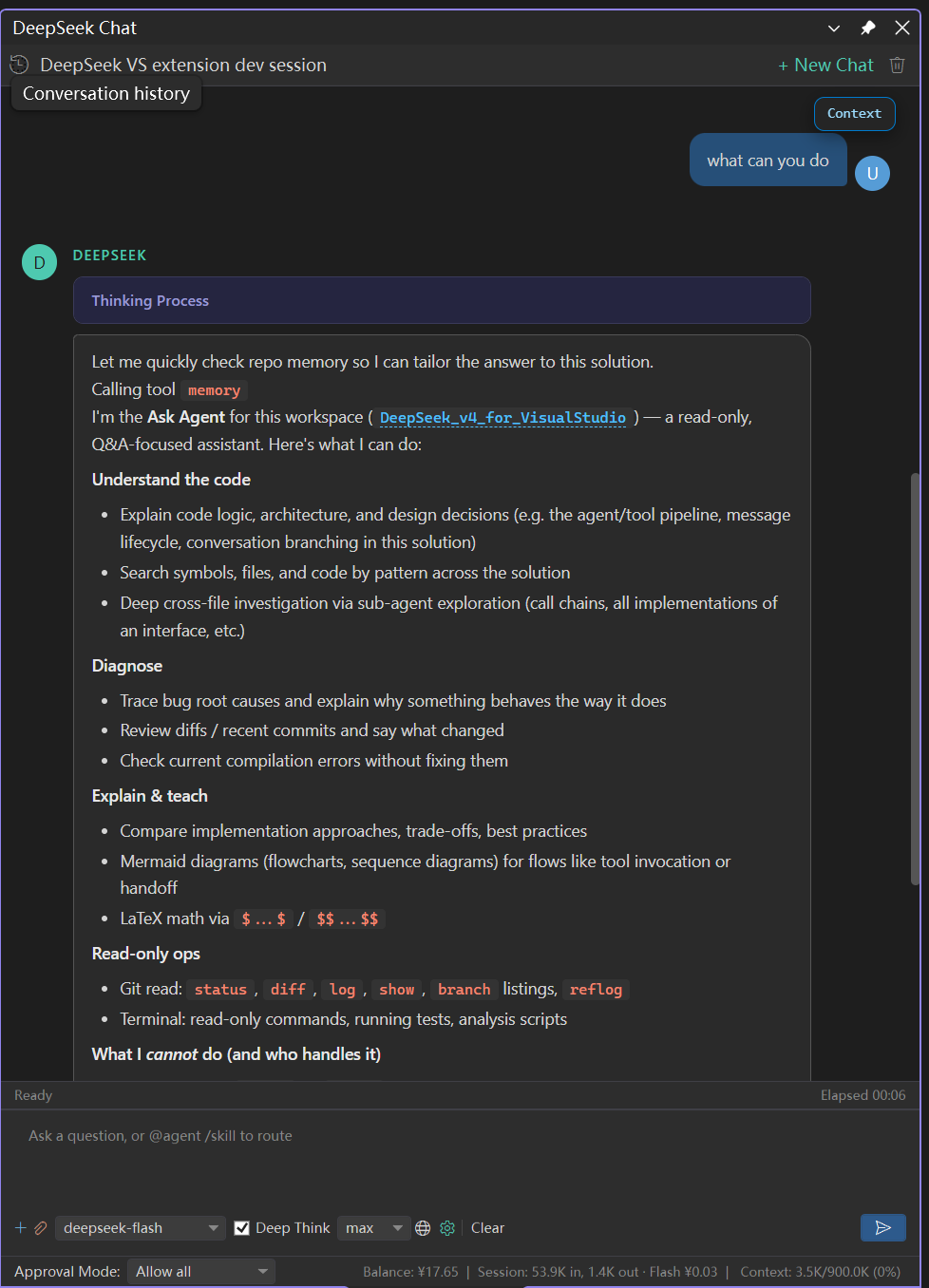
- Multi-Agent Collaboration Engine — Four specialized agents with automatic task dispatch and handoff
- Skills Engine — Define reusable AI workflows with Markdown
- MCP Protocol — Connect to any tool ecosystem with automatic Function Calling
- 1M Token Context — Handle large codebases with intelligent compression that preserves information
- Three Editing Methods — Patch / Insert / Create with four-level matching for precise application
- RAG Retrieval-Augmented Generation — Pluggable knowledge base integration
- Three OCR Engines — Read your error screenshots (PaddleOCR-Sharp / Windows / MCP)
- 🌐 Internationalization (i18n) — Auto-switch between Chinese and English, user-customizable translations
Feature Overview
| Feature |
Description |
| 🧠 DeepSeek V4 |
Streaming chat · Deep Thinking (Reasoning) · Dual model (Pro / Flash) |
| 🤖 Multi-Agent System |
Ask / Explore / Plan / Edit agents with automatic Handoff collaboration |
| 🔧 MCP Protocol |
Multi-server connections · Function Calling · Tool allowlists · Persistent config |
| 📐 Skills System |
Slash commands · Project/User/Built-in tiers · YAML frontmatter metadata |
| 📝 Three Editing Methods |
apply_patch / insert_edit_into_file / create_file, four-level matching + Healing repair |
| 📚 1M Context |
900K token budget · Context compression · No more file truncation |
| 🔍 RAG Retrieval |
Pluggable provider interface · Smart caching · Auto-injected into conversation context · 🚧 Built-in vector DB in development |
| 🌐 Web Search |
Baidu Qianfan (1500 free/month) + DuckDuckGo dual engine · Auto fallback on quota exhaustion |
| 📄 File Parsing |
50+ formats · Code/Docs/PDF/Word/Excel all supported · Drag & drop parsing |
| 🖼️ Image OCR |
PaddleOCR-Sharp local · Windows built-in · MCP remote three engines |
| 🌐 Internationalization |
Auto-detect system language · Manual override in Options · User-customizable translations |
| 📊 Code Diff Preview |
Red/green diff markers in editor · Accept/Undo per hunk · Apply all at once |
| 💡 Ghost Text Completion |
Inline grey predictions · Context-aware · Configurable debounce delay |
| 💬 Chat Window |
WebView2 rendering · Markdown/code highlighting · Multi-session persistence · Live plan display |
| ⚙️ Visual Configuration |
Tools → Options one-stop settings · Context/Search/OCR categorized management |
Multi-Agent Collaboration System
This extension includes four specialized agents that collaborate automatically via Handoff — no manual switching needed:
| Agent |
Role |
Capabilities |
Can Handoff To |
| Ask 🤔 |
Q&A Assistant |
Code explanation, read-only analysis, knowledge Q&A |
Explore |
| Explore 🔍 |
Explorer |
Codebase search, file discovery, structure analysis, reference tracking |
Ask, Plan, Edit |
| Plan 📋 |
Planner |
Task decomposition, solution design, plan.md generation |
Edit, Explore |
| Edit ✏️ |
Executor |
Code write/delete, file operations, post-edit diagnostics |
Explore, Ask |
Typical Collaboration Flow
User Question → Ask (Analyze problem)
↓ needs planning
Plan (Create plan → generate plan.md)
↓ Handoff
Edit (Execute changes → notify Explore to investigate files)
↓ completed
Ask (Summarize and report)
Each agent has its own system prompt, tool allowlist, and permission boundaries, ensuring safety and control.
Skills System
🔥 This is the core feature that sets this extension apart from ordinary AI plugins.
What Is a Skill?
A Skill is a Markdown file (SKILL.md) with YAML frontmatter that describes "when to trigger, what to do". Once loaded, the AI gains professional workflow instructions for that domain.
---
name: code-review
description: 'Review code for quality, security, and performance. Use when: code review, PR review, code audit'
argument-hint: '[file path or code snippet]'
user-invocable: true
---
# Code Review
## Review Process
1. Analyze from five dimensions: correctness, security, performance, maintainability, best practices
2. List issues by priority: 🔴 Critical → 🟡 Medium → 🟢 Suggestion
3. Provide fix suggestions and code examples for each issue
Three Skill Source Levels
| Level |
Path |
Use Case |
| 📁 Project |
.github/skills/ .agents/skills/ .claude/skills/ |
Version-controlled, team-shared |
| 👤 User |
~/.copilot/skills/ ~/.agents/skills/ |
Personal preferences, cross-project |
| 🏭 Built-in |
BuiltInSkills/ (bundled with extension) |
Out-of-the-box, e.g. code-review |
Usage
Type / in the chat window to trigger slash command autocompletion. Select a skill and the AI loads the corresponding workflow:
/code-review UserService.cs
/tdd Implement user login feature
/triage #42 How should this bug be handled
MCP Protocol Integration
Connect to external tool servers via Model Context Protocol (MCP), infinitely expanding AI capabilities:
- Multi-server simultaneous connections: Each server runs in its own process, no interference
- Automatic Function Calling: AI determines when to call MCP tools automatically
- Tool Allowlists: Each agent declares which tools it is allowed to use, fine-grained permission control
- Persistent Configuration:
%LocalAppData%\DeepSeekVS\mcp_servers.json stores server list
- Built-in OCR Server: PP-OCRv5 integrated by default (
uvx paddleocr-mcp)
- Internal Tool Filtering: Internal tools like OCR are automatically hidden from the AI's visible list to prevent accidental calls
Configuration entry: Chat window → 🔌 MCP button → Add/Manage servers.
1M Context & Compression
Leverage DeepSeek V4's 1M token context window:
Token Budget Management
| Parameter |
Value |
Description |
| Token Limit |
900K |
Reserve 100K for output |
| File Size Limit |
No limit |
No more file content truncation |
| Auto Compression Threshold |
85% |
Trigger compression when usage reaches threshold |
Context Compression
When usage exceeds 85%, early conversation turns are automatically compressed:
- Preserve last 3 turns in full
- Earlier turns compressed into concise summaries, injected as system messages
- Supports both LLM summarization and rule-based extraction modes
- Compressed summaries can be re-compressed (progressive)
- Real-time
ContextStats for querying token distribution across dimensions
Configure compression parameters under Tools → Options → DeepSeek Chat → Context Management.
RAG Retrieval-Augmented Generation
⚠️ Planned: The IRagProvider interface and RagService registration/caching infrastructure are in place. A built-in local vector database provider is under development. You can currently integrate a custom RAG backend by implementing IRagProvider.
Pluggable RAG integration providing AI with project knowledge base support:
- Provider Interface (
IRagProvider): Register any RAG backend
- Smart Caching: Reuse results for consecutive queries with Jaccard similarity ≥60%
- Auto Injection: Retrieval results injected into context before each conversation round
- Multi-provider Support: Switch active provider by name
- 🚧 Built-in Local Vector DB: Zero-config solution based on SQLite + local embedding model (planned)
// Register a custom RAG provider
var ragService = new RagService();
ragService.RegisterProvider(new MyCustomRagProvider());
ragService.SetActiveProvider("MyProvider");
ragService.IsEnabled = true;
📋 See Roadmap / TODO for RAG-related plans.
Web Search
| Search Engine |
Features |
Quota |
| Baidu Qianfan |
Excellent Chinese search results |
1500 free/month, auto switch on exhaustion |
| DuckDuckGo |
Completely free, privacy-protecting |
May not be accessible in China |
- Intelligently generates search keywords based on conversation context
- Search results automatically injected into chat context
- Seamless fallback to DuckDuckGo when Baidu quota is exhausted
File Parsing
Support drag-and-drop or paste of 50+ file formats, automatically extracting text content:
| Category |
Formats |
| Code |
.cs .py .java .js .ts .go .rs .cpp .c .h .swift .kt .rb .php .sql .html .css .xml .json .yaml .toml .proto etc. |
| Documents |
.txt .md .rst .log .csv |
| Office |
.doc .docx .xls .xlsx |
| PDF |
.pdf (parsed via UglyToad.PdfPig) |
| Images |
.png .jpg .jpeg .bmp .gif .tiff .webp → auto OCR |
How to use: Drag files directly from File Explorer into the chat window, or Ctrl+V to paste.
Image OCR
Three OCR engines for different scenarios:
| Engine |
Chinese Accuracy |
Setup Difficulty |
Best For |
| Windows Built-in |
Average |
Zero config |
English screenshots, quick lookups |
| PaddleOCR-Sharp |
≥95% |
Auto-download model |
Chinese error screenshots (recommended) |
| MCP OCR |
Depends on server |
Requires server config |
When you have a custom OCR service |
💡 Simply Ctrl+V paste an error screenshot — AI automatically recognizes the text and analyzes the problem without manually typing error messages.
Code Diff Preview
After AI modifies code, changes are marked in the editor with red (deleted) / green (added) markers:
- Live Preview: Preview all changes before applying
- Per-hunk Confirmation: Accept / Undo each diff block
- Apply All: Accept all changes at once when confirmed
- Post-Edit Diagnostics: Automatically check for newly introduced compilation errors
Toggle this feature via DeepSeekOptionsPage.
Ghost Text Code Completion
In-editor grey ghost text predictions, similar to GitHub Copilot:
- Context-Aware: Uses current file content and cursor position
- Configurable Debounce: Adjustable trigger interval to avoid excessive requests
- Caching: LRU cache for 10 most recent completion results
- Non-Intrusive: Grey text, Tab to accept, Esc to cancel
Enable and configure under Tools → Options → DeepSeek Chat.
Installation
Recommended: Download VSIX Package
- Releases → Download
DeepSeek_v4_for_VisualStudio.vsix
- Close all Visual Studio instances
- Double-click the
.vsix file → Follow the prompts to install
- Restart Visual Studio
Advanced: Build from Source
git clone https://github.com/zmy15/DeepSeek-v4-for-VisualStudio.git
# Open .slnx with VS 2022 → Ctrl+Shift+B to build → F5 to launch experimental instance
Build Environment Requirements:
| Component |
Version |
| Visual Studio |
2022 (17.14+) |
| .NET Framework SDK |
4.7.2 |
| Visual Studio SDK |
Via VS Installer → Modify → Check "Visual Studio extension development" |
| Windows |
10/11 x64 |
🌐 Internationalization (i18n)
DeepSeek v4 for Visual Studio supports Chinese and English interfaces, automatically following your system language, or manually switchable.
Automatic Language Detection
The extension automatically detects your Windows system UI language on startup:
- Chinese system → Displays Chinese UI and prompts
- English / Other systems → Displays English UI and prompts
Manual Language Switching
- Open
Tools → Options → DeepSeek Chat
- Find the Language / 语言 category
- Select from the Display Language / 显示语言 dropdown:
auto — Auto-detect system language (default)
zh-CN — Force Chinese
en — Force English
- Click "OK" — the interface updates immediately
Custom Translations
You can create custom translation files to override default translations:
- Create
zh-CN.user.json or en.user.json in the extension's Resources\Locales\ directory
- Add the key-value pairs you want to override, for example:
{
"ui.welcomeMessage": "Hello! This is my custom welcome message!\nStart asking!"
}
- Restart Visual Studio or toggle the language to apply
Coverage
i18n covers the following:
- UI Text — Tool window titles, button labels, dialogs
- AI Prompts — System prompts, skill prompts, Agent routing prompts
- Output Messages — Welcome messages, error messages, API status messages
- Settings Page — All option display names and descriptions
Quick Start
① Get an API Key
Visit platform.deepseek.com/api_keys → Create API Key → Copy.
Tools → Options → DeepSeek Chat → Paste API Key → Select model.
| Setting |
Recommended |
Description |
| API Key |
Your key |
Obtain from platform.deepseek.com |
| Selected Model |
deepseek-v4-pro |
Pro model has stronger reasoning |
| Enable Deep Thinking |
✅ On |
Show model's reasoning process |
| Reasoning Effort |
high |
Reasoning depth (high / max) |
| Search Provider |
Baidu Qianfan |
Recommended for China, 1500 free/month |
| OCR Engine |
PaddleOCR-Sharp |
Best for Chinese text recognition |
| Show Diff Markers |
✅ On |
Preview changes before applying |
| Copilot Enable |
✅ On |
Inline code completion |
| Token Budget |
900000 |
1M context upper limit |
| Auto Compression |
✅ On |
Auto compress when token limit exceeded |
③ Open Chat Window
View → Other Windows → DeepSeek Chat, or click the toolbar icon.
④ Quick Reference
| Action |
Method |
| Code Q&A |
Type your question; AI automatically reads the currently open file |
| File Content Parsing |
Drag files from File Explorer into the chat window |
| Screenshot Error Recognition |
Ctrl+V paste screenshot, auto OCR recognition |
| Web Search |
Check 🌐 Web Search in the chat window |
| Invoke Skills |
Type / to select slash commands |
| Manage MCP Servers |
Chat window → Click 🔌 MCP button |
| Switch Agent |
Agent selector at the top of the chat window |
| Multi-session Management |
Left sidebar session list → New/Switch/Delete |
Architecture Overview
┌─────────────────────────────────────────────────────────┐
│ Visual Studio 2022 │
│ ┌─────────────┐ ┌──────────────┐ ┌───────────────┐ │
│ │ Chat Window │ │ Diff Viewer │ │ Ghost Text │ │
│ │ (WebView2) │ │ (Adornment) │ │ (Tagger) │ │
│ └──────┬───────┘ └──────┬───────┘ └───────┬───────┘ │
│ │ │ │ │
│ ┌──────┴─────────────────┴───────────────────┴───────┐ │
│ │ AgentDispatcher │ │
│ │ (Central Router · Handoff Management) │ │
│ └──────┬──────┬──────┬──────┬────────────────────────┘ │
│ │ │ │ │ │
│ ┌────┴─┐ ┌─┴───┐ ┌┴───┐ ┌┴────┐ │
│ │ Ask │ │Expl.│ │Plan│ │Edit │ │
│ └──────┘ └─────┘ └────┘ └─────┘ │
│ │
│ ┌───────────────────────────────────────────────────┐ │
│ │ Service Layer │ │
│ │ DeepSeekApi │ SkillService │ McpManager │ OCR │ │
│ │ FileParser │ EditPatch │ WebSearch │ RAG │ │
│ │ ContextMgr │ Compressor │ DiffMarker │ ChatPst │ │
│ └───────────────────────────────────────────────────┘ │
│ │
│ ┌───────────────────────────────────────────────────┐ │
│ │ External Services │ │
│ │ api.deepseek.com │ MCP Servers │ Search APIs │ │
│ └───────────────────────────────────────────────────┘ │
└─────────────────────────────────────────────────────────┘
Core Services
| Service |
Responsibility |
AgentDispatcher |
Multi-agent central routing, Handoff coordination, workflow orchestration |
DeepSeekApiService |
DeepSeek API calls, streaming responses, Thinking/Reasoning control |
SkillService |
Skill discovery, loading, YAML parsing, slash command completion |
McpManagerService |
MCP server lifecycle management, tool aggregation and invocation |
EditPatchService |
Three editing method parsing, four-level matching, Healing repair, diagnostics check |
ContextCompressorService |
Context compression, LLM/rule dual-mode summarization |
RagService |
RAG provider registration, activation, retrieval result injection |
ConversationContextManager |
Conversation context construction, token budget management, message trimming |
WebSearchService |
Dual-engine search, auto switching, intelligent keyword generation |
OcrService |
Three-engine OCR unified interface (PaddleOCR-Sharp / Windows / MCP) |
FileParserService |
50+ format file text extraction |
ChatHtmlService |
WebView2 HTML/CSS/JS generation, Markdown rendering |
CodeDiffService |
Code difference calculation and editor markers |
ChatPersistenceService |
Multi-session persistent storage |
Development Guide
Project Structure
DeepSeek_v4_for_VisualStudio/
├── Models/ # Data models
│ ├── AgentModels.cs # Agent task plan models
│ ├── AgentTypes.cs # Agent type enums and definitions
│ ├── ContextModels.cs # Context statistics and compression models
│ ├── DeepSeekModels.cs # DeepSeek API request/response models
│ ├── EditPatchModels.cs # Edit patch models
│ ├── McpTypes.cs # MCP protocol types
│ ├── RagModels.cs # RAG retrieval models
│ ├── SkillDefinition.cs # Skill definition models
│ └── TreeModels.cs # File tree models
├── Services/ # Business services
│ ├── Agents/ # Agent implementations
│ │ ├── BaseAgent.cs # Agent base class
│ │ ├── AskAgent.cs # Ask agent
│ │ ├── ExploreAgent.cs # Explore agent
│ │ ├── PlanAgent.cs # Plan agent
│ │ └── EditAgent.cs # Edit agent
│ ├── AgentDispatcher.cs # Agent dispatcher
│ ├── ChatHtmlService.cs # Chat HTML rendering
│ ├── CodeDiffService.cs # Code diff service
│ ├── ContextCompressorService.cs # Context compression
│ ├── ConversationContextManager.cs # Conversation context management
│ ├── DeepSeekApiService.cs # API service
│ ├── EditPatchService.cs # Edit patch service
│ ├── FileParserService.cs # File parsing
│ ├── McpManagerService.cs # MCP management
│ ├── OcrService.cs # OCR service
│ ├── RagService.cs # RAG service
│ ├── SkillService.cs # Skills service
│ └── WebSearchService.cs # Search service
├── View/ # UI views
│ └── DeepSeekChatControl* # Chat window control (WebView2)
├── CodeCompletion/ # Code completion
│ ├── GhostTextTagger.cs # Ghost text tagger
│ └── InlinePredictionManager.cs # Inline prediction management
├── Commands/ # VS commands
├── Settings/ # Options pages
├── ToolWindows/ # Tool windows
└── Utils/ # Utilities
Debugging
- Open
.slnx in VS 2022
- Set to Debug configuration
F5 to launch Experimental Instance
- In the experimental instance, open/create a project →
View → Other Windows → DeepSeek Chat
Testing
This extension includes 86 xUnit tests covering core paths such as model serialization, patch parsing, context management, and API streaming responses.
Running Tests
# Run all tests
dotnet test DeepSeek_v4_for_VisualStudio.Tests\DeepSeek_v4_for_VisualStudio.Tests.csproj
# With coverage report
dotnet test DeepSeek_v4_for_VisualStudio.Tests\DeepSeek_v4_for_VisualStudio.Tests.csproj `
/p:CollectCoverage=true /p:CoverletOutputFormat=cobertura
Test Tech Stack
| Component |
Version |
Purpose |
| xUnit |
2.9.x |
Test framework |
| Moq |
4.20.x |
Mock framework |
| FluentAssertions |
6.12.x |
Assertion library |
| coverlet |
6.0.x |
Code coverage |
Test Structure
DeepSeek_v4_for_VisualStudio.Tests/
├── Unit/
│ ├── Models/ # Serialization, enums, tool call parsing
│ ├── Services/ # Patch parsing, 4-level matching, context management
│ └── Utils/ # String extensions
├── Integration/ # API streaming, persistence, agent dispatch
├── TestData/ # Test JSON/skill files
└── Fixtures/ # DI container fixture
FAQ
Q: Why is the chat window blank?
Make sure the WebView2 Runtime is installed. VS 2022 usually includes it, but if missing, download it from developer.microsoft.com/microsoft-edge/webview2.
Q: API call fails with 401?
Check that your API Key is correct: Tools → Options → DeepSeek Chat → API Key. Make sure the key comes from platform.deepseek.com and your account has sufficient balance.
Q: OCR Chinese recognition is inaccurate?
Switch the OCR engine to PaddleOCR-Sharp (Tools → Options → DeepSeek Chat → OCR Engine). The ChineseV5 model will be automatically downloaded on first use.
Q: Baidu search is not working?
Baidu Qianfan requires an API Key (configured in the Options page under the Search category). If you don't have a Baidu key, you can switch to DuckDuckGo (completely free), though it may be slower to access from within China.
Q: How do I add a custom Skill?
Create a .github/skills/ folder in your project root, and add a SKILL.md file (see Skills System for format). Restart the chat window for it to be discovered.
Q: Does this extension conflict with GitHub Copilot?
No conflict. This extension's Ghost Text completion is independent of GitHub Copilot and can be used alongside it. To disable this extension's completion, uncheck "Copilot Enable" in the options page.
🗺️ Roadmap / TODO
The following features have reserved interfaces or infrastructure in the architecture and are planned or under development:
🔍 RAG Retrieval-Augmented Generation
Current status: IRagProvider interface and RagService registration/caching infrastructure are in place, but no built-in provider implementation yet.
| Planned Item |
Description |
Priority |
| Built-in Local Vector DB Provider |
SQLite + local embedding model (e.g., all-MiniLM-L6-v2) for out-of-the-box project-level code indexing and semantic search |
🔴 High |
| Automatic File Indexing |
Auto-scan code files and build vector index on project open, no manual configuration needed |
🔴 High |
| Embedding Model Config UI |
Embedding model selection in options page (local / API), with DeepSeek Embedding API support |
🟡 Medium |
| Hybrid Retrieval Strategy |
BM25 keyword + vector semantic hybrid retrieval for improved code search accuracy |
🟡 Medium |
| Incremental Index Updates |
Auto incremental index update on file changes, avoiding full rebuild |
🟢 Low |
🧪 Testing & Quality
| Planned Item |
Description |
Priority |
| Unit Test Generation Skill |
Based on the tdd skill, auto-generate xUnit unit tests for selected code |
🟡 Medium |
| Integration Test Expansion |
Increase integration test coverage for Agent Handoff flows and MCP tool call chains |
🟡 Medium |
| UI Automation Tests |
Automated regression tests for the WebView2 chat window |
🟢 Low |
| Planned Item |
Description |
Priority |
| Enhanced Git Integration |
PR description generation, auto commit message writing, code review comments |
🟡 Medium |
| Solution-Level Code Indexing |
Cross-project symbol index and reference tracking for large solutions |
🟡 Medium |
| Custom MCP Server Templates |
One-click deployment templates for common MCP servers (e.g., database query, API docs) |
🟢 Low |
| Local Model Support |
Support offline use via Ollama / LM Studio and other local inference backends |
🟢 Low |
🎨 User Experience
| Planned Item |
Description |
Priority |
| Code Lens |
In-editor AI action entry points (explain code, generate tests, find references) |
🟢 Low |
| More Built-in Skills |
Professional workflows like debug-analyzer, api-designer, sql-optimizer |
🟡 Medium |
| Session Export |
Export conversations as Markdown / PDF for sharing and archiving |
🟢 Low |
💡 Feature suggestions and code contributions are welcome via Issues!
Acknowledgments
License
This project is open source under the MIT License.
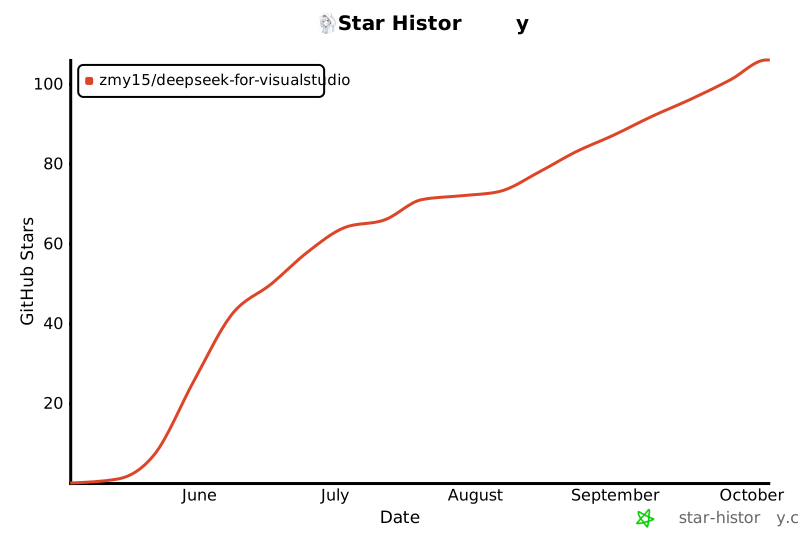
⭐ If this project helps you, please give it a Star!