Inspired by VAX, this Visual Studio extension is designed for quick code syntax highlighting customization. It offers three key features:
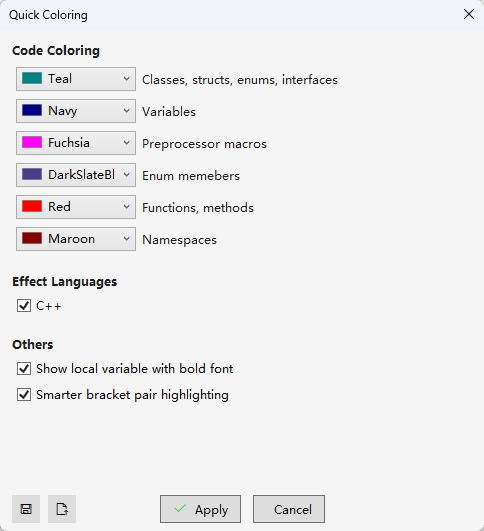
Quickly customize colors for various code elements
Enhanced bracket pair highlighting
Option: Smarter bracket pair highlighting
Save and load color profiles for easy backup and sharing
You can access the configuration panel via Tools -> Quick Coloring. The interface looks like this:
I believe it should be pretty intuitive and straightforward :)
Oh, and one more thing—actually, make that two:
Enable Visual Studio's built-in Rainbow Brackets: It is recommended to turn on this native feature at Tools > Options > Text Editor > General > Enable brace pair colorization.
Set a nice font for your code editor: A good-looking font makes a big difference (I personally use JetBrains Mono).