Marmot Postfix Completion
(The poor man's Rider/ReSharper alternative)
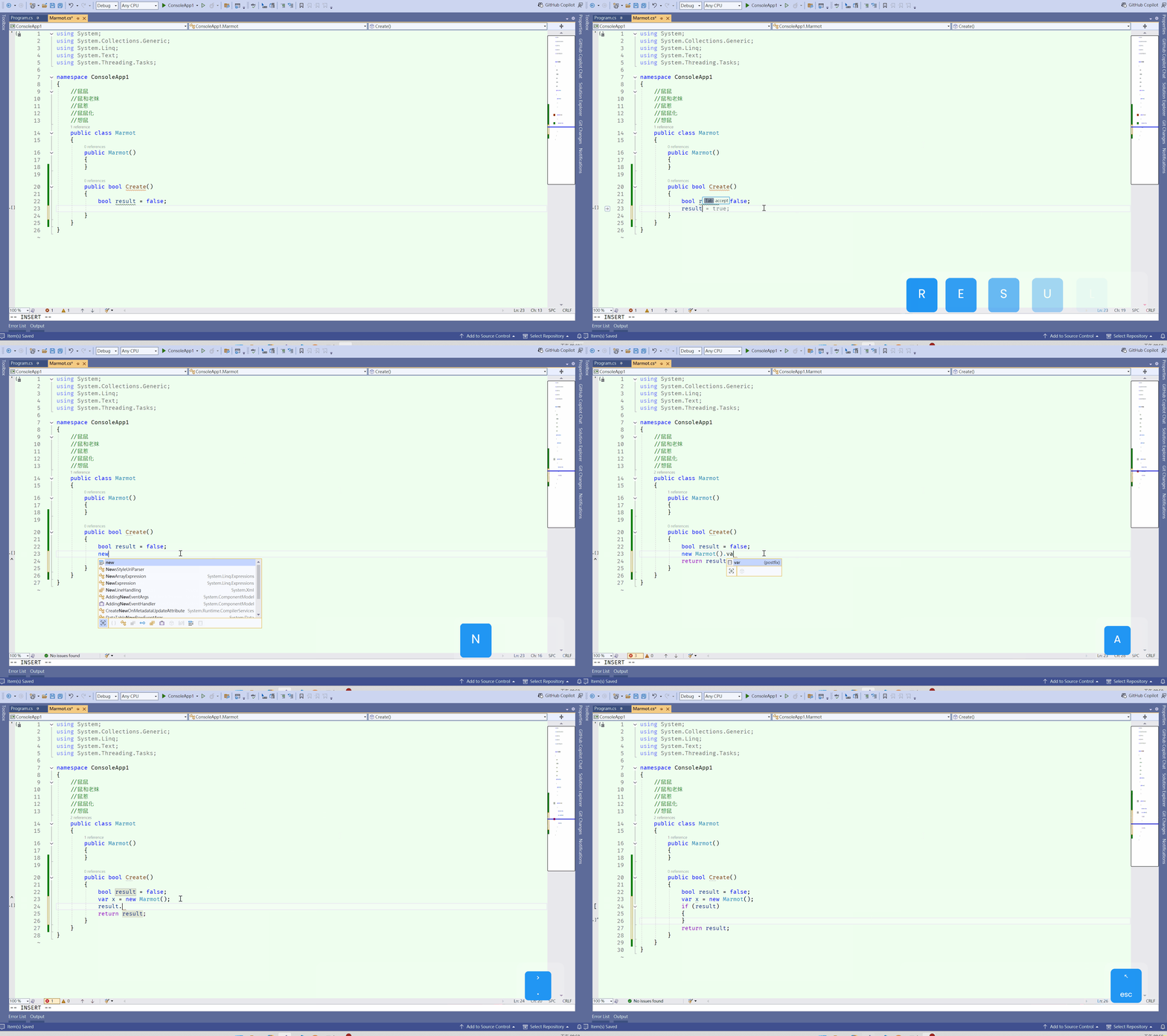
Visual Studio has always lacked a free postfix extension. After watching a pointless marmot video that was just too ridiculous, I decided to "vibe code" this project and see what happens.
This extension provides a powerful set of postfix templates for C# developers who want the efficiency of JetBrains Rider or ReSharper without the premium subscription cost.
Supported Version: Microsoft Visual Studio Community 2022 (64-bit) - Version 17.13.1
Reference: Based on ReSharper's Postfix Templates.
Simply type . after an expression followed by a shortcut to trigger the transformation:
| Shortcut |
Description |
Example |
| .arg |
Surrounds expression with invocation |
Method(expr) |
| .await |
Awaits expressions of 'Task' type |
await expr |
| .cast |
Surrounds expression with cast |
((SomeType) expr) |
| .else |
Checks boolean expression to be 'false' |
if (!expr) |
| .field |
Introduces field for expression |
_field = expr; |
| .for |
Iterates over collection with index |
for (var i = 0; i < xs.Length; i++) |
| .foreach |
Iterates over enumerable collection |
foreach (var x in expr) |
| .forr |
Iterates over collection in reverse with index |
for (var i = xs.Length-1; i >= 0; i--) |
| .if |
Checks boolean expression to be 'true' |
if (expr) |
| .inject |
Introduces primary constructor parameter of type (C# 12) |
class Component(IDependency dependency) |
| .lock |
Surrounds expression with lock block |
lock (expr) |
| .new |
Produces instantiation expression for type |
new SomeType() |
| .not |
Negates boolean expression |
!expr |
| .notnull |
Checks expression to be not-null |
if (expr != null) |
| .null |
Checks expression to be null |
if (expr == null) |
| .par |
Parenthesizes current expression |
(expr) |
| .parse |
Parses string as value of some type |
int.Parse(expr) |
| .prop |
Introduces property for expression |
Property = expr; |
| .return |
Returns expression from current function |
return expr; |
| .sel |
Selects expression in editor |
|selected + expression| |
| .switch |
Produces switch statement |
switch (expr) |
| .throw |
Throws expression of 'Exception' type |
throw expr; |
| .to |
Assigns current expression to some variable |
lvalue = expr; |
| .tryparse |
Parses string as value of some type |
int.TryParse(expr, out value) |
| .typeof |
Wraps type usage with typeof() expression |
typeof(TExpr) |
| .using |
Wraps resource with using statement |
using (expr) |
| .var |
Introduces variable for expression |
var x = expr; |
| .while |
Iterating while boolean statement is 'true' |
while (expr) |
| .yield |
Yields value from iterator method |
yield return expr; |
Development Troubleshooting
If you encounter vs instance cache issues during development or installation, navigate to the following folder:
C:\Users\YOURNAME\AppData\Local\Microsoft\VisualStudio\XXXIDExp
Delete these two folders and rebuild the project:
ComponentModelCacheExtensions
功能介紹
因為 visual studio 一直都沒有 postfix 的免錢外掛
剛好看土撥鼠廢片覺得很瞎, 就 vibe coding 做看看
Marmot Postfix Completion (沒錢買 Rider/Resharper 免費仔用的)
支援版本 Microsoft Visual Studio Community 2022 (64-bit) - Version 17.13.1
參照 ReSharper 的功能 Postfix_Templates
只需在表達式後方輸入 . 並加上縮寫,即可觸發轉換:
| 快捷鍵 (Shortcut) |
功能描述 (Description) |
範例 (Example) |
| .arg |
將表達式作為參數包裝在方法中 |
Method(expr) |
| .await |
自動等待 Task 型別表達式 |
await expr |
| .cast |
將表達式進行強制轉型包裝 |
((SomeType) expr) |
| .else |
檢查布林值是否為 false |
if (!expr) |
| .field |
將表達式引入為欄位 |
_field = expr; |
| .for |
建立以索引遞增的 for 迴圈 |
for (var i = 0; i < xs.Length; i++) |
| .foreach |
建立集合的疊代迴圈 |
foreach (var x in expr) |
| .forr |
建立以索引遞減的反向 for 迴圈 |
for (var i = xs.Length-1; i >= 0; i--) |
| .if |
檢查布林值是否為 true |
if (expr) |
| .inject |
引入 Primary Constructor 參數 (C# 12) |
class Component(IDependency dependency) |
| .lock |
將表達式包裝在 lock 區塊中 |
lock (expr) |
| .new |
產生型別的實例化表達式 |
new SomeType() |
| .not |
邏輯反轉 (否定) |
!expr |
| .notnull |
檢查表達式是否非 Null |
if (expr != null) |
| .null |
檢查表達式是否為 Null |
if (expr == null) |
| .par |
將當前表達式加上括號 |
(expr) |
| .parse |
將字串解析為特定型別數值 |
int.Parse(expr) |
| .prop |
將表達式引入為屬性 |
Property = expr; |
| .return |
將表達式從當前函數傳回 |
return expr; |
| .sel |
在編輯器中自動選取該表達式 |
|selected + expression| |
| .switch |
產生 switch 敘述區塊 |
switch (expr) |
| .throw |
拋出異常表達式 |
throw expr; |
| .to |
將表達式賦值給特定變數 |
lvalue = expr; |
| .tryparse |
嘗試解析字串並輸出數值 |
int.TryParse(expr, out value) |
| .typeof |
將型別包裝在 typeof() 中 |
typeof(TExpr) |
| .using |
將資源包裝在 using 敘述中 |
using (expr) |
| .var |
為表達式引入變數宣告 |
var x = expr; |
| .while |
當布林值為 true 時執行迴圈 |
while (expr) |
| .yield |
從反覆運算器方法傳回數值 |
yield return expr; |
開發問題
如果遇到 vs instance cache 的話可以打開這個資料夾 C:\Users\YOURNAME\AppData\Local\Microsoft\VisualStudio\XXXIDExp
刪除這兩個資料夾重新編譯即可 ComponentModelCache Extensions

