
ModelScaffolder
Describe your domain in one JSON file and get a complete, layered .NET 10 solution: entities, EF Core
persistence, validation rules, permission policies, services, a Minimal API with authentication, unit tests,
HTTP integration tests, a Postman collection and .http files. Everything compiles and the tests pass right
after generation.
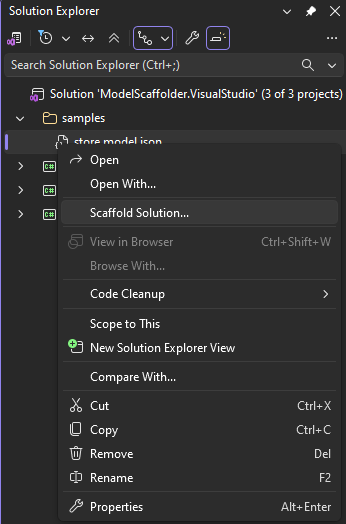
Right-click a *.model.json file in Solution Explorer and choose Scaffold Solution...
Features
- One model, many slices. Each schema in the model becomes its own vertical slice with its own API and
DbContext; all slices share one PostgreSQL database, separated by database schema.
- Clean layers per slice: Domain, Infrastructure (EF Core + PostgreSQL), Validation, Policies, Application,
Api.
- Validation from the model. Required, length and range constraints become
ReValidator rules in one editable JSON file per entity.
- Permissions out of the box. Every endpoint is protected by HTTP Basic authentication and
RePolicies policies (one JSON file per policy) with
claims like
Create.Store.Product.
- Repository pattern via GenericRepository.
- Tests included: xUnit + NSubstitute unit tests for every service, and HTTP integration tests that run the
real API against PostgreSQL in Docker (Testcontainers).
- Ready to try: a Postman collection and Visual Studio
.http files with valid sample requests.
- Helpful errors. Problems in the model are listed in the Error List with their line; double-click to jump
to them. Nothing is written until the model is valid.
- Safe regeneration. Files you changed are never overwritten without asking.
- Template-driven. Everything is generated from Handlebars templates that you can copy and customize.
Requirements
- Visual Studio 2022 (17.14 or later) or Visual Studio 2026, x64
- .NET 10 SDK; the extension runs its generator with
dotnet
- To run the generated APIs: PostgreSQL
- To run the generated integration tests: Docker
Getting started
Add a file whose name ends with .model.json to your solution or project, for example
shop.model.json, and describe your entities (see the example below).
In Solution Explorer, right-click the file and choose Scaffold Solution...
In the dialog, check the output folder and enter a user name and password for the default system user.
- The user gets every permission of every schema.
- Only a PBKDF2 hash of the password is written; the password itself is never stored.
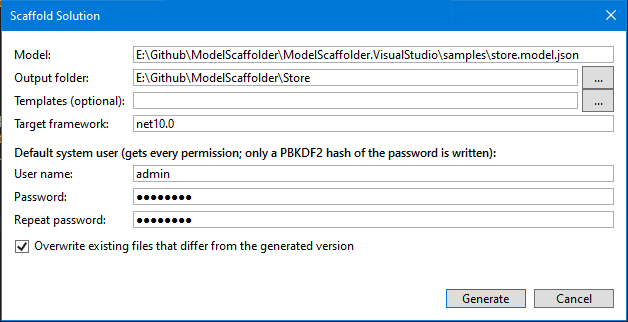
Click Generate. The ModelScaffolder pane of the Output window lists the generated files; any problems
appear in the Error List.
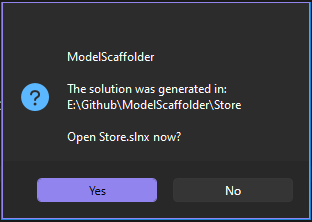
Open the generated .slnx when asked, then build and run dotnet test (Docker must be running).
The dialog remembers the output folder, templates folder, target framework and user name for each model file.
The model file
{
  "version": 1,
  "project": { "name": "Shop" },
  "schemas": [
    {
      "name": "Catalog",
      "entities": [
        {
          "name": "Category",
          "plural": "Categories",
          "properties": [
            { "name": "Id", "type": "int", "key": true, "generated": true },
            { "name": "Name", "type": "string", "required": true, "maxLength": 100, "unique": true }
          ]
        },
        {
          "name": "Product",
          "properties": [
            { "name": "Id", "type": "Guid", "key": true, "generated": true },
            { "name": "Name", "type": "string", "required": true, "maxLength": 200 },
            { "name": "Price", "type": "decimal", "required": true, "minimum": 0, "precision": 18, "scale": 2 },
            { "name": "ReleasedOn", "type": "DateOnly" }
          ]
        }
      ],
      "relationships": [
        {
          "type": "many-to-one",
          "from": "Product",
          "to": "Category",
          "inverseNavigation": "Products",
          "required": true,
          "onDelete": "Restrict"
        }
      ]
    }
  ]
}
Comments (//, /* */) and trailing commas are allowed. Unknown properties are rejected, so a typo such as
"requird" is reported instead of being silently ignored.
Project and schemas
| Field |
Description |
version |
Always 1. |
project.name |
Solution name and default database name. May contain dots (Acme.Shop). |
schemas[].name |
Slice name: root namespace of its projects (Catalog.Domain, Catalog.Api, ...), CatalogDbContext, database schema catalog. |
schemas[].entities |
The entities of the slice. |
schemas[].relationships |
Relationships between entities of the same schema. |
Entities
| Field |
Description |
name |
C# type name, e.g. Product. |
plural |
Optional. Used for the namespace, the route (/api/products) and the DbSet. Defaults to an English plural (Category → Categories, Box → Boxes). |
properties |
Scalar properties. Exactly one must be the key. |
Properties
| Field |
Applies to |
Description |
name |
all |
C# property name. |
type |
all |
string, int, long, short, decimal, double, float, bool, Guid, DateTime, DateTimeOffset, DateOnly, TimeOnly |
key |
int, long, Guid |
The primary key. |
generated |
keys |
The database generates the value. Without it, clients send the key. |
required |
all |
Non-nullable and validated. Keys are always required. |
unique |
all |
Unique index. |
minLength, maxLength |
string |
Length limits (validated; maxLength also sets the column size). |
minimum, maximum |
numbers |
Value range (validated). |
precision, scale |
decimal |
Column precision and scale. Default 18, 2. |
Relationships
| Field |
Description |
type |
many-to-one (from is the "many" side), or one-to-many (from is the "one" side). |
from, to |
Entity names of the same schema. |
foreignKey |
Optional. Defaults to principal + key name, e.g. CategoryId. Created if the entity does not declare it. |
navigation |
Optional reference navigation on the "many" side. Defaults to the principal's name. |
inverseNavigation |
Optional collection navigation on the "one" side, e.g. Products. |
required |
Whether the foreign key is required. |
onDelete |
Optional EF Core delete behavior: Cascade, Restrict, SetNull, NoAction, ClientSetNull, ClientCascade, ClientNoAction. |
Self-references (for example Employee.Manager) must be optional and need an explicit navigation.
The generated solution
Shop.slnx
README.md                          how to run, users and permissions, all endpoints
Shop.postman_collection.json       every endpoint, with valid bodies and chained ids
Directory.Build.props
Directory.Packages.props           central package versions
src/
  Authentication.Basic/            shared Basic authentication + PBKDF2 password hashing
  Catalog/
    Catalog.Domain/                entities
    Catalog.Infrastructure/        CatalogDbContext, entity configurations, repository registration
    Catalog.Validation/            Rules/{entity}-rules.json (ReValidator)
    Catalog.Policies/              permissions, Definitions/{entity}-{action}.policy.json (RePolicies)
    Catalog.Application/           DTOs, mappings, one service per entity
    Catalog.Api/                   Minimal API endpoints, appsettings.json, Catalog.Api.http
tests/
  Catalog/
    Catalog.Application.Tests/     xUnit + NSubstitute unit tests
    Catalog.Api.Tests/             HTTP integration tests (WebApplicationFactory + Testcontainers PostgreSQL)
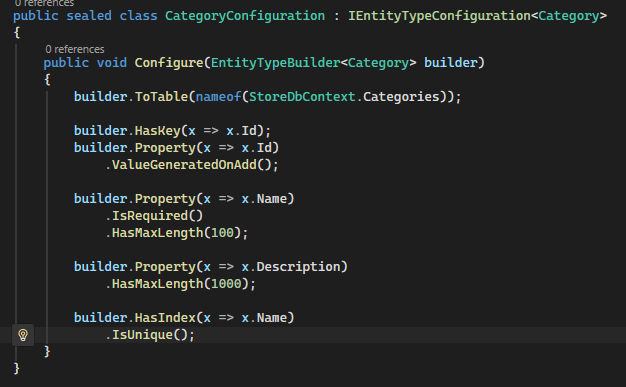
The code is plain, readable C#. For example, the entity configuration generated from the model's required,
maxLength and unique settings:
Every entity gets these endpoints:
| Method |
Route |
Permission |
GET |
/api/products?sortBy=name&order=Desc |
Get.Catalog.Product |
GET |
/api/products/{id} |
Get.Catalog.Product |
POST |
/api/products |
Create.Catalog.Product |
PUT |
/api/products/{id} |
Update.Catalog.Product |
DELETE |
/api/products/{id} |
Delete.Catalog.Product |
Responses:
- 401 without valid credentials.
- 403 when a policy denies the request.
- 400 with validation errors.
- 404 for unknown ids.
Running it
- Database: each API reads
ConnectionStrings:Default from its appsettings.json. The default is a local
PostgreSQL with user and password postgres.
- Ports: the first slice listens on
http://localhost:5080, the next on 5081, and so on.
- Tables: in Development, each API creates its tables on start; use EF Core migrations beyond prototyping.
Customizing without recompiling
- Validation rules: edit
Rules/*.json. Restart the API to apply.
- Policies: edit
Definitions/*.policy.json. Restart the API to apply.
- Users: add them under
Authentication:Users in appsettings.json. Create password hashes with
PasswordHash.Create("...").
Basic authentication sends credentials with every request: use HTTPS outside local development.
The generated solution uses these packages:
Regenerating
Changed your model? Generate again into the same folder.
- New and unchanged files are written without asking.
- Files whose content differs from the generated version are listed in the Error List. You are asked before
they are overwritten.
- Your own code: keep it in separate files (for example
partial classes) so regeneration never touches it.
Custom templates
Everything is generated from Handlebars templates listed in a manifest.json. To change the output:
- Copy the
Templates folder. It ships with the extension, under its cli\Templates folder in the Visual
Studio extensions directory.
- Edit the copy.
- Select the copy as Templates (optional) in the dialog.
The folder's README.md documents the template context: entities, properties, relationships, sample values
and more.
Diagnostics
| Code |
Problem |
| MS000 |
The model file is missing, unreadable, empty or not valid JSON; unknown property or wrong value type. |
| MS001 |
Unsupported version. |
| MS002 – MS009 |
Invalid or duplicate project/schema names; schema or project names that shadow System, Microsoft or types the generated code uses; empty (null) entries; missing system user credentials (MS007). |
| MS010 – MS017 |
Invalid or duplicate entity names (letter case ignored), plural problems, reserved names such as Task or Program, names clashing with generated types. |
| MS020 – MS038 |
Property problems: invalid or duplicate names, unknown types, keys of unsupported types, missing or composite keys, constraints that do not fit the type or contradict each other. |
| MS040 – MS048 |
Relationship problems: unsupported type, unknown entities, invalid delete behavior, foreign keys shared by two relationships, required relationships that form a cycle. |
| MS050 – MS053 |
Member name clashes found while building the model (e.g. a navigation named like its entity). |
| MS060 – MS066 |
Template problems (custom templates). |
| MS090 – MS092 |
Output problems: changed files not overwritten, write errors, invalid output folder. |
| MS099 |
Unexpected internal error; please report it. |
Warnings (MS025, MS033, MS047, MS066) do not stop generation.
Troubleshooting
| Symptom |
What to check |
| No Scaffold Solution... in the context menu |
The file name must end with .model.json, and it must be the only item selected. |
| "'dotnet' was not found" |
Install the .NET 10 SDK and restart Visual Studio. |
| Generated API tests fail to start |
Docker must be running (the tests start a PostgreSQL container). |
| Edits to the model seem ignored |
The extension saves the model before generating; check the Error List for problems. |
Source code and license
Source code, samples and issue tracker: github.com/VladGanuscheak/ModelScaffolder.
Released under the MIT License.
| |

