Item and Project Templates for Dynamics GPItem and Project templates for Visual Studio add in development for Dynamics GP |

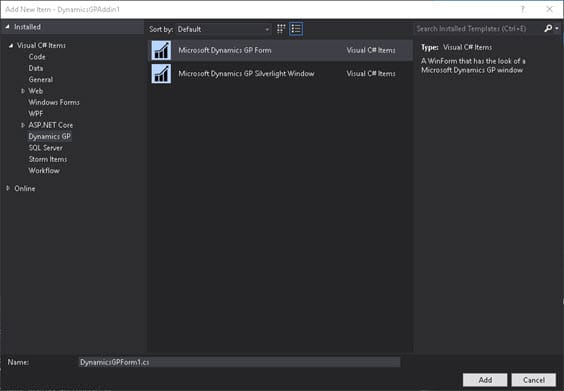
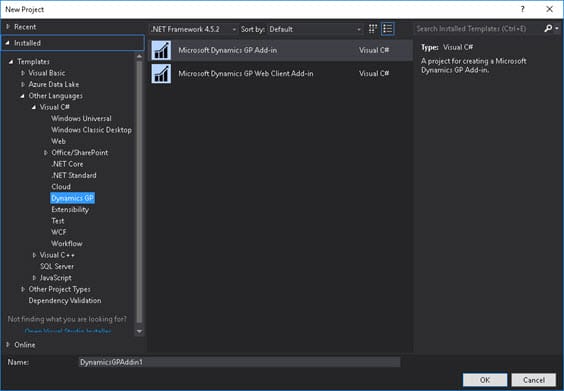
Tim WappatDynamics GP developer ProductsItem and Project templates for Visual Studio add-in development for Dynamics GPWorks with Visual Studio 2015, 2017, 2019, 2022 and 2026. Features & BenefitsAllows .NET developers to quickly and easily create .NET add-ins for Dynamics GP. Bundled with Dynamics GP, the original .NET Visual Studio add-in templates for Dynamics GP (depending on GP version) are not compatible with modern versions of Visual Studio like 2017, 2019, 2022, 2026. With VS2015 it was possible to hack the templates to work, as shown in this post: From Visual Studio 2017, the way Visual Studio templates are installed has changed to make it more efficient, but this means the manual method shown in that blog no longer works. Hence, time to do things properly. This is a proper Visual Studio extension wrapping the original templates, fully compatible with Visual Studio 2015, 2017, 2019, 2022 and 2026. When installed, these templates are found by navigating in Visual Studio to: File > New Project Under the Dynamics GP folder there will be new project types for Dynamics GP Add-in. Once the new Visual Studio project is created, it is possible to right-click the project and choose: Insert New Item A Dynamics GP option will be available, allowing creation of new GP forms. The Dynamics GP Visual Studio Tools SDK must be installed to use the templates. The SDK installs the required assemblies. More detailed information:https://timwappat.info/visual-studio-add-in-for-dynamics-gp/ Product Screenshots
[ ContactEmail: tim@timwappat.info |