Terraform pipeline task + interactive plan visualizer for Azure DevOps.
Run init, plan, apply and more — then open the Terraform tab on any build to explore your infrastructure changes with a color-coded diff table, expandable attribute diffs, a real dependency graph, and built-in policy warnings.
✨ What you get
|
|
| 🔧 Pipeline task |
install, init, validate, plan, apply, show — all Terraform commands in one task |
| ☁️ Multi-cloud backends |
Azure (azurerm), AWS (s3), GCP (gcs), custom HCL file, or local |
| 📊 Plan summary bar |
At-a-glance +12 add ~3 change −1 destroy before you read a single line |
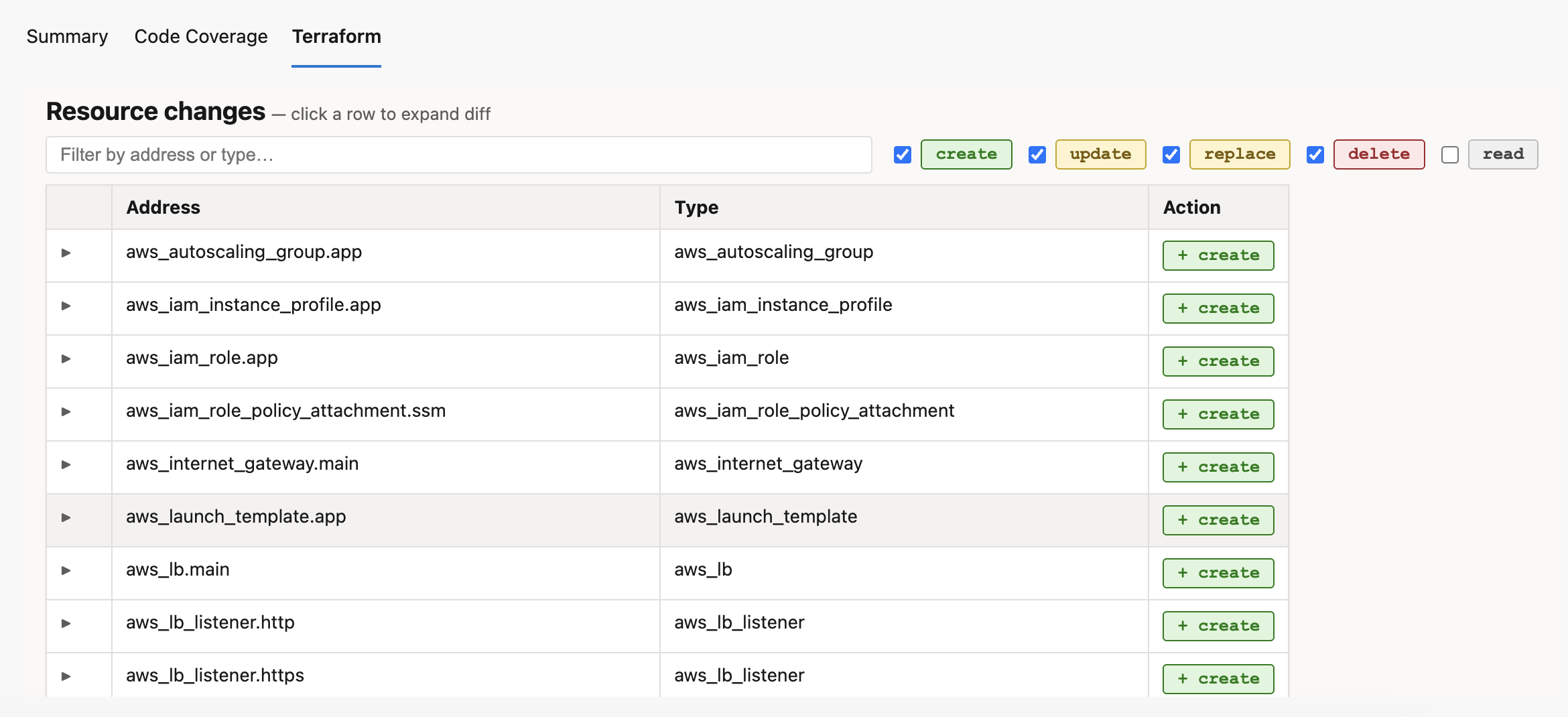
| 🎨 Color-coded change table |
Green create · Yellow update/replace · Red destroy — spot risk instantly |
| 🔍 Expandable attribute diff |
Click any resource row to see a before/after diff of every attribute |
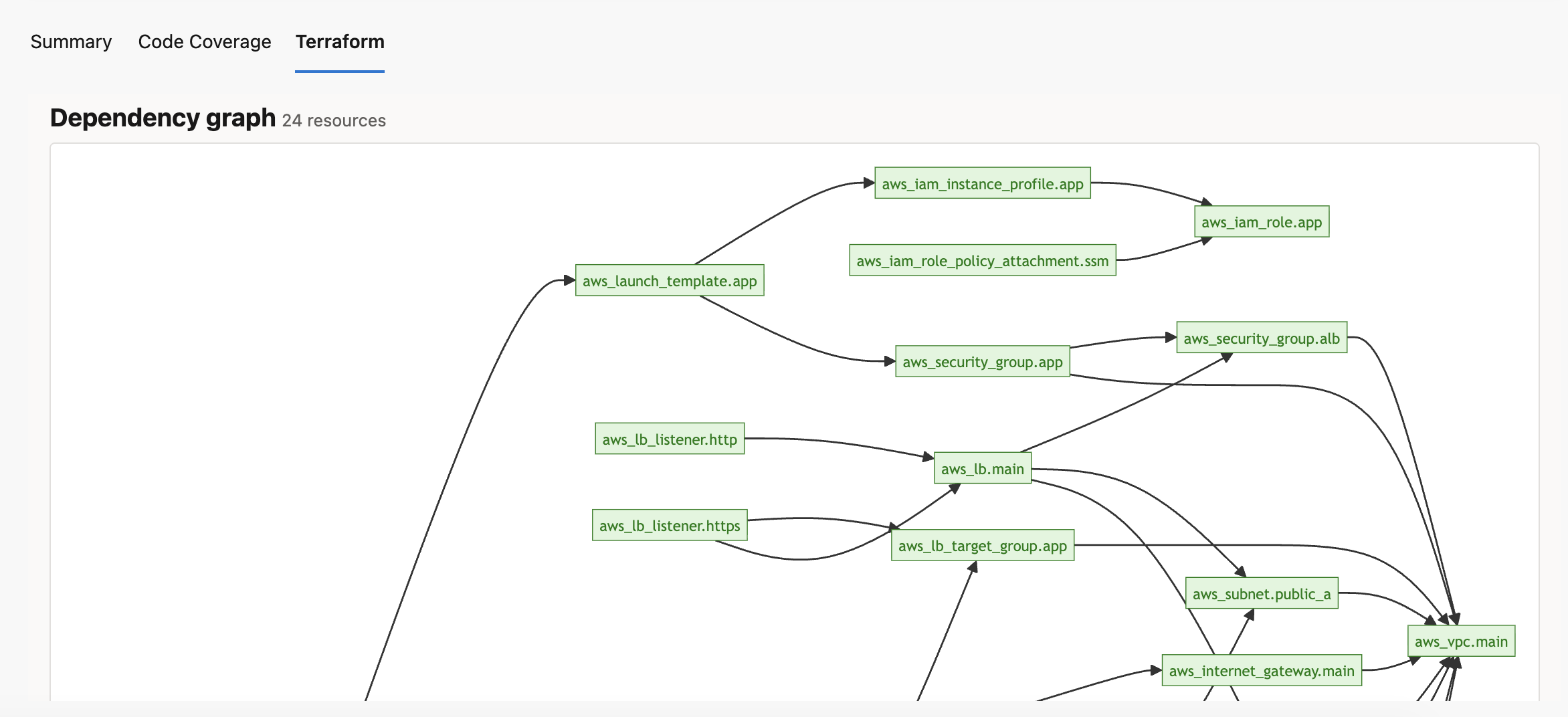
| 🗺️ Real dependency graph |
Edges parsed from configuration.references — actual resource relationships, not just provider grouping |
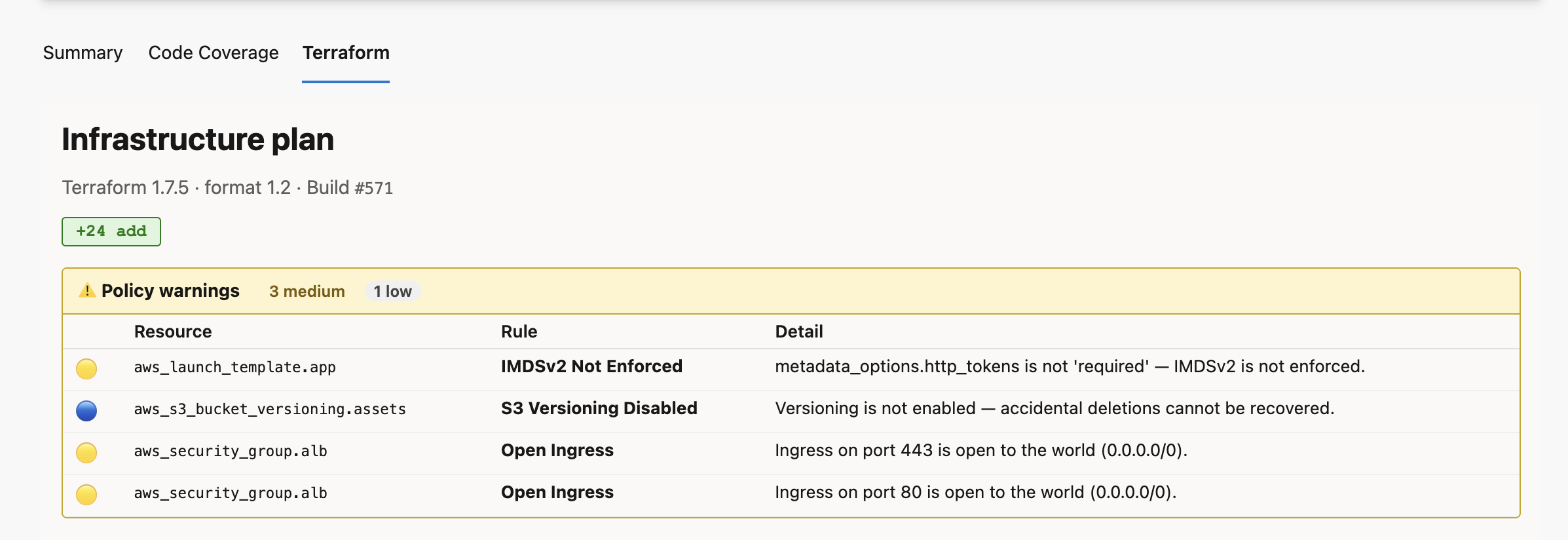
| ⚠️ Policy warnings |
Built-in checks for open security groups, unencrypted storage, public S3 buckets, IMDSv2, and more |
| 🔎 Filter & search |
Filter the change table by address, type, or action kind |
| 💬 PR comments |
Automatically post a plan summary as a pull request thread comment |
| 🔒 Minimal permissions |
Only vso.build, vso.build_execute, and optionally vso.code_write for PR comments |
| 🖥️ Cross-platform |
Linux, macOS, Windows hosted and self-hosted agents (Node 20) |
🚀 5-minute quick start
Step 1 — Install the extension
Organization Settings (⚙ bottom-left) → Extensions → Browse Marketplace → search ADO Terraform Agent → Install.
Step 2 — Add this to your pipeline YAML
pool:
  vmImage: ubuntu-latest

steps:
  - task: subzone.ado-tf-agent.terraform-task.Terraform@0
    displayName: Install Terraform
    inputs:
      command: install
      terraformVersion: 1.9.0

  - task: subzone.ado-tf-agent.terraform-task.Terraform@0
    displayName: Terraform init
    inputs:
      command: init
      workingDirectory: infra

  - task: subzone.ado-tf-agent.terraform-task.Terraform@0
    displayName: Terraform plan
    inputs:
      command: plan
      workingDirectory: infra
      publishPlanArtifact: true   # ← this powers the Terraform tab

  - task: subzone.ado-tf-agent.terraform-task.Terraform@0
    displayName: Terraform apply
    inputs:
      command: apply
      workingDirectory: infra
Run the pipeline → open the completed build → click the Terraform tab.
That's it. You'll see the plan summary, change table, policy warnings, and dependency graph.
📸 Screenshots
Resource list and summary bar
Color-coded change table with expandable diffs
Real dependency graph
📋 Plan visualization
Summary bar
Shows the blast radius at a glance:
+20 add ~3 change ±1 replace −2 destroy
Color-coded change table
| Badge |
Meaning |
🟢 + create |
New resource will be created |
🟡 ~ update |
Resource will be updated in-place |
🟡 ± replace |
Resource will be destroyed and recreated |
🔴 − delete |
Resource will be destroyed |
⚪ ○ read |
Data source read |
no-op resources (unchanged) are hidden automatically.
Use the search box to filter by address or type. Use the action checkboxes to show/hide specific change kinds.
Expandable attribute diff
Click any row to expand a full before/after diff of every attribute:
- Changed attributes highlighted in yellow
- Before values in red, after values in green
(known after apply) for computed values(sensitive) for masked values — never exposed
Policy warnings
Built-in checks run automatically against the plan JSON. No external tools or API keys needed.
| Check |
Severity |
| S3 bucket public access enabled |
🔴 High |
| Security group open to 0.0.0.0/0 on SSH/RDP |
🔴 High |
| RDS instance unencrypted or publicly accessible |
🔴 High |
| IAM policy with wildcard Action |
🔴 High |
| Azure storage account with HTTP allowed |
🔴 High |
| Security group open to 0.0.0.0/0 on other ports |
🟡 Medium |
| EC2 launch template without IMDSv2 |
🟡 Medium |
| EBS volume unencrypted |
🟡 Medium |
| IAM policy with wildcard Resource |
🟡 Medium |
| S3 versioning disabled |
🔵 Low |
Dependency graph
Built from actual configuration.references in the plan JSON — real edges between resources, color-coded by action kind.
⚙️ Task reference
Commands
| Command |
Description |
install |
Download and cache Terraform on the agent, prepend to PATH |
init |
terraform init with optional backend config |
validate |
terraform validate |
plan |
terraform plan -out tfplan — optionally publishes plan attachment |
apply |
terraform apply tfplan |
show |
terraform show -json |
| Input |
Command |
Default |
Description |
terraformVersion |
install |
1.7.5 |
Version to download, e.g. 1.9.0 |
workingDirectory |
all except install |
agent default |
Directory containing .tf files |
backendType |
init |
local |
local · azurerm · s3 · gcs · custom |
backendConfigFile |
init (custom) |
— |
Path to HCL or key=value backend config file |
planFile |
plan · apply · show |
tfplan |
Plan file name |
publishPlanArtifact |
plan |
true |
Attach plan.json for the Terraform tab |
postPrComment |
plan |
false |
Post plan summary as a PR thread comment |
additionalArguments |
all |
— |
Extra flags appended to the command |
Backend configuration
Azure (azurerm)
- task: subzone.ado-tf-agent.terraform-task.Terraform@0
  inputs:
    command: init
    workingDirectory: infra
    backendType: azurerm
    azureResourceGroup: rg-tfstate
    azureStorageAccount: mytfstateacct
    azureContainer: tfstate
    azureStateKey: myapp.tfstate
AWS (s3)
- task: subzone.ado-tf-agent.terraform-task.Terraform@0
  inputs:
    command: init
    workingDirectory: infra
    backendType: s3
    awsBucket: my-tf-state-bucket
    awsKey: prod/terraform.tfstate
    awsRegion: us-east-1
    awsDynamoDbTable: tf-lock-table   # optional
GCP (gcs)
- task: subzone.ado-tf-agent.terraform-task.Terraform@0
  inputs:
    command: init
    workingDirectory: infra
    backendType: gcs
    gcpBucket: my-tf-state-bucket
    gcpPrefix: terraform/state   # optional
Custom HCL file
- task: subzone.ado-tf-agent.terraform-task.Terraform@0
  inputs:
    command: init
    workingDirectory: infra
    backendType: custom
    backendConfigFile: backend.hcl
Post a formatted plan summary as a pull request thread comment automatically.
Supports: Azure Repos and GitHub repositories.
Setup
For Azure Repos:
- Enable Allow scripts to access the OAuth token in your pipeline settings (Edit pipeline → ··· → Triggers → uncheck "Limit job authorization scope").
For GitHub:
- Create a GitHub Personal Access Token with
repo scope
- Add it as a secret pipeline variable named
GITHUB_TOKEN
Then add to your pipeline:
- task: subzone.ado-tf-agent.terraform-task.Terraform@0
  displayName: Terraform plan
  inputs:
    command: plan
    workingDirectory: infra
    publishPlanArtifact: true
    postPrComment: true
The comment is only posted on PR builds. On branch builds it is silently skipped. The task automatically detects whether you're using Azure Repos or GitHub and uses the appropriate API.
🏗️ Terraform Plan — Build #42

🟢 20 to add · 🟡 3 to change · 🔴 1 to destroy

| | Resource | Action |
|---|---|---|
| 🟢 | aws_vpc.main | create |
| 🟢 | aws_subnet.public_a | create |
...
🔑 Important: full task name
The four-part task name is required in YAML:
subzone.ado-tf-agent.terraform-task.Terraform@0
Using a shorter form like subzone.ado-tf-agent.terraform-task@0 produces "A task is missing" even when the extension is installed.
🛠️ Troubleshooting
"A task is missing" in YAML
Use the full four-part task name above. Verify the extension is installed on the same organization as the pipeline (Organization Settings → Extensions).
Terraform tab does not appear
Ensure publishPlanArtifact: true on the plan step and that the step completed successfully. The tab scans the 10 most recent builds for a plan attachment — open a build that ran after installing this version of the extension.
PR comment not posted
Enable Allow scripts to access the OAuth token in pipeline settings. Confirm the build is triggered by a pull request (the System.PullRequest.PullRequestId variable must be set).
Dependency graph has no edges
The graph requires configuration data in the plan JSON. This is present in normal terraform plan output. Plans generated with very old Terraform versions (< 0.12) may omit it.
Sensitive values visible in diff
They won't be — the UI reads *_sensitive fields from the plan JSON and replaces all sensitive values with (sensitive).
Policy warnings not showing
Warnings only appear for resources being created or updated. Resources with no changes are skipped. Currently supports AWS and Azure resource types.
🔒 Privacy
This extension collects no data. Everything runs within your Azure DevOps organization. See the full Privacy Policy.
🔗 Links

