Project Progress DashboardAuto-syncing project dashboard for Azure DevOps Epics. Delivery status, progress, KPI charts, bug tracking, and daily email reports — no PAT, no backend. |

Project Progress DashboardIT software solutions — turning complex workflows into simple, powerful tools. Pricing
OverviewProject Progress Dashboard adds two dedicated hub pages directly inside your Azure DevOps project — a Project Dashboard and a KPI Dashboard. Every Epic (or Feature) in your project becomes a project card that you can enrich with delivery notes, track bugs on, and report on in one click. No separate login. No external URLs. No credentials to manage. It lives right alongside your Azure Boards work, authenticated by your existing Azure DevOps session. Screenshots
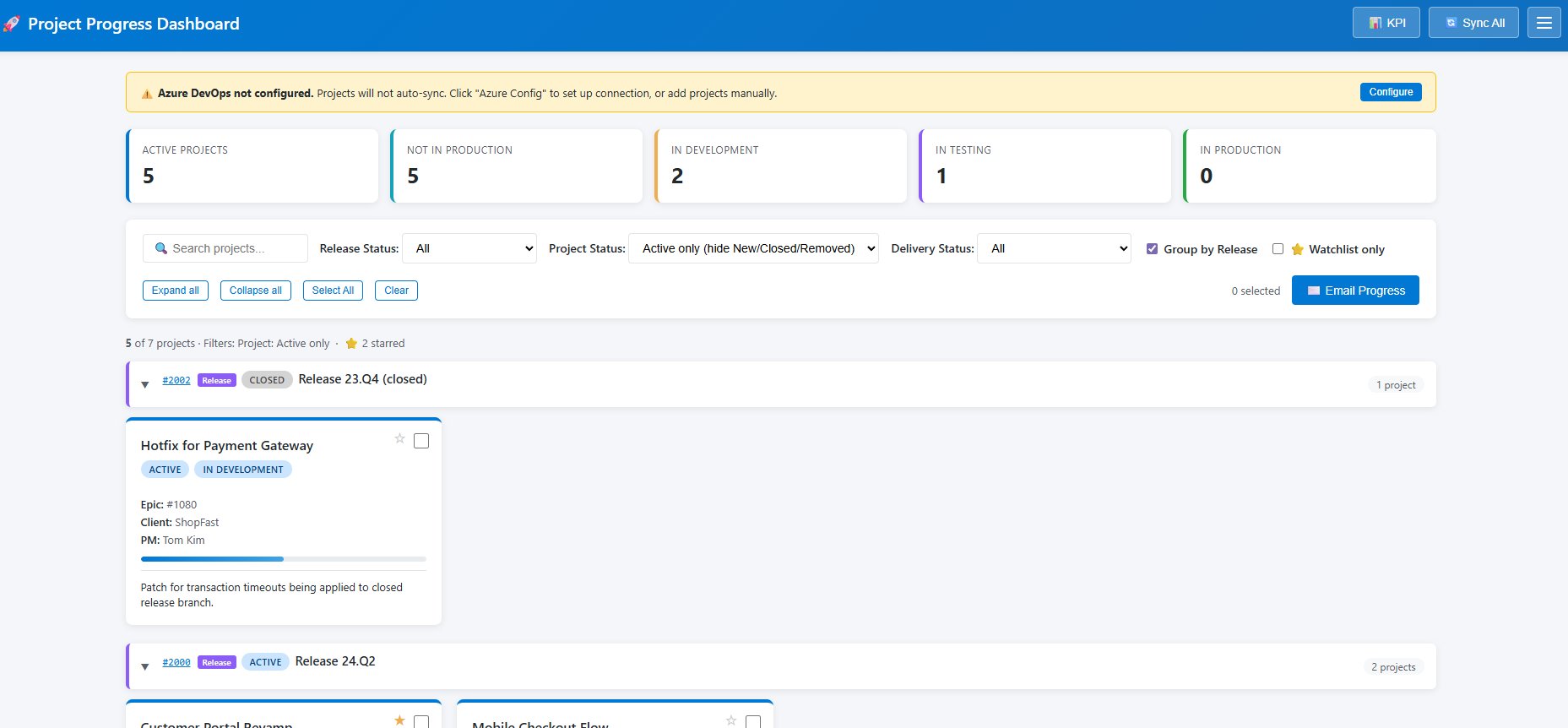
Main dashboard — project cards grouped by Release, with delivery status, progress bar (based on closed work items), PM, client, and bug count.
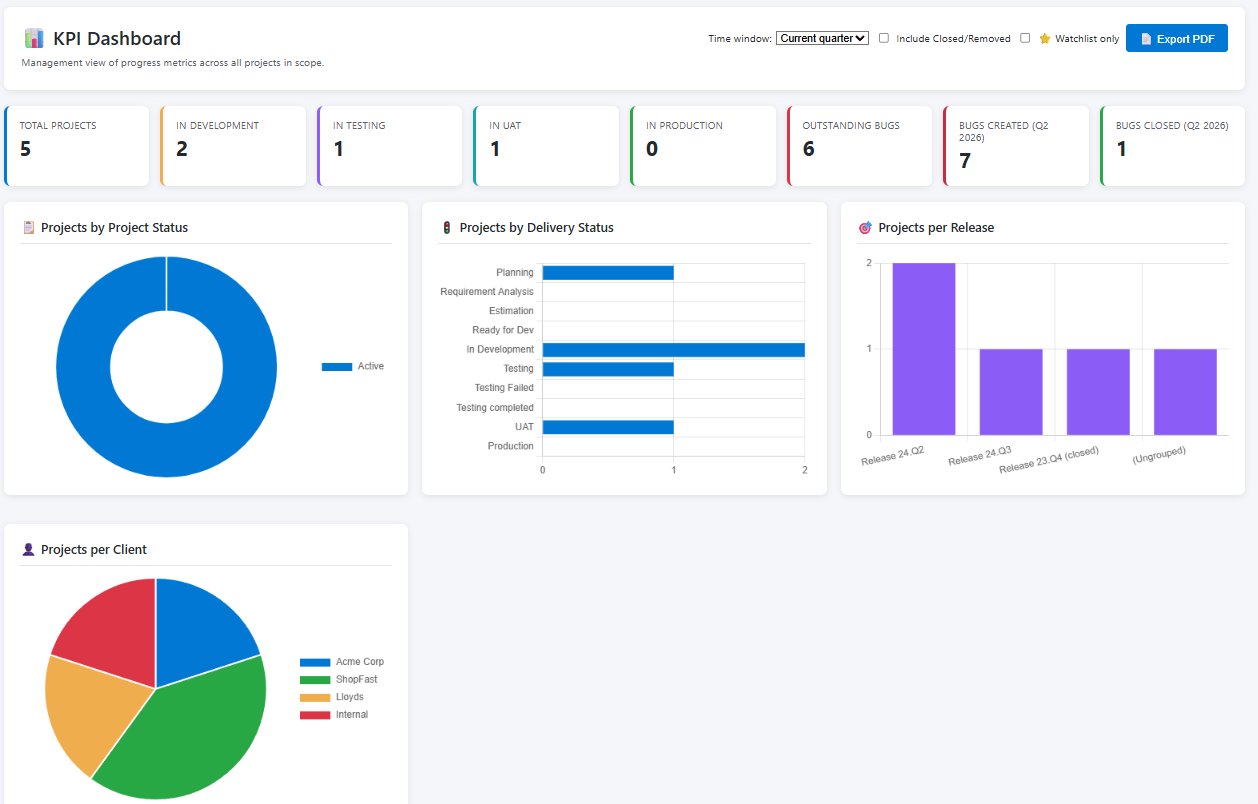
KPI Dashboard — 8 headline tiles, 7 charts, and a full project table. Exportable as PDF. Features🃏 Project CardsEvery Epic or Feature becomes a card on the dashboard, grouped by Release (or Epic, if you are tracking Features). Cards show:
🔄 Automatic Background SyncWork items, comments, and field values sync from Azure DevOps automatically on page load and every 15 minutes in the background — no manual clicking required. A live status indicator in the top bar shows the last sync time. You can still trigger an immediate sync with the Sync Now button. 📋 Project Detail PageOpen any project card to see:
📊 KPI DashboardA management-ready view with:
✉️ Daily Status EmailSelect one or more projects and click Email Progress to get a ready-to-send HTML email with:
📜 Daily HistoryEvery save of Today's Summary, Activities for Tomorrow, or Links creates a date-stamped snapshot. Browse the full history of any project by date directly from the project detail page. ⚙️ Rich Settings
No backend. No setup. Just install.This extension uses the Azure DevOps Extension Data Service — a Microsoft-hosted key-value store included with every Azure DevOps account at no extra cost. Your data stays inside Microsoft's infrastructure. There is no Scriptpad server involved in storing or processing your project data. Authentication is handled entirely by your existing Azure DevOps session. No Personal Access Token (PAT) required. Quick start
Permissions
No write access to work items is used. The extension reads your Azure DevOps data and stores dashboard annotations (summaries, delivery status, notes) separately in the Extension Data Service under your organisation. Frequently asked questionsIs there a free version? Yes — a full-featured 30-day free trial with no credit card required. After 30 days, subscribe at $4/user/month or the extension enters read-only mode. Who manages billing? Billing is handled entirely by Microsoft through your existing Azure DevOps organisation subscription. You do not need to sign up with Scriptpad or provide payment details to us directly. Can I cancel? Yes — cancel any time from your Azure DevOps organisation settings. No lock-in, no cancellation fee. Where is my data stored? All data is stored in the Azure DevOps Extension Data Service — Microsoft's infrastructure, within your organisation. Scriptpad has no access to your data. Do I need a Personal Access Token (PAT)? No. The extension uses your existing Azure DevOps session for authentication. How many users need a licence? Each user who accesses the Project Dashboard or KPI Dashboard within your Azure DevOps organisation requires a licence. Organisation administrators assign licences to specific users. Support & contact
Scriptpad Limited — IT software solutions |