Risk Manager: Risk Register & Matrix for Azure DevOps
Stop managing risks in spreadsheets. Start visualizing them where your work happens.
Risk Manager transforms Azure DevOps into a lightweight Risk Management Information System (RMIS). Identify, assess, and track risks directly within your Boards and Dashboards—no external tools, no disconnected spreadsheets.
Built for
- Risk Managers & Compliance Officers
- Project & Program Managers
- Engineering teams working with governance requirements
Why Risk Manager
Without Risk Manager
- Risks scattered across work items or spreadsheets
- Difficult to prioritize what actually matters
- No clear overview for stakeholders
With Risk Manager
- Centralized risk register inside Azure DevOps
- Visual risk matrix for instant prioritization
- Clear, real-time reporting directly in dashboards
🎨 Visualize Your Risk Landscape
Don’t just list risks—see them.
The Risk Matrix widget gives you an instant heat map of your project’s risk exposure:
Dynamic Heat Map
Automatically plots work items based on Probability and Impact
Inherent vs Residual Risk
Visualize risk before and after mitigation
Customizable Matrix (3x3 or 5x5)
Adapt to your organization’s risk framework
Instant Insight
Spot high-risk areas immediately (top-right quadrant)
⚡ Seamless Native Integration
Risk Manager is built inside Azure DevOps, not bolted on.
Work Item Integration
Assign risk levels directly to Bugs, User Stories, Tasks, or custom Risk items
Dashboard Ready
Add the Risk Matrix widget to any dashboard in seconds
Zero Learning Curve
If your team knows Azure Boards, they already know how to use Risk Manager
🛠 How it works (30 seconds)
Tag it
Add Impact and Probability fields to your work items
Assess it
Set values (e.g., High Impact / Low Probability)
Visualize it
Add the Risk Matrix widget to your dashboard
👉 Your risks are instantly mapped and visible
⚙️ Easy setup & interactive insights
Getting started is fast—and stays flexible.
Auto-setup from Admin page
Create the required Impact and Probability fields directly from the app—no manual configuration needed
Works out of the box
Minimal setup required to start visualizing risks immediately
Click to drill down
Click any cell in the matrix to instantly see the exact work items behind that risk level
From overview to action in one click
Go from high-level risk visualization to actionable issues in seconds
Screenshots
Identify high-risk areas instantly
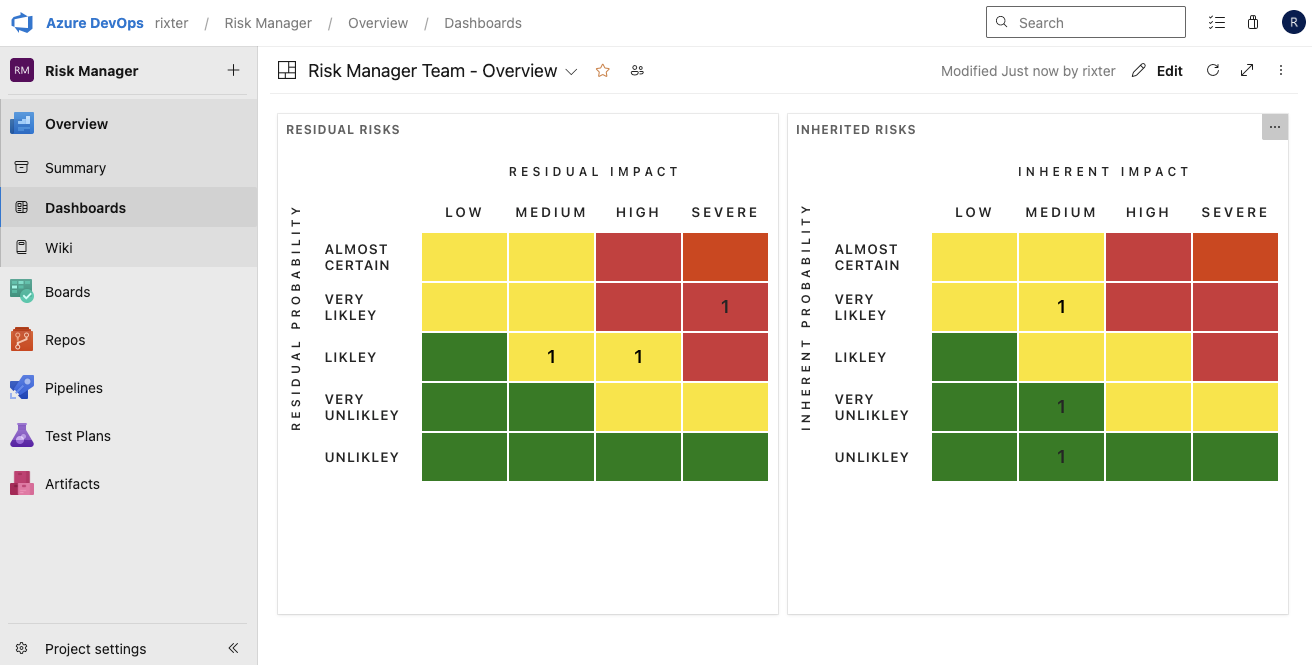
Risks in the top-right represent the highest impact and probability.
Compare inherent vs residual risk
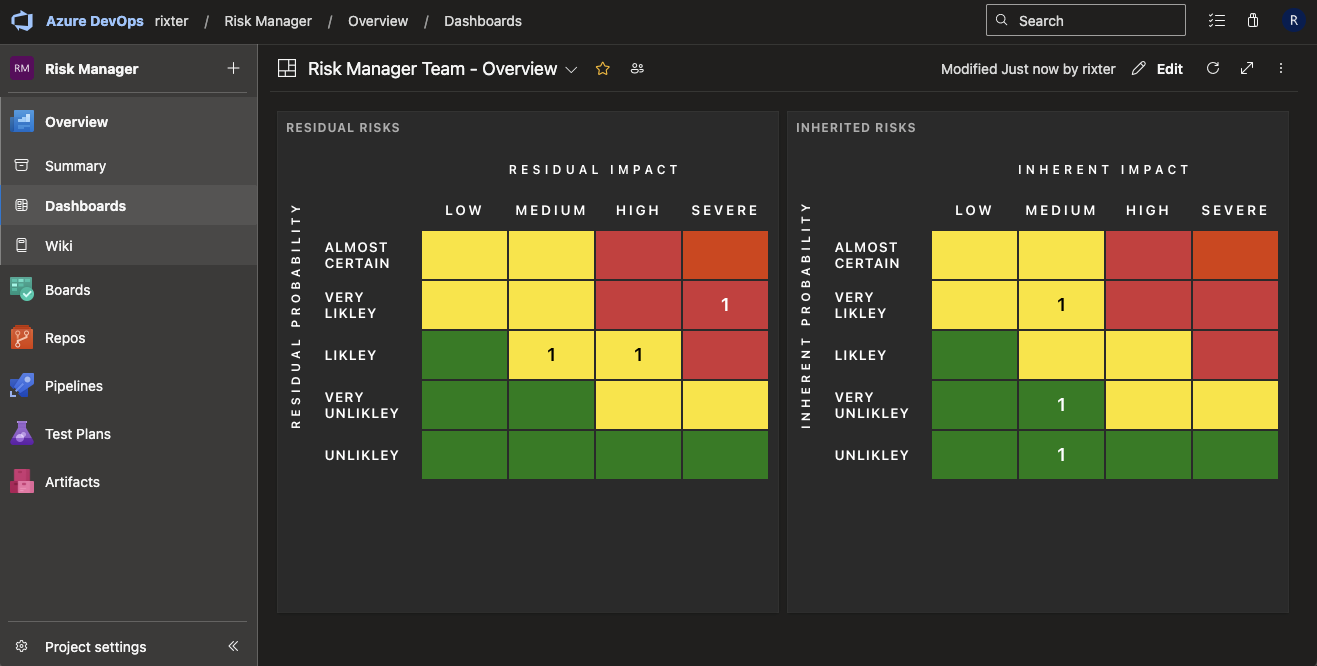
See how mitigation efforts reduce overall exposure.
Simple configuration
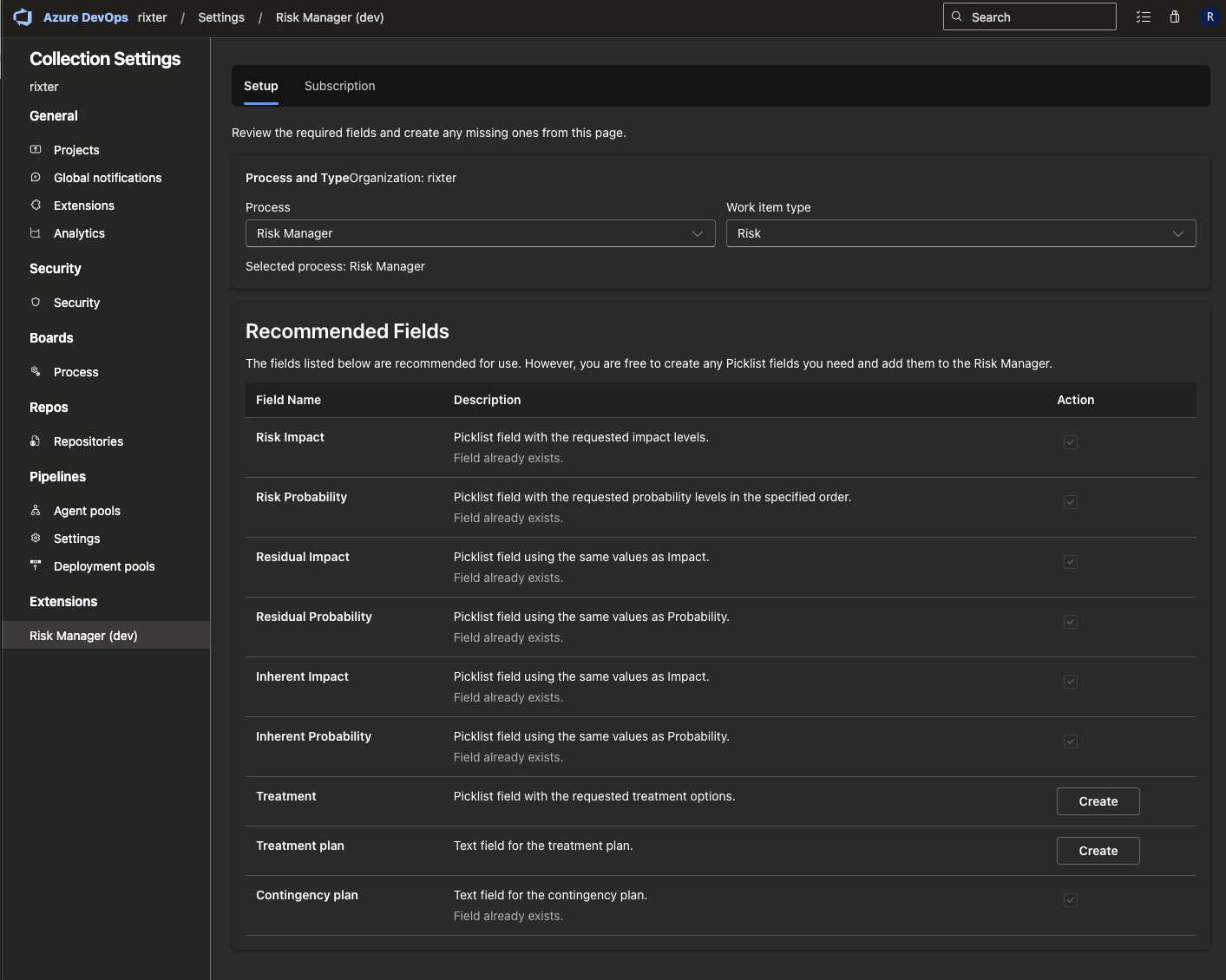
Configure fields once and start visualizing immediately.
💡 Why teams choose Risk Manager
- Turn complex risk data into a simple visual overview
- Replace spreadsheets with real-time dashboards
- Improve stakeholder communication
- Standardize risk reporting across teams
- Stay inside Azure DevOps—no context switching
💰 Enterprise Power, Lightweight Approach
Why pay for heavy GRC platforms when you only need what matters?
- Lightweight & Fast – no complex setup
- No external systems – everything stays in Azure DevOps
- Privacy-first – your data never leaves your environment
- Scales with your organization
🔐 Secure by Design
- No access to your underlying work item data outside Azure DevOps
- Minimal configuration storage only
- No external data processing
Features
- Risk Matrix dashboard widget
- Visualization of Impact vs Probability
- Support for inherent and residual risk
- Customizable matrix configuration
- Works with picklist (dropdown) fields
Limitations & notes
- Requires fields of type Picklist (dropdown) for Impact and Probability
Support
For help or questions, contact support@rixter.se or use the support portal:
https://rixter.atlassian.net/servicedesk/customer/portal/2
Please include your Azure DevOps organization name and organization ID.
Privacy & data
Risk Manager stores only the minimal configuration required to render the matrix.
We as a vendor cannot access your data.
The app does not modify work items outside user actions.
Permissions
The extension requests these scopes for specific reasons:
vso.extension.data: read configuration and stored metadatavso.extension.data_write: save configurationvso.graph: verify admin permissions during installvso.memberentitlementmanagement: determine license tiervso.work: read work items and field datavso.work_write: update risk-related fields when used

