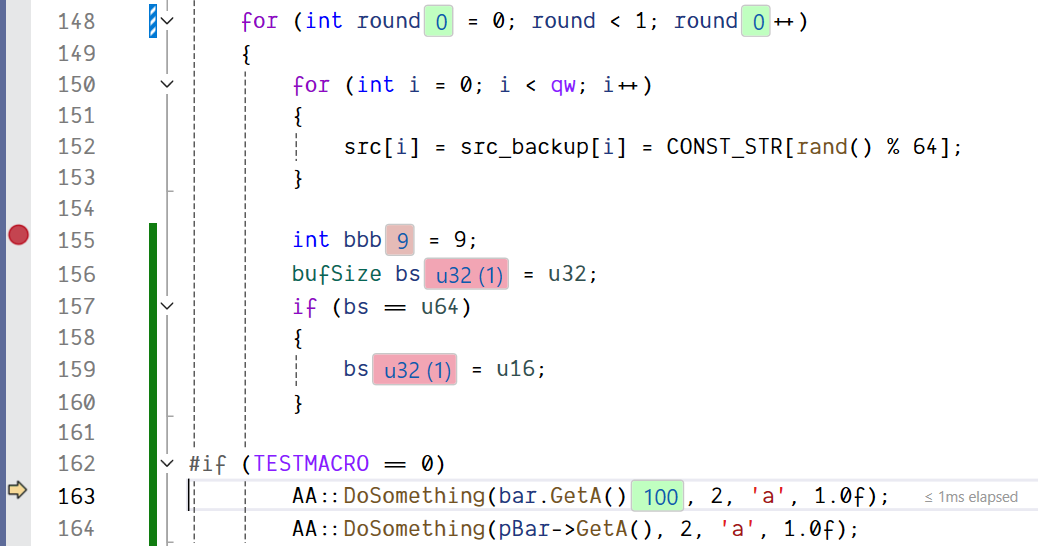
InlineCppVarDbg brings lightweight inline value hints to C++ debugging in Visual Studio, so you can see what matters without constantly opening Locals/Watch.
Built for VS2022 and VS2026 (17.x/18.x), it shows values directly in the editor while paused in break mode, with a strong focus on usability and debug-speed safety.
Highlights
Inline or end-of-line value display modes
Configurable visible range (previous lines), scoped to current function
Function parameter values always shown
One-click toolbar toggles: enable/disable, display mode, number format (Dec/Hex/Bin)
Clean formatting for arrays, enums, null pointers, and uninitialized values
Changed-value accent with step-based fade
Configurable chip colors and font size
Inactive #ifdef regions automatically ignored
Performance fail-safe: strict evaluation budget with graceful fallback to avoid slowing step operations