Git Staged Files
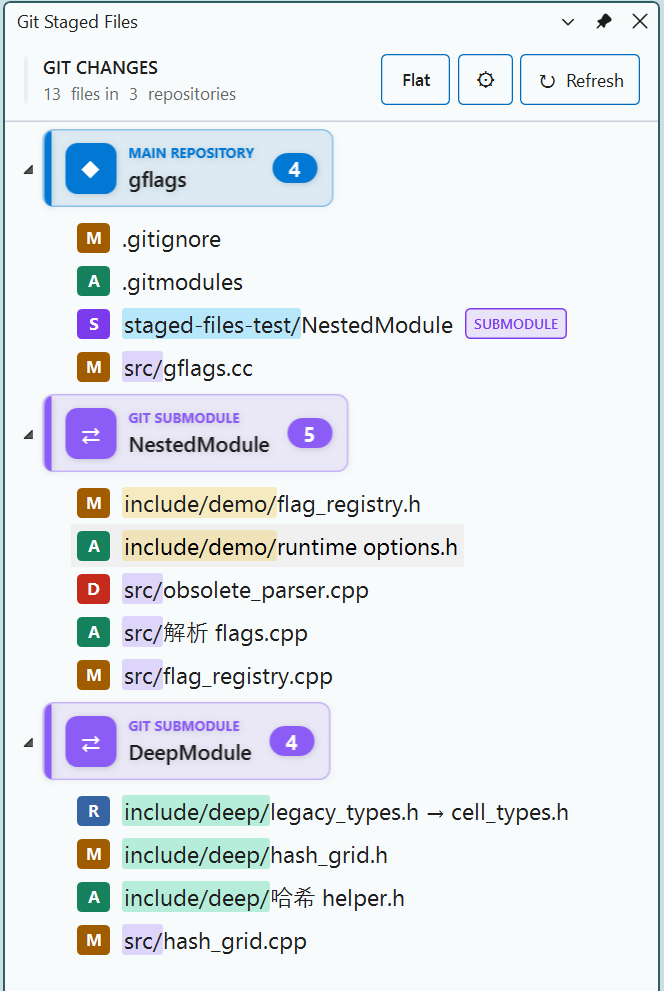
A lightweight Visual Studio tool window that shows files staged in Git's index but not yet committed. It scans the repository containing the current solution and every initialized nested submodule recursively.
Git is the source of truth: the extension displays the equivalent of git diff --cached --name-status -z for each repository. Matching untracked files can optionally be included from the extension settings.
Features
- Open from View > Other Windows > Git Staged Files.
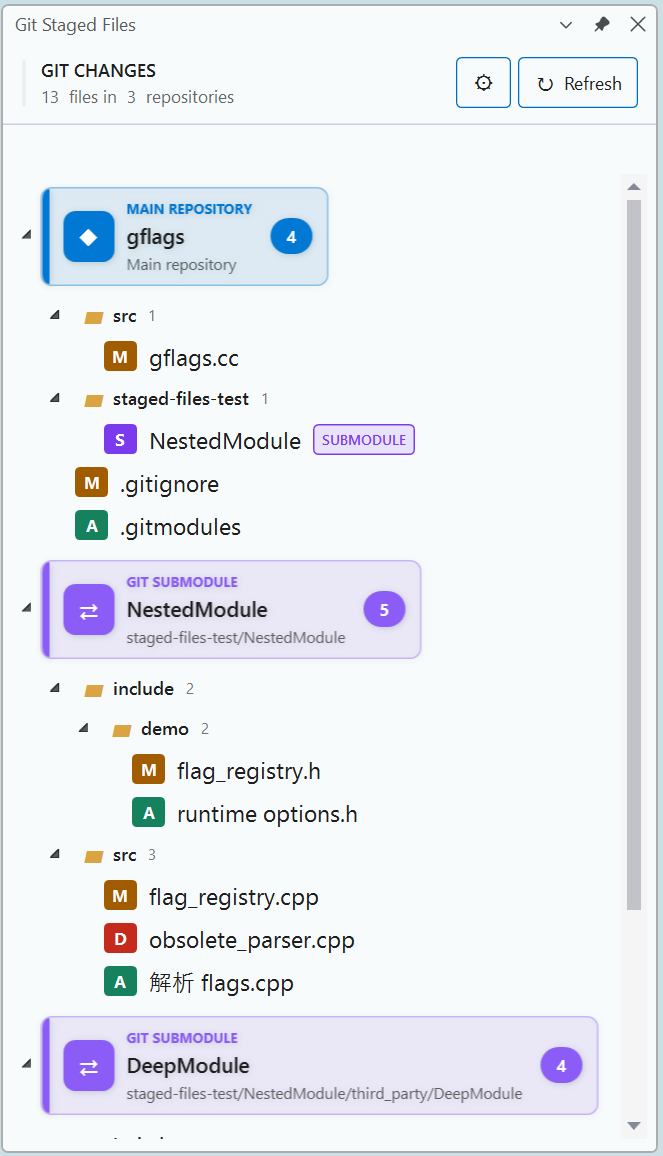
- Groups staged files by the main repository and initialized recursive submodules.
- Handles modified, added, deleted, renamed, copied, type-changed, and unmerged entries.
- Preserves spaces and Unicode paths by parsing NUL-delimited Git output.
- Double-clicks open existing files; deleted files are safely ignored; renames open the new path.
- Watches Git indexes and refreshes automatically after staged changes, with a configurable periodic refresh interval (10 minutes by default).
- Optionally shows and watches untracked files filtered by configurable file extensions; staged files are always shown.
- Provides a confirmed Git Revert (Discard Changes) action from each file's context menu.
- Supports configurable file-list font family and size under Tools > Options > Git Staged Files > General.
- Uses a theme-aware modern UI with distinct colors for added, modified, deleted, renamed, and untracked entries.
- Refresh is asynchronous, cancellable, and automatically triggered by solution/project lifecycle events.
- Detailed failures are written to the Git Staged Files Output pane.
Compatibility
The VSIX targets .NET Framework 4.7.2 and the Visual Studio 17.0 SDK API surface. Its manifest installation range is [17.0,), so one package supports both Visual Studio 2022 (17.x) and Visual Studio 2026 (18.x). This follows Microsoft's Visual Studio extension compatibility model.
The runtime integration deliberately uses mature AsyncPackage, ToolWindowPane, WPF, IVsSolutionEvents, and editor-shell APIs—no Visual Studio 2026-only APIs.
Architecture
GitStagedFiles.Core: VS-independent models, async Git process execution, NUL parsing, repository detection, and recursive submodule scanning.Package, ToolWindows, and ViewModels: the VS-specific command, lifecycle integration, WPF UI, and editor interaction.GitStagedFiles.Core.Tests: parser, recursive repository, and real Git-index tests.
Submodules are discovered one repository at a time from each .gitmodules file. Every candidate is verified with git rev-parse --show-toplevel; missing or uninitialized modules are skipped without stopping the scan.
Build and test
Install the Visual Studio extension development workload and ensure git.exe is on PATH.
dotnet test .\GitStagedFiles.Core.Tests\GitStagedFiles.Core.Tests.csproj -c Release
msbuild .\GitStagedFiles.sln /restore /p:Configuration=Release
The installable package is generated at:
bin\Release\net472\GitStagedFiles.vsix
For debugging, select the VSIX project as the startup project and press F5. The project builds, deploys, and launches the isolated GitStagedFilesExp3 Visual Studio instance.
changelog:
v1.0.10
- Toggle instantly between a compact directory tree and the original flat relative-path view.
- Merge single-child folder chains and color-group matching directory prefixes for faster scanning.
- Open Git diff on double-click and use the new Go to File context-menu action.
- Hide full repository paths by default, with an appearance option to show them when needed.
- Refine repository cards, counters, and vertical spacing for a denser, clearer layout.