OneAgent for Visual Studio
OneAgent brings the governed OneAgent coding-agent runtime to Visual Studio on
Windows. This 0.1.12 release is a public preview intended for controlled evaluation.
This release uses the same green OneAgent monogram as the VS Code extension,
including the Marketplace listing and the workbench welcome screen.
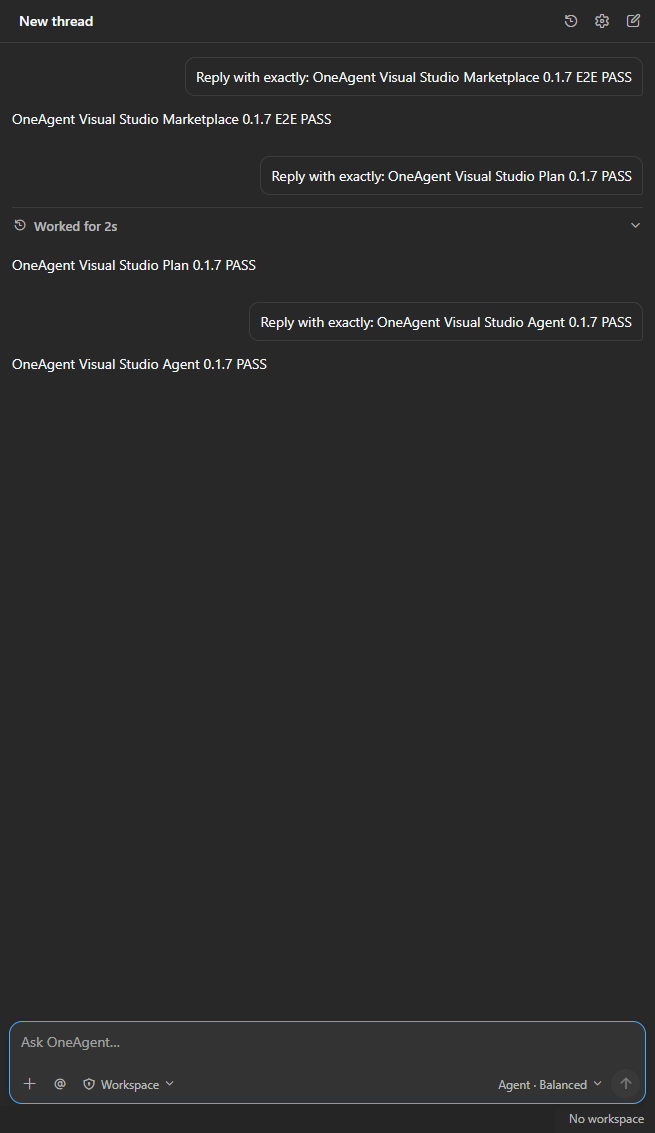
Using OneAgent
- Install OneAgent for Visual Studio from Visual Studio Marketplace and
restart Visual Studio when prompted.
- Open View > Other Windows > OneAgent and dock the Tool Window wherever it
fits your workspace.
- Sign in with an entitled OneAgent tenant account. OneAgent resolves the
tenant profile and verifies the managed OneAgent Runtime.
- Choose Agent or Plan mode, a model preset, reasoning/speed options, and the
approval policy before sending a task.
- Run multiple conversations concurrently, switch without stopping background
work, and keep each draft, attachment, approval and Stop action isolated.
- Drag files into the workbench, add Solution Explorer files as mentions, or
paste screenshots and documents before sending.
Feature tour
Familiar agent workbench
The shared workbench keeps Visual Studio and VS Code aligned: thread history,
settings, new chat, streamed activity, stop/steer controls, mode/model choices,
approval policy, and the composer use the same product contracts and UI assets.
History exposes a confirmed per-thread delete action, while Settings exposes
Delete session for the current idle conversation.
Visual Studio context and changes
Start with a solution, an Open Folder workspace, or no open project. OneAgent
uses a profile-scoped scratch workspace for general tasks when no project is
open. Attach files, folders, images, the active document, or selected editor text.
After an editing turn, review changes in Visual Studio Diff, open Git Changes,
or undo the latest captured turn when conflict checks allow it.
Governed Identity and Runtime
OneAgent Identity uses Authorization Code + PKCE. Authenticated turns travel
through OneAgent Gateway to the isolated managed OneAgent Runtime. If the
pinned Runtime is missing or incompatible, the extension offers an explicit,
UAC-gated install or repair flow and verifies the installed artifacts.
Recovery and diagnostics
This release requires OneAgent Host 0.6.0. Use the verified Runtime repair
flow when prompted after upgrading. The shared Host checks the complete UTF-8
JSON request before sending, including images, tool results, files and history.
It reads the tenant's Gateway budget, stops oversized requests with actionable
guidance and compacts eligible history between turns. The deployed Ampacs budget
is 50,000,000 bytes per request; this is not an unlimited workspace or file budget.
Restart a failed Host from the workbench and create a redacted diagnostics
bundle. Diagnostics exclude authentication tokens, account email, prompt
content, and user profile paths.
Visual Studio also exposes a native OneAgent Output pane and bounded rolling
logs under %LOCALAPPDATA%\OneAgent\VisualStudio\logs. Native commands under
Tools can show Output, open the log folder, or create diagnostics even when
the embedded WebView is blank. WebView navigation/process failures, bounded
JavaScript errors, Runtime request lifecycle, and Host diagnostics use the same
redacted event pipeline.
Preview capabilities
- Open the OneAgent Tool Window from View > Other Windows > OneAgent.
- Keep OneAgent in the right-side Solution Explorer tab group by default.
- Sign in through OneAgent Identity using Authorization Code + PKCE.
- Resolve the active OneAgent tenant profile and isolated managed runtime.
- Start a thread with a solution, Open Folder workspace, or no open project.
- Search, resume, rename, delete, and start threads from the shared history
controls, or delete the current idle session from Settings.
- Stream Agent activity and final responses, steer an active turn, or stop it.
- Select Agent/Plan mode, OneAgent model presets, reasoning, speed, and approval
policy from the shared composer.
- Add files, folders, images, the active document, selected editor text, and
file mentions as explicit IDE context.
- Handle command/file approvals, permission requests, and structured user input
without inferring consent.
- Install or repair the pinned OneAgent Host and managed OneAgent Runtime from the
authenticated OneAgent Identity release endpoint, then verify both artifacts.
- Review turn changes in Visual Studio Diff, open Git Changes, and safely undo
the latest captured editing turn with post-turn conflict detection.
- Restart a failed Host and create a redacted diagnostics bundle that excludes
authentication tokens, account email, prompt content, and user profile paths.
- Inspect native OneAgent Output and persistent rolling logs without requiring
a working embedded WebView or a
/log Visual Studio launch.
Preview limitations
This candidate uses the same workbench assets, product options, Host protocol,
Runtime release manifest, and cross-IDE behavior fixtures as the VS Code
extension. Native IDE operations remain thin platform adapters because Visual
Studio and VS Code expose different extension APIs. The current Runtime is an
invited unsigned 0.5.x pilot pinned by SHA-256; public stable promotion waits
for the organization-signed Runtime and release certificate.
Requirements
- Visual Studio 2022 version 17.14 or newer, including Visual Studio 2026
- Windows x64
- Visual Studio Core Editor workload
- An entitled OneAgent tenant account
- A compatible OneAgent Host and managed OneAgent Runtime
Privacy and network access
The extension opens OneAgent Identity for sign-in and sends authenticated agent
requests to OneAgent Gateway. It sends only the prompt and IDE context the user
explicitly submits. Authentication tokens are stored with Windows protected
storage. The extension does not enable content telemetry in this preview.
For privacy, account deletion, or security requests, contact
charles@one-agent.ai.
Support
Use the Marketplace Q&A section for general questions. For account, tenant,
security, or deletion support, email
charles@one-agent.ai. Include the Visual Studio
version and OneAgent extension version, but do not send tokens, passwords, or
customer source code.
Release notes
See CHANGELOG.md for the current preview scope and known
limitations.

