Skip to content
| Marketplace
Sign in
Azure DevOps>Azure Repos>Pull Requests Filtered
Pull Requests Filtered

Pull Requests Filtered

Omar Osman

| (0) | Free
A configurable dashboard widget showing filtered pull requests across projects, with work item traceability filtering.
Get it free

Pull Requests Filtered

A lightweight Azure DevOps dashboard widget that shows a live, filtered list of pull requests directly on any project dashboard. Pin multiple tiles — each with its own independent filter configuration — to keep the PRs that matter to you always in view.

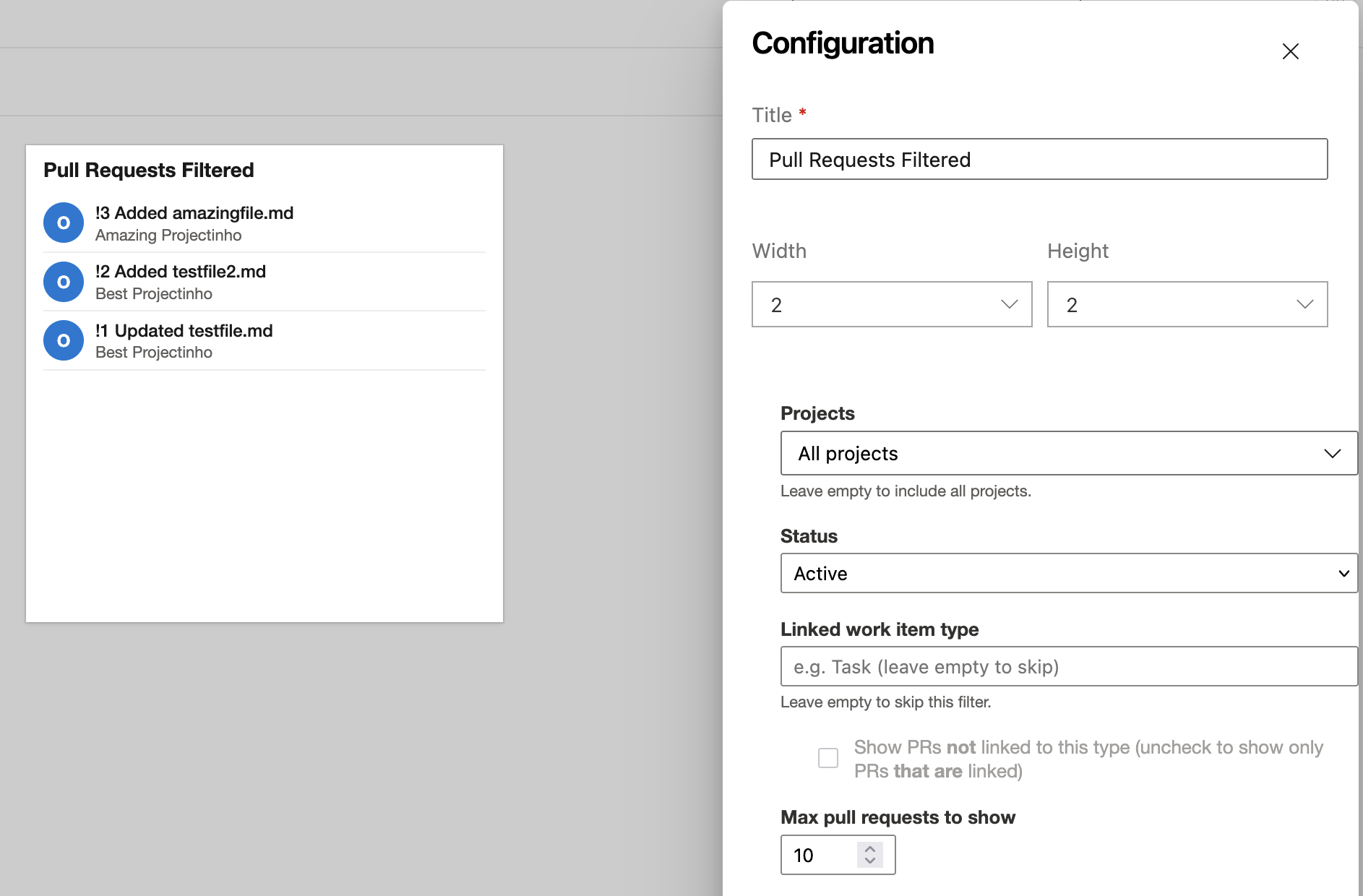
Widget preview


Features

Flexible filtering

Configure each widget tile independently:

  • Projects — choose any subset of projects within your organisation, or leave the list empty to include all projects
  • Status — filter by Active, Draft, Approved, Approved with suggestions, Awaiting Approval, Awaiting Author, Rejected, Abandoned, Completed, or All
  • Max count — display 1 to 50 pull requests per tile

Linked work item type filter

Enter a linked work item type name (e.g. Task) to filter pull requests by their traceability links:

  • Checkbox checked — show only PRs that are not linked to a work item of that type (useful for surfacing code reviews missing a required planning link)
  • Checkbox unchecked — show only PRs that are linked to a work item of that type
  • Field left empty — no work item type filtering is applied

Live configuration preview

The configuration panel updates the widget tile in real time as you adjust settings, before you save.

Configurable tile name and size

Rename the tile to anything meaningful (e.g. "My team's open PRs" or "Unlinked PRs — main") and choose from four supported tile sizes:

Size Grid units
Small 2 × 2
Wide 3 × 2
Tall 2 × 3
Large 3 × 3

Getting started

  1. Install the extension from the Marketplace
  2. Go to any project dashboard (Overview → Dashboards)
  3. Click Edit → Add a widget
  4. Search for Pull Requests Filtered and click Add
  5. Click the gear icon on the tile to configure your filters
  6. Click Save

Permissions

This extension requires the following scopes:

Scope Purpose
vso.code Read pull requests and repository information
vso.identitypicker Resolve user identities for creator/reviewer filters
vso.project Enumerate projects for the cross-project project picker
vso.work Read work item types when checking PR traceability links

Support

  • Report an issue

Privacy

This extension does not collect, store, or transmit any personal data outside of your Azure DevOps organization. All API calls are made directly from your browser to your own Azure DevOps instance.

  • Contact us
  • Jobs
  • Privacy
  • Manage cookies
  • Terms of use
  • Trademarks
© 2026 Microsoft