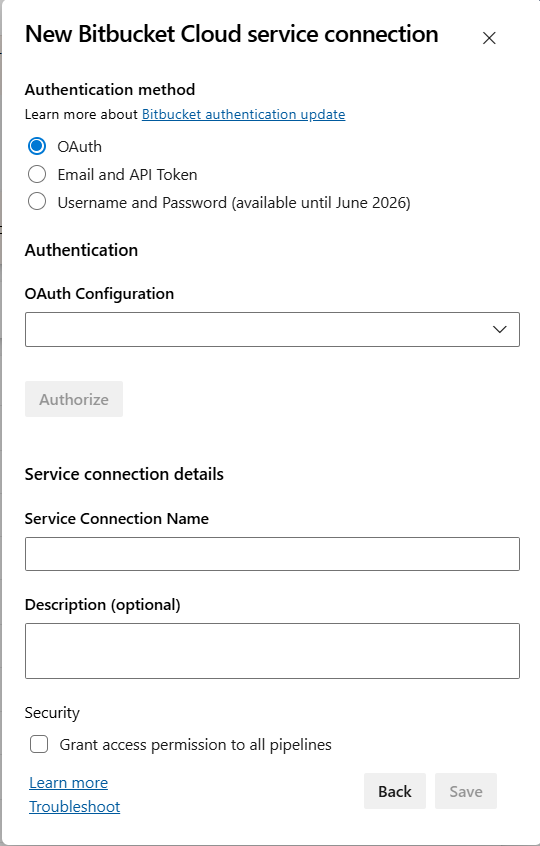
Bitbucket® artifacts for Release managementThis extension integrates Bitbucket® Cloud with Azure Pipelines. It uses the built-in Bitbucket Cloud service connection and contributes a Download Artifacts - Bitbucket task, so you can consume Bitbucket® repository sources from both classic release pipelines and YAML pipelines in Azure DevOps. UsageUsing the extension is a two-step workflow: (1) create a Bitbucket Cloud service connection in your project with OAuth or an email and API token, then (2) reference that connection from a release-pipeline artifact source or from a Connecting to Bitbucket® CloudGo to project settings -> Service connections tab, select New service connection, and choose Bitbucket Cloud:
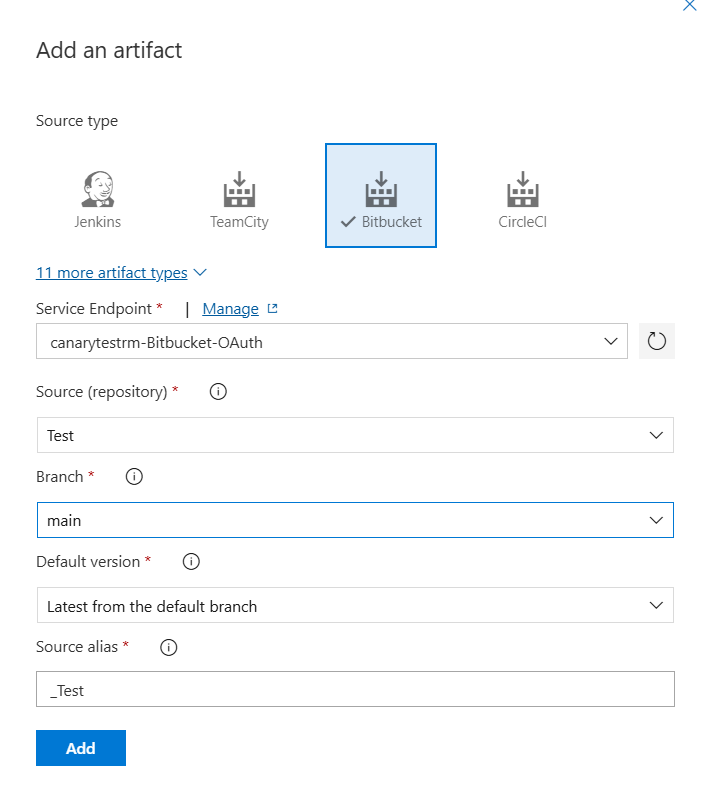
AuthenticationFor OAuth, select OAuth, choose an OAuth configuration, and select Authorize. The UI labels the method OAuth; Azure DevOps currently supplies the endpoint using the internal OAuth access tokens are sent as Bearer tokens when the extension calls the Bitbucket® API. When repositories are cloned, the extension uses You can also use Email and API Token authentication. Username/password authentication is deprecated and may be disabled by the service or rejected at runtime. For new connections, use OAuth or Email and API Token. The UI label is OAuth, while the endpoint may use the internal Linking Bitbucket® sourcesOnce you have set up the service endpoint connection, you can link Bitbucket® repository sources in your release definition.
Using in YAML pipelinesAdd the The task requires Azure Pipelines agent version 2.206.1 or newer. Self-hosted agents must also have Git available on Learn more about artifacts in Azure Pipelines. You can use Azure Pipeline Extensions on GitHub to report issues. Note: Bitbucket® is a trademark owned by Atlassian. |