Microsoft Foundry Evaluation Azure DevOps Extension
This Azure DevOps extension enables offline evaluation of Microsoft Foundry Agents within your CI/CD pipelines. It is designed to streamline the offline evaluation process, allowing you to identify potential issues and make improvements before releasing an update to production.
To use this extension, all you need to provide is a data set with test queries and a list of evaluators. This task will invoke your agent(s) with the queries, collect the performance data including latency and token counts, run the evaluations, and generate a summary report.
Features
- Agent Evaluation: Automate pre-production assessment of Microsoft Foundry agents in your CI/CD workflow.
- Evaluators: Leverage any evaluators from the Foundry evaluator catalog.
- Statistical Analysis: Evaluation results include confidence intervals and test for statistical significance to determine if changes are meaningful and not due to random variation.
Evaluator categories
- Agent evaluators: Process and system-level evaluators for agent workflows
- RAG evaluators: Evaluate end-to-end and retrieval processes in RAG systems
- Risk and safety evaluators: Assess risks and safety concerns in responses
- General purpose evaluators: Quality evaluation such as coherence and fluency
- OpenAI-based graders: Leverage OpenAI graders including string check, text simularity, score/label model
- Custom evaluators: Define your own custom evaluators using Python code or LLM-as-a-judge patterns
Parameters
| Name |
Required? |
Description |
| azure-ai-project-endpoint |
Yes |
Endpoint of your Microsoft Foundry Project |
| deployment-name |
Yes |
The name of the Azure AI model deployment to use for evaluation |
| data-path |
Yes |
Path to the data file that contains the evaluators and input queries for evaluations |
| agent-ids |
Yes |
ID of the agent(s) to evaluate in format agent-name:version (e.g., my-agent:1 or my-agent:1,my-agent:2). Multiple agents are comma-separated and compared with statistical test results |
| baseline-agent-id |
No |
ID of the baseline agent to compare against when evaluating multiple agents. If not provided, the first agent is used |
Data file
The input data file should be a JSON file with the following structure:
| Field |
Type |
Required? |
Description |
| name |
string |
Yes |
Name of the evaluation dataset |
| evaluators |
string[] |
Yes |
List of evaluator names to use. Check out the list of available evaluators in your project's evaluator catalog in Foundry portal: Build > Evaluations > Evaluator catalog |
| data |
object[] |
Yes |
Array of input objects with query and optional evaluator fields like ground_truth, context. Auto-mapped to evaluators; use data_mapping to override |
| openai_graders |
object |
No |
Configuration for OpenAI-based evaluators (label_model, score_model, string_check, etc) |
| evaluator_parameters |
object |
No |
Evaluator-specific initialization parameters (e.g., thresholds, custom settings) |
| data_mapping |
object |
No |
Custom data field mappings (auto-generated from data if not provided) |
Basic sample data file
{
  "name": "test-data",
  "evaluators": [
    "builtin.fluency",
    "builtin.task_adherence",
    "builtin.violence",
  ],
  "data": [
    {
      "query": "Tell me about Tokyo disneyland"
    },
    {
      "query": "How do I install Python?"
    }
  ]
}
Additional sample data files
Sample Pipeline
To use this Azure DevOps extension, add the task to your Azure Pipeline and configure authentication to access your Microsoft Foundry project.
steps:
  - task: AIAgentEvaluation@2
    displayName: "Evaluate AI Agents"
    inputs:
      azure-ai-project-endpoint: "$(AzureAIProjectEndpoint)"
      deployment-name: "$(DeploymentName)"
      data-path: "$(System.DefaultWorkingDirectory)/path/to/your/dataset.json"
      agent-ids: "$(AgentIds)"
Evaluation Results
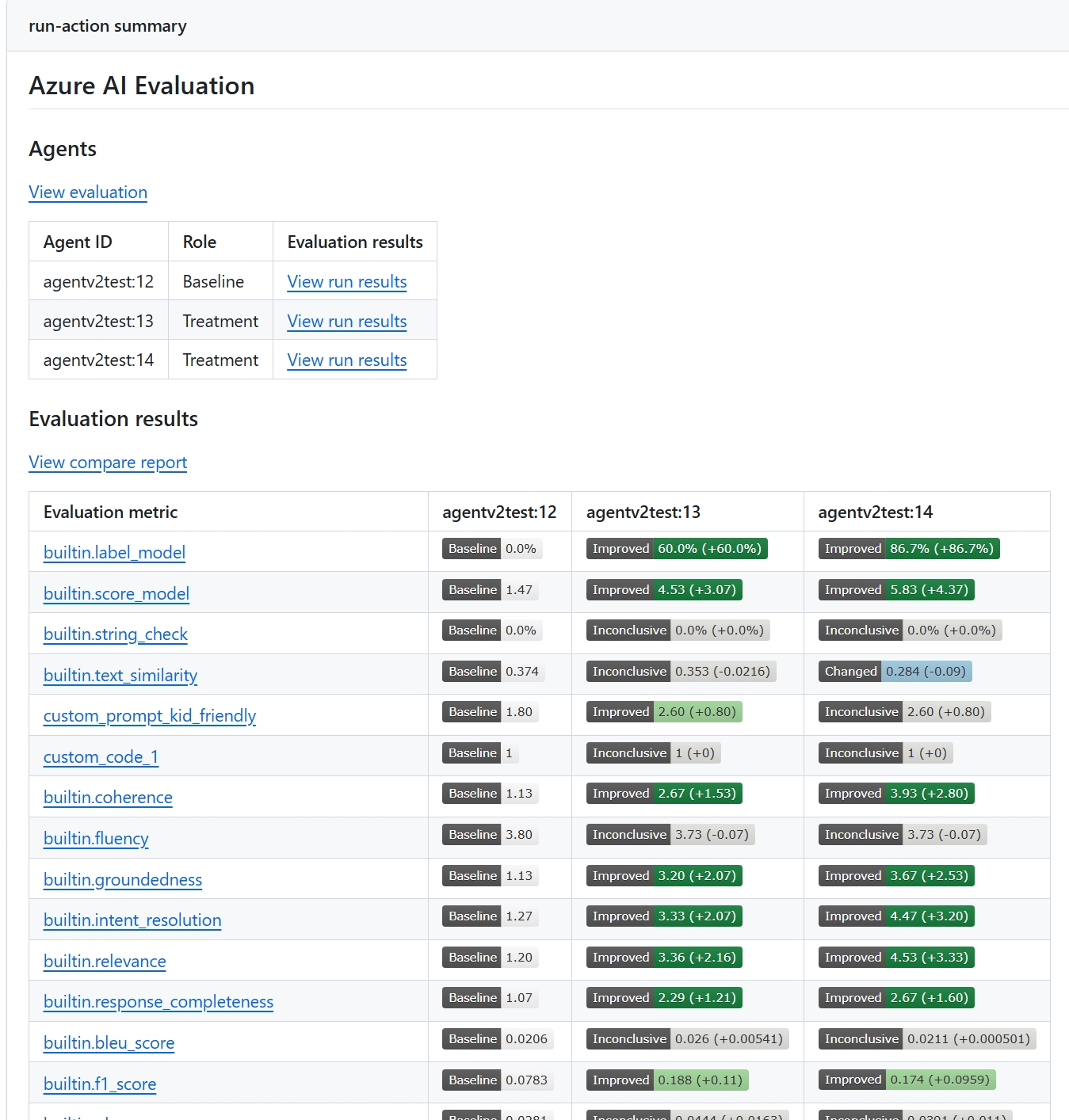
Evaluation results will appear in the Azure DevOps pipeline summary with detailed metrics
and comparisons between agents when multiple are evaluated.
Below is a sample report for comparing two agents.
Learn More
For more information about Foundry agent service and observability, see:
Contributing
This project welcomes contributions and suggestions. Most contributions require you to agree to a
Contributor License Agreement (CLA) declaring that you have the right to, and actually do, grant us
the rights to use your contribution. For details, visit here.
When you submit a pull request, a CLA bot will automatically determine whether you need to provide
a CLA and decorate the PR appropriately (e.g., status check, comment). Simply follow the instructions
provided by the bot. You will only need to do this once across all repos using our CLA.
This project has adopted the Microsoft Open Source Code of Conduct.
For more information see the Code of Conduct FAQ or
contact opencode@microsoft.com with any additional questions or comments.
Trademarks
This project may contain trademarks or logos for projects, products, or services. Authorized use of Microsoft
trademarks or logos is subject to and must follow
Microsoft's Trademark & Brand Guidelines.
Use of Microsoft trademarks or logos in modified versions of this project must not cause confusion or imply Microsoft sponsorship.
Any use of third-party trademarks or logos are subject to those third-party's policies.

