Simple Tab Saver
Simple but powerful Visual Studio extension to save tabs and restore tabs from a compact UI. Built to do one thing well, with opt-in extra features layered on top. Offers extensive customization, and uses portable storage with no absolute paths.
Supports Visual Studio 2022 and Visual Studio 2026.
User Guide · Release Notes
Overview
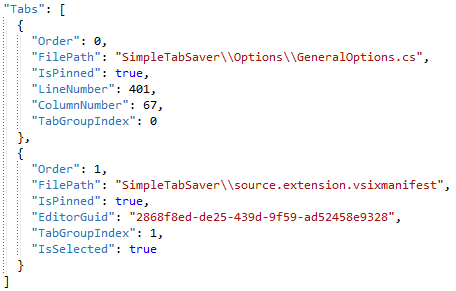
Saves the currently open document tabs into per-solution JSON files and restores them later in the same visual order. Each save captures:
- tab order
- pinned status
- tab groups
- floating windows
- duplicated documents
- split views
- cursor and scroll lines
- the active tab
- tool tabs (optionally)
- breakpoints (optionally)
Integrates with git and can automatically save and restore tabs based on the active git branch. Git Integration Guide
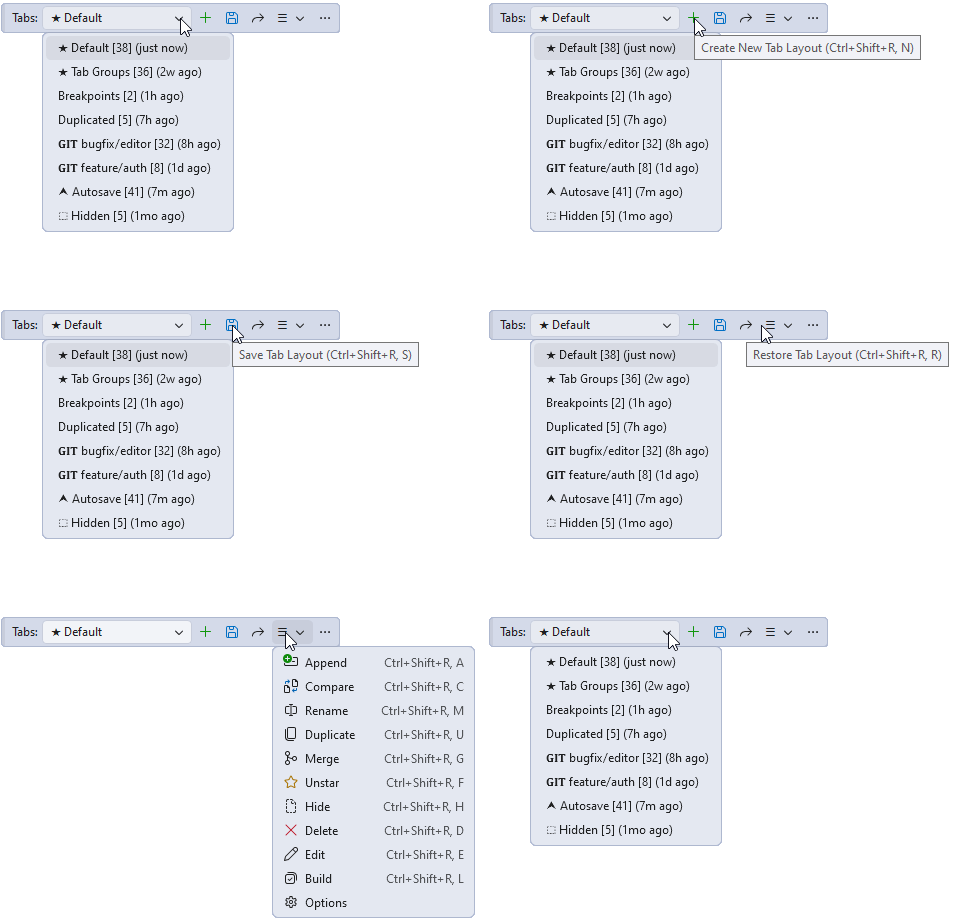
Multiple named tab layouts per solution are supported and selectable from a toolbar dropdown. Simple Tab Saver saves every tab layout as a readable plain JSON file where document paths are stored relative to the solution. Tab layouts are portable across machines and Visual Studio versions and can be shared with others. Tab layout files are created either in the solution root or in an external directory.
Features
- Compact and simple UI with a small screen footprint that barely takes any space. Simple Tab Saver is intentionally not another tool window that would have to be docked somewhere.
- Fast save and restore of tab layouts, making it almost unnoticeable and unobtrusive.
- Customizable toolbar with a tab layouts dropdown and
New / Save / Restore / Management buttons, plus default Ctrl+Shift+R chord keybindings for every action. All commands are also registered in the Customize > Add Command dialog, so individual Management commands can be placed directly on the toolbar.
- JSON storage per solution, by default at
<SolutionDir>\.tablayouts\<name>.json, storing relative file paths wherever applicable. A configurable external folder can be used instead of the solution root, or the path can be pointed at .vs\.tabLayouts so the storage stays hidden inside the Visual Studio internal folder.
- Tab order preservation matching the actual document tab strip, including pinned-first ordering and the active tab. Selected tab layout can also be opened alongside the currently open documents without closing anything (
Append button).
- Tab groups arrangement fully preserved (which group each tab belongs to, the active tab per group, and the group orientation) and re-created on restore.
- Floating windows support covering all the tabs and tab groups within each floating host, re-created on restore in their original size and position, with DPI awareness.
- Quick switching through a keyboard-driven popup that filters tab layouts and switches, restores, or appends without leaving the keyboard.
- Toolbar dropdown sorting by a configurable order key, plus starring and hiding. Starred tab layouts always sit at the top regardless of the configured sort, and hidden ones are not displayed at all, unless showing hidden is enabled, in which case they sort to the bottom.
- Tab layout management with
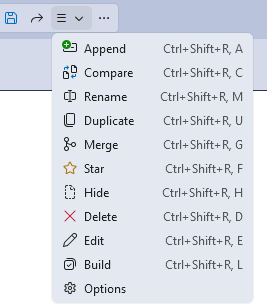
Rename, Duplicate, Merge (combine tabs from multiple tab layouts), Hide, Star (fix to top), and Delete.
- Utilities sub-menu in the Management menu with
Export/Import Settings, Open Storage Directories, Breakpoints Snapshot, Tab Layout Backups, and more.
- Solution-specific options enabling even more granular customization by overriding any extension setting for configured solutions.
- No telemetry and no uploads. Optional session logs are written locally to the extension's own installation folder, in
Logs\ subfolders.
- Free and transparent with no hidden trial period, no licensing costs, no subscriptions, and no data collection.
The Management sub-menu offers quick access to additional options.
All of the extra features are opt-in. They are designed to cover specific use cases or help with uncommon problems.
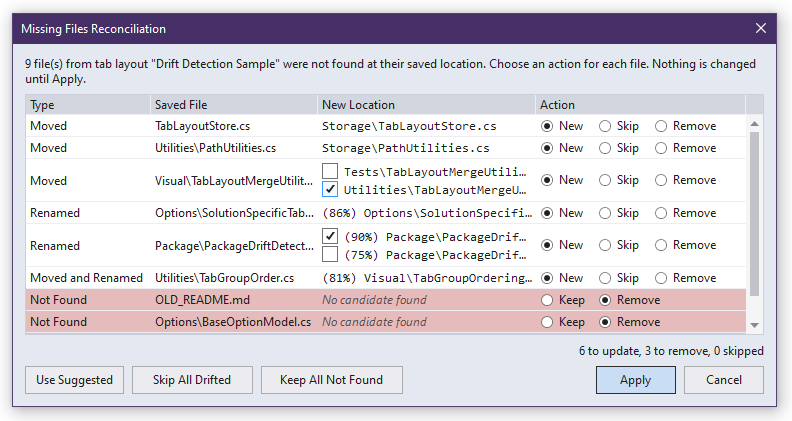
Tabs Drift Detection
When a restored tab layout points to a file that no longer exists at the saved path, the extension attempts to locate it automatically through three searches:
- Relocation: exact file name match, including extension, anywhere else in the solution tree, except in configurable excluded directories.
- Rename: same-extension file in the original directory with a similar base name (default 75 percent match, configurable between 50 and 99).
- Moved and renamed: same-extension file with a similar base name anywhere else in the solution tree, searched when the other two found nothing.
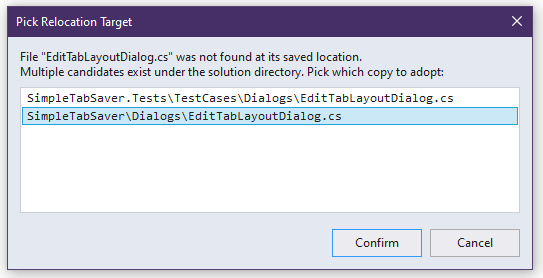
When a candidate is found, a dialog offers to adopt the new location. If multiple candidates match, a picker dialog allows choosing the right one.
When several files are missing at once (more than one moved, renamed, or not found anywhere), all decisions appear together in the Missing Files Reconciliation dialog: every file in one list with its candidate locations, and a one-click choice to use the new path, keep the entry, or remove it from the tab layout.
Autosave and Autorestore
Optionally saves the current tabs to a dedicated tab layout when the solution closes or when a build or debugging starts, and can restore a tab layout when a solution opens. The autosave tab layout name is configurable (default Autosave) or can be set to match the solution name. Autorestore can be configured to use the Last Saved, Last Restored, Autosaved, Named like Solution, or Default-named tab layout.
Git Integration
Opt-in feature that automatically creates, saves, and restores tab layouts per git branch. When a branch switch is detected, the outgoing branch tabs are saved and the incoming branch tabs are restored. A tab layout is created for each visited branch so it appears in the dropdown immediately, which can be turned off by an option. Another option closes all tabs on a branch switch, so a branch without a saved tab layout starts with an empty tab well. Git-tracked tab layouts display a GIT prefix. An optional purge removes tab layouts of branches that no longer exist locally and are older than a configurable threshold (default 7 days). Repositories using git's reftable ref storage format are supported.
Automatic Backup and Recovery
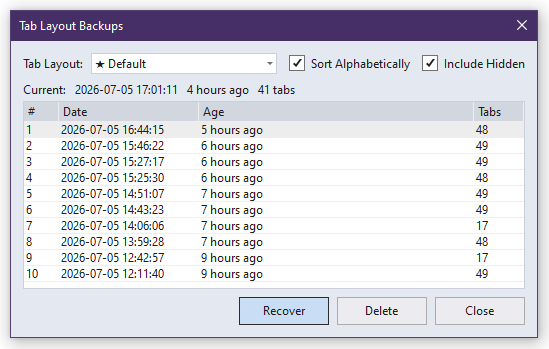
Keeps tab layouts safe by keeping copies of their previous JSON files.
- Backup: every user-initiated save (
Save button, Create New overwrite, Autosave on close, Merge into the same tab layout, and git branch switch auto-save) can automatically copy the pre-update tab layout file into a .backups\ subfolder under the storage directory.
- Recovery: available through the
Tab Layout Backups dialog in the Utilities sub-menu. It shows all backups of each tab layout and a Recover button that overwrites the main tab layout file from the backup contents.
The number of timestamped backup copies per tab layout is configurable in Options (default 5, up to 999).
Breakpoints Capture
Optionally captures breakpoints of the open documents when a tab layout is saved, and re-inserts them during restore. A line-text anchor self-corrects the saved line number when the file was edited between save and restore, with optional manual review. Stores breakpoint location, conditions, hit count filter, trace message, and enabled state. When breakpoint capture is disabled, breakpoints are ignored during save and restore, and existing ones are left untouched.
Breakpoints Snapshot
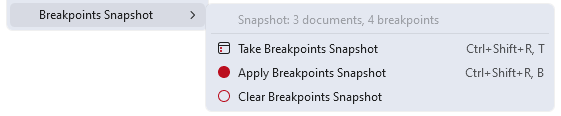
Standalone breakpoint save and restore that does not affect open documents. Made for stashing a set of configured breakpoints independently of tab layouts. The Breakpoints Snapshot sub-menu under Utilities provides the following actions:
- Take Breakpoints Snapshot: saves breakpoints of the open documents into an invisible technical tab layout (which can still be inspected as a JSON file), merging them into previously saved ones.
- Apply Breakpoints Snapshot: re-inserts saved breakpoints into documents that are already open, without reopening anything, using the same self-correction and review flow as the breakpoint re-insertion during Restore.
- Clear Breakpoints Snapshot: removes all saved entries from the snapshot.
Options in the dedicated Breakpoints Snapshot category configure the Take merge behavior, a stash workflow that removes live breakpoints after a manual Take, a silent automatic Take when a debug session ends, an additive or active-document-scoped Apply, and the sub-menu placement.
Compare, Edit and Build
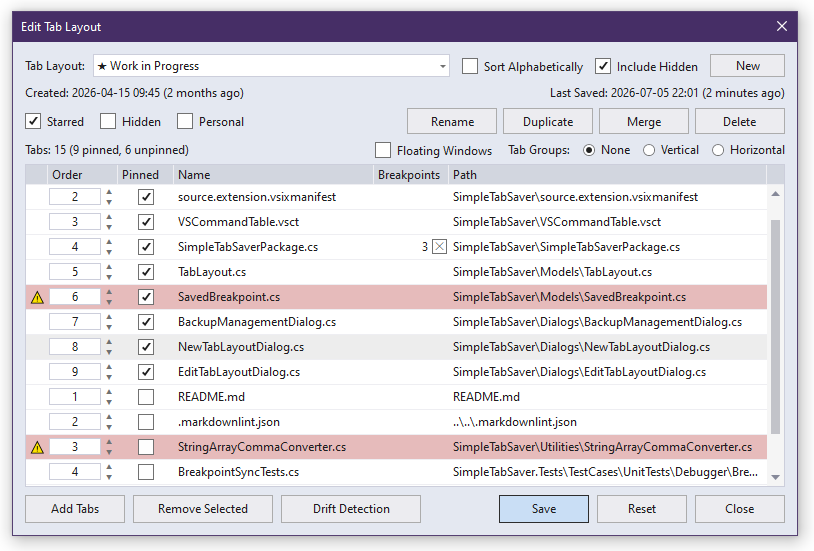
The Management menu provides Compare and Edit commands for deeper insight into saved tab layouts, and Build command for creating tab layouts by picking solution files.
- Compare: shows a read-only diff between a saved tab layout and the currently open document tabs, listing tabs that are only in the tab layout and tabs that are not saved yet. It answers "What will change during Save or Restore?" at a glance.
- Edit: opens a dialog to inspect and lightly modify a saved tab layout. Reorder tabs within their pinned or unpinned group, toggle pinned status, remove tabs, strip breakpoints, arrange tab groups and floating windows, and run relocation and rename detection on tabs whose files have moved (rows are marked red and
Drift Detection becomes enabled). The dialog also carries tab layout management options, a New button that creates a new empty tab layout, and an Add Tabs button that adds solution files as new tabs through a file picker mirroring Solution Explorer. Edits are held in memory and written only when Save is clicked.
- Build: creates a new tab layout directly from solution files. The Solution Explorer file picker opens with a
Build button to create new tab layout that contains selected solution files, and Build and Edit button which also opens it in the Edit dialog for further editing.
In both the Compare and Edit dialogs, document paths can be copied to the clipboard by right-clicking the selected rows.
Customization
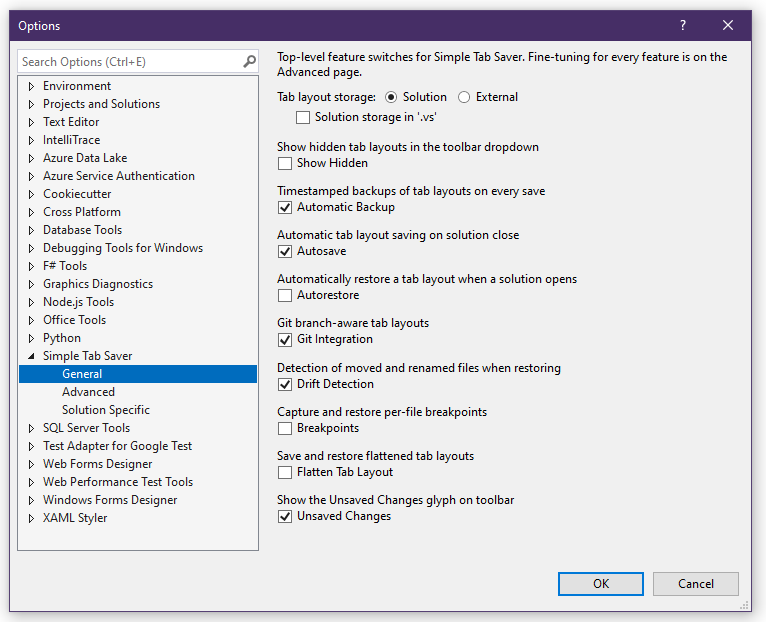
Available in Tools > Options > Simple Tab Saver, or through the Options entry in the Management menu. Almost everything in Simple Tab Saver is customizable, and it comes pre-configured with sensible defaults, so the extension is ready to use out of the box. Major features are toggled on the General page, everything else is on the Advanced page, and the Solution Specific page enables overriding any option for configured solutions (matched by name, by parent folder, or both, with support for wildcard pattern matching).
Tab Layout Actions. Up to five per-solution one-click commands can be configured that either Save, Restore or Append a chosen tab layout. They are available in the Management menu or as numbered buttons that can be manually placed on toolbars.
Settings transfer. The Utilities sub-menu has commands to export and import all extension settings to and from a JSON file. Each lists the settings by section, so individual settings can be included or excluded.
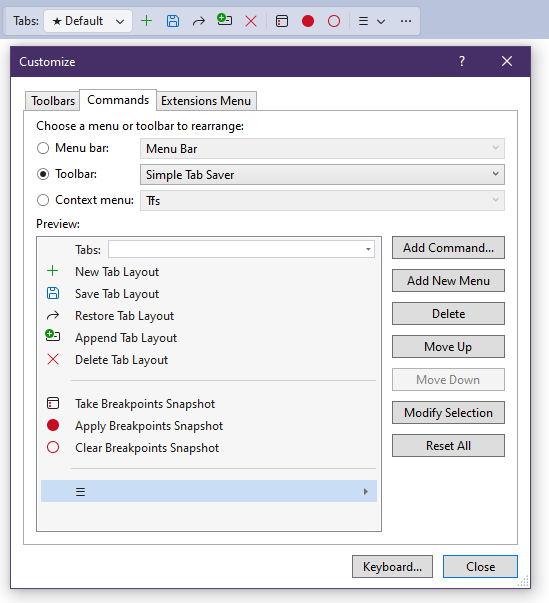
Toolbar layout. The placement of Simple Tab Saver toolbar buttons can be adjusted through the built-in Visual Studio Customize dialog. Every command is available under Add Command... in the Extensions category. The width of the tab layouts dropdown can be changed with the Modify Selection button.
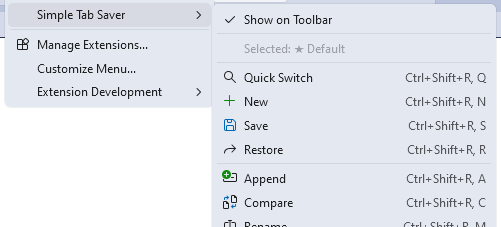
Menu bar access. The extension can also be fully operated from the Extensions > Simple Tab Saver menu on the Visual Studio menu bar. The menu includes a Selected label showing which tab layout is currently selected, so the selection stays visible even without the toolbar.
Feedback
Feedback and bug reports are welcome through the Marketplace Q&A, and are handled on a best-effort basis with no guarantees.


