Skip to content
| Marketplace
Sign in
Visual Studio>Tools>AI Code Generator
AI Code Generator

AI Code Generator

LocalAI Developer

|
141 installs
| (0) | Free
Use AI to generate plans and patches for your entire project, simply via a prompt.
Download

AI Code Generator for Visual Studio 2022

Use AI to generate plans and patches for your entire project, simply via a prompt. AI Code Generator is a Visual Studio 2022 extension for AI-assisted software development with local or remote language models. It turns a development goal into a reviewable plan, generates one patch at a time, validates C# with Roslyn, builds the solution once at the end of the workflow, and can request bounded repair patches when compilation fails.

The extension supports English and German and follows the active Visual Studio color theme.

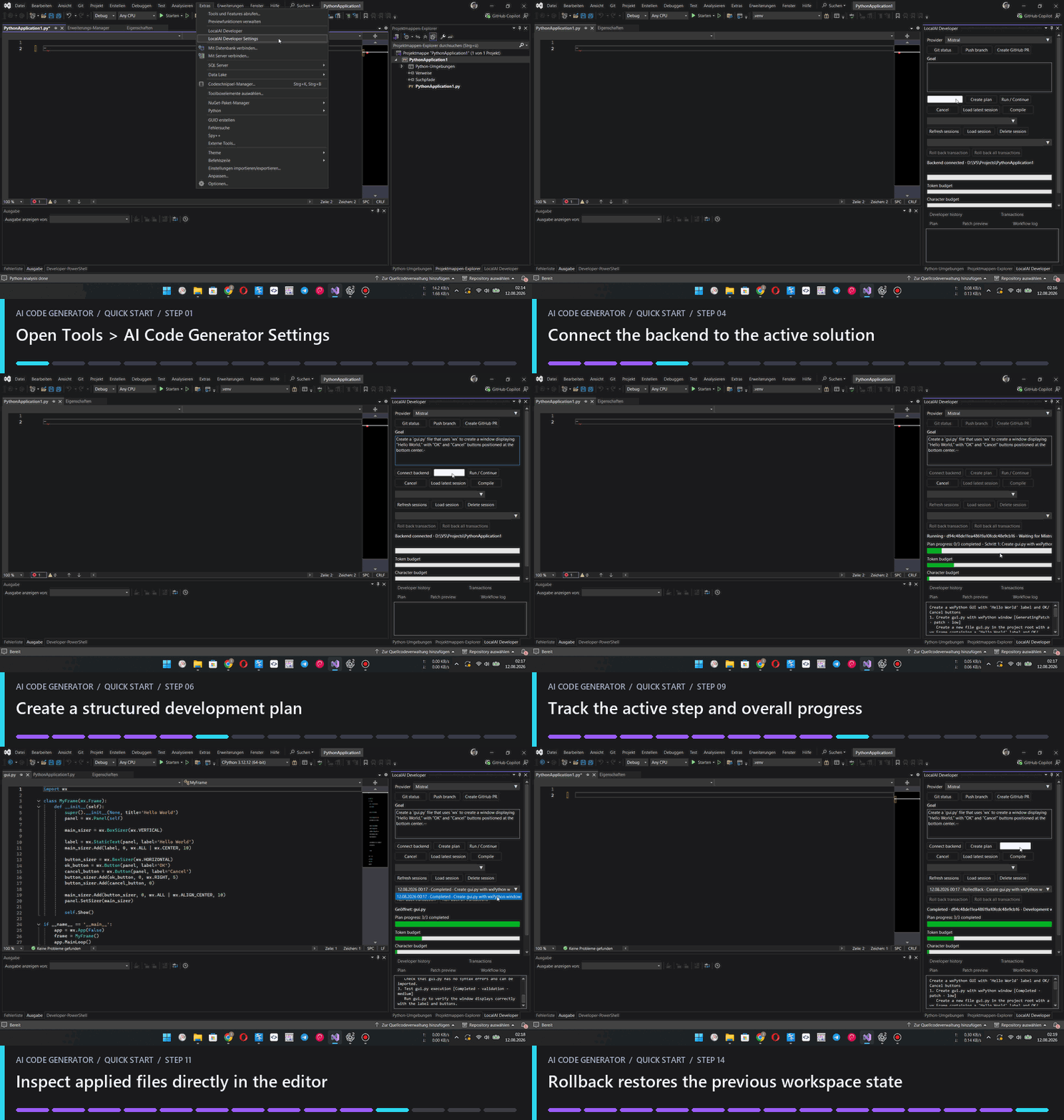
ai-code-generator-walkthrough.gif

Features

  • [x] Structured development plans with step and plan status
  • [x] Side-by-side review workflow with unified, colorized diffs
  • [x] Manual approval, skip, cancel, and rollback actions
  • [x] Atomic transaction history, including rollback of completed workflows
  • [x] Roslyn syntax validation before patch approval
  • [x] Language-aware context resolution and preflight validation for C#, Python, PHP, JavaScript, TypeScript, JSON, XML/XAML, HTML, and CSS
  • [x] Deferred solution compilation after the final relevant step
  • [x] Bounded automatic repair and recompilation
  • [x] Persistent developer sessions and structured history
  • [x] Token and character budget estimates per provider/model profile
  • [x] Optional Git branch, commit, push, and GitHub pull-request workflow
  • [x] Automatic workspace selection from the open Visual Studio solution

Providers

  • LM Studio (OpenAI-compatible API)
  • Ollama (native API)
  • Mistral
  • OpenAI

The provider interface is intentionally transport-agnostic. Custom OpenAI-compatible endpoints can be added directly under Tools > AI Code Generator Settings without changing the workflow coordinators.

Architecture

Visual Studio 2022 VSIX (.NET Framework 4.7.2 / WPF)
        |
        | JSON-RPC over stdin/stdout
        v
AI Code Generator Backend (.NET 8)
        |
        +-- Planning and plan validation
        +-- Patch preparation and approval policy
        +-- Transactional apply and rollback
        +-- Roslyn syntax/build validation
        +-- Repair coordination
        +-- Session and history persistence
        +-- Optional Git/GitHub workflow

The Visual Studio extension is a UI host. Workflow state and filesystem mutations live in the backend so approval, execution, compilation, repair, and persistence remain separated.

Language analysis

The context resolver starts with each plan step's explicit targets, adds nearby project manifests, and builds a transitive dependency graph before applying heuristic ranking. It follows Python imports, Composer PSR-4 and PHP includes, JavaScript/TypeScript imports and path aliases, C# namespaces and referenced types, MSBuild project items, XAML code-behind links, HTML assets, and CSS imports. Context selection remains bounded by the active provider's file and token budgets. Dependencies that do not fit are listed explicitly in the request as omitted, so the model can request a narrower follow-up step.

  • [x] C#: Roslyn syntax and declaration context, followed by the selected solution or project build
  • [x] Python: fixed python -m py_compile validation when Python is installed
  • [x] PHP: fixed php -l validation when PHP is installed
  • [x] JavaScript: fixed node --check validation when Node.js is installed
  • [x] TypeScript: fixed tsc --noEmit validation when TypeScript is installed
  • [x] JSON/JSONC: System.Text.Json
  • [x] XML, XAML, project files, props, targets, config, and RESX: System.Xml.Linq
  • [x] HTML and CSS-family files: deterministic structural validation

External validation commands are selected by registered backends. Model output can never provide an executable or arbitrary command-line arguments. If an optional interpreter cannot start or does not finish its syntax check within the validator timeout, AI Code Generator falls back to deterministic structural validation. An internal validator timeout is not treated as a user cancellation and cannot mark an unapplied patch as retained. Windows App Execution Alias messages such as "Python was not found" are treated as unavailable validator infrastructure, never as source-code syntax errors.

  • Contact us
  • Jobs
  • Privacy
  • Manage cookies
  • Terms of use
  • Trademarks
  • Your Privacy Choices
  • Consumer Health Privacy
© 2026 Microsoft