Skip to content
| Marketplace
Sign in
Visual Studio>Tools>Agents Usage
Agents Usage

Agents Usage

nightevil

|
2 installs
| (0) | Free
Track OpenAI Codex and GitHub Copilot quotas in Visual Studio with colored bars, subscription plans, reset times and clickable AI status indicators.
Download

Agents Usage for Visual Studio

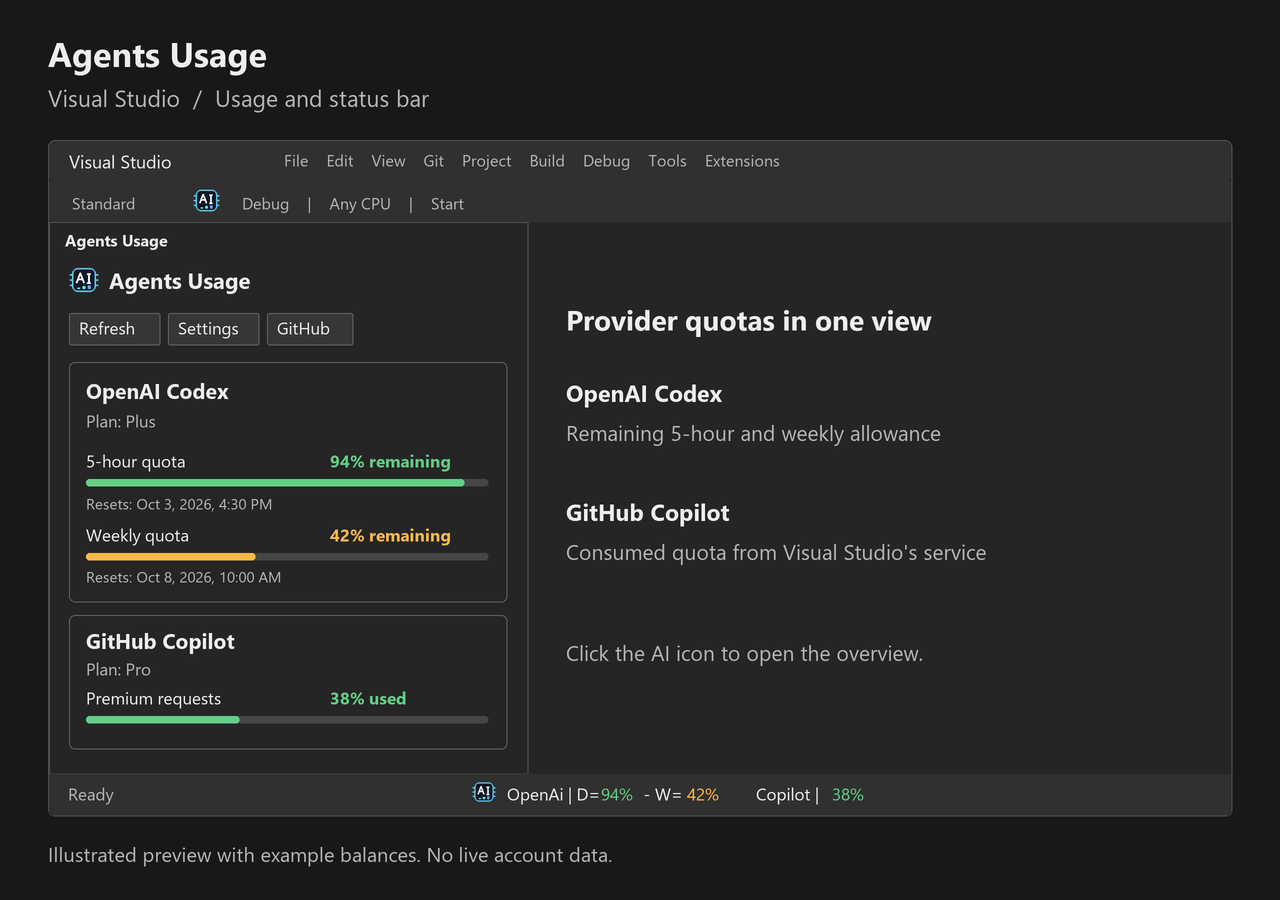
See provider-reported OpenAI Codex and GitHub Copilot quotas in a native Visual Studio tool window and the status bar.

Agents Usage overview and AI status indicators

Illustrated preview with example balances. Actual values depend on the signed-in provider account.

Features

  • OpenAI Codex: remaining 5-hour and weekly allowance, colored quota bars, subscription plan, credits and reset times.
  • GitHub Copilot: consumed allowance, plan and resets from Visual Studio's existing Copilot quota service. Free plans use included chat; paid plans use premium allowance when reported. AI credit billing and unlimited categories are identified explicitly.
  • AI icon: toolbar button, tool window icon and clickable status indicator opening the Usage overview.
  • Clear quota direction: OpenAI shows the remaining balance; Copilot shows consumption, from 0% unused to 100% exhausted. Missing quotas are unavailable, not estimated.
  • Refresh: manual refresh, background refresh and independent provider selection. Disabled providers are not read.
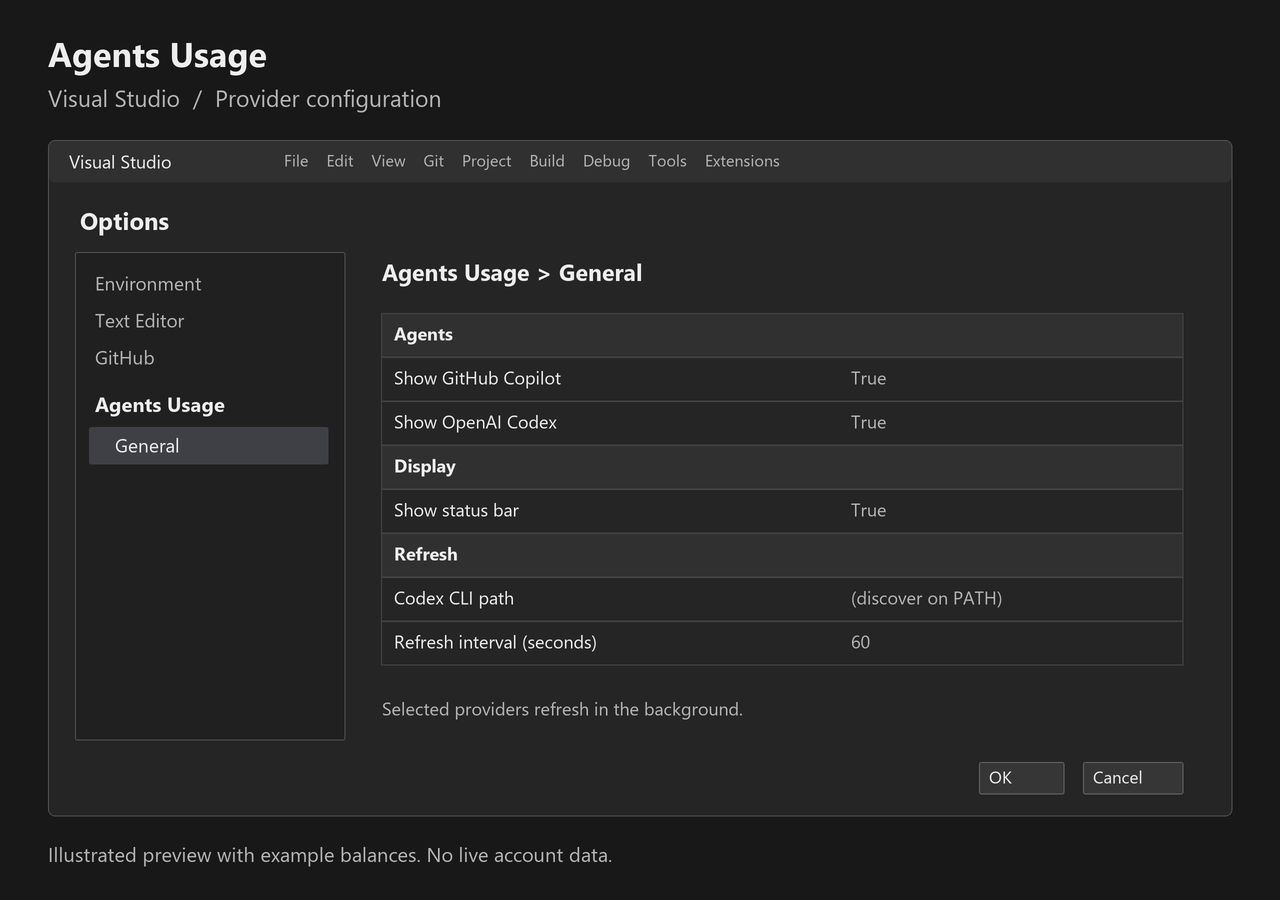
  • Configuration: provider selection, status display, Codex CLI path and refresh interval under Tools > Options > Agents Usage > General.
  • Project information: visible package version and GitHub repository link.

Compatibility and setup

For Visual Studio 2022 and 2026 Community, Professional and Enterprise on Windows x64.

Migration from 1.0.14 or earlier: uninstall the previous Agents Usage extension before installing 1.0.15. The deleted Marketplace listing's identity has been replaced; this is a new extension identity, not an automatic update. Keep only the new identity installed.

  1. Install the Visual Studio VSIX and complete the installer's instructions.
  2. Open View > Other Windows > Agents Usage, or click the AI button on the Standard toolbar.
  3. Use Settings to choose providers and configure refresh.
  4. Codex requires an installed CLI signed in with codex login. An empty CLI path uses PATH.
  5. Copilot requires a signed-in Visual Studio Copilot integration exposing quota data. Open Copilot once if the service is not loaded, then refresh. Older IDE/Copilot versions may not expose quotas.

Agents Usage provider and display configuration

Illustrated configuration preview. Settings use Visual Studio's native Options dialog.

Automatic refresh continues while the status indicator is enabled. With the status indicator disabled, automatic reads run only while the Usage window is visible. Copilot uses its existing connection without requesting a separate GitHub token. Credentials and prompt history are not read or logged, and usage is not estimated from local activity.

Provider APIs can change. The optional colored status indicator depends on Visual Studio's WPF shell layout. JetBrains AI is available in the JetBrains package. Choose the download containing visualstudio for Visual Studio; the vscode package is for Visual Studio Code.

Source and support

Source code • Report an issue • Release notes

This free, independent extension is not affiliated with or endorsed by OpenAI, GitHub, Microsoft or JetBrains. Provider subscriptions and allowances are determined by each provider.

  • Contact us
  • Jobs
  • Privacy
  • Manage cookies
  • Terms of use
  • Trademarks
  • Your Privacy Choices
  • Consumer Health Privacy
© 2026 Microsoft