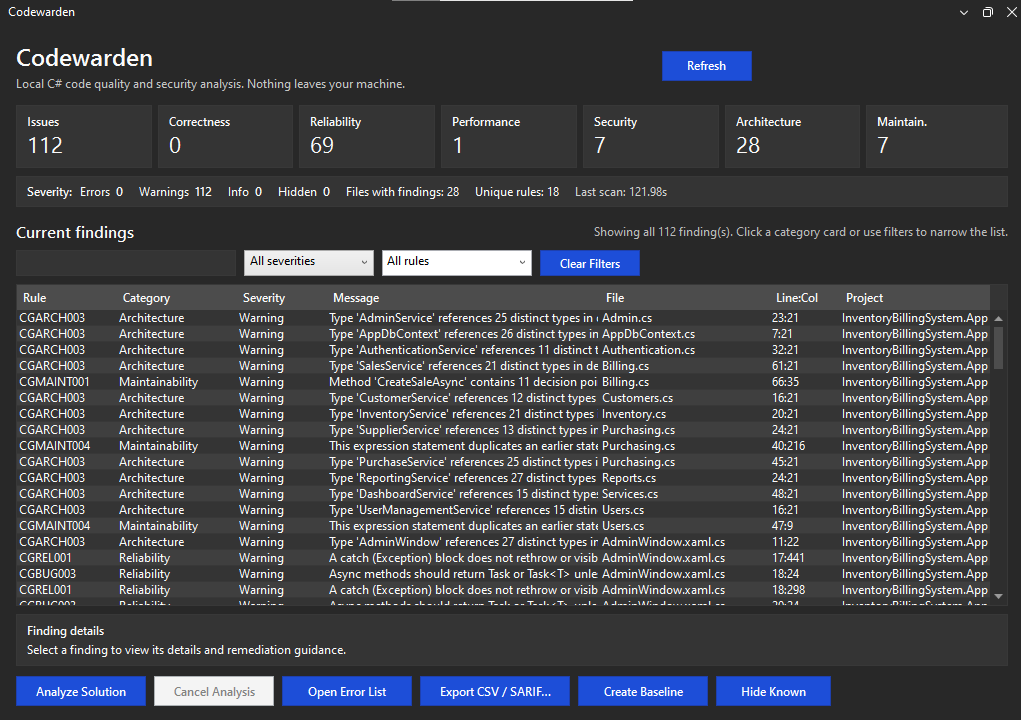
CodewardenLocal C# code quality and security analysis for Visual Studio. Run Roslyn-based checks across your solution, review findings in a themed dashboard, track only new issues with a shareable baseline, and |

Find issues. Track regressions. Improve code quality. ind code quality issues. Understand your risks. Track improvements. Build with confidence. Codewarden is a code quality and governance extension for Visual Studio 2022 that helps developers identify potential problems in their code, review analysis findings, monitor code quality, and track regressions over time. Instead of relying only on compiler errors, CodeGuard AI brings code analysis findings into a centralized dashboard, helping you understand where attention is needed and prioritize improvements before they become harder to manage. What Can Codewarden Do?
Analyze supported code patterns using CodeWarden's analyzer rules to identify potential defects, performance concerns, maintainability issues, and architectural risks.
View analysis results in one place instead of searching through scattered messages. Use the dashboard to review findings and understand which areas of your codebase need attention.
Review findings across supported categories, including performance, maintainability, reliability, and architecture. The available results depend on the analyzer rules and project content.
Establish a baseline and compare subsequent analysis results to help identify changes in your findings. This helps teams monitor whether code quality is improving or whether new issues are appearing.
Export analysis results in CSV and SARIF formats for reporting, record keeping, and integration with compatible code-quality workflows.
Use structured analysis findings and repeatable quality checks to support code reviews, technical debt management, and more consistent engineering practices. Who Should Use CodeWarden? C# and .NET developers who want greater visibility into code quality. Software architects who need to review architectural and maintainability concerns. Development teams tracking quality findings across repeated analyses. Technical leads who want reportable findings for code reviews and engineering governance. Independent developers who want a more structured approach to maintaining their projects. Why Choose CodeWarden? A centralized view of analysis findings. Multiple categories of code-quality checks. Baseline comparison for regression tracking. CSV and SARIF export support. A workflow designed to help developers prioritize code-quality improvements. How It Fits into Your Workflow Install CodeGuard AI in Visual Studio 2022. Open your supported solution or project. Run the available analysis workflow. Review findings in the CodeGuard AI dashboard. Compare results with your baseline and export reports as needed. Investigate findings and apply appropriate corrections in your code. Our Goal CodeWarden aims to make code quality more visible, measurable, and manageable—helping developers move from discovering problems to making informed engineering decisions. CodeWarden — Guard your code. Improve your quality. Build with confidence. Compatibility and available analysis rules depend on the installed version and supported project types. CodeWarden complements, rather than replaces, compiler diagnostics, testing, code review, and security assessment.
|