Skip to content
| Marketplace
Sign in
Visual Studio>Tools>Git Sentinel
Git Sentinel

Git Sentinel

Joao Figueiras

|
2 installs
| (0) | Free
Predict Git problems before they happen. Spot commit risks, forecast merge conflicts and protect commits and pushes inside Visual Studio 2026.
Download

Git Sentinel

Git Sentinel for Visual Studio 2026


Predict Git problems before they happen.

Predict. Prevent. Push.

Git Sentinel is your proactive Git companion for Visual Studio 2026. It continuously examines your repository, identifies potential problems, and helps you take action before they disrupt your workflow.

Catch a forgotten file before committing. Discover a merge conflict before merging. Spot risky changes before pushing.

No second Git client. No cloud AI. Just practical, actionable Git intelligence, right inside your IDE.


Know what needs your attention

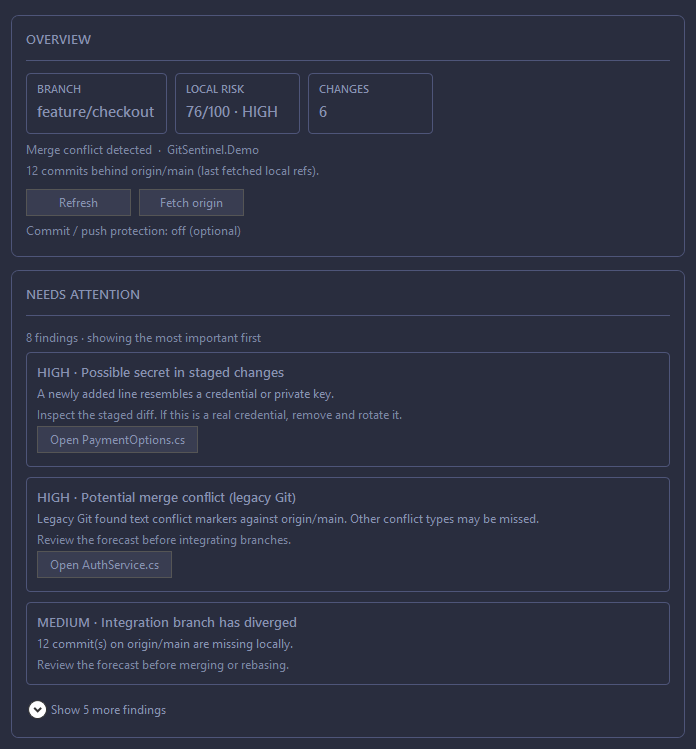
Open Git Sentinel and get a clear picture of your repository without digging through Git commands or switching tools.

  • Overview — See your current branch, local changes, synchronization status and risk index.
  • Needs Attention — Focus on the most important findings, understand why they matter and discover what to do next.
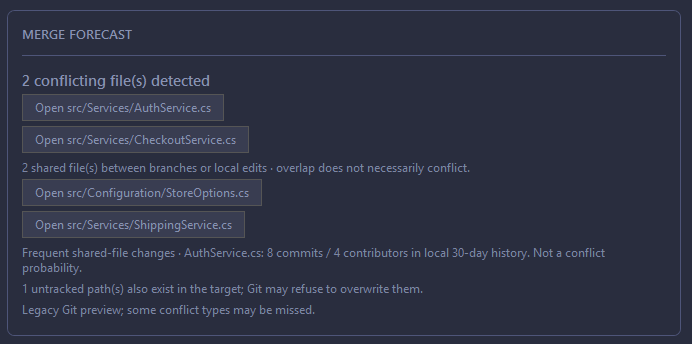
  • Merge Forecast — See confirmed conflicts and potential integration problems before you merge.

Secondary tools stay out of the way until you need them.

Predict. See conflicts before they happen.

Git Sentinel uses Git itself to simulate a merge between committed branch tips, without changing your working files. It also looks for situations that a committed merge alone cannot reveal:

  • Files and regions of code changed on both branches.
  • Uncommitted changes that overlap with the integration branch.
  • Untracked files that could get in the way of integration.
  • Frequently modified files and their recent contributor activity.

Confirmed conflicts are clearly distinguished from potential risks. On older Git versions, a limited text-based preview is available instead of a full modern merge simulation.

Forecasts use locally available Git references. Unfetched remote commits are not visible, and uncommitted changes are assessed separately.

Git Sentinel

Prevent. Catch risky changes early.

The Risk Engine checks your repository and staged changes for common problems, including:

  • Possible exposed credentials and sensitive files.
  • Temporary debugging statements and unfinished TODO/FIXME/HACK markers.
  • Unresolved conflicts, leftover merge markers and whitespace errors.
  • Partial staging and related files that may have been forgotten, such as tests or dependency lockfiles.
  • Branch divergence, missing upstream configuration and potentially outdated remote information.

Each finding explains the issue and suggests a next step. Open flagged files in the editor, review related changes, or stage an individual suggested file after confirmation.

The risk index is an explainable heuristic, not a prediction of the statistical probability of failure. Findings are suggestions for review, not guarantees that code is correct or secure.

Git Sentinel

Push. Add an extra layer of protection.

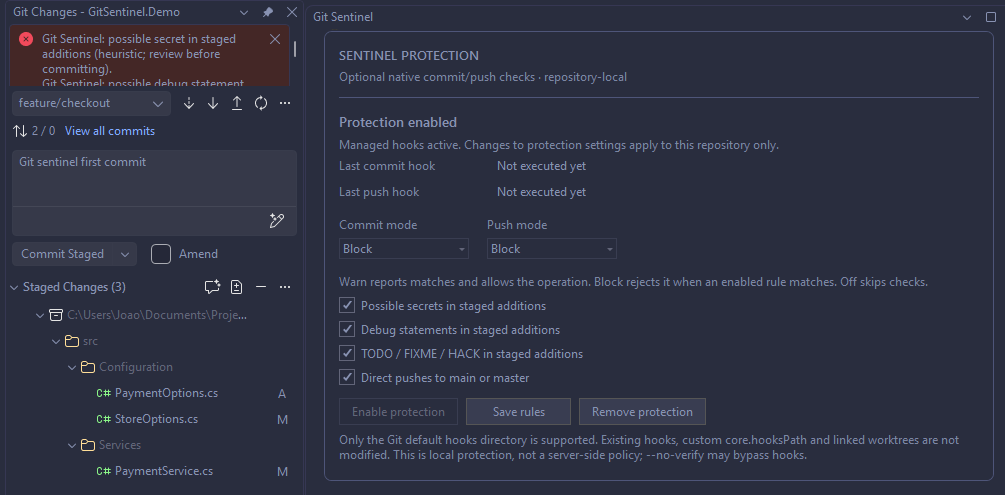
Review commit and push risks with read-only preflight checks. For additional protection, enable optional repository-local Git hooks and choose how they respond to selected rules:

Mode Behavior
Off Protection checks are disabled.
Warn Findings are reported, but the operation may continue.
Block The operation is stopped when an enabled rule is triggered.

Protect against common staged-code risks and direct pushes to main or master. Hook installation is opt-in and will not overwrite existing hooks or custom hook paths. Protection can be removed at any time.

Local hooks are not a replacement for server-side policies and may be bypassed in certain Git workflows.
Git Sentinel

Stay in your flow

Worktrees and workspace profiles

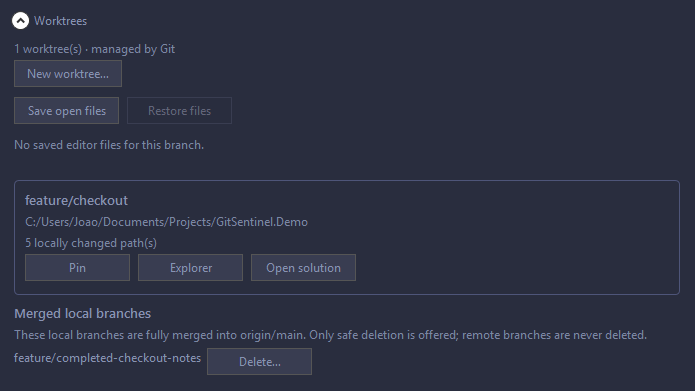
Work on another feature or investigate an urgent issue without constantly disrupting your current checkout.

Create and manage Git worktrees, pin favorites, open them in Explorer or Visual Studio, and remove clean worktrees safely. Save your open editor documents and restore them later, including the active document and cursor positions where supported.

Git Sentinel can also identify fully merged local branches for safe cleanup, with confirmation and a fresh ancestry check before deletion.
Git Sentinel

Activity and risk trends

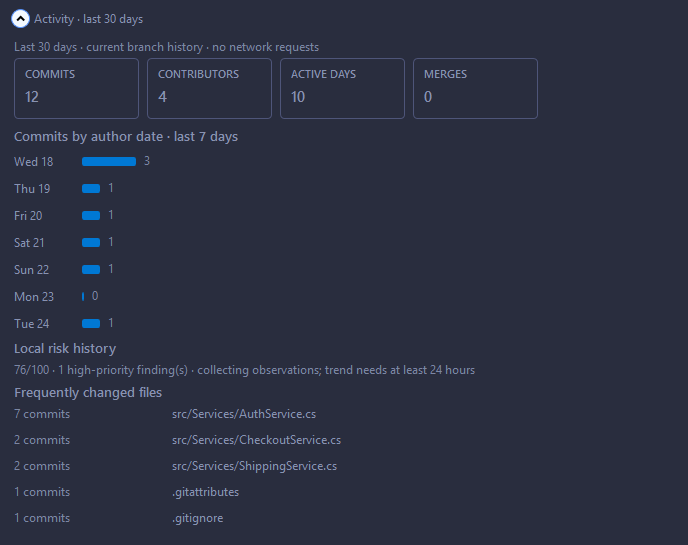
Understand how your repository evolves through recent commit activity, contributors, merges and frequently changed files. Follow the local risk trend for your current branch as observations accumulate.
Git Sentinel

Azure DevOps integration

For supported Azure Repos cloud remotes, connect your Azure DevOps account with a read-only personal access token (PAT) to bring relevant pull request, build and work item information into your Git workflow.

Open associated items directly in Azure DevOps without searching for them manually. This integration is optional, requires network access and depends on token permissions and available repository data. Credentials are protected locally using Windows encryption.


Designed for your existing Git workflow

  • Native Visual Studio experience. A compact tool window with theme-aware controls.
  • Local-first analysis. Core Git intelligence works offline using your local repository; no cloud AI service is required.
  • Background processing. Asynchronous, cancellable analysis designed to stay out of your way.
  • You stay in control. No automatic fetch, pull, push, staging, branch deletion or hook installation.
  • Privacy-conscious. No telemetry. Personal workspace preferences and bounded risk-history aggregates are stored locally.

Git Sentinel complements Visual Studio's built-in Git tools. It does not replace Git Changes, Git History, the diff viewer or the merge editor.

Getting started

  1. Install Git Sentinel from the Visual Studio Marketplace.
  2. Open a solution inside a Git repository.
  3. Select Tools → Git Sentinel.
  4. Review Needs Attention and Merge Forecast as you work.

Git Sentinel automatically follows the open Git-backed solution. Additional repository options, protection settings, worktrees and activity are available in the tool window when needed.


Less guesswork. Fewer surprises. More confidence in every commit.

Predict. Prevent. Push.


  • Contact us
  • Jobs
  • Privacy
  • Manage cookies
  • Terms of use
  • Trademarks
  • Your Privacy Choices
  • Consumer Health Privacy
© 2026 Microsoft