OpenCode Studio
The OpenCode AI coding agent, natively inside Visual Studio.
A fast, self-contained tool window with a built-in usage dashboard, a first-run import wizard and shared chat history. Works with Visual Studio 2022 and 2026.





Preview
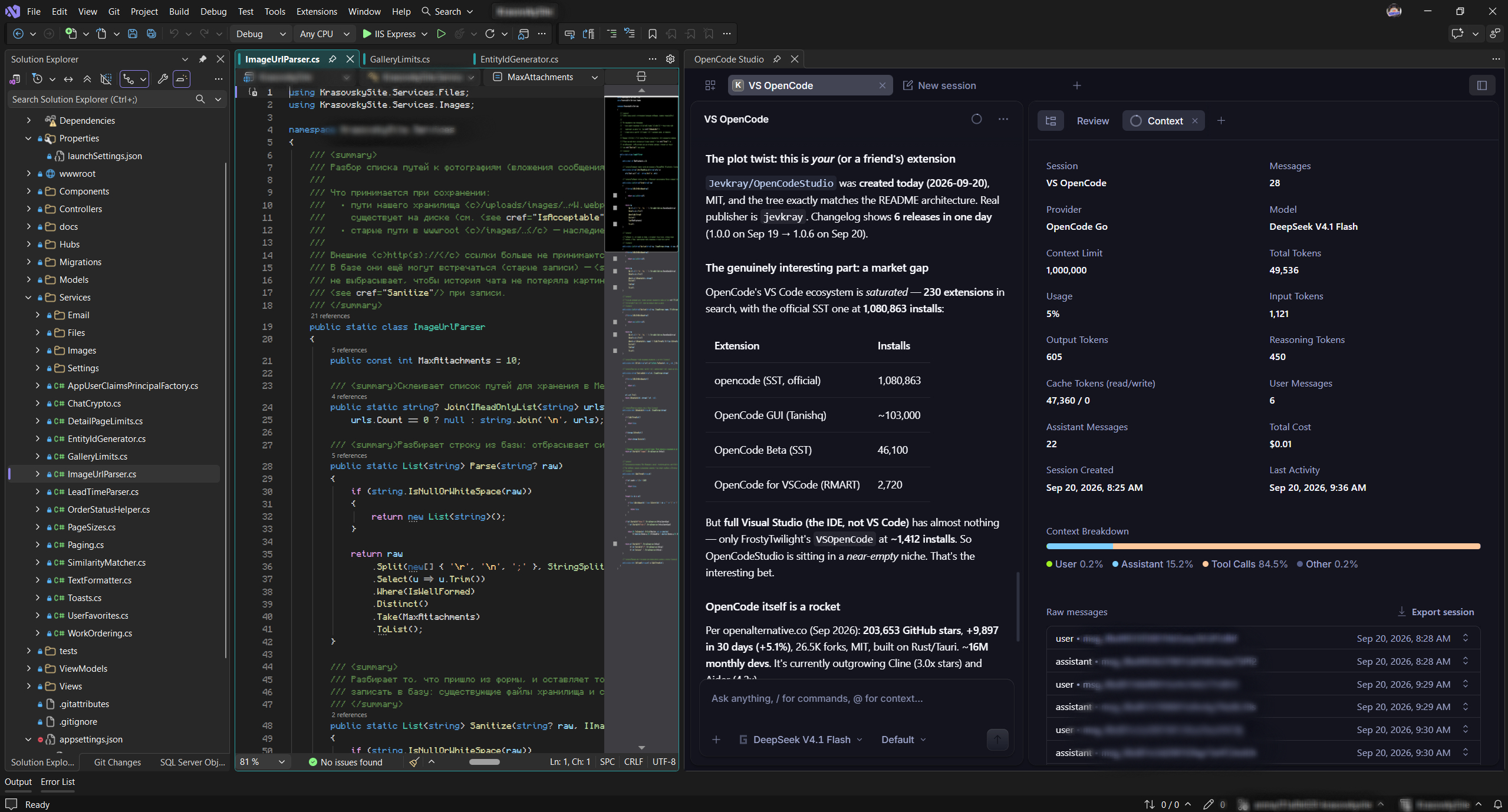
OpenCode Studio inside Visual Studio: the agent chat next to your solution, with the session panel showing model, provider, token usage, cost, last activity and the context breakdown.
Overview
OpenCode Studio embeds the full OpenCode web interface into a Visual Studio tool window using WebView2. Unlike a proxy-based integration, it points the browser straight at the OpenCode server that it launches itself - fewer moving parts, fewer bugs, and it stays in sync with every OpenCode release.
It shares the same data environment as the OpenCode CLI and desktop app, so your providers, settings, credentials and chat history are the same everywhere. Everything runs locally on 127.0.0.1. No account, no telemetry, no data leaves your machine.
What's new
- 1.0.10 - Polished documentation, contacts and a history-sync guide.
- 1.0.9 - Opens the web UI home so all projects and chats are visible; stable server port; no more auto-created empty sessions.
- 1.0.8 - Fixed chat history loading (correct project-directory encoding + explicit UTF-8).
- 1.0.7 - Chat history syncs with the CLI and desktop app; multiple Visual Studio windows share one OpenCode server.
- 1.0.6 - New brand and icon set; first-run import wizard.
Features
- Native web UI - the complete OpenCode interface (projects, sessions, tabs, themes) rendered directly, without a shim or injected scripts.
- Shared history - the same data as the CLI and desktop app, so every chat is available everywhere and across multiple Visual Studio windows.
- All chats visible - opens the web UI home, listing every project and session like the desktop app.
- Per-project sessions - detects your solution / Git root and remembers the last project, so history never appears to reset.
- Session details - model, provider, token usage, cache read/write, cost, last activity and a context breakdown, right inside Visual Studio.
- Usage dashboard - cost, tokens, requests and OpenCode-style charts with live refresh.
- First-run import wizard - detects every OpenCode installation and imports settings, themes, credentials and chat history in one click.
- Auto-reconnect - restores the session by itself if the server drops.
- File logging - diagnostics in
%LOCALAPPDATA%\OpenCodeStudio\logs\opencode-studio.log.
- Visual Studio 2022 & 2026 - one VSIX for both.
Getting started
View   -> Other Windows -> OpenCode Studio      (the agent)
Tools  -> OpenCode Studio Usage Statistics     (cost & tokens)
Tools  -> OpenCode Studio Import Settings...   (setup wizard)
Requirement: the OpenCode CLI must be installed and available on your PATH.
Syncing chat history
OpenCode stores every session against the project directory it was created in. OpenCode Studio shares the same data environment as the CLI and desktop app, so all chats are already available - but grouped by project path.
If a project lives at a different absolute path than when its chats were created (another drive, another user name, a moved or renamed folder), those sessions stay grouped under the original path. To bring the full history together:
- Open each project at the same absolute path it originally used.
- If the path changed, move the project back, or import the old data via Tools -> OpenCode Studio Import Settings... pointing at the folder with the original
opencode.db.
- Reopen the tool window - the sessions appear under the matching project.
Once the project paths line up, all chats synchronize between the CLI, the desktop app and every Visual Studio window.
Usage statistics
Open Tools -> OpenCode Studio Usage Statistics for a local dashboard built from the OpenCode API:
- KPI cards - total cost, tokens, sessions and requests.
- Cost by day - a smooth area chart.
- Tokens by type - input / output / reasoning / cache in a donut.
- Cost by model and cost per request for the current session.
- Session table with model, agent, tokens and cost.
Privacy
OpenCode Studio is local-first:
- the server binds to
127.0.0.1 only;
- credentials are stored by OpenCode itself in your own environment;
- the extension sends no telemetry and has no analytics;
- the usage dashboard reads from your local server.
License
Released under the MIT License.

