Skip to content
| Marketplace
Sign in
Visual Studio>Tools>Properties and Events Search Bar
Properties and Events Search Bar

Properties and Events Search Bar

Jean Knapp

|
4 installs
| (0) | Free
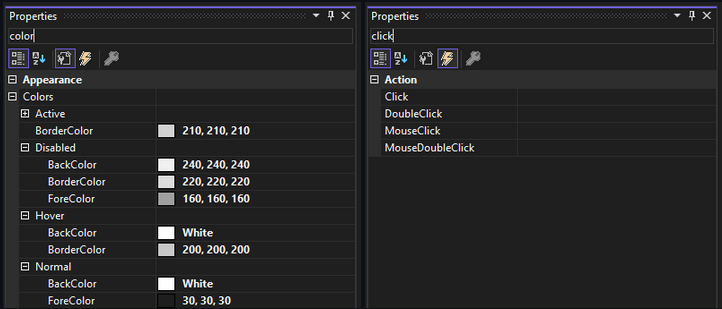
Adds a search bar to the top of the Properties window so you can filter properties, and filter events in the Events view.
Download

Adds a live search bar to the top of Visual Studio's Properties window, so you can quickly filter down long property and event lists on any WinForms designer surface. No more scrolling through dozens of rows to find the one you need.

image__1.png

Features:

  • Instant filtering: Sype to filter properties (or events, in the Events view) by name, display name, or category, updating as you type.
  • Works with nested/expandable properties: Searching a name buried inside an expandable property (like a Font or Colors sub-object) still surfaces the parent row, at any nesting depth.
  • Fully theme-aware: The search bar matches your current Visual Studio color theme automatically, including live theme switches.
  • Non-intrusive: when the search box is empty, the Properties window behaves exactly as stock VS does; nothing is modified or cached differently.

Supports Visual Studio 2022 and 2026 (WinForms designer). Simply open the Properties window on any WinForms component and start typing.

  • Contact us
  • Jobs
  • Privacy
  • Manage cookies
  • Terms of use
  • Trademarks
© 2026 Microsoft