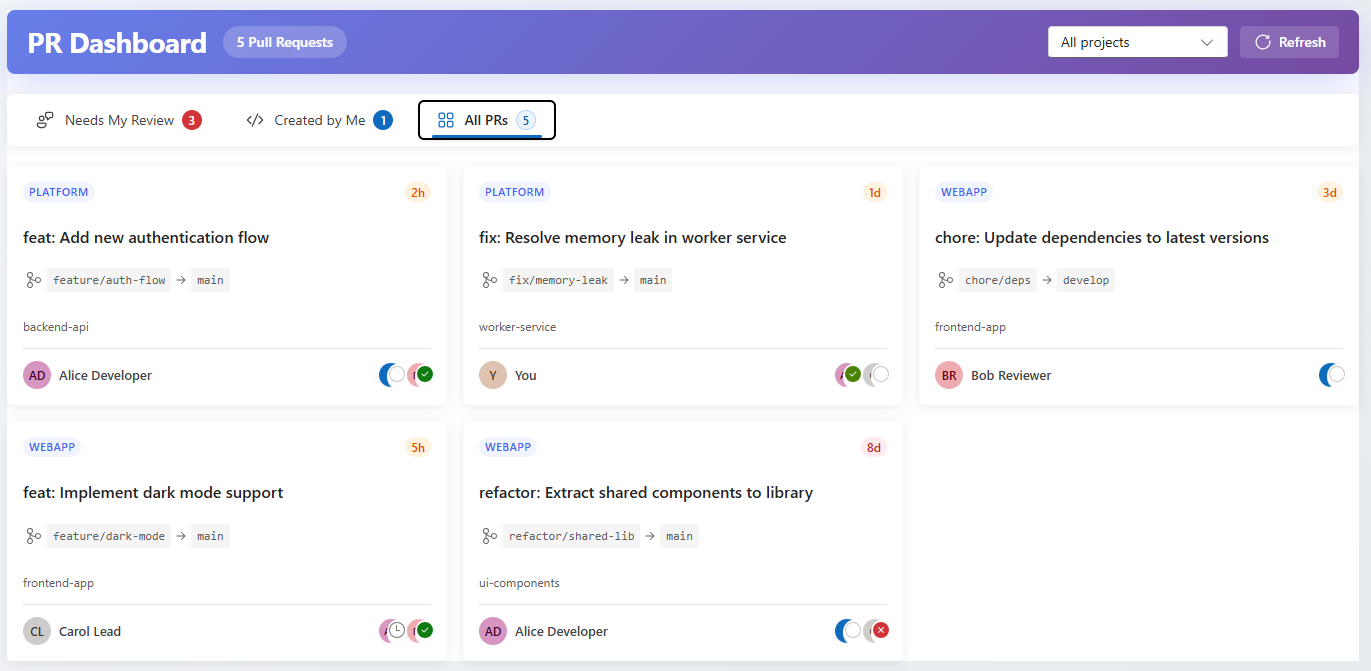
A modern, cross-project pull request dashboard for Azure DevOps that gives you a unified view of all your pull requests across multiple projects and repositories.
Features
Cross-project overview - See pull requests from all your projects in one place
Smart filtering - Filter by project, or view all projects at once
Three convenient views:
Needs My Review - PRs waiting for your review
Created by Me - Your own pull requests
All PRs - Complete overview of all active PRs
Real-time status - See reviewer votes and approval status at a glance
Quick navigation - Click any PR to open it directly in Azure DevOps
Progressive loading - PRs appear as they load for faster initial display
Screenshots
Getting Started
Install the extension from the Azure DevOps Marketplace
Navigate to Azure Repos in your project
Click on Pull Request Dashboard in the hub menu
Select a project from the dropdown or choose "All projects"
Privacy
This extension only accesses data within your Azure DevOps organization. No data is sent to external servers.
Feedback & Support
Found a bug or have a feature request? Please report issues at our GitHub repository: