CheckoutAndBuild
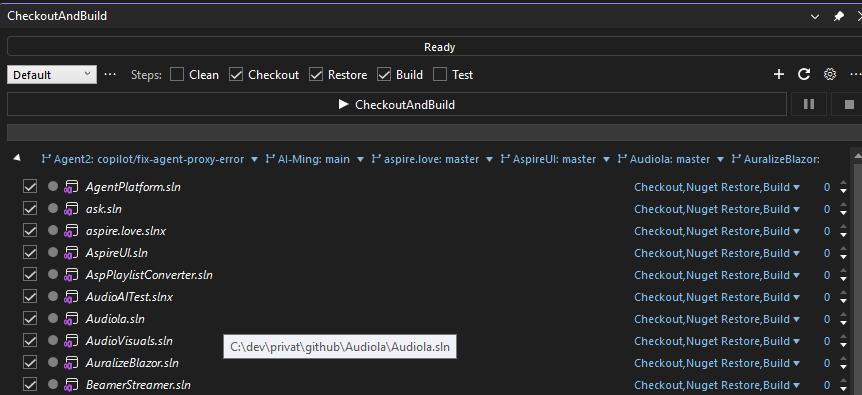
Local one-click CI for Visual Studio: keep any number of solutions up to date with a single click — clean, git checkout, NuGet restore, build and test, all out of process and in parallel.
Why
You work with many solutions and repositories at once. Keeping them all current means pulling, restoring and building each one by hand. CheckoutAndBuild does it in one run: pick your working folders, tick the pipeline steps, press one button.
Features
Pipeline
- Clean → Checkout (git pull) → NuGet restore → Build → Test for every included solution
- Solutions with the same priority build in parallel; priority groups run in order
- Dependency scan suggests the build order automatically (referenced solutions build first)
- Live status bar with elapsed time and ETA, per-solution progress, "retry failed only"
- Build errors and test failures land in the Visual Studio Error List (double-click jumps to code)
- Export the configured pipeline as a
.bat or .ps1 script
- Scheduled runs (morning build), balloon notification when a run finishes in the background, taskbar progress
- Working profiles, per-branch settings, per-solution overrides, MEF plugin API
Git cockpit
- Changes with VS diff, stage/unstage, commit & push, patch export/apply, zip export
- Stashes, history with filters and per-file follow, branches with ahead/behind badges
- Multi-repo sync (fetch/pull/push all), same-branch checkout across all repositories, merged-branch cleanup, pull-request links
- Full worktree manager: list, add, remove, prune — plus worktree switching from the main window
Azure DevOps
- Work item query view and text search & replace across work item fields (REST, PAT auth)
Getting started
- Install the extension, restart Visual Studio
- View → Other Windows → CheckoutAndBuild
- Add your working folders — solutions are discovered automatically
- Pick the steps and press CheckoutAndBuild
Settings live in %AppData%\COAB\settings.json and can be exported/imported.
Requirements
- Visual Studio 2022 or 2026 (amd64)
- git on PATH
Links
| |

