This extension contains build tasks for Microsoft Dynamics 365 Finance and Operations.
Available tasks
Build summary task
Execute best practices checks task
Analyze build quality task
Build summary task
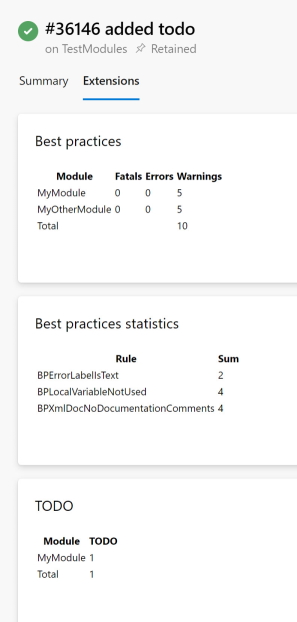
Generates a build quality summary based on compiler and best practice logs.
It's listing up:
Number of best practice violations per module
Number of best practice violations per rule
Number of todo's per module
It's looking for files with pattern *.xppbp.xml for best practice logs and *.xppc.xml for compiler logs
Results are shown in the build results as an extensions tab:
Parameters
Directory: Directory where log files are located
Filter pattern to skip modules: module mask to exclude from summary
Execute best practices checks task
Executes the best practice checks with various possibilities to enable certain rules or to run a given rule file.
Parameters
Metadata path: root folder of the metadata, so where the modules can be found
Log path: Directory where log files are located
Filter pattern to skip modules: module mask to exclude from summary
Generate CAR: Generates the CAR report, output in Logs/CAR directory
Execute all rules: Runs all rules independent of the rules configured per module (removes the AxRuleSet/BPRules.xml file in every module folder)
Override rule file: Path to a rule file. Runs the given rules of the rule file independent of the rules configured per module (copies the rules files to AxRuleSet/BPRules.xml in every module folder)
Advanced Options (hosted agents)
Framework directory: folder where the framework binaries can be found (like xppbp.exe) depending on your nuget install, for example $(NuGetsPath)\$(ToolsPackage)
Reference directories: folders used as a reference (like standard finance and operations application suite or platform), for example $(NuGetsPath)\$(PlatPackage)\ref\net40;$(NuGetsPath)\$(AppPackage)\ref\net40;$(MetadataPath);$(Build.BinariesDirectory)
Analyze build quality task
Examines the compiler and best practice logs and fails the build if needed.
This task can force a build to not have compiler and/or best practice violations and/or open tasks.
Parameters
Check best practices: checks the best practice logs/compiler logs for best practice warnings/errors/infos
Check Todo's: checks the compiler logs for todo's'
Check compiler warnings: checks the compiler logs for compiler warnings
Log folder: Directory where log files are located
Filter pattern to skip modules: module mask to exclude from analysis