TestRail for Azure DevOpsEmbed TestRail quality data directly inside Azure DevOps work items. View linked test cases, test runs, and test results without leaving Azure DevOps. Features
Setup
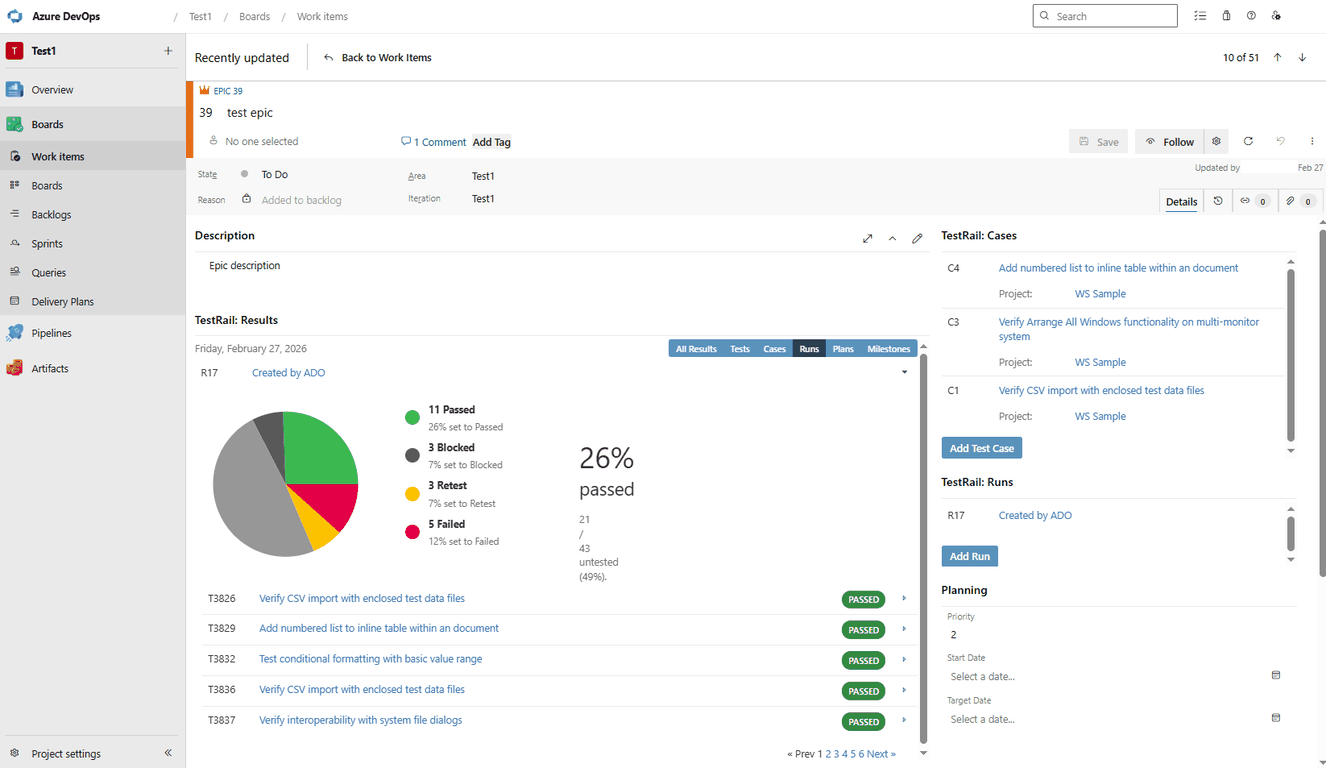
UsageOnce configured, open any work item in Azure DevOps. You will see TestRail panels in the work item form displaying linked test cases, runs, and results. The panels automatically load data based on the work item's ID matched against TestRail reference fields. Check our TestRail Support Center documentation for more info. Requirements
FAQsQ: How is this different from the existing TestRail integration for Azure DevOps?The existing TestRail integration for Azure DevOps is designed for QA teams working inside TestRail, allowing them to see work items, link to user stories, and track requirement status directly inside TestRail. The Azure DevOps Marketplace App is designed for teams working in Azure DevOps: developers, project leads, and release managers who work in Azure DevOps can see TestRail test coverage inside their own environment, without switching tools. The two integrations complement each other by providing visibility in both platforms — one brings Azure DevOps data into TestRail, the other brings TestRail data into Azure DevOps. Q: What do I need to use this app?You need an active TestRail account (Cloud or Server) and an Azure DevOps Cloud organization. The app is configured by an Azure DevOps admin, who will connect it to a TestRail instance using an API token. Individual Azure DevOps users viewing TestRail coverage data inside work items will need a valid TestRail license. Q: What can I do with the app once it's installed?Three things: link TestRail test cases to Azure DevOps user stories and requirements for full traceability; create Azure DevOps bugs directly from TestRail test results, with test context pre-filled and status syncing back; and view a read-only coverage panel inside Azure DevOps work items showing linked test cases, run history, and latest pass/fail status. Q: Does this work with TestRail Cloud and TestRail Server?Yes. The app supports both TestRail Cloud and TestRail Server on the TestRail side. On the Azure DevOps side, the app is currently available for Azure DevOps Cloud. Support for Azure DevOps Server is planned for a future release. Q: Is there an additional cost?The Marketplace App itself does not require a separate purchase nor a specific license purchase on Azure DevOps. It is available as an integration capability for TestRail customers. Azure DevOps users who need to view TestRail data inside Azure DevOps must have an active TestRail license. Q: How is the connection between TestRail and Azure DevOps secured?The app uses encrypted API token authentication. Configuration is restricted to Azure DevOps administrators. Tokens can be rotated, and the integration supports project-level mapping so you control which Azure DevOps projects connect to which TestRail projects. The app is certified by Microsoft through the Azure DevOps Marketplace. Q: How long does setup take?Most teams are up and running in under 15 minutes. An Azure DevOps admin installs the app from the Marketplace, connects it to the TestRail instance, authenticates, and maps projects. No data migration is required — your existing TestRail test cases, runs, and results are available immediately after setup. A full step-by-step guide is available in the TestRail support docs. Q: Where can I get help if something isn't working?Visit the TestRail support portal for setup documentation, troubleshooting guides, and to open a support ticket. Screenshots
|