EvoTimeLog — Time Tracking & Resource Management for Azure DevOps
EvoTimeLog is a premium, secure, and native time tracking solution built specifically for Azure DevOps Boards. Keep your teams focused and your project metrics precise with direct integration into your Work Items.
No context switching, no external portals for daily logging.
🎯 Key Features with Visual Guide
1. 📅 Monthly Timesheet Calendar
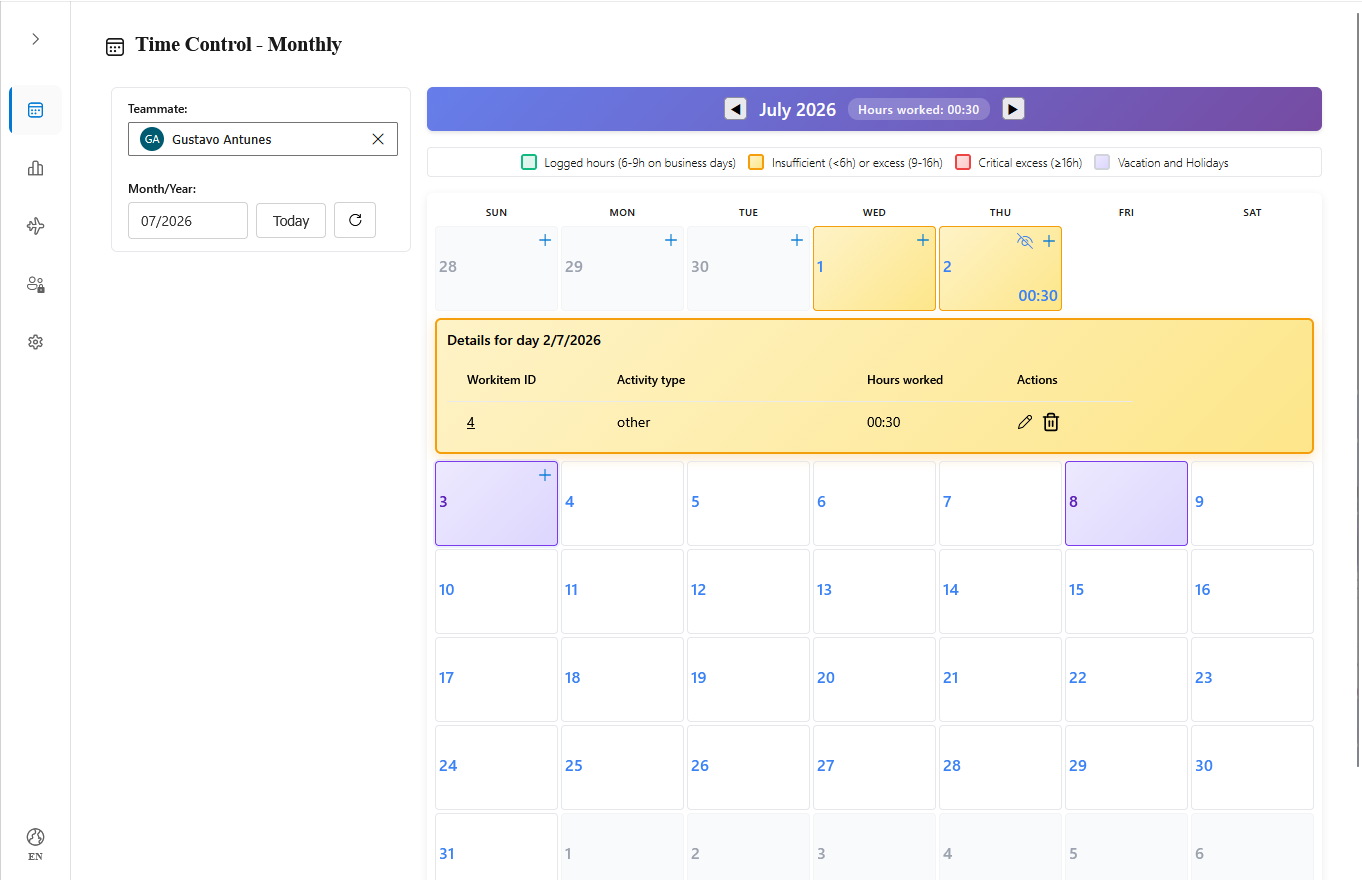
View and manage your entire month of work in one place. The intuitive calendar view displays daily totals, registration details, and allows adding, editing, or deleting entries in seconds.
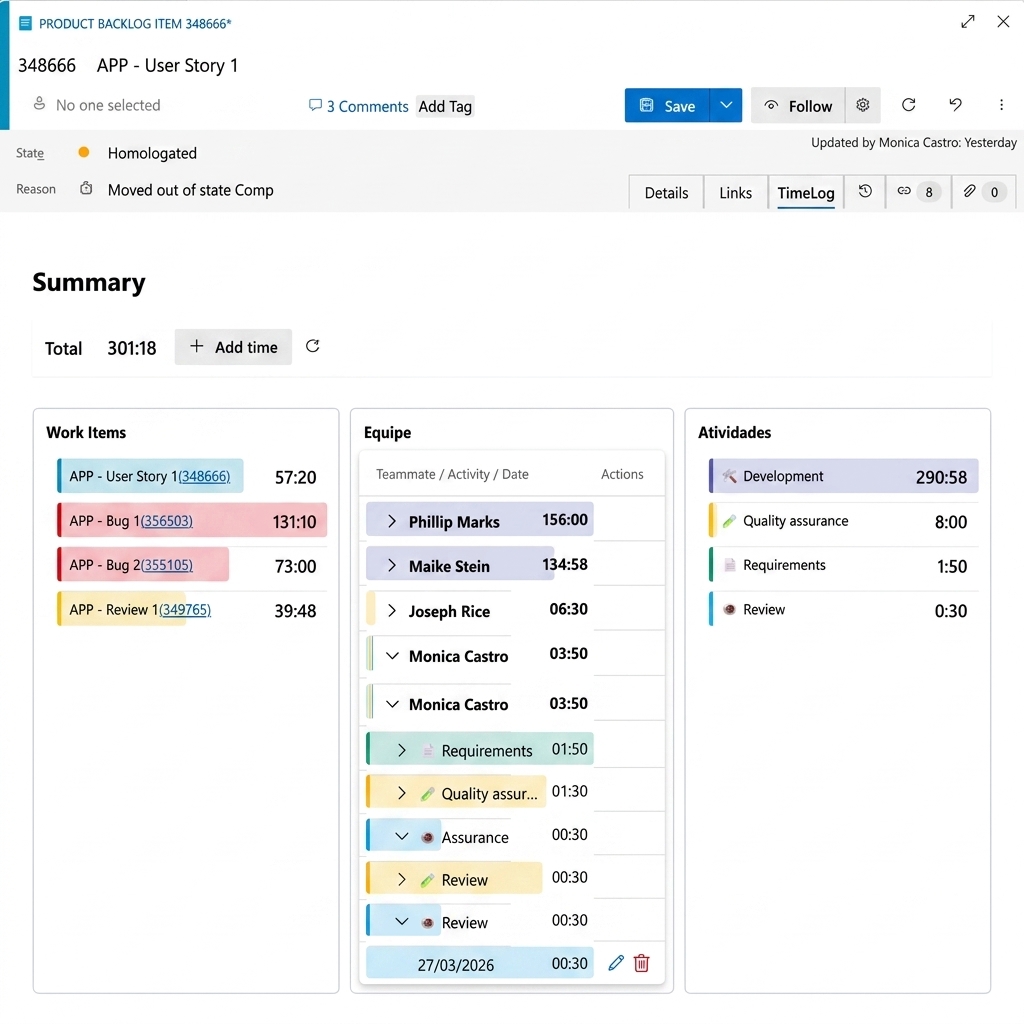
Log time directly inside your Azure Boards task cards. EvoTimeLog adds a native "Hours" tab on supported Work Item forms (Epic, Feature, User Story, Task, Bug, etc.) for streamlined daily updates.
3. ➕ Quick Time Registration
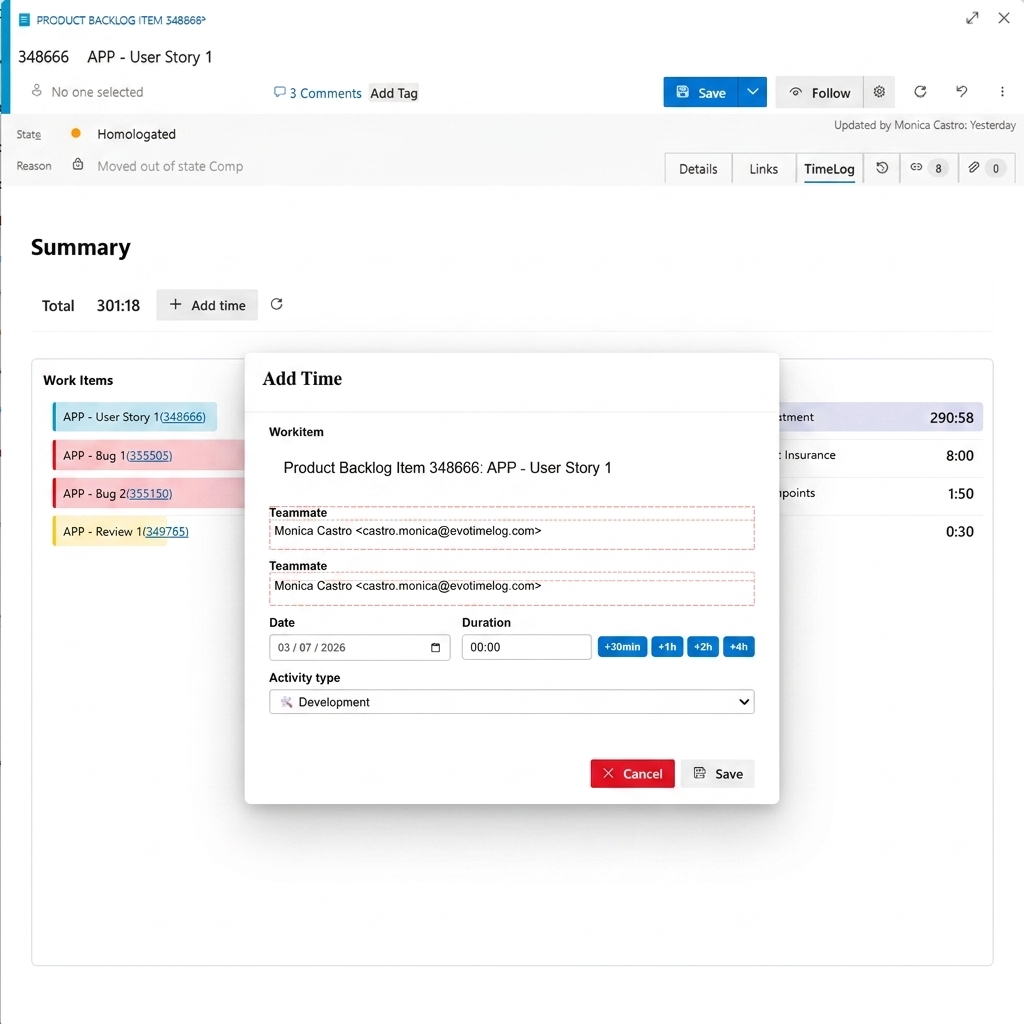
Start timers (Play/Pause) or log work manually with precise classifications (e.g., Development, Code Review, Meeting) and custom notes.
4. 📊 Team Reports & Dashboard
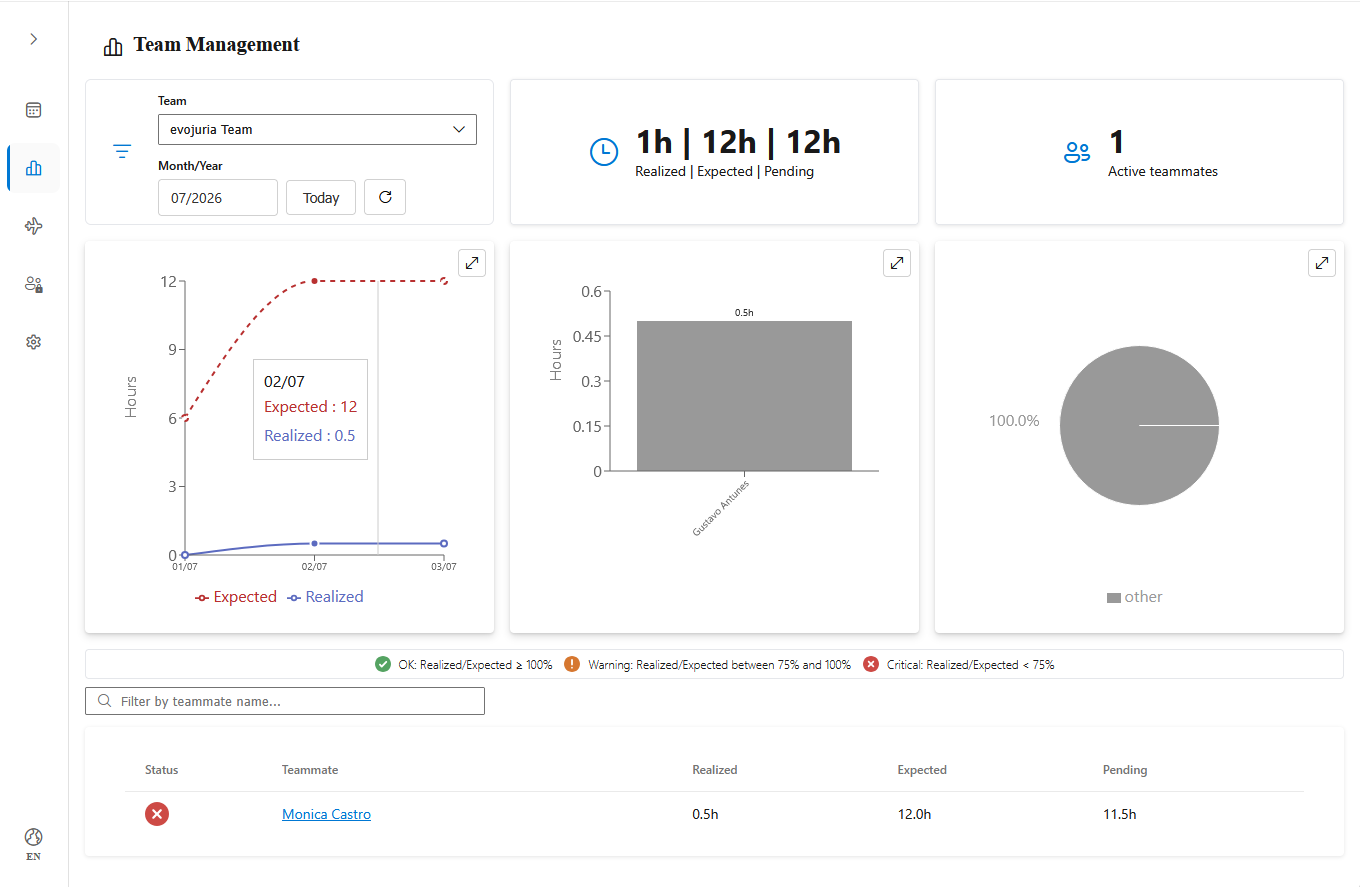
Managers can track team productivity, review timesheets, and export raw data to CSV or Excel for billing and audits.
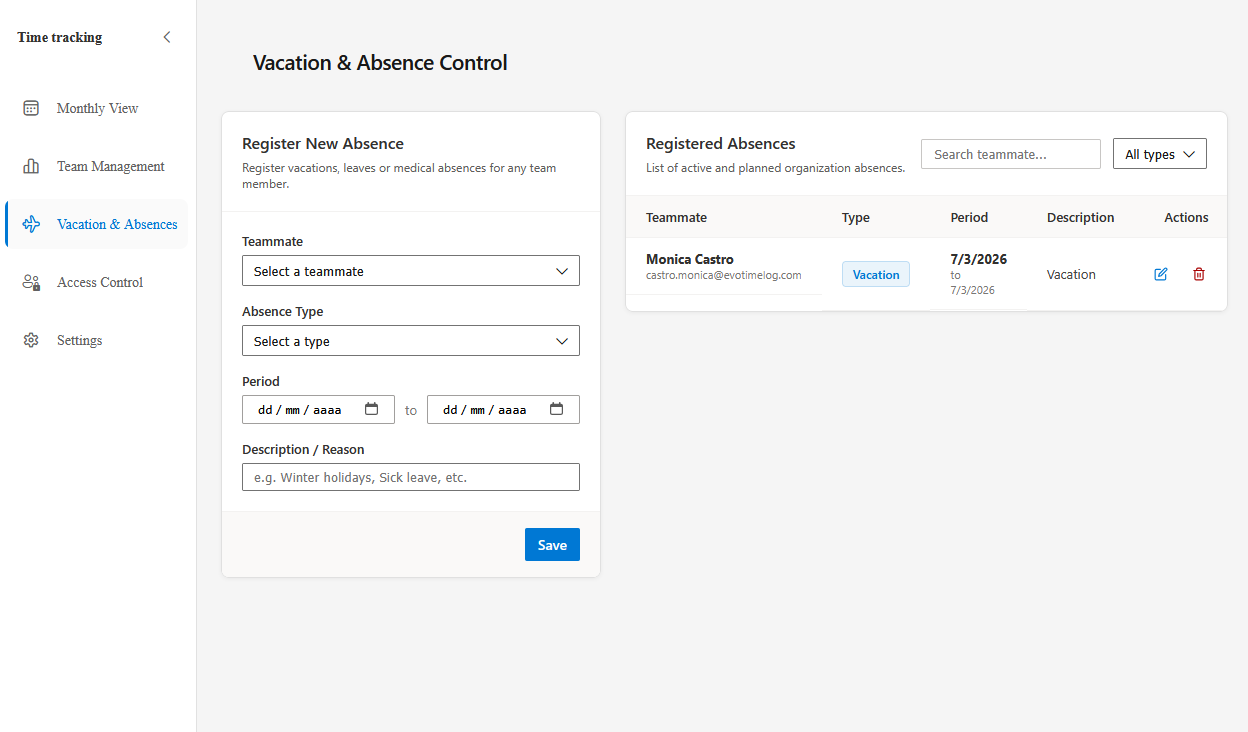
5. 🌴 Absence & Vacation Tracking
Plan capacity and track leaves or holidays directly in the tool, keeping project planning synchronized with actual team availability.
6. ✅ Timesheet Approval Workflow
Managers and approvers can review, approve, or reject submitted time entries by day or period. Ensure budget compliance, maintain audit trails, and get full visibility into team hours before they are finalized.
- Individual or Bulk Approval — approve entries one-by-one or select multiple at once.
- Budget Control — set budget thresholds per project and get alerted on overruns.
- Rejection with Reason — rejected entries include a reason so teammates can correct and resubmit.
- Approver Role — a dedicated role with all Manager privileges plus approval capabilities.
7. 🔀 Log Hours Straight from Your Git Commits
Stop retyping what you already wrote. Put the work item and the time in the commit message and EvoTimeLog turns it into a draft entry, waiting for you in the extension.
#1234 2h30 [Dev] fix login validation
- Azure Repos and GitHub — connect each repository with a webhook; setup is guided step by step inside the extension.
- Review before it counts — commits become drafts, never direct entries. Turn on automatic mode per organization once your team trusts the convention.
- Flexible duration formats —
2h, 2h30, 90m, 1.5h, 0:45 all work.
- Activity type in any language —
[Development], [Desenvolvimento], [Desarrollo], or just [Dev]. Accents are optional.
- Merge several commits into one entry — a day split across six small commits becomes a single, honest timesheet line.
- Safe by design — merge commits are skipped, redelivered events never duplicate an entry, and unknown commit e-mails wait in an admin queue instead of being silently dropped.
🔧 Automatic Fields Synchronization
Keep your Azure Boards metrics up to date. EvoTimeLog automatically updates native scheduling fields on your Work Items based on logged hours:
- Completed Work
- Remaining Work
- Original Estimate
🔭 In Development
The features below are being built and are not available yet. Administrators will be notified in the extension as soon as each one ships.
🔌 REST API for Data Queries
Bring your EvoTimeLog data into the tools your organization already uses — BI dashboards, billing systems, ERPs, or internal reports — without exporting spreadsheets by hand.
- Read your organization's data — time entries, users, activity types, and approval status.
- Filter by period, person, and work item — pull exactly the slice you need instead of the whole history.
- Token-based access, scoped to your organization — issued and revoked by an administrator under Settings → API Rest, independent of any individual user account.
💳 Pricing Plans & Licensing
EvoTimeLog is free to get started, with flexible plans tailored to teams of all sizes. The Pro plan is free during the extension's beta phase.
Perfect for small teams and developers starting out.
- Price: $0 (Free forever)
- Capacity: Up to 5 active users per organization.
- Limit: Up to 150 logged time entries per month.
- Features: Core monthly timesheet, Work Item form integration, and standard activity types.
2. Pro Plan
For growing teams that require unlimited tracking and advanced project metrics.
- Price: $0 (during the extension's beta phase).
- Note: After the official release, administrators will be notified and a 28-day trial period will be unlocked.
- Capacity: Unlimited active users and teams.
- Limit: Unlimited time entries.
- Features: Core features + custom activity types, team reports, absence/vacation calendar, timesheet approval workflow, time logging from Git commits.
3. Enterprise Plan
For larger organizations requiring custom configurations, SLAs, and dedicated security.
- Price: Custom Pricing (Contact Sales)
- Features: All Pro features + dedicated support channels, custom SSO configurations, security SLA agreements, and custom API integrations.
🚀 Onboarding Guide for Administrators
- Install the Extension: Install EvoTimeLog from the Visual Studio Marketplace.
- First Access: Open the extension under your Azure DevOps organization. The admin user profile and default tenant settings will be created automatically.
- Configure Mappings: Navigate to Settings and specify the fields you want to use for automatic synchronization.
- Manage Access: Add users and assign roles (User, Manager, Approver, Admin) in the Access Control panel.
- Connect Your Repositories (optional): In Settings → Git / Commits, enable commit tracking and create a connection for each repository. The extension shows the webhook URL, the secret, and a step-by-step guide for GitHub or Azure Repos.

