AgentBridge
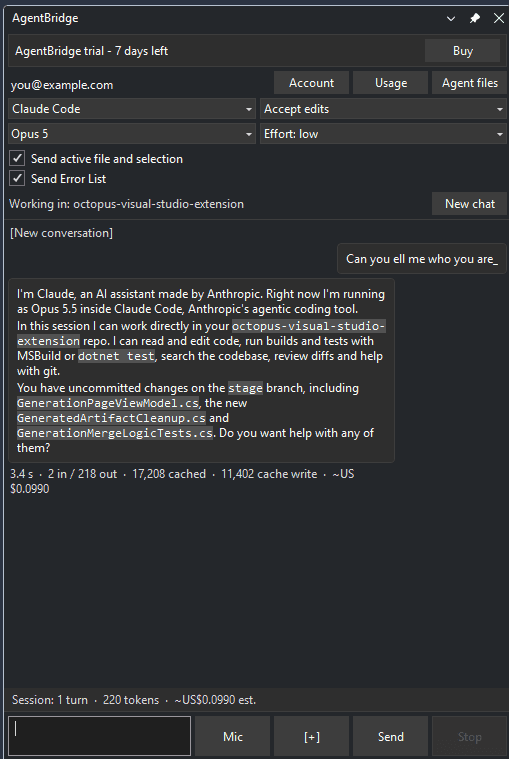
Claude Code inside Visual Studio. AgentBridge runs the Claude Code command-line agent
in a Visual Studio tool window and shows its work as a chat: answers stream in as they
are written, each file it reads or edits appears as its own row, and the editor reloads
what the agent changed.

Features
- Context without copy-paste. Your open file, your selection and the Error List go
along with each message.
- Live model and effort pickers. Switch between Claude models and effort levels
mid-conversation without losing it.
- "/" command palette. Every slash command your Claude Code installation offers,
including your own and your plugins'.
- Stop means stop. Stop cancels the current turn and keeps the conversation.
- Picks up where you left off. The conversation and the chat are kept per solution
and resumed when you reopen it.
- Usage at a glance. Session and weekly quota meters, requests, and what your turns
cost.
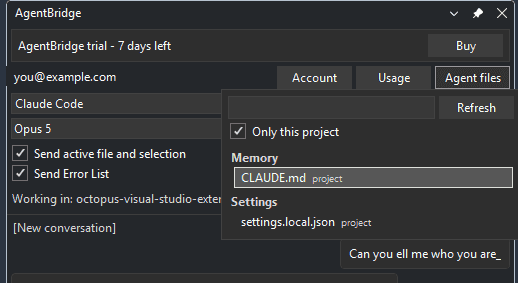
- Your agent files. Browse the memory, skills, commands, agents and settings Claude
Code loads for this project, and see which ones actually loaded.
- Dictation. Speak your prompt instead of typing it.
- Follows your theme. Light, dark and blue, switched live.
Requirements
- Visual Studio 2022 or 2026 (Community, Professional or Enterprise), x64.
- Claude Code installed and on your
PATH, and a Claude account signed in to it. AgentBridge runs Claude Code; it does
not replace it, and your Claude plan pays for the model.
Getting started
- Install the extension and restart Visual Studio.
- Open View > AgentBridge.
- Open a solution and type. The agent works in the solution's folder.
The permission mode (what the agent may do without asking) is picked in the panel's
header. Keep your work under version control: an agent edits files.
Pricing and licensing
- 40 days free, with every feature, from the first time you open the panel.
- Then USD 39 per machine per year, plus any sales tax or VAT for your country,
renewed automatically. Cancel any time; it keeps working until the paid year ends.
- Buy one seat or several (up to 99) in the same purchase: you get one key for all
of them. A seat is one machine at a time, and Release this machine in the account
menu frees it for another.
Buy: https://buy.stripe.com/28E8wR1Nu8Aq8nO9sR3cc00, or Buy in the panel.
Payment is handled by Stripe through Link, which charges the tax and appears on your
statement as LINK.COM* CLOUDCORE SYSTEMS.
Activate: your key (AGBR-XXXXX-XXXXX-XXXXX-XXXXX) arrives by email within a few
minutes - check your spam folder if it has not. Open the account menu in the panel,
choose AgentBridge licence, paste the key and press Activate.
Privacy
Your code and your prompts go to Claude Code on your own machine, never to us. The
licence check sends a hashed machine id and your key; see the
privacy statement. The licence terms
are at https://cloudcoresystems.net/agent-bridge/terms.
Support
cloudcore@cloudcoresystems.net - https://cloudcoresystems.net
AgentBridge is sold by Cloud Core Systems LLC and is not made or endorsed by Anthropic or
Microsoft.

