KubeDock Security Scan
Misconfigured Kubernetes manifests and Dockerfiles are a common source of security vulnerabilities — yet they often go undetected until after deployment. KubeDock Security Scan catches these issues earlier by running Checkov security checks directly inside your Azure DevOps pipeline, before any code reaches production.
What it does:
- 🔍 Scans Kubernetes manifests, Dockerfiles, and Helm charts for security misconfigurations
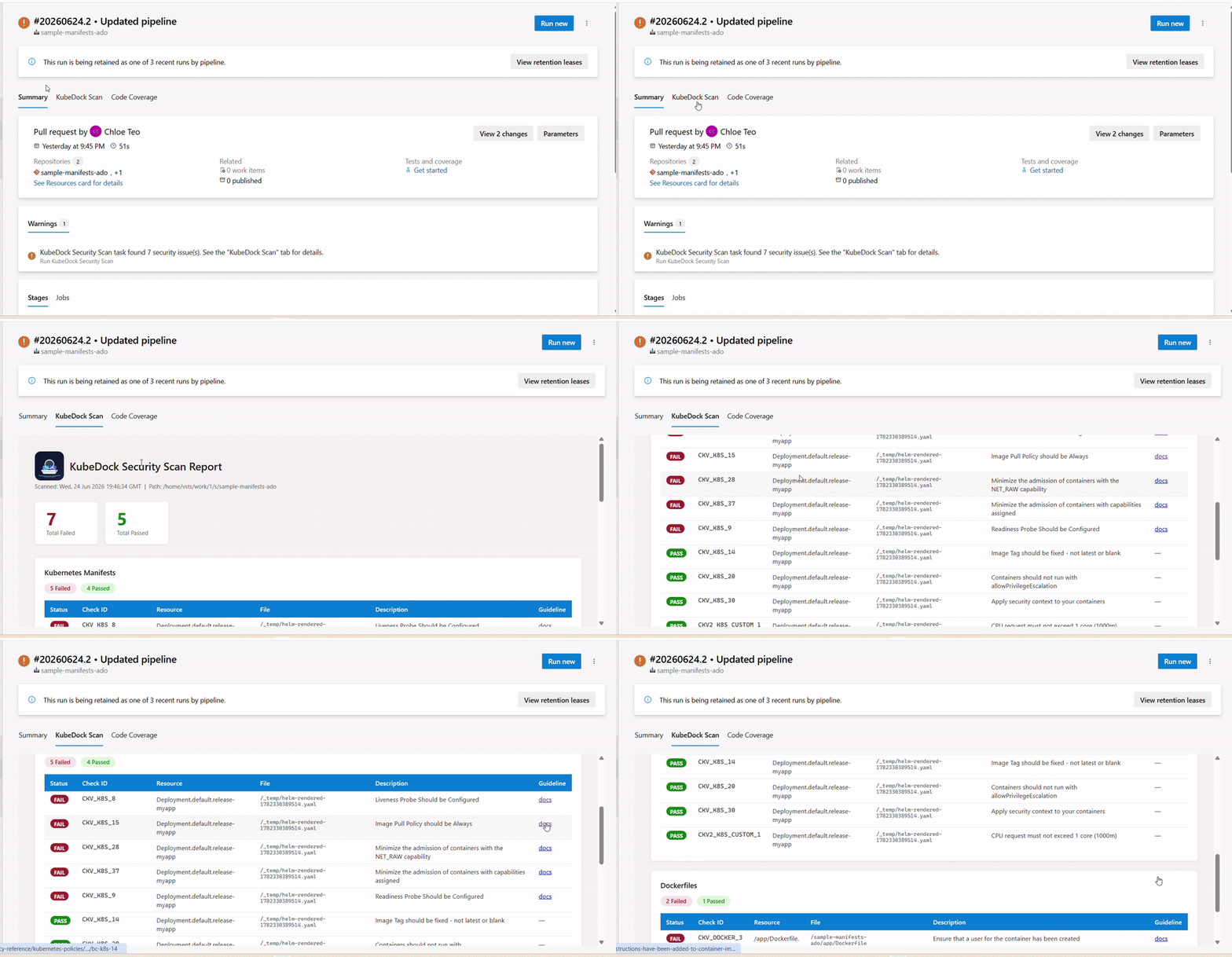
- 📋 Publishes a detailed HTML report as a dedicated KubeDock Scan tab in the pipeline summary
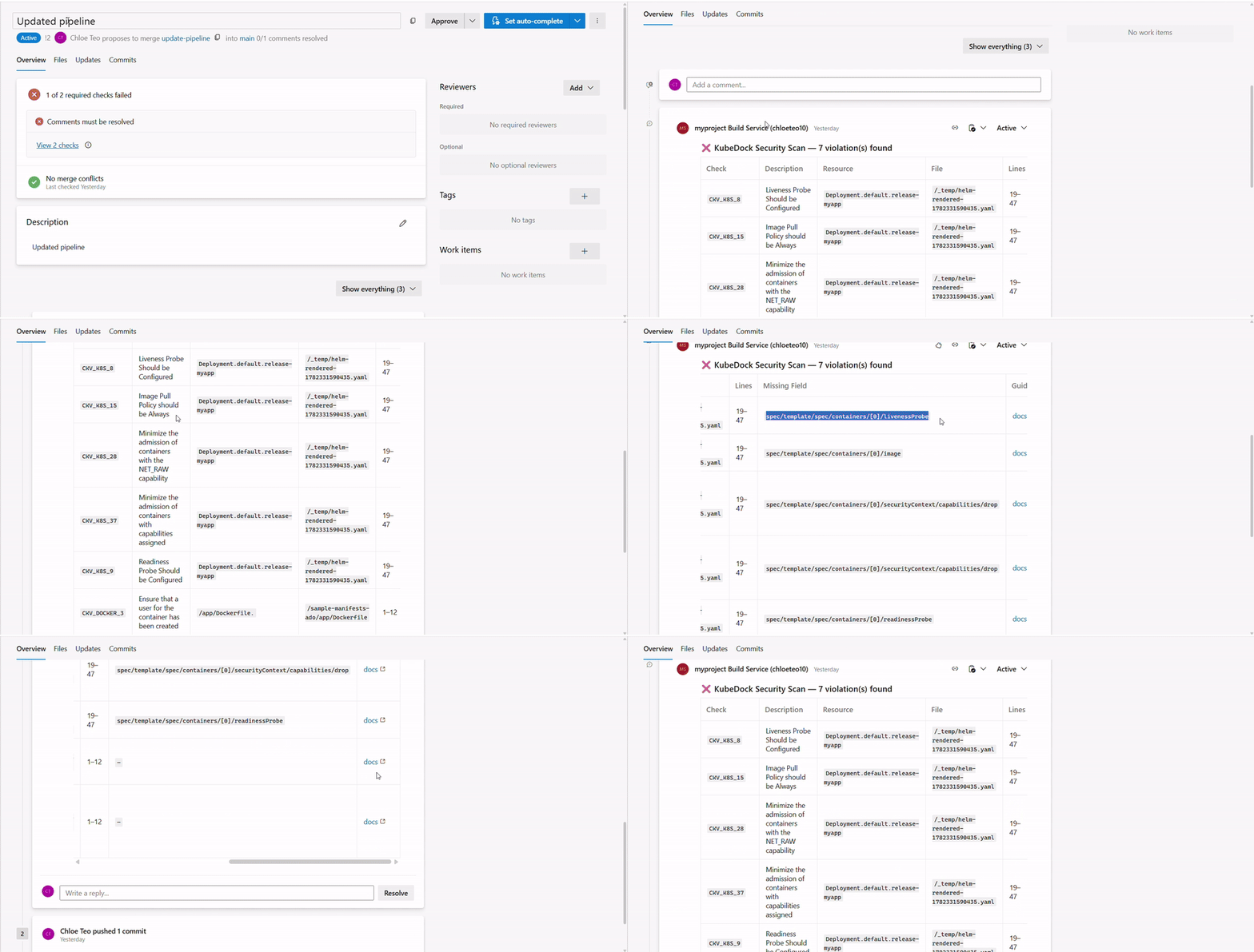
- 💬 Posts inline PR comments on violations when used as a branch policy build validation pipeline
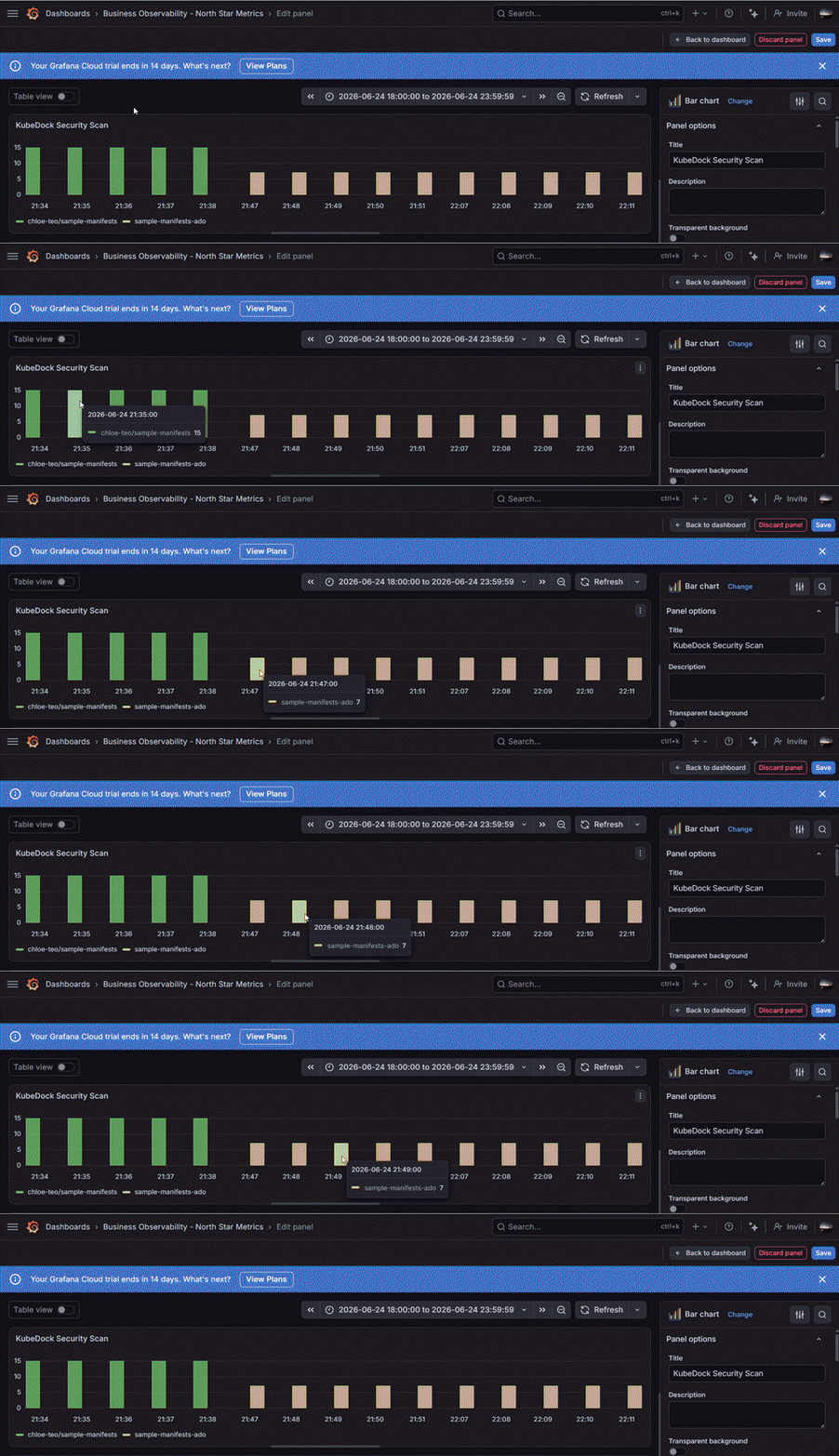
- 📊 Emits per-check metrics via OpenTelemetry for observability dashboards (e.g. Grafana)
What it solves:
- ⚡ Gives development teams immediate feedback on security issues during the pull request stage, rather than at runtime
- 🛡️ Enforces a consistent security baseline across all repositories without requiring each team to configure Checkov themselves
By default it runs all built-in Checkov policies. As a Kubernetes operator, you can narrow the scope to a specific policy list or supply custom checks (YAML or Python) via a central policy repository. See the Custom Policy Setup section for details.
Sample
Scanning result with guidelines links are shown in the KubeDock Scan tab
If this task is used for build validation pipeline of a branch policy and input postPrComments is set as true, then pull request comments will appear if there is any violation found.
You can set OTLP endpoint and OTLP headers as environment variables, and it will send metrics to your observability endpoint. This is sample of using Grafana Cloud. More info, look in to Enabling Telemetry section
| Name |
Type |
Required |
Default |
Description |
repoPath |
string |
Yes |
$(System.DefaultWorkingDirectory) |
Path to the checked-out repo to scan. Must exist or the task fails immediately. |
policyRepoPath |
string |
No |
(empty) |
Path to a pre-checked-out central policy repo. Should contain a checkov-policy.yaml and/or a custom-checks/ folder. Leave empty to use Checkov's built-in checks. |
helmFolderPath |
string |
No |
(empty) |
Path to the Helm chart directory (must contain Chart.yaml). Required when helmTemplatesPath is set. |
helmTemplatesPath |
string |
No |
(empty) |
Path to pre-checked-out Helm templates to render and scan. When set, the task uses helm template to render manifests before scanning. Requires helmFolderPath. |
helmValuesPaths |
string |
No |
(empty) |
Comma-separated list of Helm values files (e.g. values.yaml,values.prod.yaml). Required when helmTemplatesPath is set. |
failOnIssues |
boolean |
No |
false |
When true, the pipeline fails if Checkov finds any issues. When false, issues are reported as a warning (SucceededWithIssues) without breaking the build. |
postPrComment |
boolean |
No |
false |
When true and this task is used as part of a build validation pipeline set in branch policy, then PR comment will be generated if there is violation after scanning is done |
How It Works
- Installs Checkov via
pip install checkov on the agent.
- Runs three scans against
repoPath:
- Kubernetes manifests (
--framework kubernetes)
- Dockerfiles (
--framework dockerfile)
- Helm charts — either via
helm template render (if helmTemplatesPath is set) or directly (--framework helm)
- If
policyRepoPath is provided, passes checkov-policy.yaml as --config-file and custom-checks/ as --external-checks-dir.
- Generates an HTML report and attaches it to the pipeline summary as the "KubeDock Security Scan" tab.
- Sets the task result based on
failOnIssues.
- If this pipeline is used in build pipeline set in branch policy, you can set to true for "postPrComment", to provide faster feedback for misconfiguration during PR.
- If you have observability platform with OTLP endpoint, you can follow the Enabling telemetry section, and telemetry will be sent to your platform.
Usage Examples
Minimal — scan the whole repo, warn on issues:
- task: KubeDockSecurityScan@0
  inputs:
    repoPath: '$(System.DefaultWorkingDirectory)'
With custom policies and fail on issues:
- task: KubeDockSecurityScan@0
  inputs:
    repoPath: '$(System.DefaultWorkingDirectory)'
    policyRepoPath: '$(Pipeline.Workspace)/policy-repo'
    failOnIssues: true
With Helm rendering using multiple values files:
- task: KubeDockSecurityScan@0
  inputs:
    repoPath: '$(System.DefaultWorkingDirectory)'
    helmFolderPath: '$(System.DefaultWorkingDirectory)/helm/myapp'
    helmTemplatesPath: '$(System.DefaultWorkingDirectory)/templates'
    helmValuesPaths: 'helm/myapp/values.yaml,helm/myapp/values.yaml,helm/myapp/values.yaml,helm/myapp/values.staging.yaml'
    failOnIssues: true
Note: helmTemplatesPath cannot be used without helmFolderPath — the task will error if helmTemplatesPath is set but helmFolderPath is empty.
With PR comments on failed checks (branch policy pipeline):
- task: KubeDockSecurityScan@0
  inputs:
    repoPath: '$(System.DefaultWorkingDirectory)'
    postPrComment: true
    failOnIssues: true
  env:
    SYSTEM_ACCESSTOKEN: $(System.AccessToken)
Note: postPrComment requires the build service identity to have Contribute to pull requests permission on the repository. Grant this in Project Settings → Repositories → Security. The SYSTEM_ACCESSTOKEN env var must be explicitly mapped — Azure DevOps does not expose System.AccessToken to tasks automatically.
With telemetry sent to Observability Platform:
- task: KubeDockSecurityScan@0
  inputs:
    repoPath: '$(System.DefaultWorkingDirectory)'
    failOnIssues: true
  env:
    OTEL_EXPORTER_OTLP_ENDPOINT: '<your-otlp-endpoint>'
    OTEL_EXPORTER_OTLP_HEADERS: 'Authorization=Basic $(token)'
    OTEL_SERVICE_NAME: 'kubedock-security-scan'
Note: Store yourtoken as a secret pipeline variable. The env: block maps it into the task process without exposing it in logs.
Enabling Telemetry
Set these environment variables on your Azure DevOps agent:
| Variable |
Description |
OTEL_EXPORTER_OTLP_ENDPOINT |
Your OTLP endpoint (e.g. https://otlp-gateway-sample/otlp) |
OTEL_EXPORTER_OTLP_HEADERS |
Auth header (e.g. Authorization=Basic <base64-token>) |
OTEL_SERVICE_NAME |
Optional service name label (default: kubedock-security-scan) |
Metric: kubedock_scan_failed_checks_total
Each failed Checkov check emits one counter increment with these labels:
| Label |
Example |
repository |
my-org/my-app |
framework |
kubernetes, dockerfile, helm |
check_id |
CKV_K8S_14 |
resource |
Deployment.default.my-app |
Grafana Dashboard — Failed Checks by Repository
Panel type: Bar chart
Sample PromQL query:
sum by (repository) (kubedock_scan_failed_checks_total)
Dashboard setup in Grafana:
- Go to Dashboard and add a new Dashboard.
- Add a new Panel and click Configure visualization.
- At the bottom of query editor, select the prometheus data source
- Put the sample PromQL above into the input text box.
- Click Run queries
Custom Policy Setup
To curate your own policy list, choose from the following:
a. Checkov Kubernetes policy list.
b. Checkov Docker policy list.
Create a yaml file with name checkov-policy.yaml in a folder with following content to test out:
This following checks are from existing Checkov policy, select some for your team/company purpose.
check:
  # Kubernetes
  - CKV_K8S_8    # Liveness probe configured
  - CKV_K8S_9    # Readiness probe configured
  - CKV_K8S_14   # Image tag not :latest
  - CKV_K8S_15   # Image pull policy not Always when using :latest
  - CKV_K8S_20   # Containers do not run as root
  - CKV_K8S_28   # Do not admit containers with NET_RAW capability
  - CKV_K8S_30   # Do not admit containers with added capability
  - CKV_K8S_36   # Ensure pod is not running with dangerous capabilities
  - CKV_K8S_37   # Minimize the admission of containers with added capability

  # Custom
  # Uncomment this if you have custom policy - CKV2_K8S_CUSTOM_1  # CPU request must not exceed 1 core

  # Dockerfile
  - CKV_DOCKER_1  # Ensure FROM statement uses a specific version tag
  - CKV_DOCKER_2  # Ensure that HEALTHCHECK instructions have been added
  - CKV_DOCKER_3  # Ensure that a USER for the container has been created
  - CKV_DOCKER_4  # Ensure that the Dockerfile does not contain ADD instruction
- If this folder is put in a different repo, make sure this repo is pre-checkout in a folder path, then pass into argument
policyRepoPath.
- If you have custom policy via YAML or python, place them into a folder named
custom-checks along side the checkov-policy.yaml file.
Feedback & Review
If this extension helps your team/company in the software development lifecycle, please support by providing your feedback in the above Rating & Review tab or provide a star to the github repo.
Any issue or feature requests, please go to github to create an issue.

