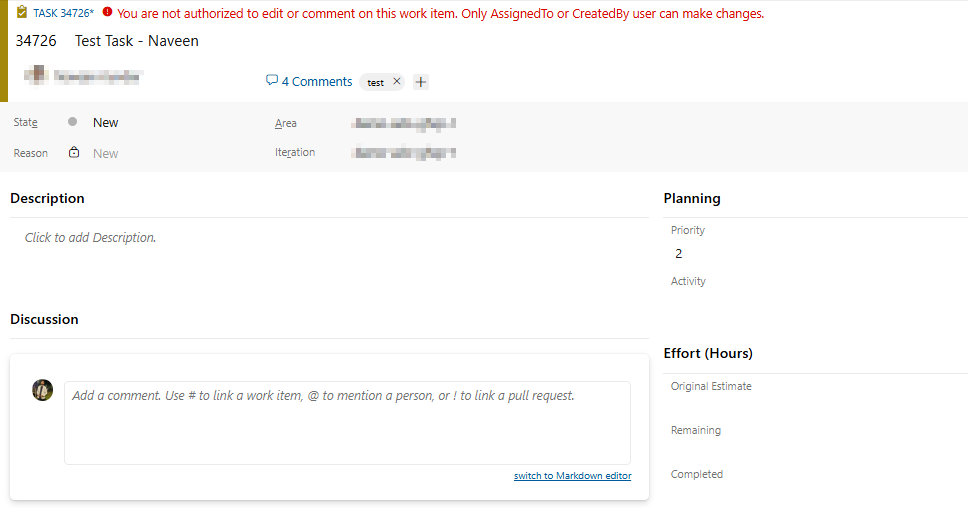
Canarys User ValidateRestricts editing and commenting on work items to only the AssignedTo or CreatedBy user, preventing unauthorized users from making changes. |

Canarys User ValidateThe Canarys User Validate is an Azure DevOps Extension crafted to validate users' actions within work items. Its primary objective is to ensure that work items can only be edited by the individuals assigned to them or those who created them, thus preventing unauthorized users from making updates and saving work items. How it WorksWhenever a user opens or attempts to modify a work item, this extension checks whether the current user has the requisite permissions to make changes. It determines this by checking if the user is either:
Based on this assessment, the extension either grants or restricts the user's ability to save the work item. Unauthorized UserIf the user lacks both assignment and creation privileges for the work item, the extension:
Authorized UserIf the user is assigned to or has created the work item, the extension removes any existing errors and re-enables the save button. Unassigned Work ItemsWhen a work item has no AssignedTo user, only the CreatedBy user can edit it. New Work ItemsNewly created work items (not yet saved) are always editable by anyone. When It RunsThe validation actively runs when work items are:
SupportShare your experiences, feature requests, and feedback at vststoolssupport@ecanarys.com with the subject line "Canarys User Validate". |