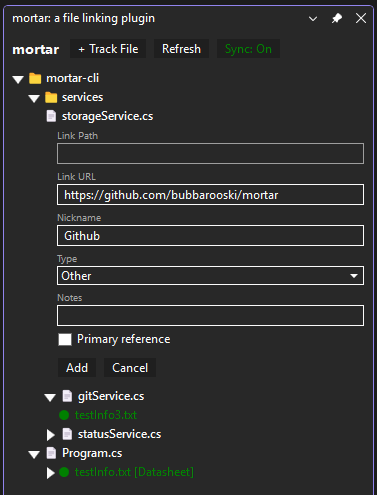
Link your source files to their documentation — datasheets, schematics, API specs, requirements — and surface them directly inside Visual Studio. Links are shared across your team via Git.
mortar links your source files to their documentation — datasheets, schematics, API specs, requirements docs — and surfaces them directly inside Visual Studio.
No more hunting through file explorers or bookmarks. Open a file, see its docs.
What it does
mortar adds a tool window to Visual Studio that shows every document linked to your source files. Links are stored in a doclinks.mor file at your solution root, which means your whole team shares them automatically through Git.
Hyperlinked — click on a link to open the file or website that makes up that link
Folder tree view — source files are grouped by directory, mirroring your project structure
Inline editing — edit links directly in the tool window without leaving the IDE
Add links from the GUI — right-click any tracked file to add a new document link, or use + Track File to track a new file
Doc type labels — tag links as Datasheet, Schematic, API Spec, Requirements, and more
Sync status — color-coded indicators show when a linked document is newer than the source file
Primary reference — mark one link as the primary reference per file
Notes — attach short notes to any link, visible inline in the tree
Git warning — banner alert when doclinks.mor has uncommitted changes
Theme-aware — respects Visual Studio's light and dark themes