Azure DevOps Build AI Analyzer
Automatically explains why your pipeline failed using an LLM of your choice — including a local, self-hosted model (Ollama, LM Studio, vLLM, llama.cpp) or any OpenAI-compatible API.
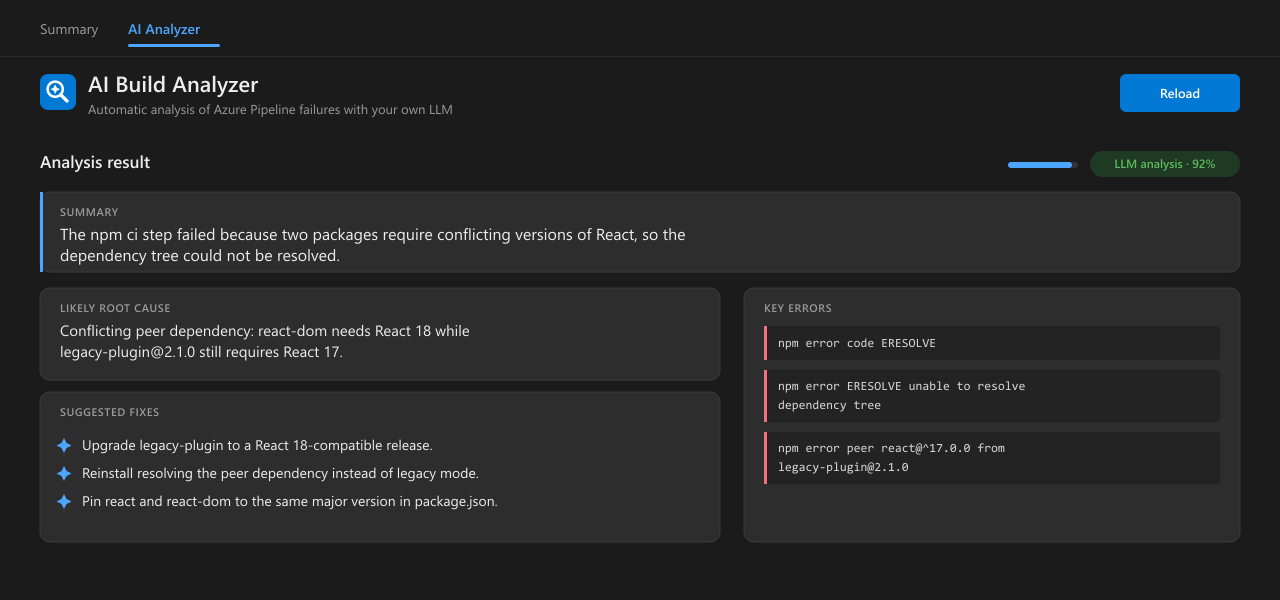
When a build fails, a pipeline task reads the logs of the failed tasks, sends them to your LLM, and attaches a structured diagnosis to the build. An AI Analyzer tab on the build results page then shows the summary, likely root cause, key errors, and suggested fixes.
No separate backend, no extra ports, no inbound changes to your Azure DevOps server — everything ships inside the extension, and the LLM is only ever called from the build agent.
Quick start
- Install this extension into your organization, then into your project.
- Add the task to the end of your job:
- task: AIBuildAnalyzer@2
  displayName: AI Build Analyzer
  condition: failed()
  inputs:
    llmUrl: http://localhost:11434/v1   # your OpenAI-compatible endpoint
    llmModel: llama3.1
- From the next failed run onward, open the build's AI Analyzer tab.
The analyzer must be the last step in the job. condition: failed() makes it run
only after an earlier step has failed while keeping the original job result.
Use your own LLM
The task works with any OpenAI-compatible /v1/chat/completions endpoint that your build agent can reach. Only llmUrl and llmModel are required. Requests use JSON mode when supported, have a complete prompt-size cap, and retry once with compact context when a model returns empty or truncated JSON.
| Backend |
llmUrl |
llmModel |
| Ollama |
http://localhost:11434/v1 |
llama3.1 |
| LM Studio |
http://localhost:1234/v1 |
loaded model |
| vLLM / llama.cpp |
http://host:8000/v1 |
served model |
| OpenAI |
https://api.openai.com/v1 |
gpt-4o-mini |
Complete task example
- task: AIBuildAnalyzer@2
  displayName: AI Build Analyzer
  condition: failed()
  inputs:
    llmUrl: https://llm.internal.example:7443/v1
    llmModel: gpt-oss:20b
    llmApiKey: $(LLM_API_KEY)  # optional secret pipeline variable
    insecureTls: true          # only for self-signed/internal certificates
    timeoutMs: '120000'
    maxOutputTokens: '3000'
    reasoningEffort: low
    maxPromptChars: '24000'
    maxLogs: '25'
    apiVersion: '6.0'
    readSource: true
    maxSourceBytes: '8000'
    maxTestResultBytes: '8000'
| Input |
Default |
Description |
llmUrl |
http://localhost:11434/v1 |
Required OpenAI-compatible API base URL ending in /v1. It must be reachable from the build agent. |
llmModel |
llama3.1 |
Required model identifier expected by the LLM server. |
llmApiKey |
(empty) |
Optional bearer token. Supply it through a secret pipeline variable; never hard-code it. |
insecureTls |
false |
Allow a self-signed/internal HTTPS certificate. Enable only when required. |
timeoutMs |
60000 |
LLM request timeout in milliseconds. |
maxOutputTokens |
3000 |
Generated-token budget shared by model reasoning and the final JSON response. |
reasoningEffort |
low |
Compatible-server reasoning level: none, low, medium, high, or max. |
maxPromptChars |
24000 |
Maximum complete prompt size, including instructions, logs, test details, and source context. |
maxLogs |
25 |
Maximum failed-task log files fetched from Azure DevOps. |
apiVersion |
6.0 |
Azure DevOps REST API version. Server 2019 may require 5.0; Server 2020 uses 6.0. |
readSource |
false |
Read relevant checked-out source files and local test-result XML as bounded extra context. |
maxSourceBytes |
8000 |
Total source-context byte budget. |
maxTestResultBytes |
8000 |
Byte budget for failed-test names, assertions, and stack traces parsed from .trx/*.test.xml. |
If the LLM is unreachable, the task falls back to a built-in offline heuristic analyzer that recognizes common CI failures.
Set readSource: true to include a bounded set of relevant checked-out files. The task tries exact log paths and then a safe recursive search for referenced filenames and common manifests, while skipping secrets, dependency/build directories, and paths outside the repository.
For a generic Publish Test Results failure, the task inspects preceding same-job logs and parses local .trx/*.test.xml files to recover failed test names, assertion messages, stack traces, and the referenced source file—even when the original test command used exit 0.
Documentation & source
Full docs, configuration, and troubleshooting:
https://github.com/jafarimohammad/azdevops-build-ai-analyzer
Licensed under MIT.

