Skip to content
| Marketplace
Sign in
Visual Studio>Controls>SSIS Web API Destination (POST data to URL)
SSIS Web API Destination (POST data to URL)

SSIS Web API Destination (POST data to URL)

ZappySys

|
812 clicks
| (0) | Free Trial
Post data to REST, JSON, XML, or SOAP APIs from SSIS without custom code. Configure authentication, headers, body templates, batch mode, file upload, and response/error outputs in a drag-and-drop destination component. Part of ZappySys SSIS PowerPack.
Get Started

Send data from SSIS to REST, JSON, XML, or SOAP APIs using a no-code destination component.

Build POST payloads, configure auth/headers, run batch requests, and capture response/error outputs for reliable API write-back workflows.
Part of ZappySys SSIS PowerPack.

Recommended starting point
View Setup Guide & Get Started →
See features, UI & examples →
Pro Tip: Start with request test mode to verify headers/body and inspect API response before full package execution.
Compatibility: SQL Server 2012–2025+ (32/64-bit) | Azure Data Factory / Azure-SSIS IR Ready

⚡ Key Benefits

  • No-Code API Posting — Send rows to API endpoints directly from SSIS data flow
  • Advanced Authentication — Support Basic, Windows, OAuth, and client certificate patterns
  • Flexible Request Body — Build JSON/XML payloads with variables and column mappings
  • Batch + Multipart Support — Group requests and upload files using multipart/form-data
  • Operational Visibility — Capture status code, response payload, and route errors

📸 Visual Overview & Setup

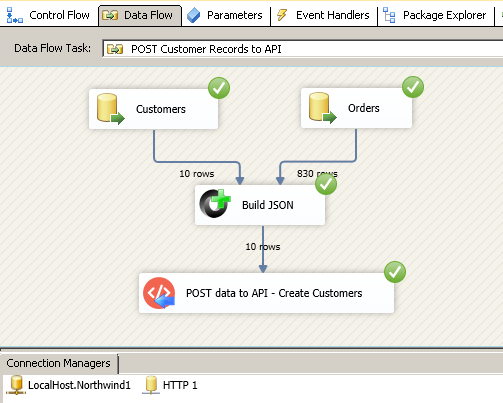
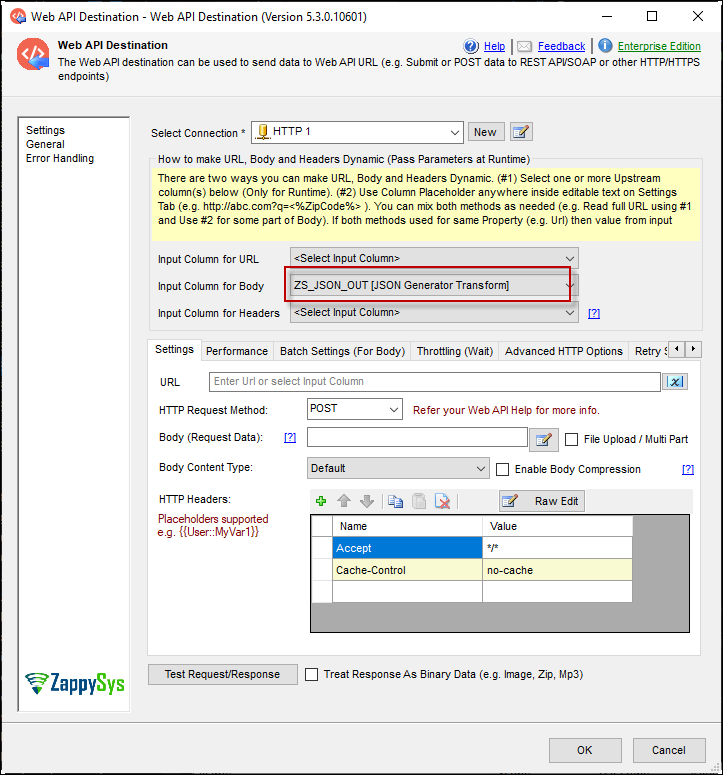
1. Post JSON to API Endpoint
Post JSON to REST API endpoint
🔍 View Full Size
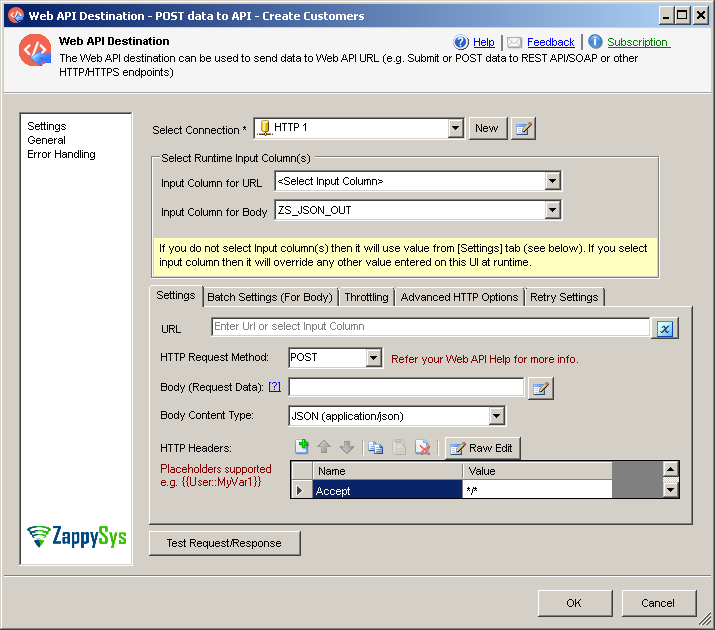
2. Configure Request Options
Configure credentials headers and POST body
🔍 View Full Size
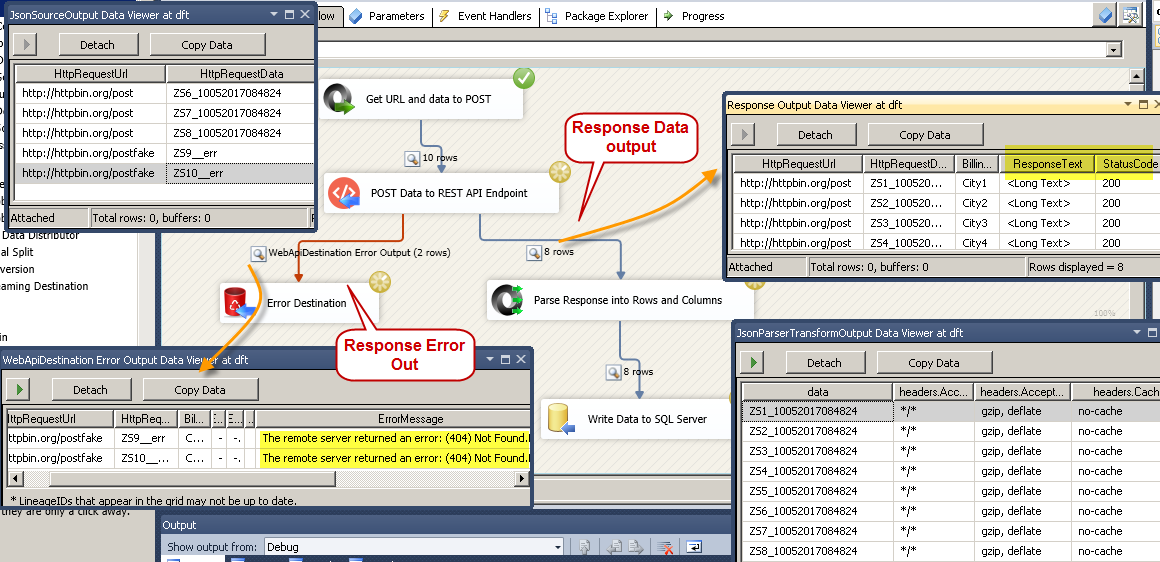
3. Response + Error Output
Configure response output and error handling
🔍 View Full Size
4. Request Body Builder UI
Web API destination request body builder UI
🔍 View Full Size
5. Mapping and Request Layout
Web API destination mapping and request layout
🔍 View Full Size
6. Advanced Request Workflow
Advanced web API destination workflow
🔍 View Full Size

🔧 Key Features

  • POST to REST/JSON/XML/SOAP API endpoints from SSIS
  • Batch mode for bulk API request submission
  • Multipart/form-data upload support
  • Dynamic variable replacement in headers/body
  • Dedicated response and error output streams

💡 Common Use Cases

  • CRM/ERP Upserts: Push transformed SSIS rows into SaaS REST APIs.
  • Webhook/Event Publishing: Send payloads to internal/external event endpoints.
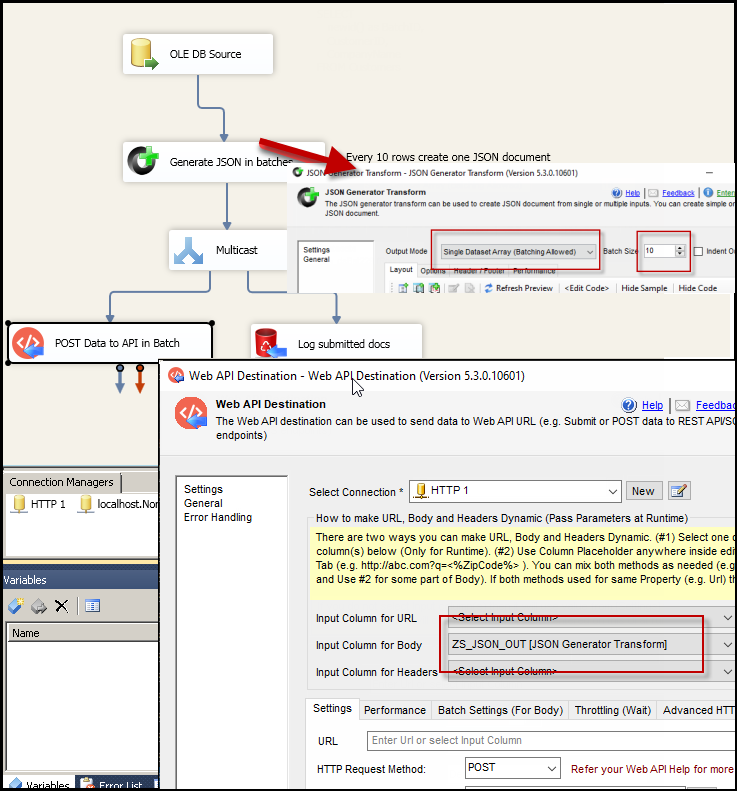
  • Bulk API Loads: Group many records into batched POST requests.
  • API File Uploads: Upload files with metadata using multipart requests.

🎯 Summary

SSIS Web API Destination lets teams publish data to virtually any API endpoint with low-code configuration and enterprise controls for authentication, batching, and error handling. It speeds up API write-back scenarios while keeping SSIS packages maintainable.

Trusted by Developers & IT Teams Worldwide

  • Built for SSIS Workflows: Purpose-built for high-performance ETL and complex integration scenarios.
  • Expert Technical Support: Direct access to engineers via email and remote screen-share sessions.
  • Proven Enterprise Scale: Trusted by 3000+ teams across 90+ countries, including Fortune 500.
SSIS PowerPack
Includes SSIS Web API Destination
Capterra Rating
Read reviews on Capterra →

Start Automating Workflows with SSIS PowerPack

Includes connectors for APIs, databases & cloud apps. Build robust ETL workflows without custom scripting.

Download SSIS PowerPack (Free Trial)

Full functionality is FREE for development within Visual Studio

  • Contact us
  • Jobs
  • Privacy
  • Manage cookies
  • Terms of use
  • Trademarks
© 2026 Microsoft