Skip to content
| Marketplace
Sign in
Visual Studio>Controls>SSIS Salesforce Destination Connector (CRM Destination)
SSIS Salesforce Destination Connector (CRM Destination)

SSIS Salesforce Destination Connector (CRM Destination)

ZappySys

|
237 clicks
| (0) | Free Trial
Load data to Salesforce from any SSIS source using drag-and-drop Bulk Insert, Update, Delete, and Upsert. Supports BULK API mode, multi-threaded loading, OAuth token auth, assignment rules, and row-level result outputs. Part of ZappySys SSIS PowerPack.
Get Started

Load data into Salesforce.com from any SSIS source with drag-and-drop mapping — no programming required.

Perform high-volume Bulk Insert, Update, Delete, and Upsert operations using standard or BULK API mode. Enable multi-threaded loading for faster throughput, authenticate securely with OAuth access token (2FA/MFA-friendly), and capture inserted vs updated row outputs for downstream auditing and routing.
Part of ZappySys SSIS PowerPack.

Recommended starting point
View Setup Guide & Get Started →
See features, UI & examples →
Pro Tip: The Visual Studio download installs a basic extension. Use the guide above to install and run the full SSIS PowerPack (all connectors & UI).
Compatibility: SQL Server 2012–2025+ (32/64-bit) | Azure Data Factory / Azure-SSIS IR Ready

⚡ Key Benefits

  • Bulk Write Operations — Perform Bulk Insert, Update, Delete, and Upsert to Salesforce from any SSIS source
  • BULK API Mode — Load millions of rows efficiently using Salesforce BULK API processing
  • Multi-Threaded Throughput — Enable parallel threads for faster high-volume data loading
  • OAuth + TLS Security — Secure transfer with TLS 1.2 and OAuth access token support (2FA/MFA friendly)
  • Operational Visibility — Report progress every N rows and final row-count summary (inserted/updated/deleted/errors)

📸 Visual Overview & Setup

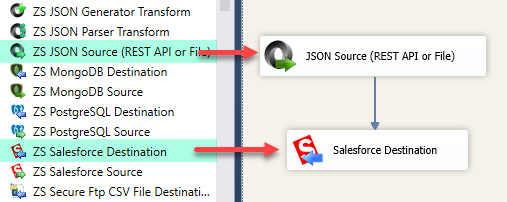
1. Drag & Drop into Data Flow
SSIS Salesforce Destination - Drag and drop into Data Flow Task
🔍 View Full Size
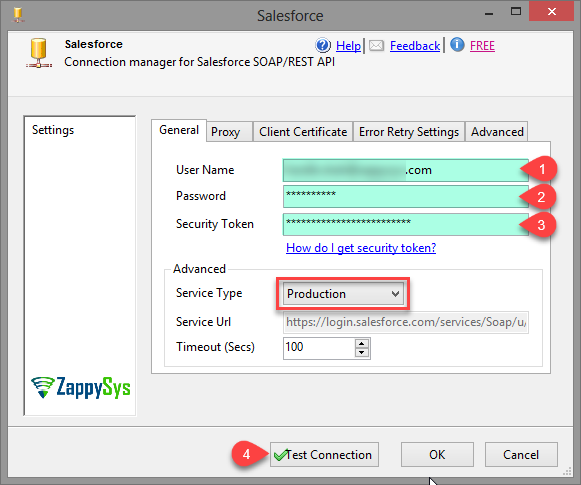
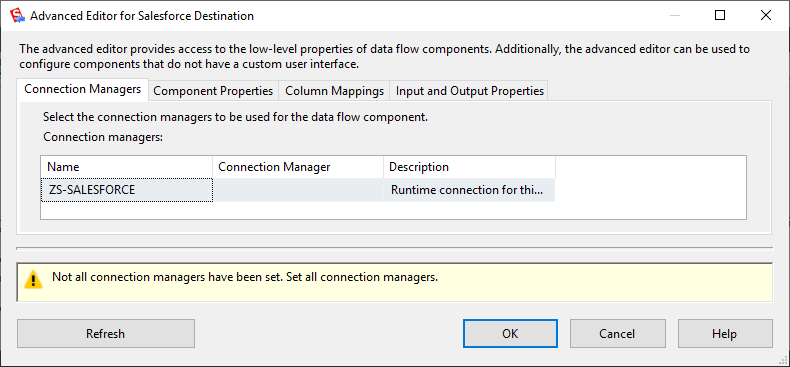
2. Configure Salesforce Connection Manager
SSIS Salesforce Connection Manager UI for OAuth and login settings
🔍 View Full Size
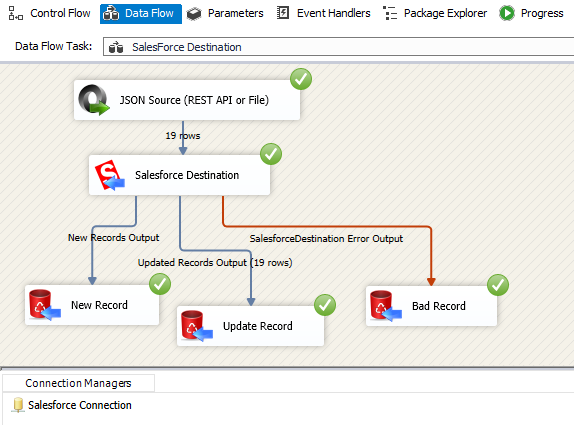
3. Upsert Example (Bulk Insert / Update)
SSIS Salesforce Destination upsert example with bulk insert and update
🔍 View Full Size
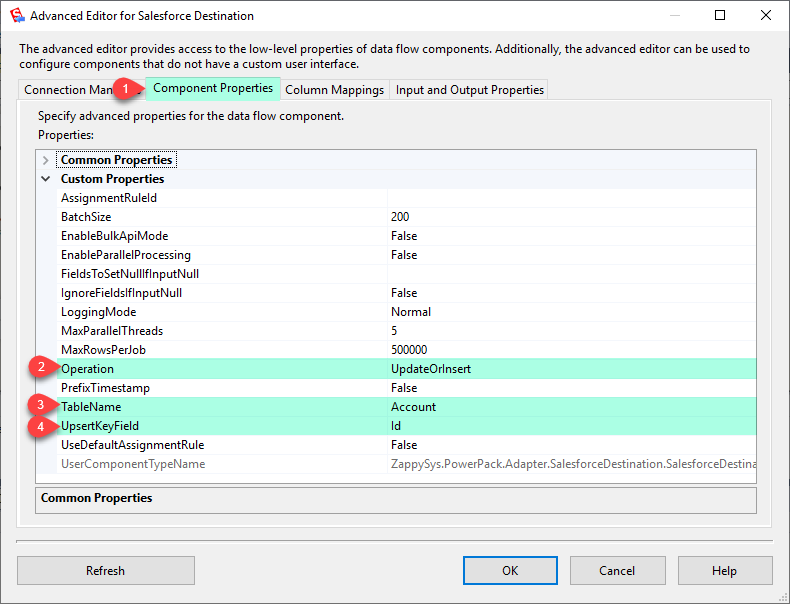
4. Destination Settings (Insert/Upsert/Update/Delete)
SSIS Salesforce Destination settings for bulk insert, upsert, update, delete
🔍 View Full Size
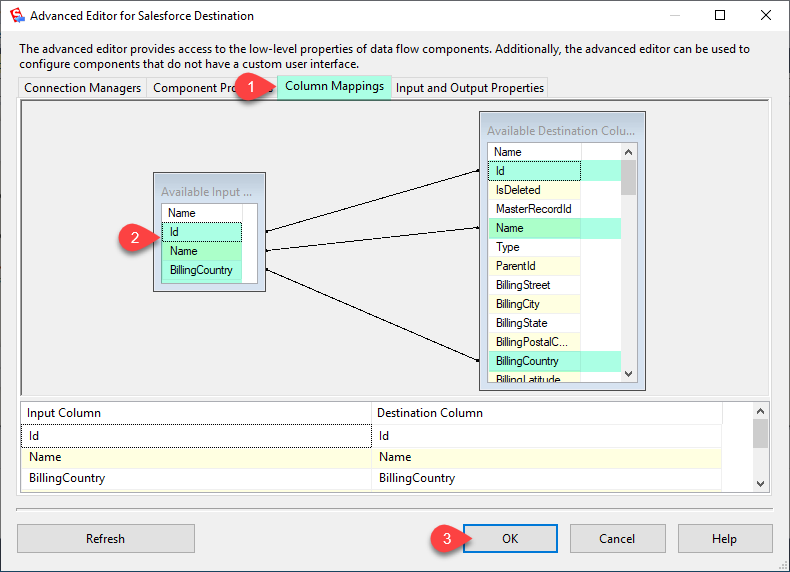
5. Column Mappings
SSIS Salesforce Destination column mapping UI
🔍 View Full Size
6. Full Settings UI
SSIS Salesforce Destination full settings UI
🔍 View Full Size

🔧 Key Features

Write Operations

  • Perform Bulk Insert, Update, Delete, and Upsert into Salesforce objects
  • BULK API mode for high-volume loads (millions of rows)
  • Capture Upsert outputs for inserted vs updated rows

Performance & Reliability

  • Multi-threaded loading for faster throughput
  • Progress reporting every N rows plus final summary stats
  • Error row routing and operational visibility for large data movements

Security & Automation

  • TLS 1.2 encrypted transfer
  • OAuth access token support for MFA/2FA scenarios
  • Execute assignment rules after insert/update for Case, Lead, and Account

💡 Common Use Cases

Common real-world scenarios for loading Salesforce from SSIS:

  • CRM Data Sync: Upsert account/contact changes from SQL Server to Salesforce on a schedule.
  • Bulk Migration: Load historical records into Salesforce using BULK API and threaded execution.
  • Master Data Alignment: Keep target Salesforce objects synchronized with source-of-truth systems.
  • Operational Auditing: Route inserted/updated/error rows to separate outputs for QA and reconciliation.

🎯 Summary

Replace custom Salesforce loading scripts with a drag-and-drop destination optimized for enterprise-scale data movement.
Run secure, high-speed bulk insert/update/delete/upsert operations with OAuth, BULK API, progress tracking, and row-level outputs — all inside native SSIS workflows.

Trusted by Developers & IT Teams Worldwide

  • Built for SSIS Workflows: Purpose-built for high-performance ETL and complex integration scenarios.
  • Expert Technical Support: Direct access to engineers via email and remote screen-share sessions.
  • Proven Enterprise Scale: Trusted by 3000+ teams across 90+ countries, including Fortune 500.

SSIS PowerPack
Includes SSIS Salesforce Destination
Capterra Rating
Read reviews on Capterra →

Start Automating Workflows with SSIS PowerPack

Includes connectors for APIs, databases & cloud apps. Build robust ETL workflows without custom scripting.

Download SSIS PowerPack (Free Trial)

Full functionality is FREE for development within Visual Studio

  • Contact us
  • Jobs
  • Privacy
  • Manage cookies
  • Terms of use
  • Trademarks
© 2026 Microsoft