Skip to content
| Marketplace
Sign in
Visual Studio>Controls>SSIS PostgreSQL Destination
SSIS PostgreSQL Destination

SSIS PostgreSQL Destination

ZappySys

|
656 clicks
| (0) | Free Trial
Load data into PostgreSQL from SSIS without ODBC scripting. Configure connection, choose target table, set batch size and logging, map columns, and execute bulk inserts with runtime visibility and validation. Part of ZappySys SSIS PowerPack.
Get Started

Load data into PostgreSQL from SSIS with a no-code destination component.

Perform bulk inserts into PostgreSQL tables with configurable batch size, logging controls, and reliable execution-time visibility.
Part of ZappySys SSIS PowerPack.

Recommended starting point
View Setup Guide & Get Started →
See features, UI & examples →
Pro Tip: Tune batch size and logging mode to balance throughput and troubleshooting effort.
Compatibility: SQL Server 2012–2025+ (32/64-bit) | Azure Data Factory / Azure-SSIS IR Ready

⚡ Key Benefits

  • Bulk inserts to PostgreSQL — Load rows directly into target tables
  • Performance tuning — Configure batch size for optimal throughput
  • Operational logging — Choose logging mode for validation and troubleshooting
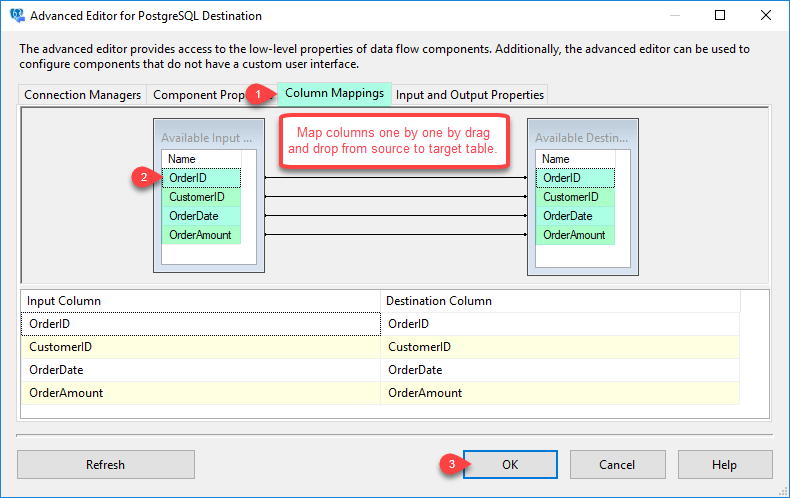
  • Reliable mapping — Drag-and-drop column mapping from SSIS sources
  • No extra drivers — Managed task support for 32/64-bit SSIS

📸 Visual Overview & Setup

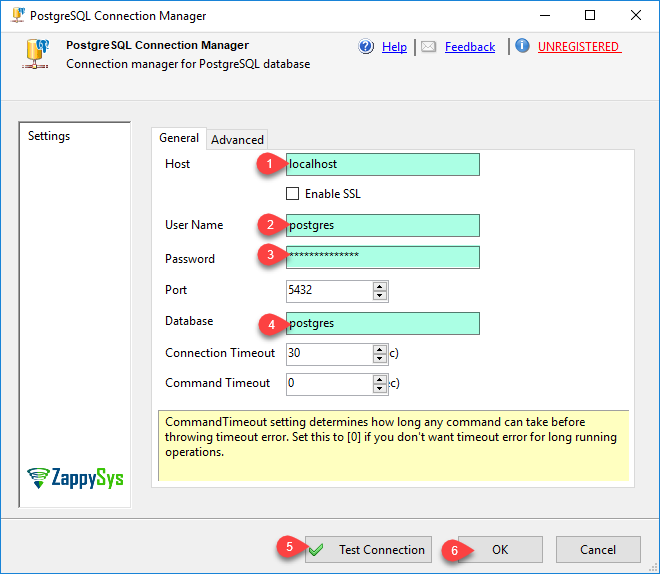
1. Create Connection
Create PostgreSQL connection in SSIS
🔍 View Full Size
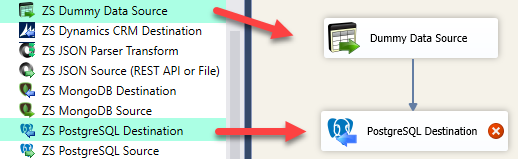
2. Drag Destination
Drag PostgreSQL destination in SSIS data flow
🔍 View Full Size
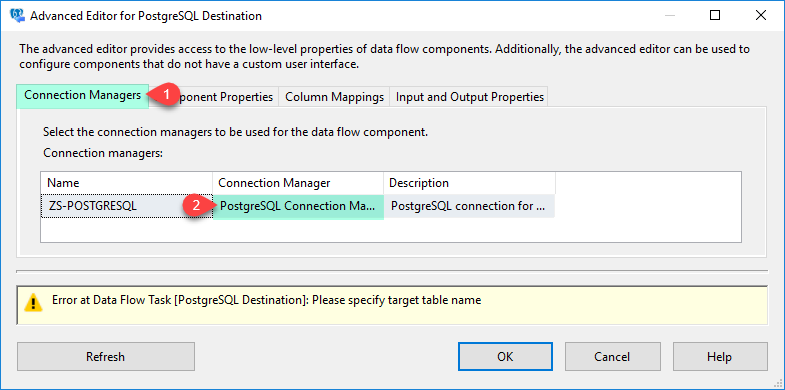
3. Configure Connection
Configure PostgreSQL connection manager settings
🔍 View Full Size
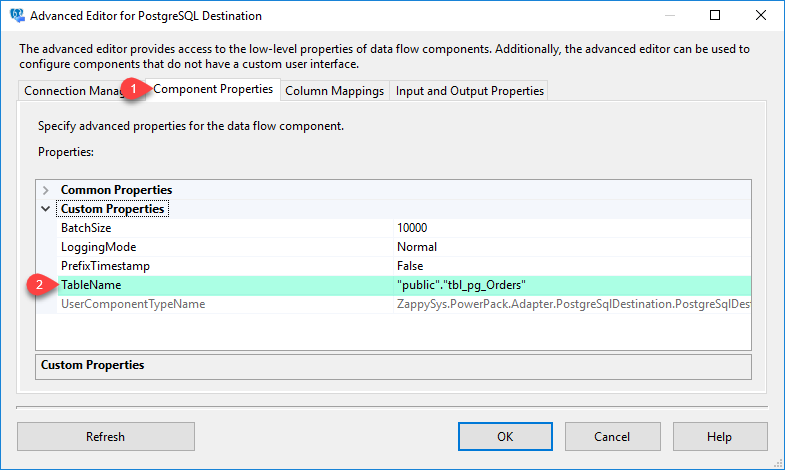
4. Target Settings
Set PostgreSQL destination target settings
🔍 View Full Size
5. Map Columns
Map columns for PostgreSQL destination
🔍 View Full Size
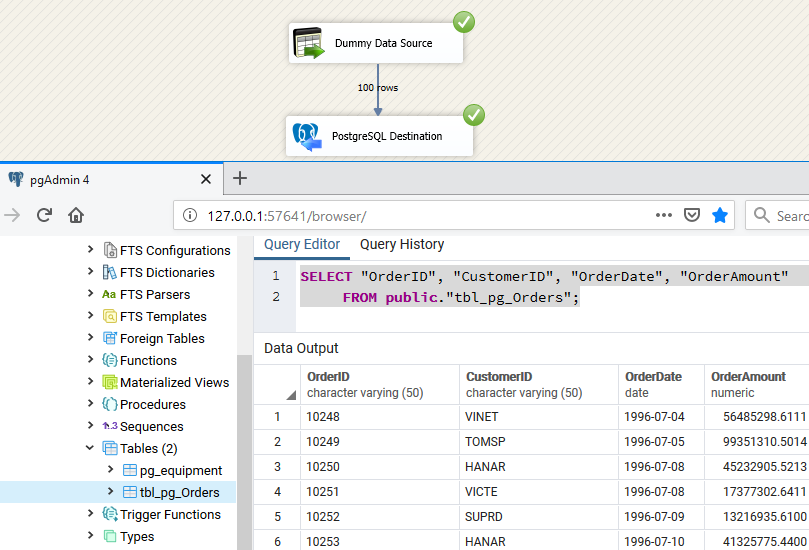
6. Execute + Verify
Execute PostgreSQL destination and verify result
🔍 View Full Size

🔧 Key Features

  • Bulk insert support — Load SSIS rows into PostgreSQL tables
  • Batch size configuration — Tune throughput for different data volumes
  • Target + mapping setup — Select destination table and map columns visually
  • Logging mode control — Choose how much detail to capture during execution
  • Production-ready execution — Designed for stable ETL workflows

💡 Common Use Cases

  • Warehouse refresh loads: Bulk insert transformed datasets into staging tables.
  • Scheduled data delivery: Run repeatable SSIS packages to keep PostgreSQL up to date.
  • Incremental updates: Use batch sizing and mapping to support smaller delta loads.
  • Cross-system integration: Move data from APIs/files/DB sources into PostgreSQL reliably.

🎯 Summary

SSIS PostgreSQL Destination helps teams bulk load data into PostgreSQL with configurable batch sizing, visual column mapping, and execution-time visibility. It reduces manual scripting and improves maintainability of ETL pipelines.

Trusted by Developers & IT Teams Worldwide

  • Built for SSIS Workflows: Purpose-built for high-performance ETL and complex integration scenarios.
  • Expert Technical Support: Direct access to engineers via email and remote screen-share sessions.
  • Proven Enterprise Scale: Trusted by 3000+ teams across 90+ countries, including Fortune 500.

SSIS PowerPack
Includes SSIS PostgreSQL Destination
Capterra Rating
Read reviews on Capterra →

Start Automating Workflows with SSIS PowerPack

Includes connectors for APIs, databases & cloud apps. Build robust ETL workflows without custom scripting.

Download SSIS PowerPack (Free Trial)

Full functionality is FREE for development within Visual Studio

  • Contact us
  • Jobs
  • Privacy
  • Manage cookies
  • Terms of use
  • Trademarks
© 2026 Microsoft