Skip to content
| Marketplace
Sign in
Visual Studio>Controls>SSIS Dynamics CRM / Dataverse Source (Dynamics 365 / On-Premises CRM / PowerApp)
SSIS Dynamics CRM / Dataverse Source (Dynamics 365 / On-Premises CRM / PowerApp)

SSIS Dynamics CRM / Dataverse Source (Dynamics 365 / On-Premises CRM / PowerApp)

ZappySys

|
1,243 clicks
| (0) | Free Trial
SSIS Dynamics CRM / Dataverse Source reads Dynamics 365 Online, Dataverse, PowerApps, and on-prem CRM using table mode or FetchXML query mode, with dynamic variable placeholders and advanced datatype handling. Part of ZappySys SSIS PowerPack.
Get Started

Extract Dynamics CRM / Dataverse data in SSIS using table mode or FetchXML query mode.

Connect to Dynamics 365 Online, Dataverse/PowerApps, or on-premises CRM, browse entities visually, and load records with support for advanced CRM datatypes and dynamic query placeholders.
Part of ZappySys SSIS PowerPack.

Recommended starting point
View Setup Guide & Get Started →
See features, UI & examples →
Pro Tip: Start with table mode to discover entity fields quickly, then switch to FetchXML query mode for server-side filtering and reduced transfer volume.
Compatibility: SQL Server 2012–2025+ (32/64-bit) | Azure Data Factory / Azure-SSIS IR Ready

⚡ Key Benefits

  • Multi-platform CRM access — Dynamics 365 Online, Dataverse/PowerApps, and on-prem CRM support
  • Two read modes — Table mode for simplicity; FetchXML query mode for precision
  • Advanced datatype support — Handles Lookup, PartyList, and Multi-Select PickList scenarios
  • Time handling controls — Auto-convert between UTC and local date/time
  • Dynamic queries — SSIS variable placeholders for runtime filtering

📸 Visual Overview & Setup

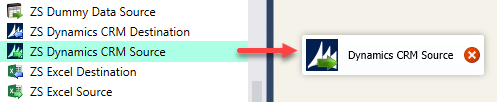
1. Drag Source in Data Flow
Drag SSIS Dynamics CRM Source in data flow
🔍 View Full Size
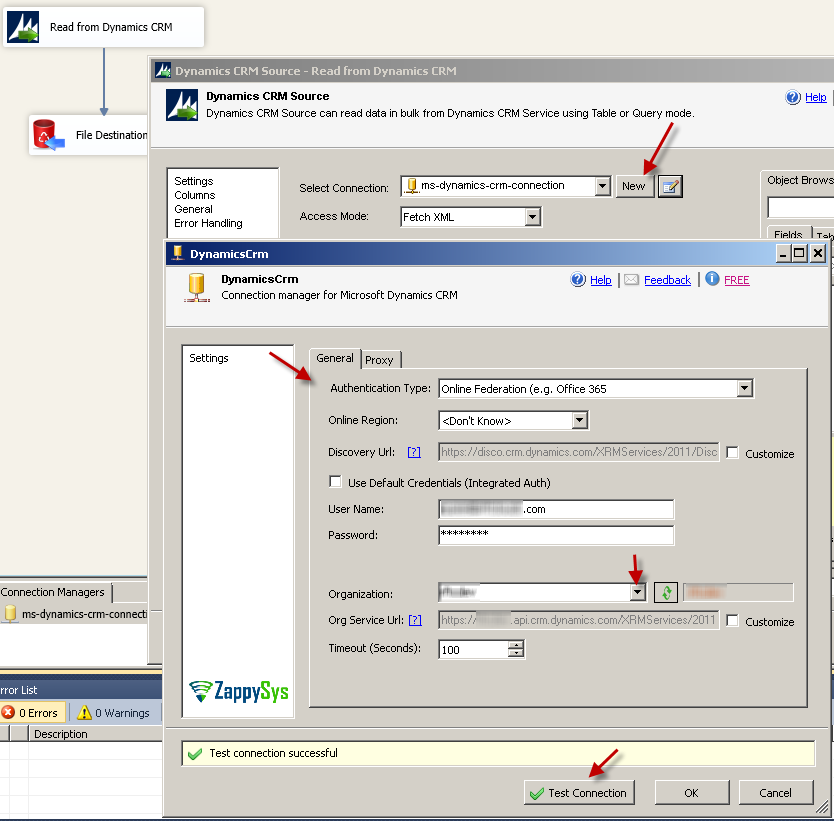
2. Create CRM Connection
Create new Dynamics 365 online connection
🔍 View Full Size
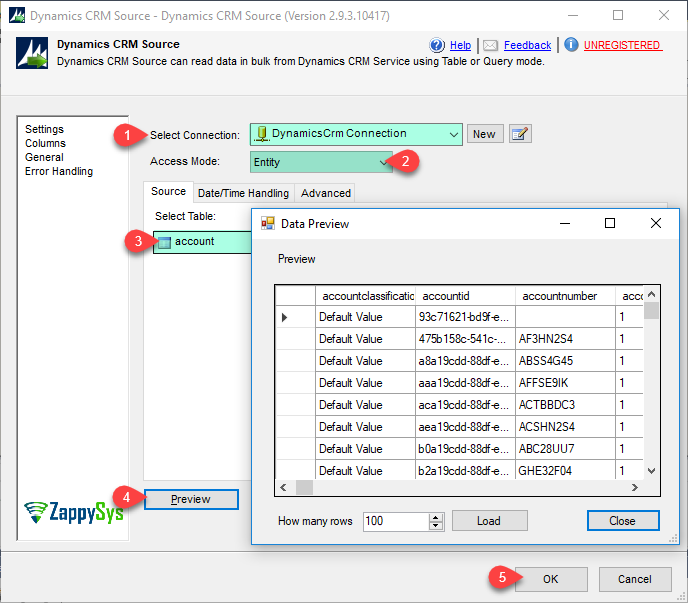
3. Read in Table Mode
Read Dynamics CRM data in table mode
🔍 View Full Size
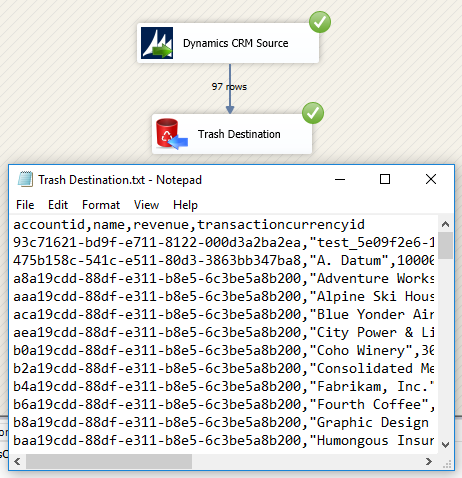
4. Execute Table Mode
Execute package in table mode
🔍 View Full Size
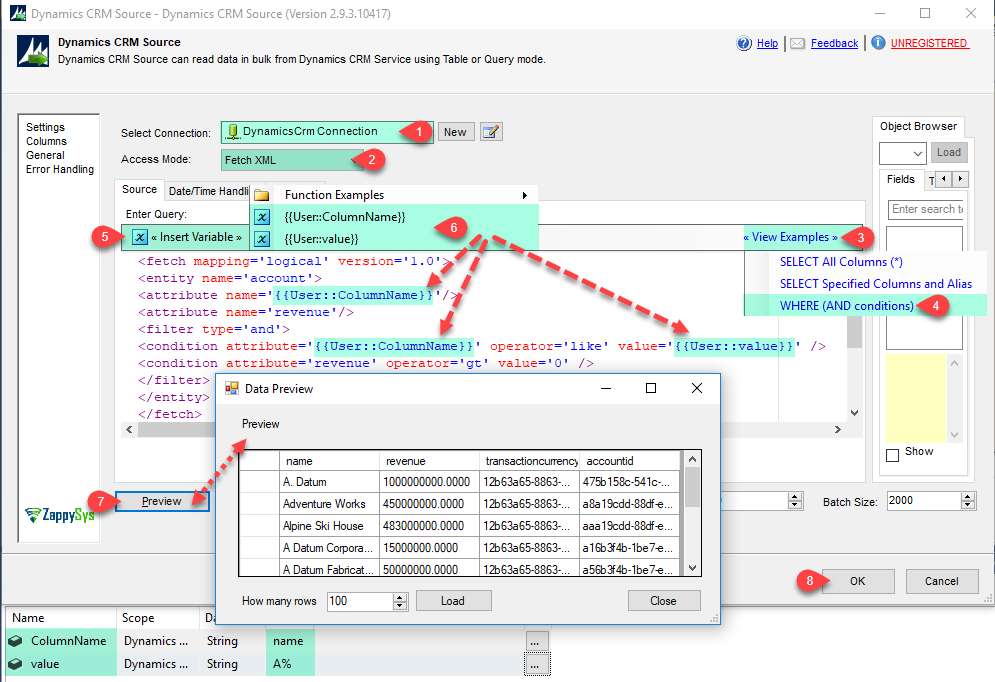
5. Read in FetchXML Query Mode
Read data in query mode using FetchXML
🔍 View Full Size
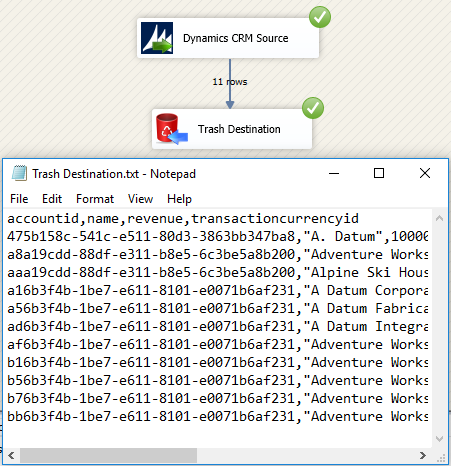
6. Execute Query Mode
Execute query mode and inspect results
🔍 View Full Size

🔧 Key Features

  • Dynamics/Dataverse coverage — Supports Dynamics 365 Online, Dataverse, PowerApps, and on-prem CRM
  • FetchXML support — Query mode for advanced filtering and projections
  • Object browser UI — Discover entities and fields with guided selection
  • Timezone conversion — Built-in UTC/local date-time handling
  • Advanced CRM fields — Lookup, PartyList, and Multi-Select PickList support
  • Runtime parameters — Variable-driven query placeholders for dynamic packages

💡 Common Use Cases

  • CRM-to-warehouse sync: Pull contacts, accounts, and activities into SQL staging.
  • Incremental extraction: Use FetchXML filters by modified date for delta loads.
  • Advanced relationship handling: Extract lookup/party data for normalized modeling.
  • Audited reporting feeds: Convert CRM timestamps to local business timezone during ingest.

🎯 Summary

SSIS Dynamics CRM Source provides a robust bridge between Microsoft CRM/Dataverse platforms and SSIS pipelines by combining user-friendly entity access with FetchXML power for production-grade extraction workloads.

Trusted by Developers & IT Teams Worldwide

  • Built for SSIS Workflows: Purpose-built for high-performance ETL and complex integration scenarios.
  • Expert Technical Support: Direct access to engineers via email and remote screen-share sessions.
  • Proven Enterprise Scale: Trusted by 3000+ teams across 90+ countries, including Fortune 500.
SSIS PowerPack
Includes SSIS Dynamics CRM Source / Dataverse
Capterra Rating
Read reviews on Capterra →

Start Automating Workflows with SSIS PowerPack

Includes connectors for APIs, databases & cloud apps. Build robust ETL workflows without custom scripting.

Download SSIS PowerPack (Free Trial)

Full functionality is FREE for development within Visual Studio

  • Contact us
  • Jobs
  • Privacy
  • Manage cookies
  • Terms of use
  • Trademarks
  • Your Privacy Choices
  • Consumer Health Privacy
© 2026 Microsoft