Skip to content
| Marketplace
Sign in
Visual Studio>Controls>SSIS Dynamics CRM/Dataverse Destination (Dynamics 365/On-Premises CRM/PowerApp)
SSIS Dynamics CRM/Dataverse Destination (Dynamics 365/On-Premises CRM/PowerApp)

SSIS Dynamics CRM/Dataverse Destination (Dynamics 365/On-Premises CRM/PowerApp)

ZappySys

|
668 clicks
| (0) | Free Trial
Write to Dynamics CRM/Dataverse from SSIS with bulk insert, update, delete, and upsert. Configure connection, map columns, and run high-volume loads from any SSIS source. Part of ZappySys SSIS PowerPack.
Get Started

Write to Microsoft Dynamics CRM / Dataverse from SSIS with bulk destination operations.

Load entities using insert, update, delete, and upsert modes, configure the CRM connection manager, map columns (including keys for updates), and execute high-volume writes from any upstream SSIS source.
Part of ZappySys SSIS PowerPack.

Recommended starting point
View Setup Guide & Get Started →
See features, UI & examples →
Pro Tip: For update, delete, and upsert, map the primary key (or alternate key) columns so CRM can match rows reliably during bulk operations.
Compatibility: SQL Server 2012–2025+ (32/64-bit) | Azure Data Factory / Azure-SSIS IR Ready

⚡ Key Benefits

  • Bulk write operations — Insert, update, delete, and upsert CRM / Dataverse entities from SSIS
  • Connection manager driven — Reuse authenticated Dynamics connections across packages
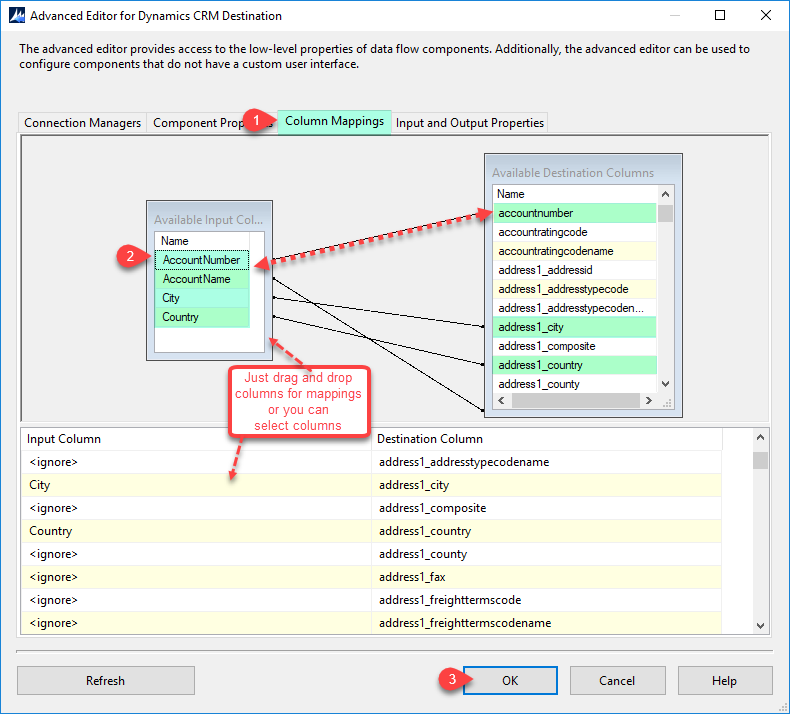
  • Flexible column mapping — Map upstream columns including keys required for match operations
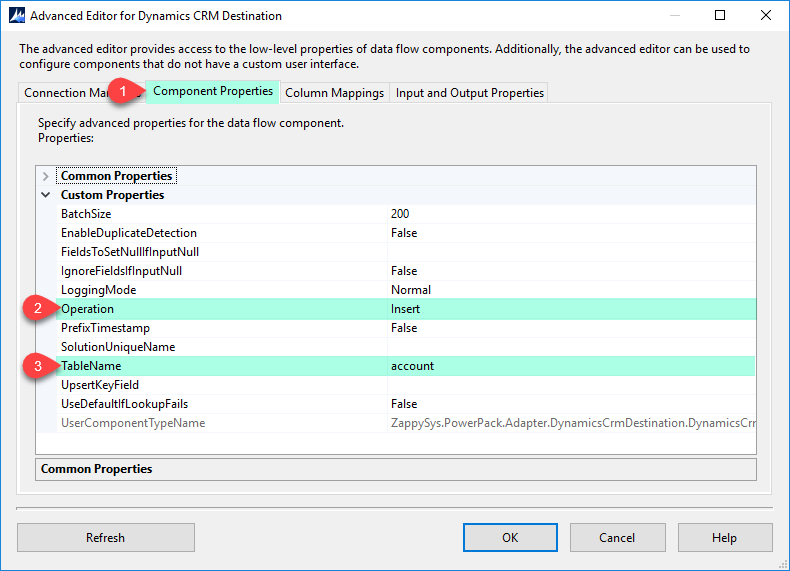
  • Operation modes per design — Switch write behavior (for example upsert vs. insert) in component properties
  • High-volume loads — Built for ETL-scale writes alongside standard data flow debugging

📸 Visual Overview & Setup

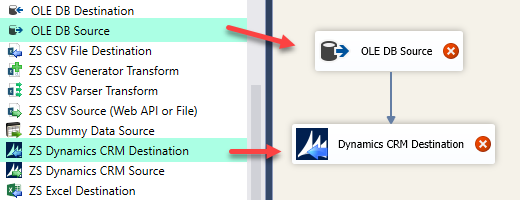
1. Drag Into Data Flow
Drag SSIS Dynamics CRM destination into data flow
🔍 View Full Size
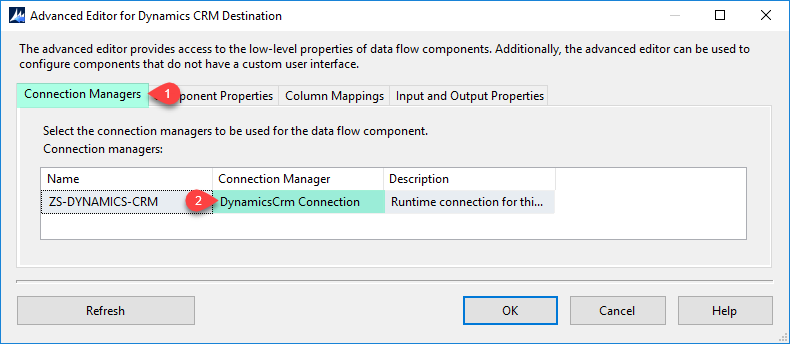
2. Connection Manager
Configure Dynamics CRM destination connection manager
🔍 View Full Size
3. Component Properties
Dynamics CRM destination component properties
🔍 View Full Size
4. Column Mappings
Map columns on Dynamics CRM destination
🔍 View Full Size
5. Execute Package / Load
Execute SSIS package with Dynamics CRM destination
🔍 View Full Size
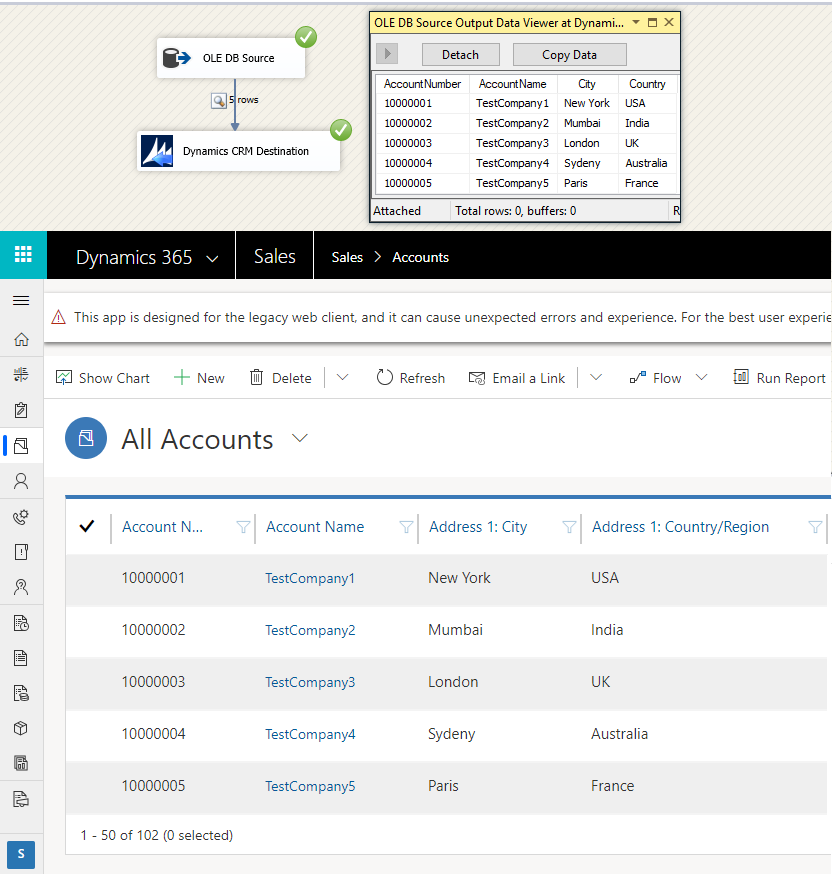
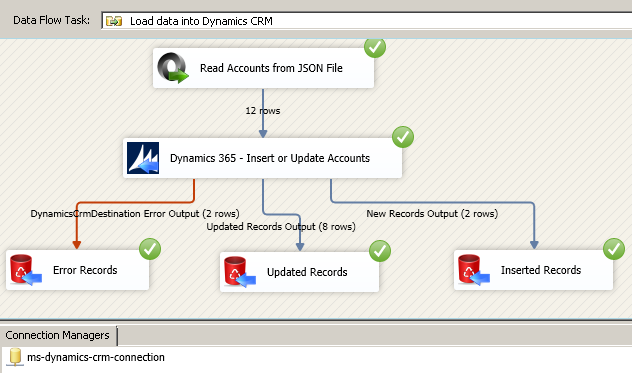
6. Bulk Upsert (Update or Insert)
Bulk upsert update or insert with Dynamics CRM destination
🔍 View Full Size

🔧 Key Features

  • Bulk insert, update, delete — Apply high-volume changes to CRM entities from the data flow
  • Bulk upsert — Update existing rows or insert new ones in one pass
  • Component property modes — Configure operation behavior (including upsert, update, delete variants)
  • Column-level mapping — Map upstream fields with explicit key columns for matching
  • CRM / Dataverse connectivity — Uses the Dynamics CRM connection pattern documented in the setup guide
  • Package-friendly debugging — Run and validate loads using standard SSIS execution tools

💡 Common Use Cases

  • ERP or SQL → CRM sync: Push accounts, contacts, and custom entities into Dynamics on a schedule.
  • Migration waves: Bulk insert or upsert cutover batches from legacy systems.
  • Data stewardship: Run corrective update and delete jobs from cleansed staging tables.
  • Integration hub loads: Land API or file data in SSIS and write matched rows to Dataverse.

🎯 Summary

The SSIS Dynamics CRM Destination packages Microsoft Dynamics / Dataverse writes as a configurable bulk component—so teams can insert, update, delete, or upsert with familiar SSIS mapping and execution, without hand-coding the Dataverse API for every load.

Trusted by Developers & IT Teams Worldwide

  • Built for SSIS Workflows: Purpose-built for high-performance ETL and complex integration scenarios.
  • Expert Technical Support: Direct access to engineers via email and remote screen-share sessions.
  • Proven Enterprise Scale: Trusted by 3000+ teams across 90+ countries, including Fortune 500.

SSIS PowerPack
Includes SSIS Dynamics CRM Destination
Capterra Rating
Read reviews on Capterra →

Start Automating Workflows with SSIS PowerPack

Includes connectors for APIs, databases & cloud apps. Build robust ETL workflows without custom scripting.

Download SSIS PowerPack (Free Trial)

Full functionality is FREE for development within Visual Studio

  • Contact us
  • Jobs
  • Privacy
  • Manage cookies
  • Terms of use
  • Trademarks
  • Your Privacy Choices
  • Consumer Health Privacy
© 2026 Microsoft