Skip to content
| Marketplace
Sign in
Visual Studio>Controls>SSIS CSV Parser Transform
SSIS CSV Parser Transform

SSIS CSV Parser Transform

ZappySys

|
243 clicks
| (0) | Free Trial
Parse and normalize CSV strings in SSIS with row/column split and pivot mode. Transform raw CSV text from files, APIs, or database columns into structured rows for downstream ETL. Part of ZappySys SSIS PowerPack.
Get Started

Parse and normalize CSV strings in SSIS with drag-and-drop transform setup.

Split raw CSV text into columns and rows, enable pivot mode to output one value per row, and process CSV content from database fields, command output, or upstream sources in standard SSIS data flows.
Part of ZappySys SSIS PowerPack.

Recommended starting point
View Setup Guide & Get Started →
See features, UI & examples →
Pro Tip: Use regular split mode first to verify columns, then enable pivot mode when you need one CSV value per output row.
Compatibility: SQL Server 2012–2025+ (32/64-bit) | Azure Data Factory / Azure-SSIS IR Ready

⚡ Key Benefits

  • CSV text to structured output — Parse delimited strings into rows and columns inside SSIS data flows
  • Pivot (normalize) mode — Convert one CSV string value into multiple output rows
  • Useful for embedded CSV — Handle CSV stored in database columns or command output streams
  • Fast visual configuration — Configure parser behavior through transform options UI
  • ETL-ready output — Feed normalized values directly into downstream transforms and destinations

📸 Visual Overview & Setup

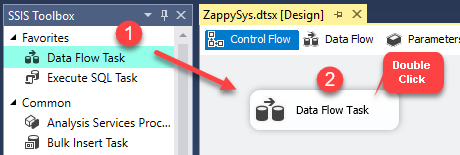
1. Drag Data Flow Task
Drag Data Flow Task in SSIS control flow
🔍 View Full Size
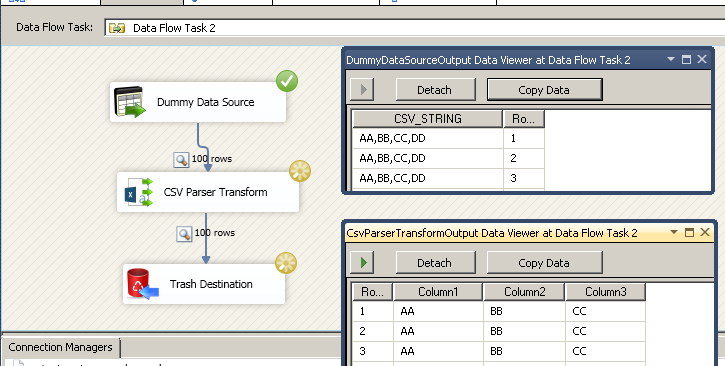
2. Add Source + CSV Parser in Data Flow
Add source and CSV Parser Transform in data flow
🔍 View Full Size
3. Configure Parser Options
Configure CSV parser transform options
🔍 View Full Size
4. Parse CSV to Columns/Rows
Parse database CSV string columns in SSIS data flow
🔍 View Full Size
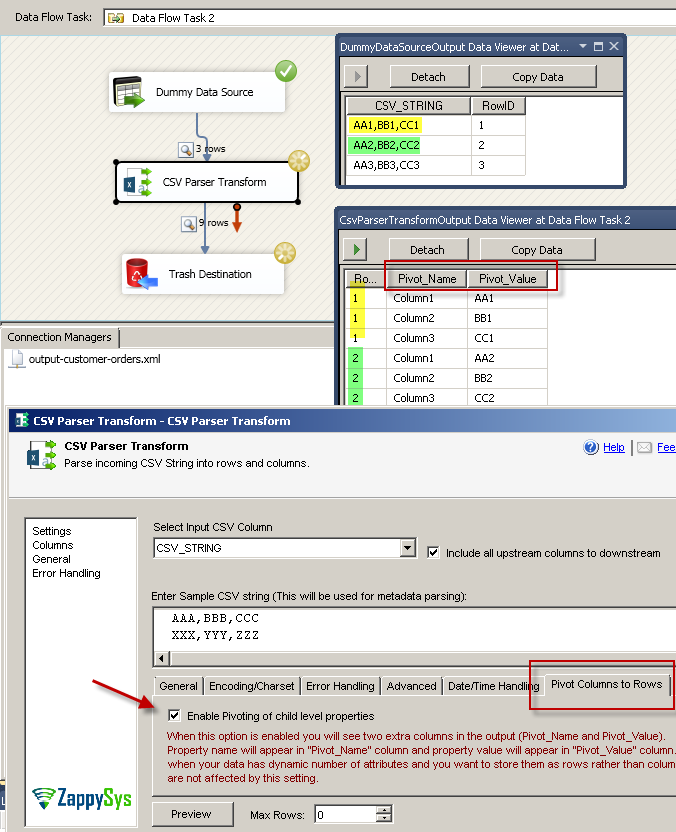
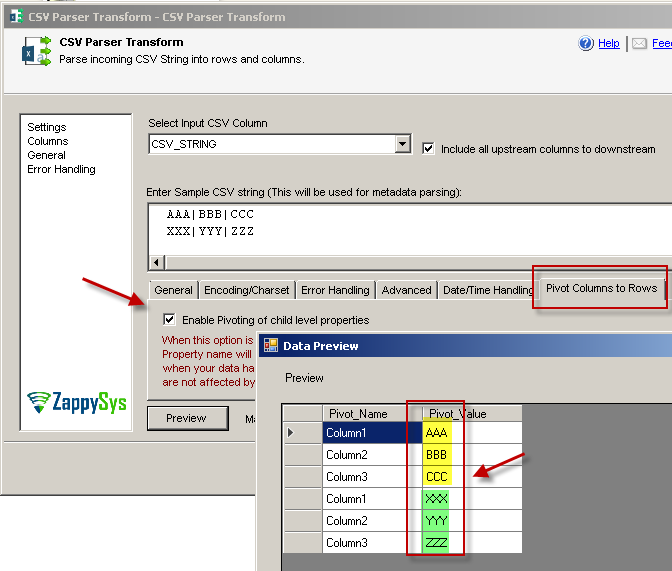
5. Enable Pivot / Normalize
Enable CSV parser pivot option to normalize string
🔍 View Full Size
6. View Normalized Output
Normalized pivot output from CSV parser transform
🔍 View Full Size

🔧 Key Features

  • CSV string parser — Split delimited text into multiple columns and rows
  • Pivot normalization mode — Emit one value per row from a single CSV string input
  • Database-column CSV handling — Parse embedded CSV stored in source table fields
  • Command-output parsing — Process CSV-like output from command line streams
  • Visual option controls — Configure delimiter and parser behavior from transform UI
  • Downstream-friendly output — Send parsed values directly to joins, lookups, and destinations

💡 Common Use Cases

  • CSV-in-column cleanup: Normalize denormalized string columns into relational rows.
  • Log/event tokenization: Parse delimited payloads from files or API outputs.
  • Pivoted attribute loads: Convert embedded value lists into one-row-per-value outputs.
  • Pre-destination shaping: Structure raw text before loading SQL, CRM, or cloud targets.

🎯 Summary

SSIS CSV Parser Transform turns raw CSV text into structured, ETL-ready rows using a configurable parser plus optional pivot normalization, so teams can convert embedded string payloads into clean tabular output without custom script tasks.

Trusted by Developers & IT Teams Worldwide

  • Built for SSIS Workflows: Purpose-built for high-performance ETL and complex integration scenarios.
  • Expert Technical Support: Direct access to engineers via email and remote screen-share sessions.
  • Proven Enterprise Scale: Trusted by 3000+ teams across 90+ countries, including Fortune 500.

SSIS PowerPack
Includes SSIS CSV Parser Transform
Capterra Rating
Read reviews on Capterra →

Start Automating Workflows with SSIS PowerPack

Includes connectors for APIs, databases & cloud apps. Build robust ETL workflows without custom scripting.

Download SSIS PowerPack (Free Trial)

Full functionality is FREE for development within Visual Studio

  • Contact us
  • Jobs
  • Privacy
  • Manage cookies
  • Terms of use
  • Trademarks
© 2026 Microsoft