Skip to content
| Marketplace
Sign in
Visual Studio>Controls>SSIS CSV Generator Transform
SSIS CSV Generator Transform

SSIS CSV Generator Transform

ZappySys

|
174 clicks
| (0) | Free Trial
Generate CSV/TSV text in SSIS from any source with configurable delimiters, headers, footers, encoding, and batch output. Build outbound flat payloads for files, APIs, and downstream systems. Part of ZappySys SSIS PowerPack.
Get Started

Generate CSV / TSV output strings in SSIS from any source using a visual transform.

Build outbound delimited payloads with custom row/column delimiters, static values, header/footer controls, encoding options, and batch output mode for APIs, files, and integration targets.
Part of ZappySys SSIS PowerPack.

Recommended starting point
View Setup Guide & Get Started →
See features, UI & examples →
Pro Tip: Use batch output mode when sending large CSV payloads to APIs so you can control chunk size and request frequency.
Compatibility: SQL Server 2012–2025+ (32/64-bit) | Azure Data Factory / Azure-SSIS IR Ready

⚡ Key Benefits

  • Generate CSV or TSV text — Convert incoming rows into delimited output strings inside data flow
  • Flexible delimiter controls — Configure row and column delimiters to match target format requirements
  • Header/footer support — Add static wrappers around generated payloads when needed
  • Batch output mode — Emit X rows per output string for chunked processing
  • Encoding support — Produce UTF8/UTF16 payloads with optional BOM behavior

📸 Visual Overview & Setup

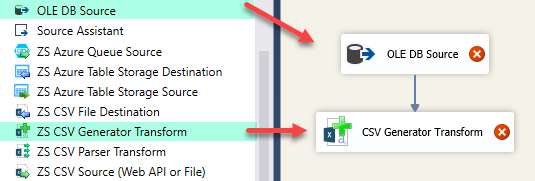
1. Drag Into Data Flow
Drag CSV Generator Transform in SSIS data flow
🔍 View Full Size
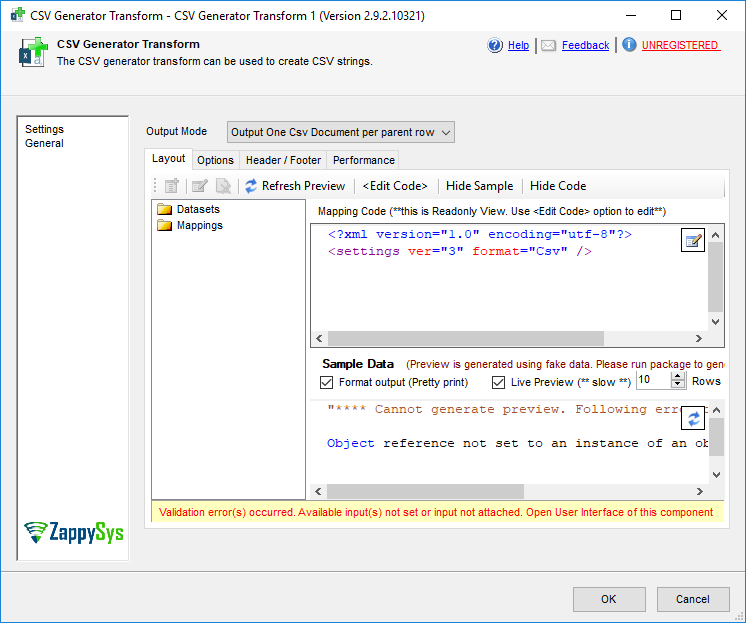
2. Open Generator UI
CSV Generator Transform settings UI
🔍 View Full Size
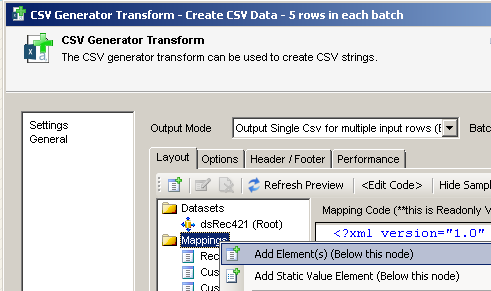
3. Add Output Columns
Add columns for CSV output
🔍 View Full Size
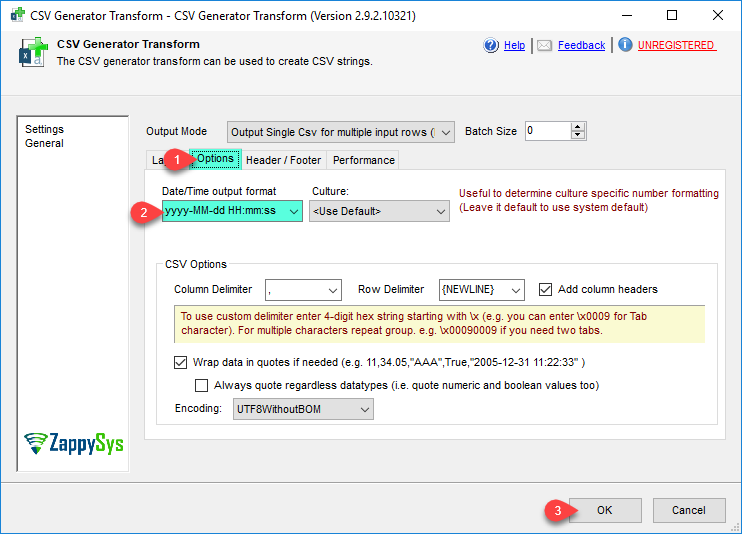
4. Configure Delimiters
Configure row and column delimiters
🔍 View Full Size
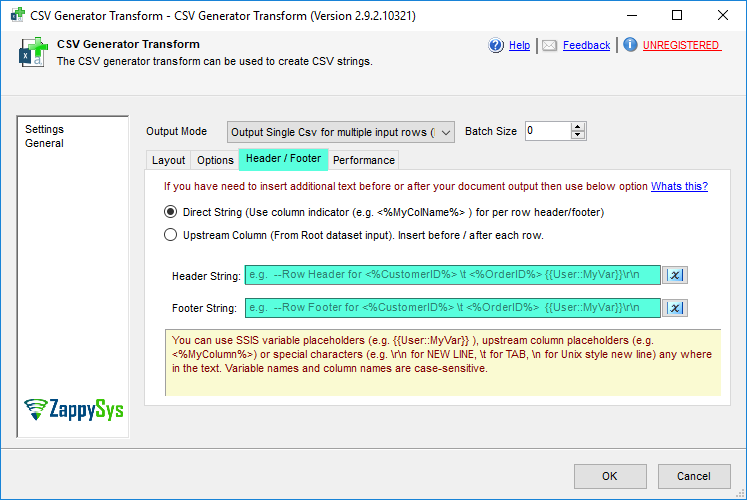
5. Header / Footer Options
Set header and footer options for CSV
🔍 View Full Size
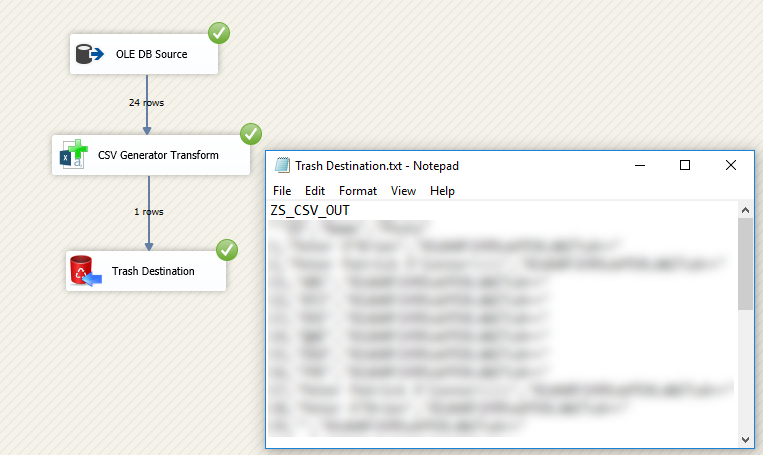
6. Execute and Review Output
Execute CSV Generator Transform and review output
🔍 View Full Size

🔧 Key Features

  • CSV/TSV string generation — Create outbound delimited payloads from any incoming dataset
  • Custom delimiters — Configure column and row separators for specific target contract formats
  • Static value columns — Add constant fields while building output strings
  • Header and footer controls — Wrap generated payloads with required metadata lines
  • Batch mode output — Generate one output string per N rows for chunked transmission
  • Encoding options — Output UTF8/UTF16 payloads with flexible BOM behavior

💡 Common Use Cases

  • API payload generation: Convert tabular rows into CSV batches for REST upload endpoints.
  • Flat-file staging: Build CSV or TSV lines for handoff to file destinations and SFTP tasks.
  • Legacy format integration: Produce delimiter-specific outputs for older downstream systems.
  • Chunked exports: Emit fixed-size groups of rows for reliable large-volume processing.

🎯 Summary

SSIS CSV Generator Transform lets teams compose well-formed CSV/TSV payloads directly in data flow by controlling columns, delimiters, headers, encoding, and batch size—making outbound file and API integrations predictable without custom scripting.

Trusted by Developers & IT Teams Worldwide

  • Built for SSIS Workflows: Purpose-built for high-performance ETL and complex integration scenarios.
  • Expert Technical Support: Direct access to engineers via email and remote screen-share sessions.
  • Proven Enterprise Scale: Trusted by 3000+ teams across 90+ countries, including Fortune 500.

SSIS PowerPack
Includes SSIS CSV Generator Transform
Capterra Rating
Read reviews on Capterra →

Start Automating Workflows with SSIS PowerPack

Includes connectors for APIs, databases & cloud apps. Build robust ETL workflows without custom scripting.

Download SSIS PowerPack (Free Trial)

Full functionality is FREE for development within Visual Studio

  • Contact us
  • Jobs
  • Privacy
  • Manage cookies
  • Terms of use
  • Trademarks
  • Your Privacy Choices
  • Consumer Health Privacy
© 2026 Microsoft