Skip to content
| Marketplace
Sign in
Visual Studio>Controls>SSIS Amazon Redshift Integration Pack
SSIS Amazon Redshift Integration Pack

SSIS Amazon Redshift Integration Pack

ZappySys

|
230 clicks
| (0) | Free Trial
Accelerate Amazon Redshift integration in SSIS with a bundled toolkit for bulk load, SQL execution, source extraction, and cluster automation. Handle high-volume data movement and administrative workflows in one no-code package. Part of ZappySys SSIS PowerPack.
Get Started

Get a complete Amazon Redshift integration toolkit for SSIS in one package.

Combine high-speed Redshift data loading, SQL command execution, source extraction, and cluster management with a drag-and-drop SSIS experience. Build end-to-end Redshift ETL and operations workflows without custom coding.
Part of ZappySys SSIS PowerPack.

Recommended starting point
View Setup Guide & Get Started →
See features, UI & examples →
Pro Tip: The Visual Studio download installs a basic extension. Use the guide above to install and run the full SSIS PowerPack (all connectors & UI).
Compatibility: SQL Server 2012–2025+ (32/64-bit) | Azure Data Factory / Azure-SSIS IR Ready

⚡ Key Benefits

  • One Pack, Multiple Redshift Tools — Data transfer, SQL execution, source reads, and cluster ops together
  • High-Volume Loading — Bulk-load millions of rows with compression and parallel processing support
  • Admin + ETL Coverage — Handle DDL/DML and cluster lifecycle automation in the same ecosystem
  • No-Code SSIS Workflow — Build and maintain Redshift pipelines with drag-and-drop components
  • Enterprise-Ready Reliability — Logging and error-handling features for production data warehouse jobs

📸 Visual Overview & Setup

1. Amazon Redshift integration toolkit
SSIS Amazon Redshift Integration Pack overview
🔍 View Full Size
2. SSIS Amazon Redshift Data Transfer Task
SSIS Amazon Redshift Data Transfer Task
🔍 View Full Size
3. SSIS Amazon Redshift ExecuteSQL Task
SSIS Amazon Redshift ExecuteSQL Task
🔍 View Full Size
4. SSIS Amazon Redshift Source
SSIS Amazon Redshift Source connector
🔍 View Full Size
5. SSIS Amazon Redshift Cluster Management Task
SSIS Amazon Redshift Cluster Management Task
🔍 View Full Size
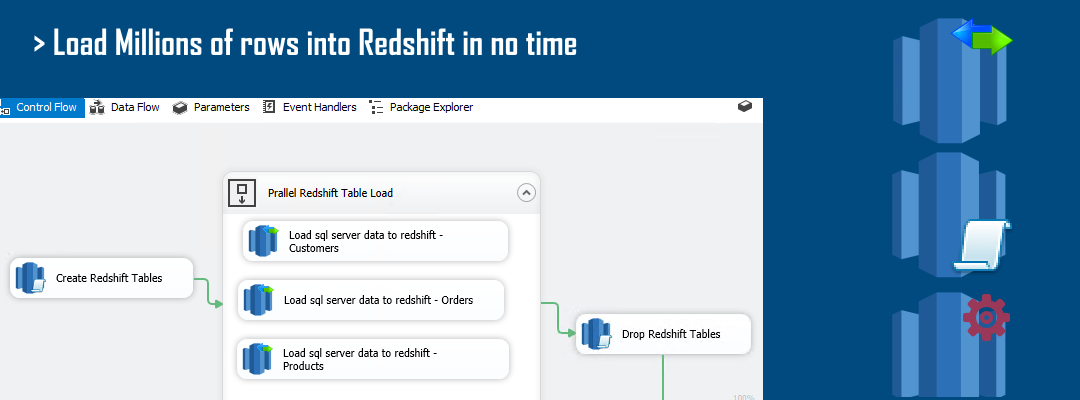
6. Redshift Pack Workflow Slide
Redshift integration pack workflow overview slide
🔍 View Full Size

🔧 Key Features

  • Bulk load task for high-volume Redshift ingestion
  • ExecuteSQL task for DDL/DML and admin commands
  • Redshift source connector for table/query extraction
  • Cluster management task for create/delete/snapshot operations
  • Integrated tooling for end-to-end Redshift workflows

💡 Common Use Cases

  • Warehouse Onboarding: Load large on-prem datasets into Redshift quickly.
  • Operational Automation: Run admin SQL and cluster tasks in scheduled jobs.
  • Bi-Directional Pipelines: Read from and write to Redshift within one SSIS solution.
  • Production Governance: Use logging and error handling for stable enterprise runs.

🎯 Summary

SSIS Amazon Redshift Integration Pack consolidates core Redshift ETL and admin capabilities into one toolkit. It helps teams implement fast, maintainable, no-code workflows for data loading, querying, and cluster operations.

Trusted by Developers & IT Teams Worldwide

  • Built for SSIS Workflows: Purpose-built for high-performance ETL and complex integration scenarios.
  • Expert Technical Support: Direct access to engineers via email and remote screen-share sessions.
  • Proven Enterprise Scale: Trusted by 3000+ teams across 90+ countries, including Fortune 500.
SSIS PowerPack
Includes Redshift Integration Components
Capterra Rating
Read reviews on Capterra →

Start Automating Workflows with SSIS PowerPack

Includes connectors for APIs, databases & cloud apps. Build robust ETL workflows without custom scripting.

Download SSIS PowerPack (Free Trial)

Full functionality is FREE for development within Visual Studio

  • Contact us
  • Jobs
  • Privacy
  • Manage cookies
  • Terms of use
  • Trademarks
  • Your Privacy Choices
  • Consumer Health Privacy
© 2026 Microsoft